Turndown HTML to Markdown Converter (Paste Rich Text, Get Markdown)
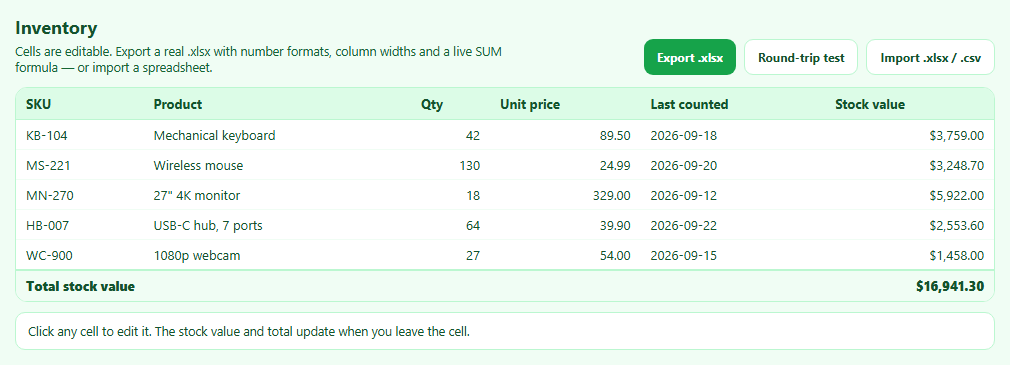
SheetJS Table to Excel Export and Import (.xlsx)
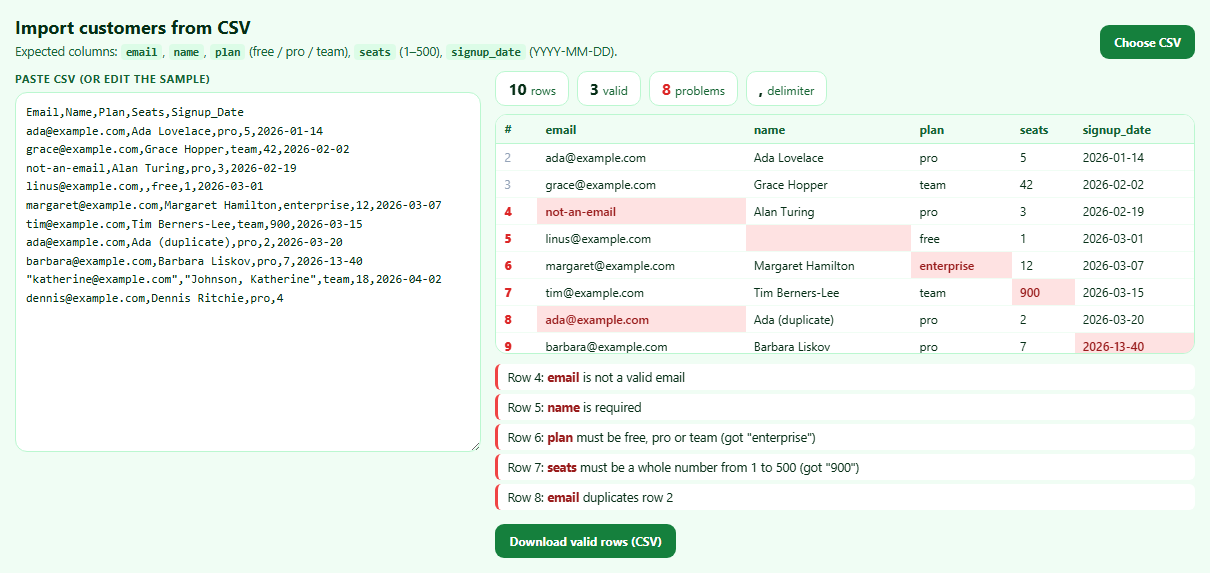
Papa Parse CSV Import Validator with Error Report
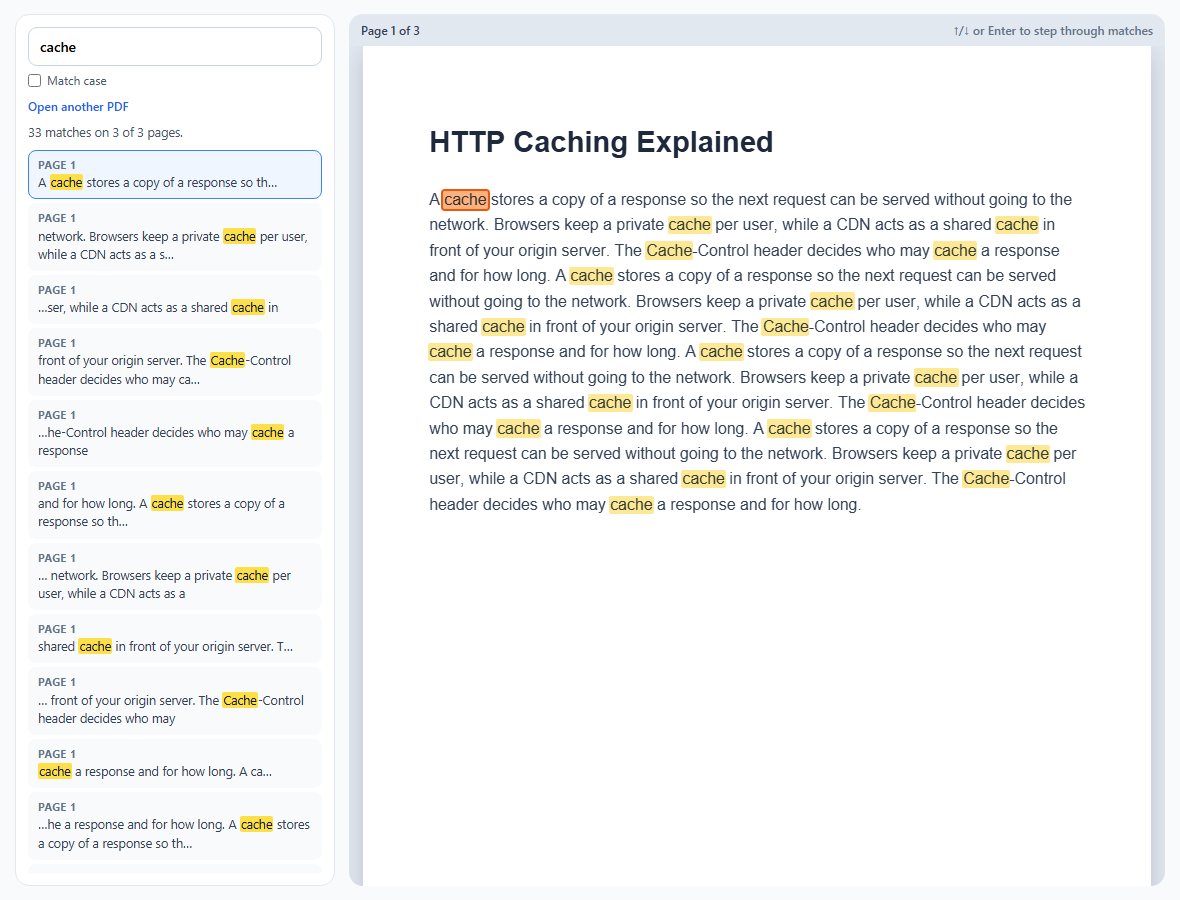
PDF.js Text Search with Highlighted Matches
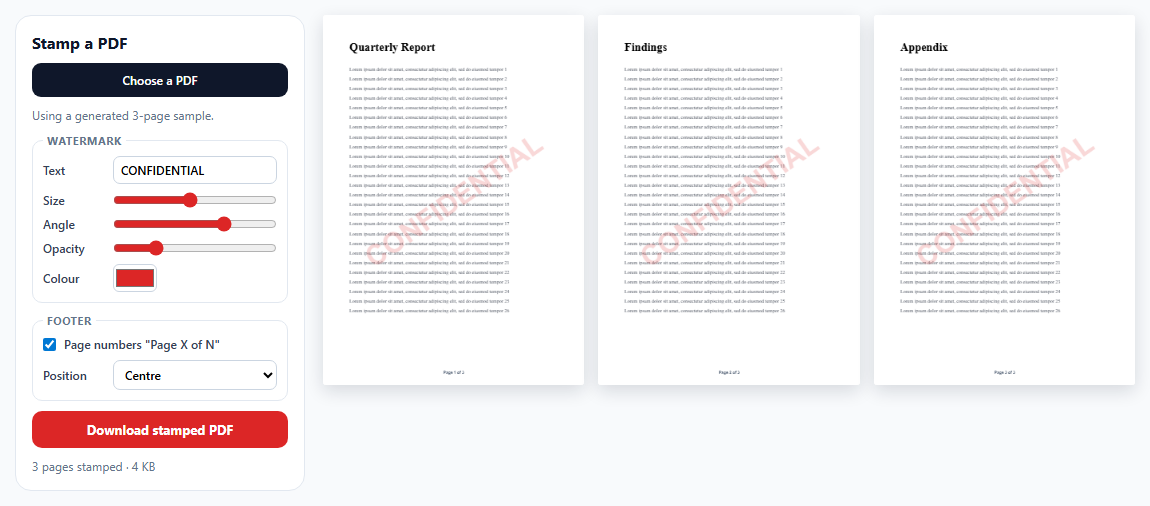
pdf-lib Watermark and Page Numbers for Existing PDFs
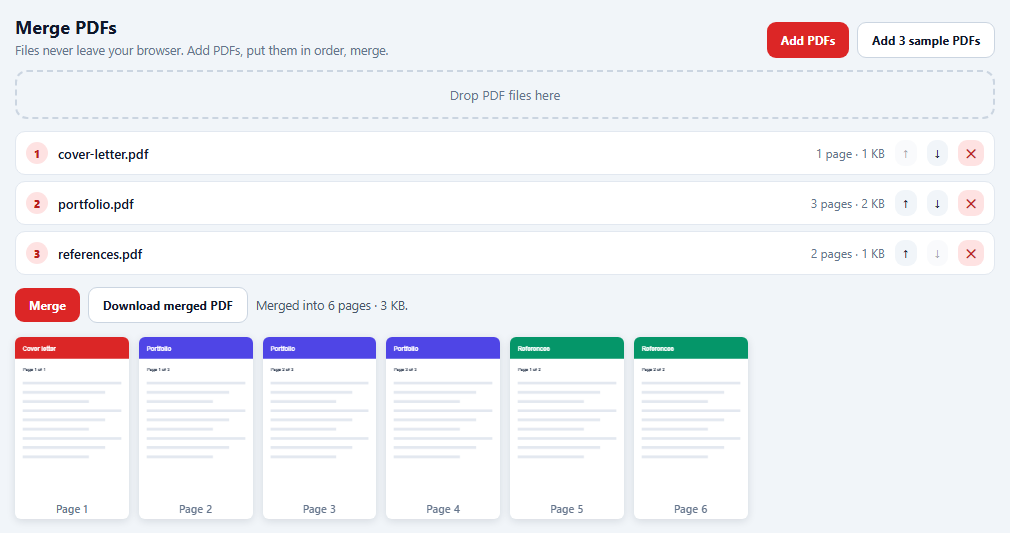
pdf-lib Merge and Reorder PDFs in the Browser
Learn Coding Visually
Learn to code with interactive, live-preview playgrounds — HTML, CSS, JavaScript, React & more.
 HTML Playground42 lessons · Click-based · Live preview
 CSS PlaygroundLearn CSS with a live editor
 JavaScript Playground60 lessons · DOM · Async · Canvas
 React PlaygroundLearn React with a live code editor
 GSAP PlaygroundLearn GSAP animation interactively
 SVG Playground44 lessons · shapes · paths · animation
 SCSS Playground45 lessons · Sass modules · tokens
 Tailwind PlaygroundLearn Tailwind CSS with a live editor
 Bootstrap 5 Playground50 lessons · live preview
Turndown HTML to Markdown Converter — Free Paste-to-Markdown Snippet
Turndown HTML to Markdown Converter (Paste Rich Text, Get Markdown) · Tools · Plain HTML, CSS & JS · Live preview
What's included
Features
About this UI Snippet
Turndown — Turning Pasted Rich Text Into Clean Markdown
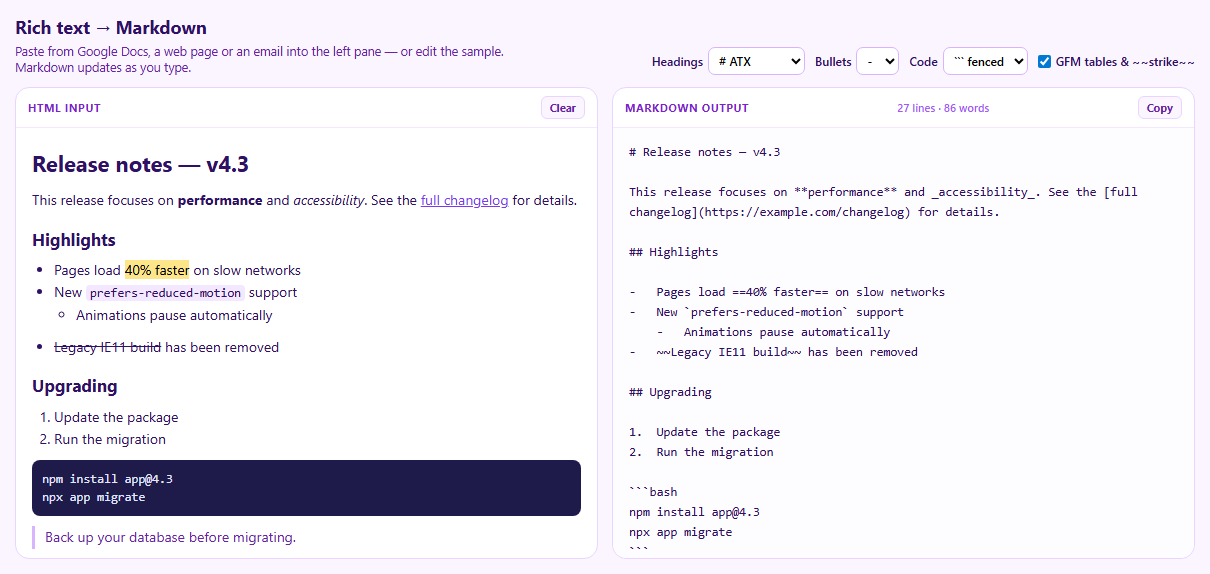
Markdown is easy to write but tedious to convert into: copying formatted text from a document or web page into a Markdown field loses links, lists and headings. Turndown does the reverse of a Markdown renderer — it walks an HTML tree and emits Markdown. This snippet wires it to a rich-text pane so pasting formatted content produces Markdown immediately.
Options map to style guides
Turndown's options decide the flavour of the output: headingStyle chooses # Heading (ATX) or underlined (setext) headings, bulletListMarker picks -, * or +, and codeBlockStyle chooses fenced blocks or four-space indentation. Changing a dropdown re-creates the service and converts again, so you can match whatever your project's linter expects.
GitHub Flavored Markdown via a plugin
Core Markdown has no tables or strikethrough, so core Turndown drops them. The turndown-plugin-gfm plugin adds rules for tables (with header rows), strikethrough and task-list checkboxes. Uncheck GFM to see the table collapse into plain text. The plugin writes strikethrough with single tildes, which the GFM spec allows but many other parsers don't, so the snippet adds its own rule for ~~double~~ tildes. Rules added later are checked first, which is how it overrides the plugin.
Custom rules
addRule(name, { filter, replacement }) teaches Turndown about elements it doesn't know. The sample includes <mark>, which standard Markdown can't express; the rule outputs ==text==, the highlight syntax used by many editors. remove() drops scripts and styles entirely instead of leaking their content as text.
Pasting from Google Docs and Word
Pasted HTML arrives covered in inline styles, class names and wrapper spans. The paste handler parses the clipboard's HTML with DOMParser, strips style, class and id attributes and non-content elements, then inserts the cleaned fragment at the cursor. Formatting that carries meaning — headings, bold, links, lists — survives.
Copying the result
The Clipboard API needs a secure context and permission, which sandboxed frames may not have, so the copy button falls back to selecting the Markdown for a manual Ctrl+C.
Build with AI
Build, Understand, Optimize, and Extend It With AI
Paste this snippet into an AI assistant like Claude and ask it how Turndown's rules are matched and why the GFM plugin is needed for tables. Ask it to add rules for figures with captions, callout boxes, or footnotes; to convert images to reference-style links; or to add a side-by-side rendered preview of the Markdown. It can also help tune the paste cleaner for a specific source like Notion.
Prompt to recreate it
Copy this into your AI assistant of choice to build the effect from scratch, or as a jumping-off point for your own variant:
Build a live HTML-to-Markdown converter with Turndown and turndown-plugin-gfm (both from a CDN) in plain HTML, CSS and JavaScript.

Requirements:
- A contenteditable rich-text pane preloaded with sample release notes (h1, h2, paragraph with bold, italic and a link, nested list with a highlighted phrase and a strikethrough item, ordered list, fenced bash code block, blockquote, table) and a read-only Markdown output pane.
- Options for heading style (ATX or setext), bullet marker (-, *, +), code block style (fenced or indented) and a GFM toggle; changing any option re-creates the Turndown service and converts again.
- Use the GFM plugin when enabled, add a custom rule converting mark elements to ==text==, and remove script, style and meta elements.
- Convert on input (debounced) and show line and word counts.
- On paste, if the clipboard has HTML, parse it with DOMParser, strip style, class and id attributes and non-content elements, and insert the cleaned HTML at the cursor.
- A copy button using the Clipboard API with a fallback that selects the output text, and a clear button.
Want to tighten it up first? Run this prompt through the AI Prompt Studio to score it across 8 quality dimensions, catch anti-patterns, and tune the wording for Claude, ChatGPT, or Gemini before you paste it in.
Source Code
<div class="td">
<header class="td-head">
<div>
<h2>Rich text → Markdown</h2>
<p>Paste from Google Docs, a web page or an email into the left pane — or edit the sample. Markdown updates as you type.</p>
</div>
<div class="td-opts">
<label>Headings <select id="tdHeading"><option value="atx"># ATX</option><option value="setext">Setext ===</option></select></label>
<label>Bullets <select id="tdBullet"><option>-</option><option>*</option><option>+</option></select></label>
<label>Code <select id="tdCode"><option value="fenced">``` fenced</option><option value="indented">indented</option></select></label>
<label class="td-check"><input type="checkbox" id="tdGfm" checked> GFM tables & ~~strike~~</label>
</div>
</header>
<div class="td-grid">
<section class="td-pane">
<div class="td-label">HTML input <button type="button" id="tdClear" class="td-mini">Clear</button></div>
<div class="td-edit" id="tdEdit" contenteditable="true" aria-label="Rich text input" spellcheck="false"></div>
</section>
<section class="td-pane">
<div class="td-label">Markdown output <span id="tdStats"></span> <button type="button" id="tdCopy" class="td-mini">Copy</button></div>
<textarea id="tdOut" readonly aria-label="Markdown output" spellcheck="false"></textarea>
</section>
</div>
</div>*{box-sizing:border-box;margin:0;padding:0}
body{font-family:system-ui,-apple-system,sans-serif;background:#faf5ff;color:#2e1065;min-height:100vh;padding:20px}
.td{max-width:1180px;margin:0 auto}
.td-head{display:flex;justify-content:space-between;align-items:flex-end;gap:12px;flex-wrap:wrap;margin-bottom:12px}
.td h2{font-size:18px}
.td-head p{font-size:12.5px;color:#6b21a8;margin-top:4px;max-width:520px}
.td-opts{display:flex;gap:10px;flex-wrap:wrap;align-items:center;font-size:12px;font-weight:600}
.td-opts label{display:flex;align-items:center;gap:5px}
.td-opts select{font:600 12px system-ui;border:1px solid #d8b4fe;border-radius:7px;padding:4px 6px;background:#fff}
.td :focus-visible{outline:2px solid #a855f7;outline-offset:2px}
.td-grid{display:grid;grid-template-columns:1fr 1fr;gap:14px}
@media (max-width:820px){.td-grid{grid-template-columns:1fr}}
.td-pane{background:#fff;border:1px solid #e9d5ff;border-radius:14px;display:flex;flex-direction:column;min-width:0}
.td-label{display:flex;align-items:center;gap:8px;padding:8px 12px;border-bottom:1px solid #f3e8ff;font-size:11px;font-weight:700;color:#7e22ce;text-transform:uppercase;letter-spacing:.05em}
.td-label span{margin-left:auto;text-transform:none;letter-spacing:0;font-weight:600;color:#a855f7}
.td-mini{border:1px solid #e9d5ff;background:#faf5ff;color:#6b21a8;border-radius:6px;padding:3px 8px;font:700 11px system-ui;cursor:pointer}
.td-label span + .td-mini{margin-left:0}
.td-label .td-mini:only-of-type{margin-left:auto}
.td-edit{height:430px;overflow:auto;padding:14px 16px;font-size:14px;line-height:1.6;outline:none;scrollbar-width:thin}
.td-edit h1{font-size:22px;margin:4px 0 8px}.td-edit h2{font-size:17px;margin:14px 0 6px}
.td-edit p,.td-edit ul,.td-edit ol,.td-edit blockquote,.td-edit pre,.td-edit table{margin:0 0 10px}
.td-edit ul,.td-edit ol{padding-left:22px}
.td-edit blockquote{border-left:3px solid #d8b4fe;padding-left:10px;color:#6b21a8}
.td-edit pre{background:#1e1b4b;color:#e0e7ff;padding:10px;border-radius:8px;font:12px/1.5 ui-monospace,monospace;overflow:auto}
.td-edit code{font:12.5px ui-monospace,monospace;background:#f3e8ff;padding:1px 4px;border-radius:4px}
.td-edit pre code{background:none;padding:0}
.td-edit table{border-collapse:collapse;font-size:13px}
.td-edit th,.td-edit td{border:1px solid #e9d5ff;padding:4px 8px}
.td-edit mark{background:#fde68a}
.td-edit a{color:#7c3aed}
#tdOut{height:430px;border:0;resize:none;padding:14px 16px;font:12.5px/1.6 ui-monospace,monospace;color:#2e1065;background:#fdfcff;border-radius:0 0 14px 14px;outline:none;white-space:pre-wrap;overflow-wrap:anywhere;overflow:auto;scrollbar-width:thin}var SAMPLE = [
'<h1>Release notes — v4.3</h1>',
'<p>This release focuses on <strong>performance</strong> and <em>accessibility</em>. See the <a href="https://example.com/changelog">full changelog</a> for details.</p>',
'<h2>Highlights</h2>',
'<ul><li>Pages load <mark>40% faster</mark> on slow networks</li><li>New <code>prefers-reduced-motion</code> support<ul><li>Animations pause automatically</li></ul></li><li><del>Legacy IE11 build</del> has been removed</li></ul>',
'<h2>Upgrading</h2>',
'<ol><li>Update the package</li><li>Run the migration</li></ol>',
'<pre><code class="language-bash">npm install app@4.3\nnpx app migrate</code></pre>',
'<blockquote><p>Back up your database before migrating.</p></blockquote>',
'<table><thead><tr><th>Metric</th><th>v4.2</th><th>v4.3</th></tr></thead><tbody><tr><td>First paint</td><td>1.8 s</td><td>1.1 s</td></tr><tr><td>Bundle size</td><td>212 KB</td><td>168 KB</td></tr></tbody></table>',
].join('');
var edit = document.getElementById('tdEdit');
var out = document.getElementById('tdOut');
function makeService() {
var service = new TurndownService({
headingStyle: document.getElementById('tdHeading').value,
bulletListMarker: document.getElementById('tdBullet').value,
codeBlockStyle: document.getElementById('tdCode').value,
emDelimiter: '_',
strongDelimiter: '**',
linkStyle: 'inlined',
});
// The GFM plugin adds tables, strikethrough and task lists, which core
// Markdown (and core Turndown) don't have.
if (document.getElementById('tdGfm').checked) {
service.use(turndownPluginGfm.gfm);
// The plugin writes ~single~ tildes. GitHub accepts that, but many other
// Markdown parsers only understand ~~double~~, so normalise. addRule
// puts new rules FIRST, so this overrides the plugin's own rule.
service.addRule('strikethroughDouble', {
filter: ['del', 's', 'strike'],
replacement: function (content) { return '~~' + content + '~~'; },
});
}
// A custom rule: <mark> has no Markdown equivalent, so without a rule its
// text is kept but the highlight is lost. Many editors use ==text==.
service.addRule('highlight', {
filter: 'mark',
replacement: function (content) { return '==' + content + '=='; },
});
// Drop elements that should never reach Markdown, content included.
service.remove(['script', 'style', 'meta']);
return service;
}
function convert() {
var md = makeService().turndown(edit.innerHTML);
out.value = md;
var words = (md.match(/[A-Za-z0-9]+/g) || []).length;
document.getElementById('tdStats').textContent = md.split(String.fromCharCode(10)).length + ' lines · ' + words + ' words';
}
// Paste: keep the clipboard's HTML (so formatting survives) but strip
// inline styles and classes, which Google Docs and Word add in bulk.
edit.addEventListener('paste', function (e) {
var html = e.clipboardData && e.clipboardData.getData('text/html');
if (!html) return; // plain text: let the browser insert it normally
e.preventDefault();
var doc = new DOMParser().parseFromString(html, 'text/html');
doc.querySelectorAll('script, style, meta, link').forEach(function (n) { n.remove(); });
doc.querySelectorAll('*').forEach(function (n) { n.removeAttribute('style'); n.removeAttribute('class'); n.removeAttribute('id'); });
var range = window.getSelection().getRangeAt(0);
range.deleteContents();
var frag = range.createContextualFragment(doc.body.innerHTML);
range.insertNode(frag);
convert();
});
var t;
edit.addEventListener('input', function () { clearTimeout(t); t = setTimeout(convert, 120); });
document.querySelectorAll('.td-opts select, .td-opts input').forEach(function (el) { el.addEventListener('change', convert); });
document.getElementById('tdClear').addEventListener('click', function () { edit.innerHTML = ''; convert(); edit.focus(); });
// The async Clipboard API can be unavailable (insecure context or a
// sandboxed frame without permission). Fall back to selecting the text.
document.getElementById('tdCopy').addEventListener('click', function (e) {
var btn = e.currentTarget;
function done(label) { btn.textContent = label; setTimeout(function () { btn.textContent = 'Copy'; }, 1400); }
if (navigator.clipboard && window.isSecureContext) {
navigator.clipboard.writeText(out.value).then(function () { done('Copied'); }, function () { out.select(); done('Press Ctrl+C'); });
} else { out.select(); done('Press Ctrl+C'); }
});
edit.innerHTML = SAMPLE;
convert();Step by step
How to Use
- 1Start from the sampleRelease notes with headings, lists, code, a quote and a table.
- 2Paste your own contentFrom Google Docs, Word, email or a web page.
- 3Choose a styleHeading, bullet and code-block options update the output.
- 4Toggle GFMSee tables and strikethrough appear or disappear.
- 5Copy the MarkdownUse Copy, or select and Ctrl+C if the clipboard is blocked.
Real-world uses
Common Use Cases
Got questions?
Frequently Asked Questions
Create a TurndownService with your preferred options and call service.turndown(htmlStringOrNode). It returns a Markdown string.
Core Markdown has no table syntax, so Turndown ignores table structure by default. Add the turndown-plugin-gfm plugin with service.use(turndownPluginGfm.gfm).
Add a rule: service.addRule('name', { filter: 'tag' or a function, replacement: function (content, node) { return ...; } }). Use service.keep() to keep the raw HTML, or service.remove() to drop it.
Read the clipboard's text/html, parse it with DOMParser, remove style, class and id attributes and non-content elements, then insert the cleaned HTML and convert it.
Turndown only produces text; it doesn't execute scripts. But if you later render the Markdown back to HTML, sanitise that output (for example with DOMPurify), because Markdown can contain raw HTML and links.