
Learn Coding Visually
Learn to code with interactive, live-preview playgrounds — HTML, CSS, JavaScript, React & more.
 HTML Playground42 lessons · Click-based · Live preview
 CSS PlaygroundLearn CSS with a live editor
 JavaScript Playground60 lessons · DOM · Async · Canvas
 React PlaygroundLearn React with a live code editor
 GSAP PlaygroundLearn GSAP animation interactively
 SVG Playground44 lessons · shapes · paths · animation
 SCSS Playground45 lessons · Sass modules · tokens
 Tailwind PlaygroundLearn Tailwind CSS with a live editor
 Bootstrap 5 Playground50 lessons · live preview
File Checksum Verifier — Free HTML CSS JS Snippet
File Checksum Verifier · Forms · Plain HTML, CSS & JS · Live preview
What's included
Features
About this UI Snippet
File Checksum Verifier — SHA-256 Digest and Live Match Indicator
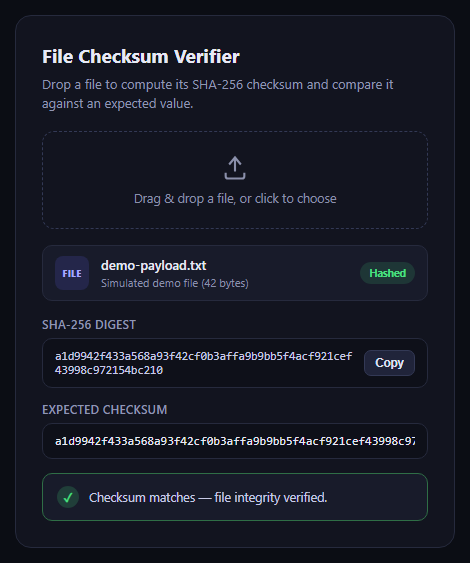
This snippet is a self-contained checksum verification tool: a user drops or selects a file, its bytes are read into an ArrayBuffer, and the browser's native Web Crypto API hashes them into a SHA-256 digest shown as a hex string. Pasting an expected checksum into the text field triggers a live comparison with a clear match or mismatch state.
Real hashing, not a placeholder
The core of the tool is crypto.subtle.digest('SHA-256', buffer), called on the raw ArrayBuffer produced by file.arrayBuffer(). The returned digest is a binary ArrayBuffer, which bufferToHex() walks byte by byte, converting each to a two-character hex pair, to produce the familiar lowercase hex checksum string.
Idle-state demo data
Since the embedded preview has no real file to hash on load, an IIFE encodes a small hardcoded string with TextEncoder and hashes it the same way a dropped file would be hashed, so the UI shows a genuine computed digest and a pre-filled matching "expected checksum" the instant the snippet loads.
Drag-and-drop and click-to-browse
The drop zone listens for dragover, dragleave, and drop events, toggling a highlighted border style during a drag, and also forwards clicks to a hidden file input for the traditional browse flow. Both paths funnel into the same processFile() function.
Build with AI
Build, Understand, Optimize, and Extend It With AI
Hand this snippet's HTML, CSS, and JavaScript to an AI coding assistant like Claude and ask it to adapt "File Checksum Verifier" to your project — restyle it to match your design system, wire it up to real data instead of the static example, or port it to the framework you're building in.
Prompt to recreate it
Copy this into your AI assistant of choice to build the effect from scratch, or as a jumping-off point for your own variant:
Build a forms component called "File Checksum Verifier" using plain HTML, CSS, and vanilla JavaScript — no framework, no build step.

Requirements:
- Match the structure and behavior of the "File Checksum Verifier" snippet from the UI Snippets Library.
- Keep the markup semantic and the styling self-contained (no external dependencies beyond what the original snippet uses).
- Keep the JavaScript vanilla, with no framework runtime required.
- Make it easy to restyle via CSS custom properties or class overrides so it can be dropped into a real project.
Want to tighten it up first? Run this prompt through the AI Prompt Studio to score it across 8 quality dimensions, catch anti-patterns, and tune the wording for Claude, ChatGPT, or Gemini before you paste it in.
Source Code
<div class="fcv-card">
<div class="fcv-head">
<h2>File Checksum Verifier</h2>
<p>Drop a file to compute its SHA-256 checksum and compare it against an expected value.</p>
</div>
<div class="fcv-drop" id="fcvDrop">
<svg width="28" height="28" viewBox="0 0 24 24" fill="none" stroke="currentColor" stroke-width="1.8"><path d="M12 3v12"/><path d="M7 9l5-6 5 6"/><path d="M4 16v3a2 2 0 0 0 2 2h12a2 2 0 0 0 2-2v-3"/></svg>
<span id="fcvDropLabel">Drag & drop a file, or click to choose</span>
<input type="file" id="fcvFileInput" hidden />
</div>
<div class="fcv-file-row" id="fcvFileRow">
<div class="fcv-file-icon">FILE</div>
<div class="fcv-file-meta">
<div class="fcv-file-name" id="fcvFileName">demo-payload.txt</div>
<div class="fcv-file-size" id="fcvFileSize">Simulated demo file (42 bytes)</div>
</div>
<span class="fcv-badge" id="fcvBadge">Hashed</span>
</div>
<div class="fcv-field">
<label>SHA-256 digest</label>
<div class="fcv-hash-row">
<code id="fcvHashOutput">computing…</code>
<button class="fcv-copy" id="fcvCopyHash" type="button">Copy</button>
</div>
</div>
<div class="fcv-field">
<label for="fcvExpected">Expected checksum</label>
<input type="text" id="fcvExpected" placeholder="Paste the expected SHA-256 checksum here" autocomplete="off" spellcheck="false" />
</div>
<div class="fcv-result" id="fcvResult">
<span class="fcv-result-icon" id="fcvResultIcon">?</span>
<span id="fcvResultText">Paste an expected checksum above to compare.</span>
</div>
</div>*{box-sizing:border-box}
body{font-family:system-ui,-apple-system,sans-serif;background:#0b0d14;min-height:100vh;display:flex;align-items:center;justify-content:center;padding:24px}
.fcv-card{font-family:system-ui,-apple-system,sans-serif;background:#12141f;color:#e7e9f5;border:1px solid #262a3d;border-radius:16px;padding:26px;max-width:440px;width:100%}
.fcv-head h2{margin:0 0 6px;font-size:19px}
.fcv-head p{margin:0 0 18px;font-size:13px;color:#9096b3;line-height:1.5}
.fcv-drop{border:1.5px dashed #333955;border-radius:12px;padding:22px;display:flex;flex-direction:column;align-items:center;gap:8px;text-align:center;color:#8b90ab;cursor:pointer;transition:border-color .15s,background .15s;margin-bottom:16px}
.fcv-drop:hover,.fcv-drop.fcv-drag{border-color:#6366f1;background:rgba(99,102,241,.06);color:#c7cae6}
.fcv-drop span{font-size:12.5px}
.fcv-file-row{display:flex;align-items:center;gap:12px;background:#181b2a;border:1px solid #262a3d;border-radius:10px;padding:10px 12px;margin-bottom:16px}
.fcv-file-icon{width:34px;height:34px;border-radius:8px;background:rgba(99,102,241,.16);color:#a5a9ff;font-size:9px;font-weight:800;letter-spacing:.03em;display:flex;align-items:center;justify-content:center;flex-shrink:0}
.fcv-file-meta{flex:1;min-width:0}
.fcv-file-name{font-size:13px;font-weight:600;white-space:nowrap;overflow:hidden;text-overflow:ellipsis}
.fcv-file-size{font-size:11px;color:#8b90ab;margin-top:2px}
.fcv-badge{font-size:10.5px;font-weight:700;background:rgba(74,222,128,.14);color:#4ade80;padding:4px 9px;border-radius:999px;white-space:nowrap}
.fcv-field{margin-bottom:14px}
.fcv-field label{display:block;font-size:11.5px;font-weight:600;color:#9096b3;text-transform:uppercase;letter-spacing:.04em;margin-bottom:6px}
.fcv-hash-row{display:flex;align-items:center;gap:8px;background:#0e1019;border:1px solid #262a3d;border-radius:10px;padding:10px 12px}
.fcv-hash-row code{flex:1;font-family:ui-monospace,SFMono-Regular,Menlo,monospace;font-size:11.5px;word-break:break-all;color:#c7cae6}
.fcv-copy{flex-shrink:0;background:#20243a;border:1px solid #333955;color:#dfe2f6;font-size:11.5px;font-weight:600;padding:6px 10px;border-radius:7px;cursor:pointer}
.fcv-copy:hover{background:#282d47}
.fcv-field input[type="text"]{width:100%;background:#0e1019;border:1px solid #262a3d;border-radius:10px;padding:10px 12px;color:#e7e9f5;font-family:ui-monospace,SFMono-Regular,Menlo,monospace;font-size:12px}
.fcv-field input[type="text"]:focus{outline:none;border-color:#6366f1}
.fcv-result{display:flex;align-items:center;gap:10px;padding:12px 14px;border-radius:10px;background:#181b2a;border:1px solid #262a3d;font-size:12.5px;color:#c7cae6}
.fcv-result-icon{width:22px;height:22px;border-radius:50%;display:flex;align-items:center;justify-content:center;font-size:12px;font-weight:800;flex-shrink:0;background:#262a3d;color:#9096b3}
.fcv-result.fcv-match{border-color:#2f6e46}
.fcv-result.fcv-match .fcv-result-icon{background:rgba(74,222,128,.18);color:#4ade80}
.fcv-result.fcv-mismatch{border-color:#7a2f3a}
.fcv-result.fcv-mismatch .fcv-result-icon{background:rgba(248,113,113,.18);color:#f87171}// Converts an ArrayBuffer to a lowercase hex string.
function bufferToHex(buffer) {
var bytes = new Uint8Array(buffer);
var hex = '';
for (var i = 0; i < bytes.length; i++) {
hex += bytes[i].toString(16).padStart(2, '0');
}
return hex;
}
async function hashArrayBuffer(buffer) {
var digest = await crypto.subtle.digest('SHA-256', buffer);
return bufferToHex(digest);
}
var currentHash = '';
var hashOutput = document.getElementById('fcvHashOutput');
var fileNameEl = document.getElementById('fcvFileName');
var fileSizeEl = document.getElementById('fcvFileSize');
var badgeEl = document.getElementById('fcvBadge');
var expectedInput = document.getElementById('fcvExpected');
var resultBox = document.getElementById('fcvResult');
var resultIcon = document.getElementById('fcvResultIcon');
var resultText = document.getElementById('fcvResultText');
var dropZone = document.getElementById('fcvDrop');
var fileInput = document.getElementById('fcvFileInput');
var dropLabel = document.getElementById('fcvDropLabel');
var copyBtn = document.getElementById('fcvCopyHash');
function compareChecksum() {
var expected = expectedInput.value.trim().toLowerCase();
if (!expected) {
resultBox.className = 'fcv-result';
resultIcon.textContent = '?';
resultText.textContent = 'Paste an expected checksum above to compare.';
return;
}
if (expected === currentHash.toLowerCase()) {
resultBox.className = 'fcv-result fcv-match';
resultIcon.textContent = '\u2713';
resultText.textContent = 'Checksum matches — file integrity verified.';
} else {
resultBox.className = 'fcv-result fcv-mismatch';
resultIcon.textContent = '\u2715';
resultText.textContent = 'Checksum does not match the computed digest.';
}
}
async function processFile(file) {
hashOutput.textContent = 'computing…';
badgeEl.textContent = 'Hashing…';
fileNameEl.textContent = file.name;
fileSizeEl.textContent = file.size + ' bytes';
dropLabel.textContent = 'Drop another file to re-hash';
var buffer = await file.arrayBuffer();
currentHash = await hashArrayBuffer(buffer);
hashOutput.textContent = currentHash;
badgeEl.textContent = 'Hashed';
compareChecksum();
}
dropZone.addEventListener('click', function () { fileInput.click(); });
fileInput.addEventListener('change', function (e) {
if (e.target.files && e.target.files[0]) processFile(e.target.files[0]);
});
dropZone.addEventListener('dragover', function (e) { e.preventDefault(); dropZone.classList.add('fcv-drag'); });
dropZone.addEventListener('dragleave', function () { dropZone.classList.remove('fcv-drag'); });
dropZone.addEventListener('drop', function (e) {
e.preventDefault();
dropZone.classList.remove('fcv-drag');
if (e.dataTransfer.files && e.dataTransfer.files[0]) processFile(e.dataTransfer.files[0]);
});
expectedInput.addEventListener('input', compareChecksum);
copyBtn.addEventListener('click', function () {
if (!currentHash) return;
navigator.clipboard.writeText(currentHash).then(function () {
copyBtn.textContent = 'Copied!';
setTimeout(function () { copyBtn.textContent = 'Copy'; }, 1500);
});
});
// Idle-state demo: hash a hardcoded string simulating a small text file so
// the UI shows a real computed digest immediately, without requiring a click.
(async function seedDemo() {
var demoText = 'demo-payload.txt contents used for the idle-state preview';
var encoder = new TextEncoder();
var buffer = encoder.encode(demoText).buffer;
currentHash = await hashArrayBuffer(buffer);
hashOutput.textContent = currentHash;
expectedInput.value = currentHash;
compareChecksum();
})();Step by step
How to Use
- 1Load the snippetClick "File Checksum Verifier" in the sidebar to load its HTML, CSS, and JS into the editor panels. The preview updates instantly.
- 2Edit the codeModify any panel — HTML, CSS, or JS. The preview refreshes as you type. Use Reset in each panel header to restore the original.
- 3Preview on devicesClick the Mobile (375px), Tablet (768px), or Desktop buttons in the preview header to check responsiveness.
- 4Export in your formatClick "HTML" to download a standalone file, "JSX" for a React component, "Tailwind" for a React + Tailwind CSS component, "Tailwind HTML" for a standalone HTML file with Tailwind CDN, "Vue" for a Vue 3 SFC with <template>/<script setup>/<style scoped>, or "Angular" for a standalone Angular .component.ts file. "Copy all" copies the full code to clipboard.
- 5Save your versionClick "Save as", type a name, and press Enter. Your snippet saves to IndexedDB and appears in the Saved tab.
Real-world uses
Common Use Cases
Got questions?
Frequently Asked Questions
No. The file is read locally with file.arrayBuffer() and hashed entirely in-browser via crypto.subtle.digest — nothing is uploaded anywhere.
On load, the script hashes a hardcoded demo string the same way it would hash a real file, so the interface demonstrates real computed output immediately.
Yes — change the algorithm name passed to crypto.subtle.digest, e.g. 'SHA-1' or 'SHA-512'; the browser's SubtleCrypto implementation supports several digest algorithms.