
Learn Coding Visually
Learn to code with interactive, live-preview playgrounds — HTML, CSS, JavaScript, React & more.
 HTML Playground42 lessons · Click-based · Live preview
 CSS PlaygroundLearn CSS with a live editor
 JavaScript Playground60 lessons · DOM · Async · Canvas
 React PlaygroundLearn React with a live code editor
 GSAP PlaygroundLearn GSAP animation interactively
 SVG Playground44 lessons · shapes · paths · animation
 SCSS Playground45 lessons · Sass modules · tokens
 Tailwind PlaygroundLearn Tailwind CSS with a live editor
 Bootstrap 5 Playground50 lessons · live preview
Password Generator with Entropy Meter — Free HTML CSS JS Snippet
Password Generator with Entropy Meter · Forms · Plain HTML, CSS & JS · Live preview
What's included
Features
About this UI Snippet
Password Generator with Entropy Meter — Real Bits-of-Entropy Calculation
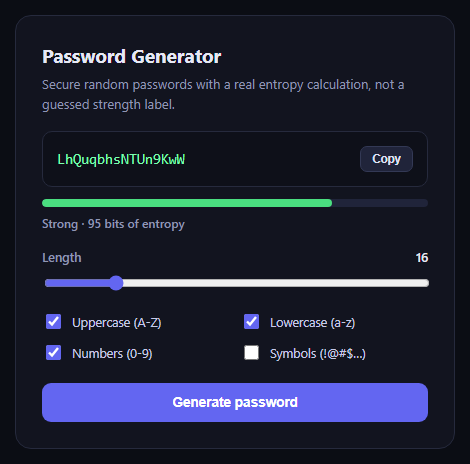
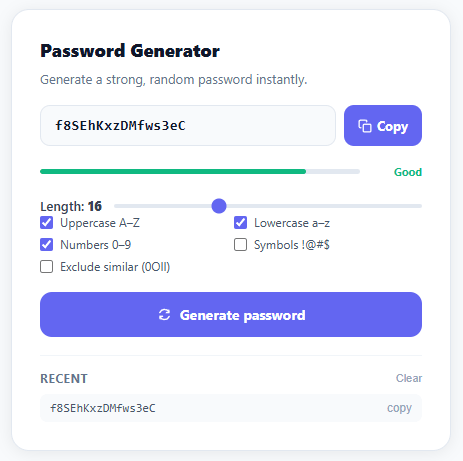
This snippet generates passwords securely and rates them honestly. Instead of an arbitrary "strong/weak" guess, the strength meter is driven by a real entropy calculation: bits = length × log2(charset size), the standard formula for the information content of a uniformly random string.
Secure character selection
Each password character is chosen using crypto.getRandomValues on a Uint32Array, with the result taken modulo the active character pool's length — never Math.random, which is unsuitable for anything security-sensitive.
Configurable character sets and length
Four checkboxes toggle uppercase letters, lowercase letters, numbers, and symbols in and out of the active pool, and a range slider from 6 to 64 characters controls password length. Both regenerate the password and recompute entropy immediately.
Honest entropy-based strength
calculateEntropy() multiplies the chosen length by Math.log2(charsetSize) to get real bits of entropy, and strengthFromEntropy() buckets that number into weak/fair/strong/very strong labels with a matching coloured bar — so enabling more character types or increasing length visibly and correctly raises the score.
Build with AI
Build, Understand, Optimize, and Extend It With AI
Hand this snippet's HTML, CSS, and JavaScript to an AI coding assistant like Claude and ask it to adapt "Password Generator with Entropy Meter" to your project — restyle it to match your design system, wire it up to real data instead of the static example, or port it to the framework you're building in.
Prompt to recreate it
Copy this into your AI assistant of choice to build the effect from scratch, or as a jumping-off point for your own variant:
Build a forms component called "Password Generator with Entropy Meter" using plain HTML, CSS, and vanilla JavaScript — no framework, no build step.

Requirements:
- Match the structure and behavior of the "Password Generator with Entropy Meter" snippet from the UI Snippets Library.
- Keep the markup semantic and the styling self-contained (no external dependencies beyond what the original snippet uses).
- Keep the JavaScript vanilla, with no framework runtime required.
- Make it easy to restyle via CSS custom properties or class overrides so it can be dropped into a real project.
Want to tighten it up first? Run this prompt through the AI Prompt Studio to score it across 8 quality dimensions, catch anti-patterns, and tune the wording for Claude, ChatGPT, or Gemini before you paste it in.
Source Code
<div class="pge-card">
  <div class="pge-head">
    <h2>Password Generator</h2>
    <p>Secure random passwords with a real entropy calculation, not a guessed strength label.</p>
  </div>

  <div class="pge-output-row">
    <code id="pgeOutput">…</code>
    <button class="pge-copy" id="pgeCopy" type="button">Copy</button>
  </div>

  <div class="pge-strength">
    <div class="pge-strength-track"><div class="pge-strength-fill" id="pgeStrengthFill"></div></div>
    <div class="pge-strength-label" id="pgeStrengthLabel">Fair · 0 bits</div>
  </div>

  <div class="pge-field">
    <div class="pge-slider-row">
      <label for="pgeLength">Length</label>
      <span id="pgeLengthValue">16</span>
    </div>
    <input type="range" id="pgeLength" min="6" max="64" value="16" />
  </div>

  <div class="pge-checks">
    <label><input type="checkbox" id="pgeUpper" checked /> Uppercase (A-Z)</label>
    <label><input type="checkbox" id="pgeLower" checked /> Lowercase (a-z)</label>
    <label><input type="checkbox" id="pgeNumbers" checked /> Numbers (0-9)</label>
    <label><input type="checkbox" id="pgeSymbols" /> Symbols (!@#$…)</label>
  </div>

  <button class="pge-btn" id="pgeGenerate" type="button">Generate password</button>
</div>*{box-sizing:border-box}
body{font-family:system-ui,-apple-system,sans-serif;background:#0b0d14;min-height:100vh;display:flex;align-items:center;justify-content:center;padding:24px}
.pge-card{font-family:system-ui,-apple-system,sans-serif;background:#12141f;color:#e7e9f5;border:1px solid #262a3d;border-radius:16px;padding:26px;max-width:440px;width:100%}
.pge-head h2{margin:0 0 6px;font-size:19px}
.pge-head p{margin:0 0 18px;font-size:13px;color:#9096b3;line-height:1.5}
.pge-output-row{display:flex;align-items:center;gap:10px;background:#0e1019;border:1px solid #262a3d;border-radius:10px;padding:14px;margin-bottom:12px}
.pge-output-row code{flex:1;font-family:ui-monospace,SFMono-Regular,Menlo,monospace;font-size:14.5px;color:#7dffb0;word-break:break-all}
.pge-copy{flex-shrink:0;background:#20243a;border:1px solid #333955;color:#dfe2f6;font-size:11.5px;font-weight:600;padding:6px 11px;border-radius:7px;cursor:pointer}
.pge-copy:hover{background:#282d47}
.pge-strength{margin-bottom:18px}
.pge-strength-track{height:8px;border-radius:99px;background:#20243a;overflow:hidden;margin-bottom:8px}
.pge-strength-fill{height:100%;width:0%;border-radius:99px;transition:width .25s ease,background .25s ease}
.pge-strength-label{font-size:12px;color:#9096b3;font-weight:600}
.pge-field{margin-bottom:16px}
.pge-slider-row{display:flex;justify-content:space-between;font-size:12.5px;color:#9096b3;margin-bottom:8px;font-weight:600}
.pge-slider-row span{color:#e7e9f5}
input[type="range"]{width:100%;accent-color:#6366f1}
.pge-checks{display:grid;grid-template-columns:1fr 1fr;gap:10px;margin-bottom:20px}
.pge-checks label{display:flex;align-items:center;gap:8px;font-size:12.5px;color:#c7cae6}
.pge-checks input{accent-color:#6366f1;width:15px;height:15px}
.pge-btn{width:100%;background:#6366f1;border:none;color:#fff;font-size:13.5px;font-weight:700;padding:12px;border-radius:9px;cursor:pointer}
.pge-btn:hover{background:#4f52e0}var CHARSETS = {
upper: 'ABCDEFGHIJKLMNOPQRSTUVWXYZ',
lower: 'abcdefghijklmnopqrstuvwxyz',
numbers: '0123456789',
symbols: '!@#$%^&*()-_=+[]{}<>?',
};
var upperEl = document.getElementById('pgeUpper');
var lowerEl = document.getElementById('pgeLower');
var numbersEl = document.getElementById('pgeNumbers');
var symbolsEl = document.getElementById('pgeSymbols');
var lengthEl = document.getElementById('pgeLength');
var lengthValueEl = document.getElementById('pgeLengthValue');
var outputEl = document.getElementById('pgeOutput');
var strengthFill = document.getElementById('pgeStrengthFill');
var strengthLabel = document.getElementById('pgeStrengthLabel');
function activeCharset() {
var pool = '';
if (upperEl.checked) pool += CHARSETS.upper;
if (lowerEl.checked) pool += CHARSETS.lower;
if (numbersEl.checked) pool += CHARSETS.numbers;
if (symbolsEl.checked) pool += CHARSETS.symbols;
return pool;
}
// Cryptographically secure random password, one character at a time,
// sourced from crypto.getRandomValues rather than Math.random.
function generatePassword(length, pool) {
if (!pool) return '';
var randomValues = new Uint32Array(length);
crypto.getRandomValues(randomValues);
var result = '';
for (var i = 0; i < length; i++) {
result += pool[randomValues[i] % pool.length];
}
return result;
}
// Real Shannon-style entropy estimate: bits = length * log2(charset size).
function calculateEntropy(length, charsetSize) {
if (charsetSize <= 1) return 0;
return length * Math.log2(charsetSize);
}
function strengthFromEntropy(bits) {
if (bits < 40) return { label: 'Weak', color: '#f87171', pct: 25 };
if (bits < 64) return { label: 'Fair', color: '#facc15', pct: 50 };
if (bits < 100) return { label: 'Strong', color: '#4ade80', pct: 75 };
return { label: 'Very strong', color: '#22d3ee', pct: 100 };
}
function updateAll() {
var length = parseInt(lengthEl.value, 10);
lengthValueEl.textContent = length;
var pool = activeCharset();
var password = pool ? generatePassword(length, pool) : '(select at least one character type)';
outputEl.textContent = password;
var bits = calculateEntropy(length, pool.length || 1);
var strength = strengthFromEntropy(bits);
strengthFill.style.width = strength.pct + '%';
strengthFill.style.background = strength.color;
strengthLabel.textContent = strength.label + ' · ' + Math.round(bits) + ' bits of entropy';
}
[upperEl, lowerEl, numbersEl, symbolsEl].forEach(function (el) {
el.addEventListener('change', updateAll);
});
lengthEl.addEventListener('input', updateAll);
document.getElementById('pgeGenerate').addEventListener('click', updateAll);
document.getElementById('pgeCopy').addEventListener('click', function () {
var btn = this;
navigator.clipboard.writeText(outputEl.textContent).then(function () {
var original = btn.textContent;
btn.textContent = 'Copied!';
setTimeout(function () { btn.textContent = original; }, 1500);
});
});
updateAll();Step by step
How to Use
- 1Load the snippetClick "Password Generator with Entropy Meter" in the sidebar to load its HTML, CSS, and JS into the editor panels. The preview updates instantly.
- 2Edit the codeModify any panel — HTML, CSS, or JS. The preview refreshes as you type. Use Reset in each panel header to restore the original.
- 3Preview on devicesClick the Mobile (375px), Tablet (768px), or Desktop buttons in the preview header to check responsiveness.
- 4Export in your formatClick "HTML" to download a standalone file, "JSX" for a React component, "Tailwind" for a React + Tailwind CSS component, "Tailwind HTML" for a standalone HTML file with Tailwind CDN, "Vue" for a Vue 3 SFC with <template>/<script setup>/<style scoped>, or "Angular" for a standalone Angular .component.ts file. "Copy all" copies the full code to clipboard.
- 5Save your versionClick "Save as", type a name, and press Enter. Your snippet saves to IndexedDB and appears in the Saved tab.
Real-world uses
Common Use Cases
Got questions?
Frequently Asked Questions
Yes. It multiplies the password length by log2 of the active character set size to get bits of entropy, then buckets that number into a label — it is not a hardcoded or guessed rating.
Math.random is not cryptographically secure and can be predictable; crypto.getRandomValues draws from the operating system's secure random source, which is what password generation requires.
The output shows a prompt to select at least one character type, since an empty character pool cannot produce a password or a meaningful entropy value.