Learn Coding Visually
Learn to code with interactive, live-preview playgrounds — HTML, CSS, JavaScript, React & more.
 HTML Playground42 lessons · Click-based · Live preview
 CSS PlaygroundLearn CSS with a live editor
 JavaScript Playground60 lessons · DOM · Async · Canvas
 React PlaygroundLearn React with a live code editor
 GSAP PlaygroundLearn GSAP animation interactively
 SVG Playground44 lessons · shapes · paths · animation
 SCSS Playground45 lessons · Sass modules · tokens
 Tailwind PlaygroundLearn Tailwind CSS with a live editor
 Bootstrap 5 Playground50 lessons · live preview
Text Hash Generator — Free HTML CSS JS Snippet
Text Hash Generator · Forms · Plain HTML, CSS & JS · Live preview
What's included
Features
About this UI Snippet
Text Hash Generator — Live SHA-1, SHA-256 & SHA-384 Digests
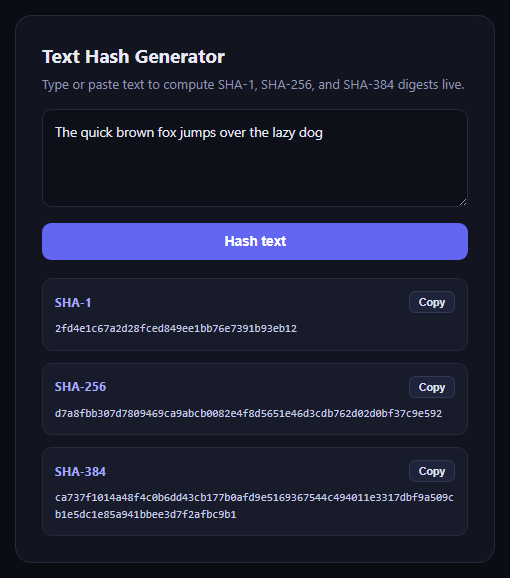
This snippet hashes arbitrary text into three digest algorithms at once — SHA-1, SHA-256, and SHA-384 — entirely in the browser using the native crypto.subtle.digest method, with no server round trip and no third-party hashing library.
How the hashing works
The input string is first encoded into a byte array with TextEncoder, which crypto.subtle.digest accepts directly. The function loops over a small algorithms array, calling digest(algo.name, data) for each of 'SHA-1', 'SHA-256', and 'SHA-384', converting each resulting ArrayBuffer into a lowercase hex string with the shared bufferToHex helper.
Live and on-demand hashing
Typing in the textarea triggers a debounced re-hash (300ms after the last keystroke) so all three digests stay in sync with the input without recomputing on every keystroke, while the "Hash text" button forces an immediate recalculation.
Per-algorithm copy buttons
Each result row has its own small copy button that reads the corresponding <code> element's text and writes it to the clipboard via navigator.clipboard.writeText, with a short "Copied" label swap for feedback.
Build with AI
Build, Understand, Optimize, and Extend It With AI
Hand this snippet's HTML, CSS, and JavaScript to an AI coding assistant like Claude and ask it to adapt "Text Hash Generator" to your project — restyle it to match your design system, wire it up to real data instead of the static example, or port it to the framework you're building in.
Prompt to recreate it
Copy this into your AI assistant of choice to build the effect from scratch, or as a jumping-off point for your own variant:
Build a forms component called "Text Hash Generator" using plain HTML, CSS, and vanilla JavaScript — no framework, no build step.

Requirements:
- Match the structure and behavior of the "Text Hash Generator" snippet from the UI Snippets Library.
- Keep the markup semantic and the styling self-contained (no external dependencies beyond what the original snippet uses).
- Keep the JavaScript vanilla, with no framework runtime required.
- Make it easy to restyle via CSS custom properties or class overrides so it can be dropped into a real project.
Want to tighten it up first? Run this prompt through the AI Prompt Studio to score it across 8 quality dimensions, catch anti-patterns, and tune the wording for Claude, ChatGPT, or Gemini before you paste it in.
Source Code
<div class="thg-card">
  <div class="thg-head">
    <h2>Text Hash Generator</h2>
    <p>Type or paste text to compute SHA-1, SHA-256, and SHA-384 digests live.</p>
  </div>

  <textarea id="thgInput" rows="4" placeholder="Type something to hash…">The quick brown fox jumps over the lazy dog</textarea>

  <button class="thg-btn" id="thgHashBtn" type="button">Hash text</button>

  <div class="thg-results">
    <div class="thg-result-row">
      <div class="thg-result-head">
        <span class="thg-algo">SHA-1</span>
        <button class="thg-copy" data-target="thgOutSha1" type="button">Copy</button>
      </div>
      <code id="thgOutSha1">…</code>
    </div>
    <div class="thg-result-row">
      <div class="thg-result-head">
        <span class="thg-algo">SHA-256</span>
        <button class="thg-copy" data-target="thgOutSha256" type="button">Copy</button>
      </div>
      <code id="thgOutSha256">…</code>
    </div>
    <div class="thg-result-row">
      <div class="thg-result-head">
        <span class="thg-algo">SHA-384</span>
        <button class="thg-copy" data-target="thgOutSha384" type="button">Copy</button>
      </div>
      <code id="thgOutSha384">…</code>
    </div>
  </div>
</div>*{box-sizing:border-box}
body{font-family:system-ui,-apple-system,sans-serif;background:#0b0d14;min-height:100vh;display:flex;align-items:center;justify-content:center;padding:24px}
.thg-card{font-family:system-ui,-apple-system,sans-serif;background:#12141f;color:#e7e9f5;border:1px solid #262a3d;border-radius:16px;padding:26px;max-width:480px;width:100%}
.thg-head h2{margin:0 0 6px;font-size:19px}
.thg-head p{margin:0 0 16px;font-size:13px;color:#9096b3;line-height:1.5}
#thgInput{width:100%;background:#0e1019;border:1px solid #262a3d;border-radius:10px;padding:12px;color:#e7e9f5;font-family:system-ui,sans-serif;font-size:13.5px;resize:vertical;margin-bottom:12px}
#thgInput:focus{outline:none;border-color:#6366f1}
.thg-btn{width:100%;background:#6366f1;border:none;color:#fff;font-size:13.5px;font-weight:700;padding:11px;border-radius:9px;cursor:pointer;margin-bottom:18px}
.thg-btn:hover{background:#4f52e0}
.thg-results{display:flex;flex-direction:column;gap:12px}
.thg-result-row{background:#181b2a;border:1px solid #262a3d;border-radius:10px;padding:12px}
.thg-result-head{display:flex;justify-content:space-between;align-items:center;margin-bottom:8px}
.thg-algo{font-size:11.5px;font-weight:700;color:#a5a9ff;text-transform:uppercase;letter-spacing:.04em}
.thg-copy{background:#20243a;border:1px solid #333955;color:#dfe2f6;font-size:10.5px;font-weight:600;padding:4px 9px;border-radius:6px;cursor:pointer}
.thg-copy:hover{background:#282d47}
.thg-result-row code{display:block;font-family:ui-monospace,SFMono-Regular,Menlo,monospace;font-size:11px;word-break:break-all;color:#c7cae6;line-height:1.5}var algorithms = [
{ name: 'SHA-1', outputId: 'thgOutSha1' },
{ name: 'SHA-256', outputId: 'thgOutSha256' },
{ name: 'SHA-384', outputId: 'thgOutSha384' },
];
function bufferToHex(buffer) {
var bytes = new Uint8Array(buffer);
var hex = '';
for (var i = 0; i < bytes.length; i++) hex += bytes[i].toString(16).padStart(2, '0');
return hex;
}
async function hashAll(text) {
var encoder = new TextEncoder();
var data = encoder.encode(text);
for (var i = 0; i < algorithms.length; i++) {
var algo = algorithms[i];
var digest = await crypto.subtle.digest(algo.name, data);
document.getElementById(algo.outputId).textContent = bufferToHex(digest);
}
}
var input = document.getElementById('thgInput');
var hashBtn = document.getElementById('thgHashBtn');
var debounceTimer = null;
function scheduleHash() {
clearTimeout(debounceTimer);
debounceTimer = setTimeout(function () { hashAll(input.value); }, 300);
}
input.addEventListener('input', scheduleHash);
hashBtn.addEventListener('click', function () { hashAll(input.value); });
document.querySelectorAll('.thg-copy').forEach(function (btn) {
btn.addEventListener('click', function () {
var target = document.getElementById(btn.dataset.target);
navigator.clipboard.writeText(target.textContent).then(function () {
var original = btn.textContent;
btn.textContent = 'Copied';
setTimeout(function () { btn.textContent = original; }, 1200);
});
});
});
// Hash the pre-filled demo text on load.
hashAll(input.value);Step by step
How to Use
- 1Load the snippetClick "Text Hash Generator" in the sidebar to load its HTML, CSS, and JS into the editor panels. The preview updates instantly.
- 2Edit the codeModify any panel — HTML, CSS, or JS. The preview refreshes as you type. Use Reset in each panel header to restore the original.
- 3Preview on devicesClick the Mobile (375px), Tablet (768px), or Desktop buttons in the preview header to check responsiveness.
- 4Export in your formatClick "HTML" to download a standalone file, "JSX" for a React component, "Tailwind" for a React + Tailwind CSS component, "Tailwind HTML" for a standalone HTML file with Tailwind CDN, "Vue" for a Vue 3 SFC with <template>/<script setup>/<style scoped>, or "Angular" for a standalone Angular .component.ts file. "Copy all" copies the full code to clipboard.
- 5Save your versionClick "Save as", type a name, and press Enter. Your snippet saves to IndexedDB and appears in the Saved tab.
Real-world uses
Common Use Cases
Got questions?
Frequently Asked Questions
SHA-1 is included for compatibility and comparison purposes; it is cryptographically broken for collision resistance, so SHA-256 or SHA-384 should be preferred for any security-sensitive use.
No. TextEncoder and crypto.subtle.digest both run locally in the browser, so the text never leaves the page.
A 300ms debounce avoids recomputing three digests on every keystroke, keeping the UI responsive while still feeling live.