Learn Coding Visually
Learn to code with interactive, live-preview playgrounds — HTML, CSS, JavaScript, React & more.
 HTML Playground42 lessons · Click-based · Live preview
 CSS PlaygroundLearn CSS with a live editor
 JavaScript Playground60 lessons · DOM · Async · Canvas
 React PlaygroundLearn React with a live code editor
 GSAP PlaygroundLearn GSAP animation interactively
 SVG Playground44 lessons · shapes · paths · animation
 SCSS Playground45 lessons · Sass modules · tokens
 Tailwind PlaygroundLearn Tailwind CSS with a live editor
 Bootstrap 5 Playground50 lessons · live preview
pdf-lib Watermark and Page Numbers for Existing PDFs — Free Snippet
pdf-lib Watermark and Page Numbers for Existing PDFs · Tools · Plain HTML, CSS & JS · Live preview
What's included
Features
About this UI Snippet
Watermarking PDFs With pdf-lib — Rotated Text, Opacity and Page Numbers
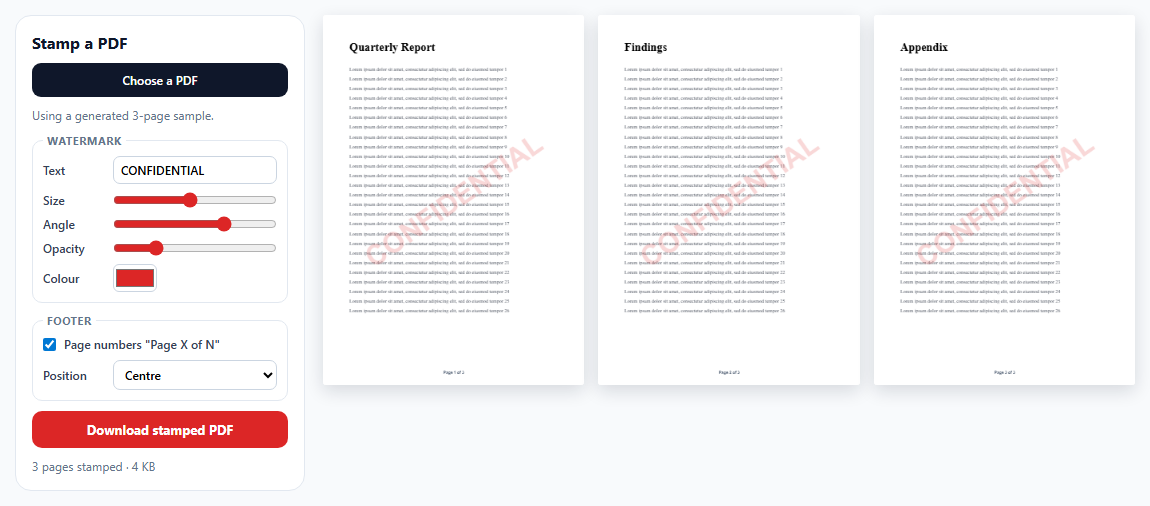
Stamping "DRAFT" or "CONFIDENTIAL" across every page, or adding page numbers to a document that doesn't have them, are everyday PDF chores. pdf-lib can modify an existing PDF in the browser: load it, draw on top of each page, save. This snippet adds a configurable watermark and footer and shows the stamped pages live.
Editing, not re-creating
PDFDocument.load(bytes) parses the existing file, and getPages() returns its pages. Drawing with page.drawText adds new content on top of what's already there — text, images and vector content in the original are untouched, and text stays selectable.
Always stamp from the original
Each change of text, size, angle or colour reloads the *original* bytes and stamps again. Stamping the previous output instead would layer watermark upon watermark every time a slider moved.
Centring rotated text is geometry
drawText with rotate: degrees(a) rotates around the text's start point — the left end of its baseline — not its centre. Putting that point at the page centre would swing the text off to one side. The snippet measures the text with widthOfTextAtSize and heightAtSize, then moves the start point back from the centre by half the width and half the height rotated by the same angle, so the watermark's midpoint lands exactly in the middle at any angle.
Transparency and colour
opacity makes the watermark translucent so the content underneath stays readable. The colour picker's hex value converts to pdf-lib's rgb(), which takes 0–1 components.
Page numbers
"Page X of N" is measured and either centred or right-aligned 40 points from the edge, 26 points above the bottom.
Private by default
Files are read with the File API and never uploaded. A generated three-page sample means the tool works without your own file.
Build with AI
Build, Understand, Optimize, and Extend It With AI
Paste this snippet into an AI assistant like Claude and ask it to derive the rotated-text centring formula with a diagram. Ask it to add an image watermark (a logo PNG with embedPng), a tiled diagonal pattern across the page, a watermark applied only to selected pages, or a header with the document title and date. It can also help you keep file size low when stamping large documents.
Prompt to recreate it
Copy this into your AI assistant of choice to build the effect from scratch, or as a jumping-off point for your own variant:
Build a browser-based PDF watermark and page-number tool with pdf-lib and a PDF.js 3 preview (both from a CDN) in plain HTML, CSS and JavaScript.

Requirements:
- Start with a generated three-page sample PDF, and let the user choose their own PDF file, validating it before use.
- Controls for watermark text, font size, angle (−90 to 90), opacity and colour, plus a page-number toggle with centred or right-aligned position.
- On every change, reload the original bytes (never the previous output), embed Helvetica Bold, and draw the watermark on every page centred at the page midpoint accounting for rotation: offset the start point by half the text width and height rotated by the angle.
- Draw "Page X of N" footers, measured for alignment.
- Render up to six stamped pages with PDF.js (passing a copy of the bytes), ignore outdated renders, and show page count and size.
- A download button that saves stamped.pdf via a Blob URL with a note about sandboxed previews.
Want to tighten it up first? Run this prompt through the AI Prompt Studio to score it across 8 quality dimensions, catch anti-patterns, and tune the wording for Claude, ChatGPT, or Gemini before you paste it in.
Source Code
<div class="pw">
  <aside class="pw-panel">
    <h2>Stamp a PDF</h2>
    <label class="pw-file">Choose a PDF <input type="file" id="pwFile" accept="application/pdf"></label>
    <p class="pw-src" id="pwSrc">Using a generated 3-page sample.</p>
    <fieldset>
      <legend>Watermark</legend>
      <label>Text <input id="pwText" value="CONFIDENTIAL" maxlength="24"></label>
      <label>Size <input type="range" id="pwSize" min="24" max="110" value="64"></label>
      <label>Angle <input type="range" id="pwAngle" min="-90" max="90" value="35"></label>
      <label>Opacity <input type="range" id="pwOpacity" min="5" max="60" value="18"></label>
      <label>Colour <input type="color" id="pwColor" value="#dc2626"></label>
    </fieldset>
    <fieldset>
      <legend>Footer</legend>
      <label class="pw-check"><input type="checkbox" id="pwNums" checked> Page numbers "Page X of N"</label>
      <label>Position <select id="pwPos"><option value="center">Centre</option><option value="right">Right</option></select></label>
    </fieldset>
    <button type="button" id="pwDownload">Download stamped PDF</button>
    <p class="pw-status" id="pwStatus" role="status"></p>
  </aside>
  <div class="pw-preview" id="pwPages" aria-label="Preview of stamped pages"></div>
</div>*{box-sizing:border-box;margin:0;padding:0}
body{font-family:system-ui,-apple-system,sans-serif;background:#f8fafc;color:#0f172a;min-height:100vh;padding:20px}
.pw{max-width:1120px;margin:0 auto;display:grid;grid-template-columns:290px minmax(0,1fr);gap:18px;align-items:start}
@media (max-width:820px){.pw{grid-template-columns:1fr}}
.pw-panel{background:#fff;border:1px solid #e2e8f0;border-radius:16px;padding:16px;display:flex;flex-direction:column;gap:10px}
.pw h2{font-size:16px}
.pw fieldset{border:1px solid #e2e8f0;border-radius:10px;padding:8px 10px 10px;display:flex;flex-direction:column;gap:8px}
.pw legend{font-size:11px;font-weight:700;color:#64748b;padding:0 4px;text-transform:uppercase;letter-spacing:.05em}
.pw label{display:grid;grid-template-columns:62px 1fr;align-items:center;gap:8px;font-size:12px;font-weight:600;color:#334155}
.pw label.pw-check{display:flex;grid-template-columns:none}
.pw input[type=range]{accent-color:#dc2626;width:100%}
.pw input#pwText,.pw select{font:600 12px system-ui;border:1px solid #cbd5e1;border-radius:7px;padding:5px 7px;width:100%}
.pw input[type=color]{width:44px;height:28px;border:1px solid #cbd5e1;border-radius:6px;padding:0;background:none}
.pw-file{display:block!important;text-align:center;background:#0f172a;color:#fff!important;border-radius:9px;padding:9px;cursor:pointer}
.pw-file input{position:absolute;width:1px;height:1px;opacity:0}
.pw-file:focus-within{outline:2px solid #f87171;outline-offset:2px}
.pw-src,.pw-status{font-size:12px;color:#64748b}
#pwDownload{border:0;border-radius:10px;background:#dc2626;color:#fff;font:700 13px system-ui;padding:10px;cursor:pointer}
.pw :focus-visible{outline:2px solid #f87171;outline-offset:2px}
.pw-preview{display:grid;grid-template-columns:repeat(auto-fill,minmax(230px,1fr));gap:14px}
.pw-preview canvas{width:100%;display:block;background:#fff;box-shadow:0 6px 18px rgba(15,23,42,.14);border-radius:3px}pdfjsLib.GlobalWorkerOptions.workerSrc = 'https://cdn.jsdelivr.net/npm/pdfjs-dist@3.11.174/build/pdf.worker.min.js';
var PDFDocument = PDFLib.PDFDocument, StandardFonts = PDFLib.StandardFonts, rgb = PDFLib.rgb, degrees = PDFLib.degrees;
var source = null; // original bytes, never modified
var stamped = null; // latest output
var statusEl = document.getElementById('pwStatus');
function hexToRgb(hex) {
var n = parseInt(hex.slice(1), 16);
return rgb(((n >> 16) & 255) / 255, ((n >> 8) & 255) / 255, (n & 255) / 255);
}
async function makeSample() {
var doc = await PDFDocument.create();
var font = await doc.embedFont(StandardFonts.TimesRoman);
var bold = await doc.embedFont(StandardFonts.TimesRomanBold);
for (var i = 0; i < 3; i++) {
var p = doc.addPage([595, 842]);
p.drawText(['Quarterly Report', 'Findings', 'Appendix'][i], { x: 60, y: 760, size: 26, font: bold });
for (var l = 0; l < 26; l++) {
p.drawText('Lorem ipsum dolor sit amet, consectetur adipiscing elit, sed do eiusmod tempor ' + (l + 1), { x: 60, y: 715 - l * 22, size: 11, font: font, color: rgb(0.25, 0.28, 0.33) });
}
}
return doc.save();
}
// Stamping always starts again from the untouched source bytes, so moving
// a slider never stacks a second watermark on the first.
async function stamp() {
var doc = await PDFDocument.load(source);
var font = await doc.embedFont(StandardFonts.HelveticaBold);
var text = document.getElementById('pwText').value || ' ';
var size = Number(document.getElementById('pwSize').value);
var angle = Number(document.getElementById('pwAngle').value);
var opacity = Number(document.getElementById('pwOpacity').value) / 100;
var color = hexToRgb(document.getElementById('pwColor').value);
var nums = document.getElementById('pwNums').checked;
var pos = document.getElementById('pwPos').value;
var pages = doc.getPages();
pages.forEach(function (page, i) {
var sz = page.getSize();
// drawText rotates around the text's START point (left end of the
// baseline), not its centre. To centre rotated text on the page, move
// that start point back from the centre by half the text's width and
// height, rotated by the same angle.
var w = font.widthOfTextAtSize(text, size);
var h = font.heightAtSize(size, { descender: false });
var rad = angle * Math.PI / 180;
var x = sz.width / 2 - (w / 2) * Math.cos(rad) + (h / 2) * Math.sin(rad);
var y = sz.height / 2 - (w / 2) * Math.sin(rad) - (h / 2) * Math.cos(rad);
page.drawText(text, { x: x, y: y, size: size, font: font, color: color, rotate: degrees(angle), opacity: opacity });
if (nums) {
var label = 'Page ' + (i + 1) + ' of ' + pages.length;
var lw = font.widthOfTextAtSize(label, 9);
page.drawText(label, {
x: pos === 'right' ? sz.width - 40 - lw : (sz.width - lw) / 2,
y: 26, size: 9, font: font, color: rgb(0.4, 0.45, 0.52),
});
}
});
stamped = await doc.save();
return stamped;
}
var token = 0;
async function refresh() {
var my = ++token;
var bytes = await stamp();
if (my !== token) return;
// Hand PDF.js a copy: it detaches the buffer it's given.
var pdf = await pdfjsLib.getDocument({ data: bytes.slice(0) }).promise;
var box = document.getElementById('pwPages');
var canvases = [];
for (var n = 1; n <= Math.min(pdf.numPages, 6); n++) {
var page = await pdf.getPage(n);
var vp = page.getViewport({ scale: 0.55 * (window.devicePixelRatio || 1) });
var c = document.createElement('canvas');
c.width = vp.width; c.height = vp.height;
await page.render({ canvasContext: c.getContext('2d'), viewport: vp }).promise;
canvases.push(c);
}
pdf.destroy();
if (my !== token) return;
box.replaceChildren.apply(box, canvases);
statusEl.textContent = pdf.numPages + ' page' + (pdf.numPages === 1 ? '' : 's') + ' stamped · ' + (bytes.byteLength / 1024).toFixed(0) + ' KB' + (pdf.numPages > 6 ? ' (previewing the first 6)' : '');
}
var t;
function schedule() { clearTimeout(t); t = setTimeout(refresh, 120); }
document.querySelectorAll('.pw-panel input:not([type=file]), .pw-panel select').forEach(function (el) {
el.addEventListener('input', schedule);
el.addEventListener('change', schedule);
});
document.getElementById('pwFile').addEventListener('change', async function (e) {
var file = e.target.files[0];
if (!file) return;
try {
var bytes = new Uint8Array(await file.arrayBuffer());
await PDFDocument.load(bytes); // validate before switching
source = bytes;
document.getElementById('pwSrc').textContent = 'Using ' + file.name + '.';
refresh();
} catch (err) {
statusEl.textContent = 'That file could not be opened as a PDF (' + err.message + ').';
}
});
document.getElementById('pwDownload').addEventListener('click', function () {
if (!stamped) return;
var url = URL.createObjectURL(new Blob([stamped], { type: 'application/pdf' }));
var a = document.createElement('a');
a.href = url; a.download = 'stamped.pdf';
document.body.appendChild(a); a.click(); a.remove();
setTimeout(function () { URL.revokeObjectURL(url); }, 2000);
statusEl.textContent = 'Saving stamped.pdf — sandboxed previews may block downloads; open the demo in its own tab if needed.';
});
makeSample().then(function (b) { source = b; refresh(); });Step by step
How to Use
- 1Start with the sampleA generated 3-page report is stamped immediately.
- 2Adjust the watermarkText, size, angle, opacity and colour update the preview.
- 3Toggle page numbersCentred or right-aligned "Page X of N".
- 4Use your own PDFChoose a file; it's processed locally.
- 5DownloadSaves stamped.pdf (open in its own tab if the sandbox blocks it).
Real-world uses
Common Use Cases
Got questions?
Frequently Asked Questions
Load the file with pdf-lib's PDFDocument.load, embed a font, and for each page call page.drawText with the watermark text, a rotate value from degrees(), a colour and an opacity. Save the document to get the stamped bytes.
drawText rotates around the text's start point. Measure the text width and height, then place the start point at the page centre minus half the width and height rotated by the angle: x = cx − (w/2)cosθ + (h/2)sinθ and y = cy − (w/2)sinθ − (h/2)cosθ.
Yes. Loop over doc.getPages() and draw "Page i of n" on each, measuring the label with font.widthOfTextAtSize to centre or right-align it.
No. A watermark is visible labelling, not protection; someone can remove or crop it. Use it to communicate status or ownership, not as security.
Drawing adds content permanently to the loaded document. Re-stamping the previous output would add another watermark each time, so the snippet always starts from the untouched source bytes.