
Learn Coding Visually
Learn to code with interactive, live-preview playgrounds — HTML, CSS, JavaScript, React & more.
 HTML Playground42 lessons · Click-based · Live preview
 CSS PlaygroundLearn CSS with a live editor
 JavaScript Playground60 lessons · DOM · Async · Canvas
 React PlaygroundLearn React with a live code editor
 GSAP PlaygroundLearn GSAP animation interactively
 SVG Playground44 lessons · shapes · paths · animation
 SCSS Playground45 lessons · Sass modules · tokens
 Tailwind PlaygroundLearn Tailwind CSS with a live editor
 Bootstrap 5 Playground50 lessons · live preview
Papa Parse CSV Import Validator with Error Report — Free JavaScript Snippet
Papa Parse CSV Import Validator with Error Report · Tools · Plain HTML, CSS & JS · Live preview
What's included
Features
About this UI Snippet
CSV Import Validation With Papa Parse — Catch Bad Rows Before They Reach Your Database
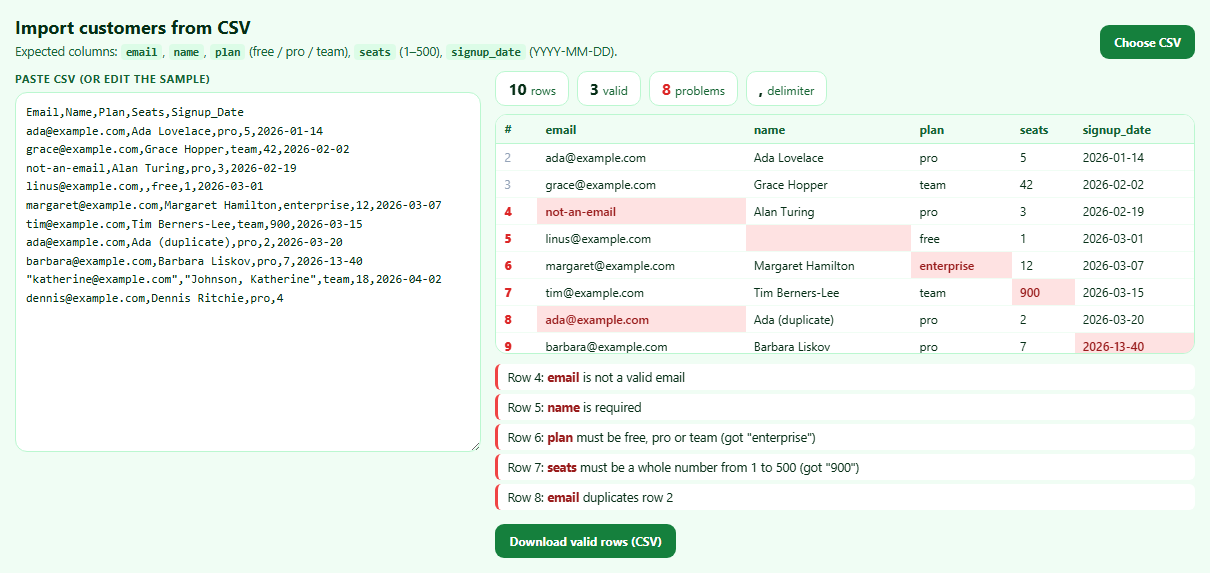
Every "import from CSV" feature eventually receives a spreadsheet exported from somewhere else: headers with odd capitalisation, a missing column, emails with typos, values out of range, dates that can't exist. Validating in the browser gives users immediate, line-numbered feedback they can fix before anything is uploaded. Papa Parse handles the hard part — parsing CSV correctly — and this snippet adds a schema on top.
Parsing properly is not split(',')
Real CSV has quoted fields containing commas ("Johnson, Katherine"), escaped quotes and line breaks inside cells. Papa Parse handles all of these, detects the delimiter automatically, and reports structural problems such as a row with too few fields as errors with a code and row index.
Normalising headers
header: true returns each row as an object keyed by column name. transformHeader trims, lowercases and replaces spaces with underscores, so "Signup_Date", "signup date" and " SIGNUP_DATE" all map to the same key.
Typing only what should be typed
dynamicTyping converts numeric-looking strings to numbers. Enabling it globally is a classic bug: ZIP codes, phone numbers and IDs lose leading zeros. Passing an object — { seats: true } — types only the columns that are really numbers.
Schema rules
Each expected column has a function returning an error or null: required fields, an email pattern, an allowed set of plans, a 1–500 whole-number range, and a date check that round-trips through Date.UTC so "2026-13-40" is rejected even though it matches the pattern. The first occurrence of each email is remembered so duplicates point back to the original line.
Reporting in the user's line numbers
Errors use spreadsheet-style line numbers (data index + 2, accounting for the header), and the preview highlights exactly which cells failed.
Exporting clean rows
Papa.unparse turns the valid rows back into correctly quoted CSV for download.
Build with AI
Build, Understand, Optimize, and Extend It With AI
Paste this snippet into an AI assistant like Claude and ask it to add a rule for a new column, or to explain why dynamicTyping is restricted. Ask it to add inline editing of bad cells in the preview table, a column-mapping step for files with different headers, streaming large files with Papa's step callback, or sending the valid rows to an API in batches.
Prompt to recreate it
Copy this into your AI assistant of choice to build the effect from scratch, or as a jumping-off point for your own variant:
Build a CSV import validator with Papa Parse (from a CDN) in plain HTML, CSS and JavaScript.

Requirements:
- A textarea preloaded with a sample customer CSV containing typical problems (invalid email, missing name, unknown plan, out-of-range seats, duplicate email, impossible date, a quoted field containing a comma, a row with too few fields), and a file chooser that reads a CSV with Papa.
- Parse with header rows, greedy empty-line skipping, headers normalised to lowercase underscore keys, and numeric typing only for the seats column.
- Validate each row against a schema: required email with a valid format and no duplicates (pointing to the first occurrence), required name, plan in free/pro/team, seats as a whole number 1–500, and signup_date as YYYY-MM-DD that is a real calendar date; also report missing columns and Papa's structural errors.
- Show stats (rows, valid, problems, detected delimiter), a preview table with spreadsheet line numbers and invalid cells highlighted, and a list of errors with line numbers and column names.
- Re-validate as the user edits, escape all displayed values, and offer a download of only the valid rows using Papa.unparse.
Want to tighten it up first? Run this prompt through the AI Prompt Studio to score it across 8 quality dimensions, catch anti-patterns, and tune the wording for Claude, ChatGPT, or Gemini before you paste it in.
Source Code
<div class="pp">
  <header class="pp-head">
    <div>
      <h2>Import customers from CSV</h2>
      <p>Expected columns: <code>email</code>, <code>name</code>, <code>plan</code> (free / pro / team), <code>seats</code> (1–500), <code>signup_date</code> (YYYY-MM-DD).</p>
    </div>
    <label class="pp-file">Choose CSV<input type="file" id="ppFile" accept=".csv,text/csv"></label>
  </header>
  <div class="pp-grid">
    <div class="pp-input">
      <label for="ppText" class="pp-label">Paste CSV (or edit the sample)</label>
      <textarea id="ppText" spellcheck="false"></textarea>
    </div>
    <div class="pp-out">
      <div class="pp-stats" id="ppStats" aria-live="polite"></div>
      <div class="pp-tablewrap"><table class="pp-table" id="ppTable"></table></div>
      <ul class="pp-errors" id="ppErrors"></ul>
      <div class="pp-actions">
        <button type="button" id="ppClean">Download valid rows (CSV)</button>
        <span id="ppStatus" role="status"></span>
      </div>
    </div>
  </div>
</div>*{box-sizing:border-box;margin:0;padding:0}
body{font-family:system-ui,-apple-system,sans-serif;background:#f0fdf4;color:#052e16;min-height:100vh;padding:20px}
.pp{max-width:1180px;margin:0 auto}
.pp-head{display:flex;justify-content:space-between;align-items:flex-end;gap:12px;flex-wrap:wrap;margin-bottom:12px}
.pp h2{font-size:18px}
.pp-head p{font-size:12.5px;color:#166534;margin-top:4px}
.pp code{font:600 11.5px ui-monospace,monospace;background:#dcfce7;padding:1px 5px;border-radius:4px}
.pp-file{background:#15803d;color:#fff;border-radius:9px;padding:9px 14px;font:700 12px system-ui;cursor:pointer}
.pp-file input{position:absolute;width:1px;height:1px;opacity:0}
.pp-file:focus-within,.pp :focus-visible{outline:2px solid #22c55e;outline-offset:2px}
.pp-grid{display:grid;grid-template-columns:minmax(0,.8fr) minmax(0,1.2fr);gap:14px}
@media (max-width:900px){.pp-grid{grid-template-columns:1fr}}
.pp-label{display:block;font-size:11px;font-weight:700;color:#166534;margin-bottom:6px;text-transform:uppercase;letter-spacing:.05em}
#ppText{width:100%;height:360px;border:1px solid #bbf7d0;border-radius:12px;padding:10px;font:12px/1.55 ui-monospace,monospace;color:#052e16;background:#fff;resize:vertical;white-space:pre;overflow:auto}
.pp-out{min-width:0}
.pp-stats{display:flex;gap:8px;flex-wrap:wrap;margin-bottom:8px}
.pp-stat{background:#fff;border:1px solid #bbf7d0;border-radius:10px;padding:6px 12px;font-size:12px;color:#166534}
.pp-stat b{font-size:16px;color:#052e16;margin-right:4px}
.pp-stat.bad b{color:#dc2626}
.pp-tablewrap{overflow:auto;max-height:240px;border:1px solid #bbf7d0;border-radius:12px;background:#fff;scrollbar-width:thin}
.pp-table{border-collapse:collapse;width:100%;font-size:12px}
.pp-table th{position:sticky;top:0;background:#f0fdf4;text-align:left;padding:6px 8px;font-weight:700;color:#166534;border-bottom:1px solid #bbf7d0;white-space:nowrap}
.pp-table td{padding:5px 8px;border-bottom:1px solid #f0fdf4;white-space:nowrap}
.pp-table td.row{color:#94a3b8;font-variant-numeric:tabular-nums}
.pp-table td.bad{background:#fee2e2;color:#991b1b;font-weight:600}
.pp-table tr.badrow td.row{color:#dc2626;font-weight:800}
.pp-errors{list-style:none;margin-top:10px;max-height:150px;overflow:auto;display:flex;flex-direction:column;gap:4px;font-size:12.5px;scrollbar-width:thin}
.pp-errors li{background:#fff;border-left:3px solid #ef4444;border-radius:6px;padding:5px 9px}
.pp-errors li b{color:#991b1b}
.pp-actions{display:flex;align-items:center;gap:10px;margin-top:10px;flex-wrap:wrap}
#ppClean{border:0;border-radius:9px;background:#15803d;color:#fff;font:700 12px system-ui;padding:9px 14px;cursor:pointer}
#ppClean:disabled{opacity:.4}
#ppStatus{font-size:12px;color:#166534}var SAMPLE = [
'Email,Name,Plan,Seats,Signup_Date',
'ada@example.com,Ada Lovelace,pro,5,2026-01-14',
'grace@example.com,Grace Hopper,team,42,2026-02-02',
'not-an-email,Alan Turing,pro,3,2026-02-19',
'linus@example.com,,free,1,2026-03-01',
'margaret@example.com,Margaret Hamilton,enterprise,12,2026-03-07',
'tim@example.com,Tim Berners-Lee,team,900,2026-03-15',
'ada@example.com,Ada (duplicate),pro,2,2026-03-20',
'barbara@example.com,Barbara Liskov,pro,7,2026-13-40',
'"katherine@example.com","Johnson, Katherine",team,18,2026-04-02',
'dennis@example.com,Dennis Ritchie,pro,4',
].join(String.fromCharCode(10));
// One rule per expected column. Each returns an error message or null.
var EMAIL = /^[^@\s]+@[^@\s]+\.[^@\s]+$/;
var SCHEMA = {
email: function (v, seen) {
if (!v) return 'is required';
if (!EMAIL.test(v)) return 'is not a valid email';
if (seen[v.toLowerCase()]) return 'duplicates row ' + seen[v.toLowerCase()];
return null;
},
name: function (v) { return v ? null : 'is required'; },
plan: function (v) { return ['free', 'pro', 'team'].indexOf(String(v).toLowerCase()) === -1 ? 'must be free, pro or team (got "' + v + '")' : null; },
seats: function (v) { return typeof v !== 'number' || !Number.isInteger(v) || v < 1 || v > 500 ? 'must be a whole number from 1 to 500 (got "' + v + '")' : null; },
signup_date: function (v) {
var m = /^(\d{4})-(\d{2})-(\d{2})$/.exec(v || '');
if (!m) return 'must look like YYYY-MM-DD';
// Round-trip through Date to reject impossible dates like 2026-13-40.
var d = new Date(Date.UTC(+m[1], +m[2] - 1, +m[3]));
return d.getUTCMonth() !== +m[2] - 1 || d.getUTCDate() !== +m[3] ? 'is not a real date' : null;
},
};
var COLS = Object.keys(SCHEMA);
var validRows = [];
function esc(s) { return String(s == null ? '' : s).replace(/[&<>"]/g, function (c) { return { '&': '&', '<': '<', '>': '>', '"': '"' }[c]; }); }
function run(text) {
// header:true turns rows into objects keyed by column name.
// transformHeader normalises "Signup_Date " to "signup_date".
// dynamicTyping converts numeric strings to numbers, but only for the
// columns we list, so a ZIP code like "02134" would stay a string.
var res = Papa.parse(text, {
header: true,
skipEmptyLines: 'greedy',
transformHeader: function (h) { return h.trim().toLowerCase().replace(/\s+/g, '_'); },
dynamicTyping: { seats: true },
});
var errors = [];
var missing = COLS.filter(function (c) { return res.meta.fields.indexOf(c) === -1; });
missing.forEach(function (c) { errors.push({ row: 'header', msg: 'Missing required column <b>' + c + '</b>' }); });
// Papa's own structural errors: wrong number of fields, bad quotes.
res.errors.forEach(function (e) {
errors.push({ row: e.row + 2, msg: 'Row ' + (e.row + 2) + ': ' + esc(e.message) + ' (' + e.code + ')' });
});
var structuralRows = {};
res.errors.forEach(function (e) { structuralRows[e.row] = true; });
var seen = {};
var badCells = {};
validRows = [];
res.data.forEach(function (row, i) {
var line = i + 2; // +1 for the header, +1 for 1-based line numbers
var rowOk = !structuralRows[i];
COLS.forEach(function (c) {
if (missing.indexOf(c) !== -1) return;
var err = SCHEMA[c](row[c], seen);
if (err) { rowOk = false; badCells[i + ':' + c] = true; errors.push({ row: line, msg: 'Row ' + line + ': <b>' + c + '</b> ' + esc(err) }); }
});
if (row.email && EMAIL.test(row.email) && !seen[row.email.toLowerCase()]) seen[row.email.toLowerCase()] = line;
if (rowOk && !missing.length) validRows.push(row);
row.__ok = rowOk;
});
// Report in file order: header problems first, then by line number.
errors.sort(function (a, b) { return (a.row === 'header' ? 0 : a.row) - (b.row === 'header' ? 0 : b.row); });
document.getElementById('ppStats').innerHTML =
'<span class="pp-stat"><b>' + res.data.length + '</b>rows</span>' +
'<span class="pp-stat"><b>' + validRows.length + '</b>valid</span>' +
'<span class="pp-stat' + (errors.length ? ' bad' : '') + '"><b>' + errors.length + '</b>problems</span>' +
'<span class="pp-stat"><b>' + res.meta.delimiter.replace(String.fromCharCode(9), 'tab') + '</b>delimiter</span>';
document.getElementById('ppTable').innerHTML =
'<thead><tr><th>#</th>' + COLS.map(function (c) { return '<th>' + c + '</th>'; }).join('') + '</tr></thead><tbody>' +
res.data.map(function (row, i) {
return '<tr class="' + (row.__ok ? '' : 'badrow') + '"><td class="row">' + (i + 2) + '</td>' + COLS.map(function (c) {
return '<td class="' + (badCells[i + ':' + c] ? 'bad' : '') + '">' + esc(row[c]) + '</td>';
}).join('') + '</tr>';
}).join('') + '</tbody>';
document.getElementById('ppErrors').innerHTML = errors.length
? errors.map(function (e) { return '<li>' + e.msg + '</li>'; }).join('')
: '<li style="border-color:#22c55e">No problems found — every row is ready to import.</li>';
document.getElementById('ppClean').disabled = !validRows.length;
}
var input = document.getElementById('ppText');
var t;
input.addEventListener('input', function () { clearTimeout(t); t = setTimeout(function () { run(input.value); }, 200); });
document.getElementById('ppFile').addEventListener('change', function (e) {
var file = e.target.files[0];
if (!file) return;
// Papa can read File objects directly and handles the text decoding.
Papa.parse(file, {
complete: function (r) { input.value = Papa.unparse(r.data); run(input.value); },
error: function (err) { document.getElementById('ppStatus').textContent = 'Could not read file: ' + err.message; },
});
});
// unparse turns objects back into CSV, quoting fields that contain commas,
// quotes or line breaks.
document.getElementById('ppClean').addEventListener('click', function () {
var csv = Papa.unparse(validRows.map(function (r) {
var o = {}; COLS.forEach(function (c) { o[c] = r[c]; }); return o;
}));
var url = URL.createObjectURL(new Blob([csv], { type: 'text/csv' }));
var a = document.createElement('a');
a.href = url; a.download = 'customers-valid.csv';
document.body.appendChild(a); a.click(); a.remove();
setTimeout(function () { URL.revokeObjectURL(url); }, 1500);
document.getElementById('ppStatus').textContent = 'Saving ' + validRows.length + ' valid rows — sandboxed previews may block downloads.';
});
input.value = SAMPLE;
run(SAMPLE);Step by step
How to Use
- 1Review the sampleTen rows with typical problems are validated on load.
- 2Read the reportEach problem cites its line number and column; bad cells are red.
- 3Fix the textEdit the CSV and the validation reruns as you type.
- 4Load your own fileChoose a CSV; Papa reads and decodes it locally.
- 5Export clean rowsDownload only the rows that passed every rule.
Real-world uses
Common Use Cases
Got questions?
Frequently Asked Questions
Use Papa Parse: Papa.parse(fileOrString, { header: true, complete: fn }). It handles quoted fields, embedded commas and line breaks, detects the delimiter and can read File objects directly.
It converts anything that looks numeric into a number, which strips leading zeros from ZIP codes, phone numbers and IDs. Pass an object listing only the numeric columns instead.
Papa's data index starts at 0 for the first data row. Add 1 for the header row and 1 more to make it 1-based: line = index + 2.
After checking the format, build a date with Date.UTC(year, month − 1, day) and confirm the resulting month and day are the ones you passed in. JavaScript rolls invalid dates over, so a mismatch means the date doesn't exist.
Papa.unparse(arrayOfObjects) produces CSV with a header row and correctly quotes values containing commas, quotes or line breaks.