You Might Also Like
Learn Coding Visually
Learn to code with interactive, live-preview playgrounds — HTML, CSS, JavaScript, React & more.
 HTML Playground42 lessons · Click-based · Live preview
 CSS PlaygroundLearn CSS with a live editor
 JavaScript Playground60 lessons · DOM · Async · Canvas
 React PlaygroundLearn React with a live code editor
 GSAP PlaygroundLearn GSAP animation interactively
 SVG Playground44 lessons · shapes · paths · animation
 SCSS Playground45 lessons · Sass modules · tokens
 Tailwind PlaygroundLearn Tailwind CSS with a live editor
 Bootstrap 5 Playground50 lessons · live preview
CSV Import Column Mapper — HTML CSS JS Snippet
CSV Import Mapper · Forms · Plain HTML, CSS & JS · Live preview
What's included
Features
About this UI Snippet
CSV Import Mapper — Column-to-Field Mapping UI with Hint-Based Auto-Guessing, Live Samples, Required-Field Gating & Validated Review
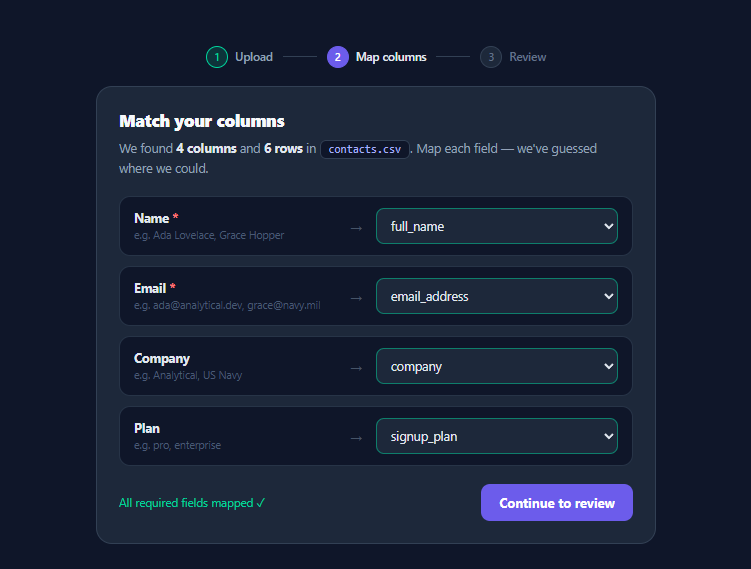
Every B2B product eventually ships "Import from CSV", and the hard part is never parsing — it's the *mapping step*: users arrive with files whose columns are named full_name, email_address, or E-Mail (work), and your schema wants name and email. Products like Flatfile and OneSchema built businesses on this single screen. This snippet implements it in vanilla HTML, CSS, and JavaScript: a three-step wizard (upload → map → review) whose centrepiece is the column mapper with hint-based auto-guessing, live sample values, required-field gating, and a validated preview table that marks bad cells and reports what the import will skip.
Two schemas and one dictionary between them
The component's inputs model the real problem exactly. CSV is the parsed upload — headers plus rows (in production, produced by your parser after the file-drop step; the File Dropzone snippet is the natural predecessor). FIELDS is *your* schema: key, label, required flag, and — the piece that powers the magic — a hints array of substrings commonly seen in wild headers for that field. The entire mapping state is one object: { fieldKey: headerIndex }, with −1 meaning skipped. Every downstream feature — samples, validation, preview, import — reads only this dictionary, which is also precisely the payload your import endpoint wants.
Auto-guessing: cheap fuzzy matching that feels smart
On load, each field scans the CSV headers for the first one containing any of its hints (case-insensitively): email_address matches the email hint, full_name matches full, signup_plan matches plan. Matched selects get a green guessed border communicating "we did this for you — check it"; the tint clears the moment the user touches the select, because at that point it's their choice, not a guess. Substring-hints is deliberately the 20-line version of what import SaaS does with string-distance and ML — and it resolves the overwhelming majority of real files, because header vocabularies are conventional. Each mapping row also shows *live sample values* from the first two data rows ("e.g. ada@analytical.dev, grace@navy.mil") — the single highest-value feature of the screen, since users confirm mappings by recognising their data, not by reasoning about header names.
Gating and the review step
validateMapping() runs on every change: required fields without a mapping outline red, the status line lists them, and Continue disables until they're resolved — the wizard cannot proceed into a broken import. Step 3 rebuilds a preview table from mapped columns only, running per-cell validation (the demo validates email format; the deliberately broken alan@bletchley row demonstrates it): bad cells tint red with a warning glyph, bad rows get a left edge-bar, empty optional values render as a muted *empty* — and the summary line states the consequence honestly: "1 value failed validation… bad rows are skipped on import." The import button then simulates the POST and reports the outcome split ("5 contacts imported · 1 row skipped"), because import UIs that swallow failures silently generate support tickets.
Wizard mechanics
The step rail (numbered dots, done/active states, connector lines) is driven by one setStep(n) class toggle; panels show/hide via the hidden attribute; Back returns to mapping with all state intact since the mapping dictionary never resets. The whole flow is deliberately session-stateless beyond that one object — making it trivial to lift into a modal, a settings page, or the multi-step-form patterns in the Multi-Step Form snippet.
Build with AI
Build, Understand, Optimize, and Extend It With AI
The mapper is a screen you'll customise heavily, and an AI assistant shortens every customisation: paste this snippet into Claude with your actual import schema (field names, which are required, what formats they take) and ask it to rewrite FIELDS with well-chosen hints — then feed it five real header rows from customer files and ask it to test its own hints against them, which immediately reveals the gaps substring matching leaves. The upgrade requests that pay off, in order: the scored guesser with a refuse-to-guess threshold (wrong green borders are worse than none), a declarative per-field validators map driving the review step, header normalisation for punctuation-heavy exports, and the content-based fallback that recognises an email column by sampling its values. For the backend seam, describe your storage setup and ask for the POST { fileId, mapping } endpoint plus the validate-only dry-run variant, with the client merge of dry-run findings into the summary line. And if your files run large, ask for the capped-preview-full-count split — the review must render 100 rows while counting 100,000.
Prompt to recreate it
Copy this into your AI assistant of choice to build the effect from scratch, or as a jumping-off point for your own variant:
Build the column-mapping step of a CSV import wizard in plain HTML, CSS, and JavaScript — the screen that matches a user's CSV headers to an app's schema fields, with auto-guessing, gating, and a validated review. No libraries.

Requirements:
- Model the two sides as data: a parsed CSV constant (headers array + rows matrix, ~6 rows including one deliberately invalid email and one empty optional cell) and a FIELDS schema array where each target field has a key, label, required flag, and a hints array of lowercase substrings expected in wild header names; the entire mapping state must be ONE dictionary of field-key → header-index (−1 = skipped) that every feature reads.
- Auto-guess on load: map each field to the first header whose lowercased name includes any of its hints, and tint successfully guessed selects with a green border that clears permanently the first time the user changes that select (a guess the user touched is a choice, not a guess).
- Render one mapping row per field — label with a red asterisk when required, a live sample line showing the first two data values of the currently mapped column ("e.g. ada@…, grace@…") or "Not mapped", an arrow, and a select listing "— Skip —" plus every CSV header — with a single delegated change handler updating the dictionary and re-deriving samples and validation.
- Gate progression: required fields mapped to −1 outline red, a status line lists them by label, and the Continue button disables until all are resolved (flipping to a green "all mapped ✓" state).
- A three-dot step rail (Upload done, Map active, Review pending) driven by one setStep function; Continue switches to a review panel that rebuilds a preview table from mapped columns only, validating email format per cell — bad cells tinted red with a warning glyph, bad rows edge-barred, empty optionals rendered as muted "empty" — and a summary line stating how many values failed and that bad rows will be skipped.
- The import button simulates a POST (disabled + "Importing…" for ~1s) then shows a success panel with a spring-pop check ring and the honest outcome split ("5 contacts imported · 1 row skipped (invalid email)"); Back returns to mapping with all state intact, and comment that the mapping dictionary itself is the API payload — the server should re-read the stored file and apply the indexes, never receive re-mapped rows from the client.
Want to tighten it up first? Run this prompt through the AI Prompt Studio to score it across 8 quality dimensions, catch anti-patterns, and tune the wording for Claude, ChatGPT, or Gemini before you paste it in.
Step by step
How to Use
- 1Walk the happy path and the failureThe mapper loads with three of four fields auto-guessed (green borders) from the fake contacts.csv. Note the sample values under each field name — that's how users verify guesses. Set a required field to "— Skip —" and watch the red outline, the status message, and the disabled Continue. Restore it, continue, and see the review table: alan@bletchley fails email validation, its cell marked and the summary declaring one row will be skipped. Import and read the honest outcome split.
- 2Plug in your real parsed CSVReplace the CSV constant with your parser's output — { headers: string[], rows: string[][] }. For parsing itself use Papa Parse (handles quoted commas, BOMs, encodings) fed by a file input or the File Dropzone as step 1. Everything else — guessing, samples, gating, preview — adapts automatically since it only reads headers/rows.
- 3Define your schema and hintsEdit FIELDS to your import target: key (your API field), label, required, and hints — lowercase substrings you expect in wild headers ("phone", "mobile", "tel" for a phone field). Hints are checked in order against headers with includes(), so put the most specific first. Add per-field validators by extending the review step's per-cell check beyond the email case — a validators map keyed by field key keeps it declarative.
- 4Send the importThe mapping dictionary is the payload: POST { mapping, fileId } and let the server re-read the stored upload applying the same column indexes — never send re-mapped row data from the client for large files. For the demo-scale alternative, build rows client-side: CSV.rows.map(r => Object.fromEntries(FIELDS.filter(f => mapping[f.key] >= 0).map(f => [f.key, r[mapping[f.key]]]))). Report the imported/skipped split from the server response in the done panel.
- 5Handle big files in the previewThe review table should never render 50,000 rows — cap it at the first 100 with a "Showing 100 of 48,712 rows" note, but run validation counts over everything (the counting loop is O(rows) and cheap; only DOM rendering is expensive). For duplicate detection ("3 rows match existing contacts"), add a server-side dry-run endpoint called on entering step 3 and merge its findings into the summary line.
- 6Export and composeClick JSX for React — mapping as state, selects controlled, review memoised from (mapping, rows). Compose the full import flow from this library: File Dropzone → this mapper → Upload Progress during the POST → Toast Notification on completion, with the Step Progress rail if you want a fancier stepper.
Real-world uses
Common Use Cases
Got questions?
Frequently Asked Questions
Each target field carries a hints array of lowercase substrings, and the guesser takes the first CSV header whose lowercased name includes any hint — email_address matches "email", full_name matches "full", signup_plan matches "plan". It is deliberately the simplest thing that works, and it works surprisingly often because real-world header vocabulary is conventional. Three upgrades in increasing order of effort: normalise headers before matching (strip spaces, underscores, punctuation — so "E-Mail (work)" becomes "emailwork" and matches); score all candidates instead of taking the first hit (exact match > startsWith > includes, pick the best, and refuse to guess below a threshold so wild files show honestly unmapped selects rather than wrong green ones); and content-based fallback — when no header matches, sample the first rows of unmatched columns and test them against field validators (a column whose values look like emails probably is the email column, whatever its header says). That last technique is most of what commercial import tools' "AI matching" does for common fields.
Because users verify mappings by recognising their own data, not by reasoning about header semantics. A user squinting at "full_name → Name" is doing abstract schema translation; the same user seeing "e.g. Ada Lovelace, Grace Hopper" confirms instantly — and, critically, a WRONG mapping becomes self-evident ("e.g. pro, enterprise" under the Email field is unmissable) in a way the header comparison never is. This is the single feature usability studies of import flows flag most consistently. Two samples is the deliberate sweet spot: one value can be coincidentally plausible in the wrong column (a company named "Turing" looks like a surname), while three or more overflow the row on narrow screens; two values catch the coincidence case while staying scannable. Skip empty cells when picking samples in production (the demo's || '—' placeholder handles the display side), and always sample data rows, never the header row.
Both, with different jobs. Client-side validation (this snippet's review step) exists for feedback latency: users see bad cells and skip counts instantly, iterate on their file, and arrive at the server with realistic expectations — it is UX, not enforcement. The server must re-validate everything regardless, because the client saw at most a preview and can be bypassed trivially. For the import itself, send the mapping dictionary plus a file reference — POST { fileId, mapping } — and let the server re-read its stored copy of the upload applying the column indexes: client-side re-mapping and re-uploading of row data caps out quickly (a 50MB CSV re-serialised in the browser is a tab crash) and invites truncation bugs. The dry-run pattern completes the architecture: on entering review, call the same server import in validate-only mode and merge its findings (duplicates against existing records, permission failures — things the client cannot know) into the summary line, so the preview's promises match the import's reality.
React: the mapping dictionary becomes the single source of truth — const [mapping, setMapping] = useState(initialGuesses) — with selects controlled (value={mapping[f.key]}, onChange updating the dict), samples and gating derived inline or via useMemo, and the review rows computed with useMemo(() => buildRows(mapping, csv), [mapping, csv]); the guessed-tint state is a one-shot: keep a touched set and style green only for untouched auto-matched fields. Step state is one useState<1|2|3>. Angular mirrors it with a signals record, computed() for gating and review rows, and a select bound via [ngModel] or reactive forms per field. Tailwind: mapping rows are grid grid-cols-[1fr_20px_1.2fr] items-center gap-2.5 bg-slate-900 border border-slate-700 rounded-xl px-3.5 py-3; selects are w-full bg-slate-800 border border-slate-700 rounded-lg px-2.5 py-2 text-sm with data-[guessed]:border-emerald-400/50 data-[missing]:border-red-400; the review table uses the standard th classes text-[10.5px] uppercase tracking-wider text-slate-400 bg-slate-900 with bad cells as text-red-400 after:content-['_⚠'] and bad rows shadow-[inset_2px_0_0] shadow-red-400 on the first cell.