Learn Coding Visually
Learn to code with interactive, live-preview playgrounds — HTML, CSS, JavaScript, React & more.
 HTML Playground42 lessons · Click-based · Live preview
 CSS PlaygroundLearn CSS with a live editor
 JavaScript Playground60 lessons · DOM · Async · Canvas
 React PlaygroundLearn React with a live code editor
 GSAP PlaygroundLearn GSAP animation interactively
 SVG Playground44 lessons · shapes · paths · animation
 SCSS Playground45 lessons · Sass modules · tokens
 Tailwind PlaygroundLearn Tailwind CSS with a live editor
 Bootstrap 5 Playground50 lessons · live preview
jsPDF Invoice Generator with Live PDF Preview — Free JavaScript Snippet
jsPDF Invoice Generator with Live PDF Preview · Tools · Plain HTML, CSS & JS · Live preview
What's included
Features
About this UI Snippet
jsPDF Invoice Generator — A Real PDF, Built and Previewed in the Browser
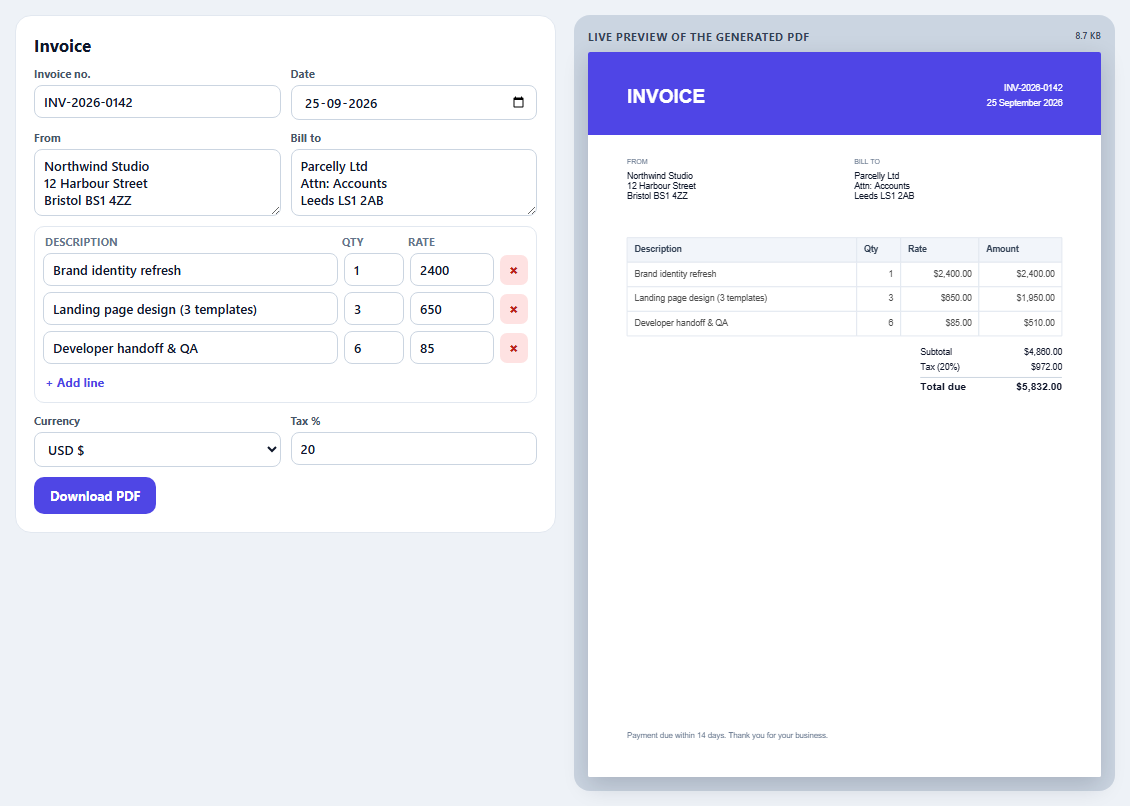
Generating an invoice PDF usually means a server, a headless browser or a paid API. For many apps that's unnecessary: jsPDF can draw a complete, text-based PDF in the browser, and PDF.js can render it back so users see exactly what they'll download. This snippet combines both into a small invoicing tool.
Drawing with jsPDF
The document is built in millimetres on A4. The header is a filled rectangle with white text; addresses are wrapped to a column width with splitTextToSize, which returns an array of lines jsPDF can print directly; right-aligned figures use { align: 'right' } with the x coordinate at the right margin. Text stays real text in the PDF, so it's selectable and searchable.
Tables with jspdf-autotable
Hand-positioning table rows gets painful as soon as a description wraps. The autotable plugin handles column widths, wrapping, row heights and page breaks. After it runs, doc.lastAutoTable.finalY tells you where the table ended, which is where the totals are drawn.
Previewing the real output
The preview isn't an HTML imitation. Every edit regenerates the PDF, and PDF.js renders page one onto a canvas at the device pixel ratio. A render token discards results from older edits so fast typing never shows a stale page.
A gotcha worth knowing
PDF.js *transfers* the ArrayBuffer you give it to its worker, which detaches it. If you still need the bytes — to upload them, or load them into another library — pass a copy with bytes.slice(0), otherwise the next use fails with "Cannot perform Construct on a detached ArrayBuffer".
Downloads and sandboxes
doc.save() triggers a download. Sandboxed iframes (such as this site's live preview) block downloads unless they allow them, so the status message tells users to open the demo in its own tab. In a normal page it works directly.
Fonts
The built-in Helvetica covers $, £ and €. For other currency symbols or scripts, embed a TTF font with addFileToVFS and addFont.
Build with AI
Build, Understand, Optimize, and Extend It With AI
Paste this snippet into an AI assistant like Claude and ask it to explain how autoTable's finalY lets the totals follow a table of any length. Ask it to add a logo image, a second page of terms, embedded fonts for other currencies, invoice numbering saved per client, or emailing the PDF bytes to an API endpoint. It can also review rounding: whether tax should be calculated per line or on the subtotal for your country.
Prompt to recreate it
Copy this into your AI assistant of choice to build the effect from scratch, or as a jumping-off point for your own variant:
Build a browser-based invoice generator with jsPDF and the jspdf-autotable plugin, previewing the generated file with PDF.js 3 (all loaded from a CDN), in plain HTML, CSS and JavaScript.

Requirements:
- A form with invoice number, date, "from" and "bill to" addresses, editable line items (description, quantity, rate, remove) with an add-line button, a currency select ($, £, €) and a tax percentage.
- Build an A4 PDF in millimetres: a coloured header with "INVOICE", number and formatted date; wrapped address blocks; a line-item table with autoTable (right-aligned numeric columns); subtotal, tax and bold total drawn after the table's final y position; a footer note.
- Regenerate the PDF on every edit (debounced), render page one with PDF.js onto a canvas at the device pixel ratio, ignore outdated renders, and show the file size. Pass PDF.js a copy of the bytes.
- A Download button that saves the PDF using the invoice number as the file name and notes that sandboxed previews may block downloads.
Want to tighten it up first? Run this prompt through the AI Prompt Studio to score it across 8 quality dimensions, catch anti-patterns, and tune the wording for Claude, ChatGPT, or Gemini before you paste it in.
Source Code
<div class="jiv">
  <form class="jiv-form" id="jivForm" autocomplete="off">
    <h2>Invoice</h2>
    <div class="jiv-row">
      <label>Invoice no. <input name="no" value="INV-2026-0142"></label>
      <label>Date <input name="date" type="date" value="2026-09-25"></label>
    </div>
    <div class="jiv-row">
      <label>From <textarea name="from" rows="3">Northwind Studio
12 Harbour Street
Bristol BS1 4ZZ</textarea></label>
      <label>Bill to <textarea name="to" rows="3">Parcelly Ltd
Attn: Accounts
Leeds LS1 2AB</textarea></label>
    </div>
    <div class="jiv-items">
      <div class="jiv-ihead"><span>Description</span><span>Qty</span><span>Rate</span><span></span></div>
      <div id="jivItems"></div>
      <button type="button" id="jivAdd" class="jiv-link">+ Add line</button>
    </div>
    <div class="jiv-row">
      <label>Currency <select name="cur"><option value="$">USD $</option><option value="£">GBP £</option><option value="€">EUR €</option></select></label>
      <label>Tax % <input name="tax" type="number" min="0" max="50" step="0.5" value="20"></label>
    </div>
    <div class="jiv-actions">
      <button type="button" id="jivDownload">Download PDF</button>
      <span id="jivStatus" role="status"></span>
    </div>
  </form>
  <div class="jiv-preview">
    <div class="jiv-plabel">Live preview of the generated PDF <small id="jivSize"></small></div>
    <canvas id="jivCanvas" aria-label="Rendered invoice PDF"></canvas>
  </div>
</div>*{box-sizing:border-box;margin:0;padding:0}
body{font-family:system-ui,-apple-system,sans-serif;background:#eef2f7;color:#0f172a;min-height:100vh;padding:20px}
.jiv{max-width:1100px;margin:0 auto;display:grid;grid-template-columns:minmax(0,1fr) minmax(0,1fr);gap:18px;align-items:start}
@media (max-width:860px){.jiv{grid-template-columns:1fr}}
.jiv-form{background:#fff;border:1px solid #e2e8f0;border-radius:16px;padding:18px}
.jiv-form h2{font-size:17px;margin-bottom:10px}
.jiv-row{display:grid;grid-template-columns:1fr 1fr;gap:10px;margin-bottom:10px}
.jiv label{display:flex;flex-direction:column;gap:4px;font-size:11px;font-weight:700;color:#475569}
.jiv input,.jiv textarea,.jiv select{font:500 13px system-ui;color:#0f172a;border:1px solid #cbd5e1;border-radius:8px;padding:7px 9px;background:#fff;width:100%}
.jiv textarea{resize:vertical}
.jiv :focus-visible{outline:2px solid #6366f1;outline-offset:1px}
.jiv-items{border:1px solid #e2e8f0;border-radius:10px;padding:8px;margin-bottom:10px}
.jiv-ihead,.jiv-line{display:grid;grid-template-columns:1fr 60px 84px 28px;gap:6px;align-items:center}
.jiv-ihead{font-size:10.5px;font-weight:700;color:#64748b;text-transform:uppercase;letter-spacing:.04em;padding:0 2px 4px}
.jiv-line{margin-bottom:6px}
.jiv-line button{border:0;background:#fee2e2;color:#b91c1c;border-radius:7px;height:30px;cursor:pointer;font-weight:800}
.jiv-link{border:0;background:none;color:#4f46e5;font:700 12px system-ui;cursor:pointer;padding:4px 2px}
.jiv-actions{display:flex;align-items:center;gap:12px;flex-wrap:wrap}
#jivDownload{border:0;border-radius:10px;background:#4f46e5;color:#fff;font:700 13px system-ui;padding:10px 16px;cursor:pointer}
#jivStatus{font-size:12px;color:#64748b}
.jiv-preview{background:#cbd5e1;border-radius:16px;padding:14px;position:sticky;top:12px}
.jiv-plabel{font-size:11px;font-weight:700;color:#334155;text-transform:uppercase;letter-spacing:.05em;margin-bottom:8px;display:flex;justify-content:space-between}
.jiv-plabel small{font-weight:600;text-transform:none;letter-spacing:0}
#jivCanvas{width:100%;height:auto;display:block;background:#fff;box-shadow:0 8px 24px rgba(15,23,42,.18);border-radius:2px}// PDF.js renders the preview. Inside a sandboxed preview it can't start a
// cross-origin worker, so it falls back to a "fake worker" on the main
// thread automatically; setting workerSrc tells it where that code lives.
pdfjsLib.GlobalWorkerOptions.workerSrc = 'https://cdn.jsdelivr.net/npm/pdfjs-dist@3.11.174/build/pdf.worker.min.js';
var form = document.getElementById('jivForm');
var itemsEl = document.getElementById('jivItems');
var lines = [
['Brand identity refresh', 1, 2400],
['Landing page design (3 templates)', 3, 650],
['Developer handoff & QA', 6, 85],
];
function renderLines() {
itemsEl.innerHTML = lines.map(function (l, i) {
return '<div class="jiv-line"><input aria-label="Description" data-i="' + i + '" data-k="0" value="' + String(l[0]).replace(/"/g, '"') + '">' +
'<input aria-label="Quantity" type="number" min="0" step="1" data-i="' + i + '" data-k="1" value="' + l[1] + '">' +
'<input aria-label="Rate" type="number" min="0" step="0.01" data-i="' + i + '" data-k="2" value="' + l[2] + '">' +
'<button type="button" aria-label="Remove line" data-del="' + i + '">×</button></div>';
}).join('');
}
function money(cur, v) { return cur + v.toLocaleString('en-US', { minimumFractionDigits: 2, maximumFractionDigits: 2 }); }
function build() {
var f = new FormData(form);
var cur = f.get('cur');
var tax = Math.max(0, Number(f.get('tax')) || 0);
var doc = new jspdf.jsPDF({ unit: 'mm', format: 'a4' });
var W = doc.internal.pageSize.getWidth();
// Header band
doc.setFillColor(79, 70, 229);
doc.rect(0, 0, W, 34, 'F');
doc.setTextColor(255, 255, 255);
doc.setFont('helvetica', 'bold');
doc.setFontSize(22);
doc.text('INVOICE', 16, 21);
doc.setFontSize(10);
doc.setFont('helvetica', 'normal');
doc.text(String(f.get('no')), W - 16, 16, { align: 'right' });
var d = f.get('date') ? new Date(f.get('date') + 'T00:00:00') : new Date();
doc.text(d.toLocaleDateString('en-GB', { day: 'numeric', month: 'long', year: 'numeric' }), W - 16, 22, { align: 'right' });
// Addresses. splitTextToSize wraps text to a width in the doc's units.
doc.setTextColor(100, 116, 139);
doc.setFontSize(8);
doc.text('FROM', 16, 46);
doc.text('BILL TO', W / 2 + 4, 46);
doc.setTextColor(15, 23, 42);
doc.setFontSize(10);
doc.text(doc.splitTextToSize(String(f.get('from')), W / 2 - 24), 16, 52);
doc.text(doc.splitTextToSize(String(f.get('to')), W / 2 - 24), W / 2 + 4, 52);
var subtotal = 0;
var body = lines.map(function (l) {
var amount = (Number(l[1]) || 0) * (Number(l[2]) || 0);
subtotal += amount;
return [String(l[0]), String(l[1]), money(cur, Number(l[2]) || 0), money(cur, amount)];
});
var taxAmt = subtotal * tax / 100;
// autoTable draws the table, handles row heights and page breaks, and
// stores where it finished in doc.lastAutoTable.finalY.
doc.autoTable({
startY: 76,
head: [['Description', 'Qty', 'Rate', 'Amount']],
body: body,
theme: 'grid',
styles: { font: 'helvetica', fontSize: 10, cellPadding: 3, lineColor: [226, 232, 240], lineWidth: 0.2 },
headStyles: { fillColor: [241, 245, 249], textColor: [51, 65, 85], fontStyle: 'bold' },
columnStyles: { 1: { halign: 'right', cellWidth: 18 }, 2: { halign: 'right', cellWidth: 32 }, 3: { halign: 'right', cellWidth: 34 } },
margin: { left: 16, right: 16 },
});
var y = doc.lastAutoTable.finalY + 8;
var right = W - 16;
function totalRow(label, value, bold) {
doc.setFont('helvetica', bold ? 'bold' : 'normal');
doc.setFontSize(bold ? 12 : 10);
doc.text(label, right - 58, y);
doc.text(value, right, y, { align: 'right' });
y += bold ? 9 : 6;
}
totalRow('Subtotal', money(cur, subtotal));
totalRow('Tax (' + tax + '%)', money(cur, taxAmt));
doc.setDrawColor(203, 213, 225);
doc.line(right - 58, y - 3, right, y - 3);
y += 2;
totalRow('Total due', money(cur, subtotal + taxAmt), true);
doc.setFont('helvetica', 'normal');
doc.setFontSize(9);
doc.setTextColor(100, 116, 139);
doc.text('Payment due within 14 days. Thank you for your business.', 16, doc.internal.pageSize.getHeight() - 16);
return doc;
}
var canvas = document.getElementById('jivCanvas');
var renderToken = 0;
async function preview() {
var token = ++renderToken;
var bytes = build().output('arraybuffer');
document.getElementById('jivSize').textContent = (bytes.byteLength / 1024).toFixed(1) + ' KB';
// PDF.js TRANSFERS the buffer it is given to its worker, which detaches it.
// Pass a copy if you still need the original bytes afterwards.
var pdf = await pdfjsLib.getDocument({ data: new Uint8Array(bytes.slice(0)) }).promise;
var page = await pdf.getPage(1);
if (token !== renderToken) return; // a newer edit started; drop this one
var scale = (canvas.clientWidth || 500) / page.getViewport({ scale: 1 }).width * (window.devicePixelRatio || 1);
var vp = page.getViewport({ scale: scale });
canvas.width = vp.width;
canvas.height = vp.height;
await page.render({ canvasContext: canvas.getContext('2d'), viewport: vp }).promise;
pdf.destroy();
}
var timer;
function schedule() { clearTimeout(timer); timer = setTimeout(preview, 250); }
itemsEl.addEventListener('input', function (e) {
var i = e.target.dataset.i, k = e.target.dataset.k;
if (i === undefined) return;
lines[i][k] = k === '0' ? e.target.value : Number(e.target.value);
schedule();
});
itemsEl.addEventListener('click', function (e) {
var del = e.target.dataset.del;
if (del === undefined) return;
lines.splice(Number(del), 1);
renderLines();
schedule();
});
document.getElementById('jivAdd').addEventListener('click', function () {
lines.push(['New item', 1, 100]);
renderLines();
schedule();
itemsEl.lastElementChild.querySelector('input').focus();
});
form.addEventListener('input', function (e) { if (!e.target.dataset.i) schedule(); });
form.addEventListener('change', schedule);
document.getElementById('jivDownload').addEventListener('click', function () {
var name = String(new FormData(form).get('no') || 'invoice').replace(/[^a-z0-9-_]+/gi, '_') + '.pdf';
build().save(name);
// Sandboxed previews (like this page's live editor) block downloads.
document.getElementById('jivStatus').textContent = 'Saving ' + name + ' — if nothing downloads, open the preview in its own tab.';
});
renderLines();
preview();Step by step
How to Use
- 1Load the librariesjsPDF, jspdf-autotable and PDF.js from the CDN.
- 2Edit the invoiceChange addresses, line items, currency and tax; the preview updates.
- 3Add or remove linesThe table grows and totals recalculate.
- 4DownloadSaves a real PDF named after the invoice number.
- 5Style itChange colours and layout in build(); the preview shows the result.
Real-world uses
Common Use Cases
Got questions?
Frequently Asked Questions
Create a document with new jspdf.jsPDF({ unit: 'mm', format: 'a4' }), draw text, lines and shapes with coordinates in those units, then call doc.save('file.pdf') to download or doc.output('arraybuffer') to get the bytes.
Load the jspdf-autotable plugin and call doc.autoTable({ head, body, startY }). It handles column widths, text wrapping and page breaks, and doc.lastAutoTable.finalY gives the y position where the table ended.
Get the bytes with doc.output('arraybuffer'), load them with PDF.js (pdfjsLib.getDocument), and render a page to a canvas. This shows the real file rather than an HTML approximation.
PDF.js transfers the buffer you pass to its worker, which detaches it in your code. Pass a copy (bytes.slice(0)) to PDF.js if you need to use the original bytes again.
Sandboxed iframes block downloads unless they include allow-downloads. Open the demo in its own tab, or in your own site the download works normally.