Learn Coding Visually
Learn to code with interactive, live-preview playgrounds — HTML, CSS, JavaScript, React & more.
 HTML Playground42 lessons · Click-based · Live preview
 CSS PlaygroundLearn CSS with a live editor
 JavaScript Playground60 lessons · DOM · Async · Canvas
 React PlaygroundLearn React with a live code editor
 GSAP PlaygroundLearn GSAP animation interactively
 SVG Playground44 lessons · shapes · paths · animation
 SCSS Playground45 lessons · Sass modules · tokens
 Tailwind PlaygroundLearn Tailwind CSS with a live editor
 Bootstrap 5 Playground50 lessons · live preview
pdf-lib Merge and Reorder PDFs in the Browser — Free JavaScript Snippet
pdf-lib Merge and Reorder PDFs in the Browser · Tools · Plain HTML, CSS & JS · Live preview
What's included
Features
About this UI Snippet
Merge PDFs Client-Side With pdf-lib — Private, Fast, No Server
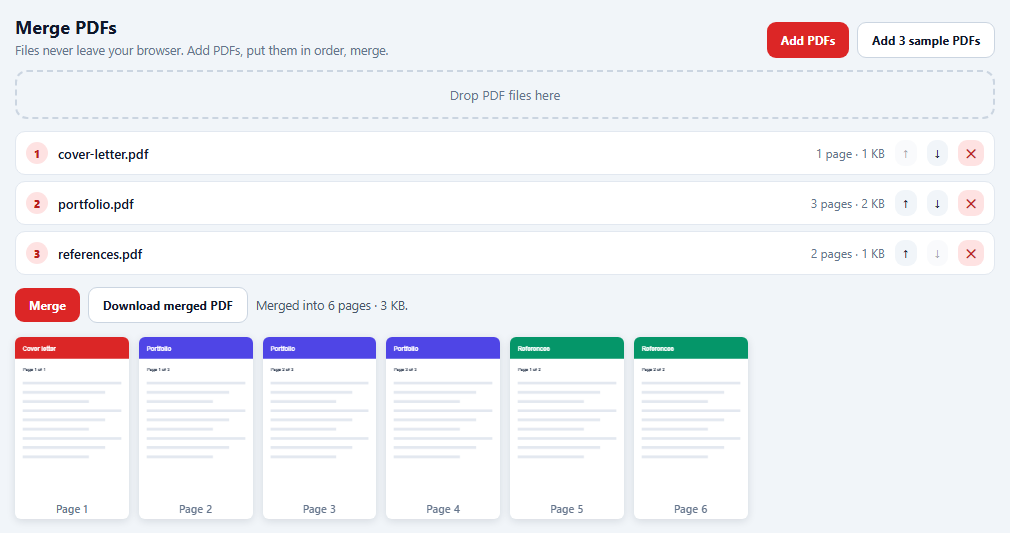
"Merge these PDFs" is one of the most common document tasks, and most online tools do it by uploading your files to a server. With pdf-lib the whole job can run in the browser: files are read locally, merged in memory, and downloaded without leaving the device. That matters for contracts, medical documents or anything else private.
Reading files
Files come from a file input or drag and drop. file.arrayBuffer() gives the raw bytes, which are loaded with PDFDocument.load. Loading up front validates the file — a corrupt or non-PDF file is reported instead of failing at merge time — and gives the page count for the list.
The merge is copyPages
A new empty document is created with PDFDocument.create(). For each source file, in the chosen order, out.copyPages(src, src.getPageIndices()) copies every page, then each is added with addPage. copyPages doesn't just copy drawing instructions: it brings along every resource a page references — fonts, images, colour spaces — which is what makes merging unrelated files work. Metadata such as the title is set on the output before save() returns the bytes.
Seeing the result
After merging, PDF.js renders a thumbnail of every page, so you can check the order before downloading. Because PDF.js detaches the buffer it's given, it receives a copy; the original bytes stay available for the download.
Sample files without network
"Add 3 sample PDFs" generates three small documents with pdf-lib itself — coloured headers and page numbers — so the demo is fully usable without your own files.
Limits
Everything is held in memory, which is fine for typical documents but not for gigabyte archives. Encrypted PDFs can't be loaded without their password. Links and form fields within pages are copied, but a document-level outline (bookmarks) isn't merged.
Build with AI
Build, Understand, Optimize, and Extend It With AI
Paste this snippet into an AI assistant like Claude and ask it to explain why copyPages is needed instead of adding pages directly. Ask it to add per-file page ranges, drag-to-reorder with SortableJS, rotating individual pages, or merging the bookmarks outline. It can also help you process very large files by streaming them one at a time to keep memory low.
Prompt to recreate it
Copy this into your AI assistant of choice to build the effect from scratch, or as a jumping-off point for your own variant:
Build a browser-only PDF merge tool with pdf-lib and a PDF.js 3 preview (both from a CDN) in plain HTML, CSS and JavaScript.

Requirements:
- Add PDFs with a multi-file input or a drag-and-drop zone; read each with file.arrayBuffer(), validate it by loading it with pdf-lib, and show its name, page count and size, or an error message if it can't be read.
- A button that generates three sample PDFs with pdf-lib (coloured header, title, "Page X of N", placeholder lines) so the tool works with no files.
- A numbered list with move up, move down and remove buttons.
- Merge: create a new document and copy all pages from each file in list order with copyPages, set the title and producer, and save.
- Render every page of the merged document as a thumbnail with PDF.js (passing a copy of the bytes), and enable a download button that saves merged.pdf via a Blob URL, noting that sandboxed previews may block downloads.
Want to tighten it up first? Run this prompt through the AI Prompt Studio to score it across 8 quality dimensions, catch anti-patterns, and tune the wording for Claude, ChatGPT, or Gemini before you paste it in.
Source Code
<div class="pm">
  <header class="pm-head">
    <div>
      <h2>Merge PDFs</h2>
      <p>Files never leave your browser. Add PDFs, put them in order, merge.</p>
    </div>
    <div class="pm-add">
      <label class="pm-file">Add PDFs<input type="file" id="pmFiles" accept="application/pdf" multiple></label>
      <button type="button" id="pmSamples" class="ghost">Add 3 sample PDFs</button>
    </div>
  </header>
  <div class="pm-drop" id="pmDrop">Drop PDF files here</div>
  <ol class="pm-list" id="pmList" aria-label="Files to merge"></ol>
  <div class="pm-bar">
    <button type="button" id="pmMerge" disabled>Merge</button>
    <button type="button" id="pmDownload" class="ghost" disabled>Download merged PDF</button>
    <span id="pmStatus" role="status"></span>
  </div>
  <div class="pm-pages" id="pmPages" aria-label="Pages of the merged PDF"></div>
</div>*{box-sizing:border-box;margin:0;padding:0}
body{font-family:system-ui,-apple-system,sans-serif;background:#f1f5f9;color:#0f172a;min-height:100vh;padding:20px}
.pm{max-width:980px;margin:0 auto}
.pm-head{display:flex;justify-content:space-between;align-items:flex-end;gap:12px;flex-wrap:wrap}
.pm h2{font-size:18px}
.pm-head p{font-size:12.5px;color:#64748b;margin-top:3px}
.pm-add{display:flex;gap:8px}
.pm button,.pm-file{border:0;border-radius:9px;padding:9px 14px;font:700 12px system-ui;background:#dc2626;color:#fff;cursor:pointer;display:inline-flex;align-items:center}
.pm .ghost{background:#fff;color:#0f172a;border:1px solid #cbd5e1}
.pm button:disabled{opacity:.4;cursor:default}
.pm-file input{position:absolute;width:1px;height:1px;opacity:0}
.pm-file:focus-within,.pm button:focus-visible{outline:2px solid #f87171;outline-offset:2px}
.pm-drop{margin-top:12px;border:2px dashed #cbd5e1;border-radius:12px;padding:14px;text-align:center;font-size:13px;color:#64748b;transition:border-color .15s,background .15s}
.pm-drop.over{border-color:#dc2626;background:#fef2f2;color:#991b1b}
.pm-list{list-style:none;margin-top:12px;display:flex;flex-direction:column;gap:6px;counter-reset:f}
.pm-item{display:flex;align-items:center;gap:10px;background:#fff;border:1px solid #e2e8f0;border-radius:10px;padding:8px 10px;counter-increment:f}
.pm-item::before{content:counter(f);width:22px;height:22px;border-radius:50%;background:#fee2e2;color:#b91c1c;font:800 11px system-ui;display:grid;place-items:center;flex:0 0 auto}
.pm-item .nm{flex:1;min-width:0;font-size:13px;font-weight:600;overflow:hidden;text-overflow:ellipsis;white-space:nowrap}
.pm-item .meta{font-size:12px;color:#64748b;white-space:nowrap}
.pm-item button{padding:5px 8px;background:#f1f5f9;color:#0f172a;font-size:12px}
.pm-item button.rm{background:#fee2e2;color:#b91c1c}
.pm-bar{display:flex;align-items:center;gap:8px;margin-top:12px;flex-wrap:wrap}
#pmStatus{font-size:12.5px;color:#475569}
.pm-pages{display:grid;grid-template-columns:repeat(auto-fill,minmax(110px,1fr));gap:10px;margin-top:14px}
.pm-page{background:#fff;border-radius:6px;box-shadow:0 2px 8px rgba(15,23,42,.12);overflow:hidden}
.pm-page canvas{width:100%;display:block}
.pm-page span{display:block;text-align:center;font:600 11px system-ui;color:#64748b;padding:3px 0}pdfjsLib.GlobalWorkerOptions.workerSrc = 'https://cdn.jsdelivr.net/npm/pdfjs-dist@3.11.174/build/pdf.worker.min.js';
var PDFDocument = PDFLib.PDFDocument, rgb = PDFLib.rgb, StandardFonts = PDFLib.StandardFonts;
var files = []; // { name, bytes: Uint8Array, pages }
var merged = null;
var listEl = document.getElementById('pmList');
var statusEl = document.getElementById('pmStatus');
async function addFile(name, bytes) {
try {
// Loading validates the file and gives us the page count up front.
var doc = await PDFDocument.load(bytes, { ignoreEncryption: false });
files.push({ name: name, bytes: bytes, pages: doc.getPageCount() });
merged = null;
render();
} catch (e) {
statusEl.textContent = name + ' could not be read (' + (e.message || 'not a valid PDF') + ').';
}
}
function render() {
listEl.innerHTML = files.map(function (f, i) {
return '<li class="pm-item"><span class="nm" title="' + f.name.replace(/"/g, '"') + '">' + f.name.replace(/</g, '<') + '</span>' +
'<span class="meta">' + f.pages + ' page' + (f.pages === 1 ? '' : 's') + ' · ' + (f.bytes.byteLength / 1024).toFixed(0) + ' KB</span>' +
'<button type="button" data-up="' + i + '" aria-label="Move ' + f.name + ' up"' + (i === 0 ? ' disabled' : '') + '>↑</button>' +
'<button type="button" data-down="' + i + '" aria-label="Move ' + f.name + ' down"' + (i === files.length - 1 ? ' disabled' : '') + '>↓</button>' +
'<button type="button" class="rm" data-rm="' + i + '" aria-label="Remove ' + f.name + '">✕</button></li>';
}).join('');
var total = files.reduce(function (s, f) { return s + f.pages; }, 0);
document.getElementById('pmMerge').disabled = files.length < 2;
document.getElementById('pmDownload').disabled = !merged;
if (!merged) statusEl.textContent = files.length ? files.length + ' files, ' + total + ' pages in total.' : 'Add at least two PDFs.';
}
listEl.addEventListener('click', function (e) {
var b = e.target.closest('button');
if (!b) return;
var i;
if ((i = b.dataset.up) !== undefined) { i = +i; var t = files[i - 1]; files[i - 1] = files[i]; files[i] = t; }
else if ((i = b.dataset.down) !== undefined) { i = +i; var u = files[i + 1]; files[i + 1] = files[i]; files[i] = u; }
else if ((i = b.dataset.rm) !== undefined) files.splice(+i, 1);
merged = null;
document.getElementById('pmPages').innerHTML = '';
render();
});
// The merge: a new empty document, then copyPages from each source in
// order. copyPages copies the page AND everything it references (fonts,
// images), which is why it works across independent files.
async function merge() {
statusEl.textContent = 'Merging…';
var out = await PDFDocument.create();
for (var i = 0; i < files.length; i++) {
var src = await PDFDocument.load(files[i].bytes);
var pages = await out.copyPages(src, src.getPageIndices());
pages.forEach(function (p) { out.addPage(p); });
}
out.setTitle('Merged document');
out.setProducer('pdf-lib in the browser');
merged = await out.save();
render();
statusEl.textContent = 'Merged into ' + out.getPageCount() + ' pages · ' + (merged.byteLength / 1024).toFixed(0) + ' KB.';
preview(merged);
}
// Render every page of the merged file as a small thumbnail with PDF.js.
async function preview(bytes) {
var box = document.getElementById('pmPages');
box.innerHTML = '';
// PDF.js detaches the buffer it receives; pass a copy so the merged bytes
// stay usable for the download button.
var pdf = await pdfjsLib.getDocument({ data: bytes.slice(0) }).promise;
for (var n = 1; n <= pdf.numPages; n++) {
var page = await pdf.getPage(n);
var vp = page.getViewport({ scale: 0.35 });
var c = document.createElement('canvas');
c.width = vp.width; c.height = vp.height;
var wrap = document.createElement('div');
wrap.className = 'pm-page';
wrap.appendChild(c);
wrap.insertAdjacentHTML('beforeend', '<span>Page ' + n + '</span>');
box.appendChild(wrap);
await page.render({ canvasContext: c.getContext('2d'), viewport: vp }).promise;
}
pdf.destroy();
}
document.getElementById('pmMerge').addEventListener('click', merge);
document.getElementById('pmDownload').addEventListener('click', function () {
var url = URL.createObjectURL(new Blob([merged], { type: 'application/pdf' }));
var a = document.createElement('a');
a.href = url; a.download = 'merged.pdf';
document.body.appendChild(a); a.click(); a.remove();
setTimeout(function () { URL.revokeObjectURL(url); }, 2000);
statusEl.textContent = 'Saving merged.pdf — sandboxed previews may block downloads; open the demo in its own tab if needed.';
});
function readFiles(list) {
Array.prototype.forEach.call(list, function (file) {
if (file.type !== 'application/pdf' && !/\.pdf$/i.test(file.name)) return;
file.arrayBuffer().then(function (buf) { addFile(file.name, new Uint8Array(buf)); });
});
}
document.getElementById('pmFiles').addEventListener('change', function (e) { readFiles(e.target.files); e.target.value = ''; });
var drop = document.getElementById('pmDrop');
['dragenter', 'dragover'].forEach(function (t) { drop.addEventListener(t, function (e) { e.preventDefault(); drop.classList.add('over'); }); });
['dragleave', 'drop'].forEach(function (t) { drop.addEventListener(t, function (e) { e.preventDefault(); drop.classList.remove('over'); }); });
drop.addEventListener('drop', function (e) { readFiles(e.dataTransfer.files); });
// Sample files are generated with pdf-lib itself, so the demo works with no
// uploads and no network requests for documents.
async function sample(title, color, pages) {
var doc = await PDFDocument.create();
var font = await doc.embedFont(StandardFonts.HelveticaBold);
for (var i = 1; i <= pages; i++) {
var p = doc.addPage([420, 595]);
p.drawRectangle({ x: 0, y: 515, width: 420, height: 80, color: color });
p.drawText(title, { x: 28, y: 545, size: 22, font: font, color: rgb(1, 1, 1) });
p.drawText('Page ' + i + ' of ' + pages, { x: 28, y: 470, size: 16, font: font, color: rgb(0.2, 0.25, 0.33) });
for (var l = 0; l < 9; l++) p.drawRectangle({ x: 28, y: 420 - l * 34, width: 364 - (l % 3) * 60, height: 10, color: rgb(0.89, 0.91, 0.94) });
}
return doc.save();
}
async function addSamples() {
await addFile('cover-letter.pdf', await sample('Cover letter', rgb(0.86, 0.15, 0.15), 1));
await addFile('portfolio.pdf', await sample('Portfolio', rgb(0.31, 0.27, 0.9), 3));
await addFile('references.pdf', await sample('References', rgb(0.02, 0.59, 0.41), 2));
}
document.getElementById('pmSamples').addEventListener('click', addSamples);
// Open with the samples already merged so the page shows a working result.
render();
addSamples().then(merge);Step by step
How to Use
- 1Add filesPick or drop PDFs, or press "Add 3 sample PDFs".
- 2Order themUse the arrow buttons; remove files with ✕.
- 3MergePages are copied into one new document in list order.
- 4Check the pagesThumbnails of every merged page appear below.
- 5DownloadSaves merged.pdf (open the demo in its own tab if the sandbox blocks it).
Real-world uses
Common Use Cases
Got questions?
Frequently Asked Questions
Create an empty document with PDFDocument.create(). For each source, load it with PDFDocument.load(bytes), copy its pages with out.copyPages(src, src.getPageIndices()), and add each copied page with out.addPage(page). Finally call out.save() to get the merged bytes.
No. Files are read with the File API and processed in memory by pdf-lib in the browser. Nothing is sent to a server.
Yes. Pass an array of page indexes to copyPages instead of getPageIndices(), for example [0, 2, 3] to copy the first, third and fourth pages.
A page belongs to its document and references objects such as fonts and images stored there. copyPages creates copies of the page and all its referenced objects in the target document.
pdf-lib cannot decrypt password-protected files. It will throw when loading them unless you pass ignoreEncryption, which only works for files that are encrypted but openable without a password, and the output may not be usable.