Learn Coding Visually
Learn to code with interactive, live-preview playgrounds — HTML, CSS, JavaScript, React & more.
 HTML Playground42 lessons · Click-based · Live preview
 CSS PlaygroundLearn CSS with a live editor
 JavaScript Playground60 lessons · DOM · Async · Canvas
 React PlaygroundLearn React with a live code editor
 GSAP PlaygroundLearn GSAP animation interactively
 SVG Playground44 lessons · shapes · paths · animation
 SCSS Playground45 lessons · Sass modules · tokens
 Tailwind PlaygroundLearn Tailwind CSS with a live editor
 Bootstrap 5 Playground50 lessons · live preview
Stagger List — Free HTML CSS JS Animation Snippet
Staggered List Animation · Animations · Plain HTML, CSS & JS · Live preview
What's included
Features
About this UI Snippet
Stagger List — setTimeout nth-item Delay, opacity+translateX Reveal
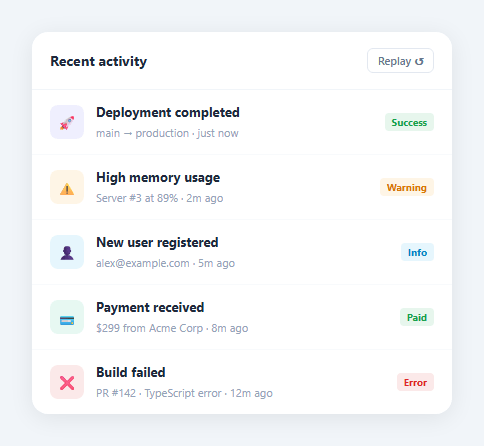
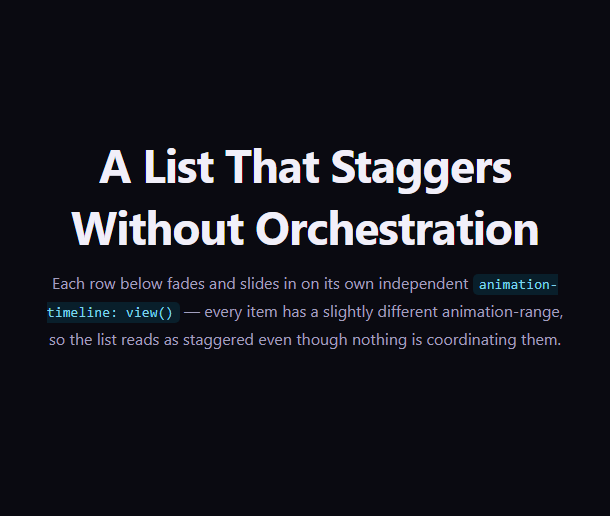
A stagger list animates list items into view one by one with increasing delays — each item slides in from the left slightly after the previous one, the same stagger used by the reveal on scroll. Used on feature lists, team member grids, and anywhere a vertical list needs more visual energy than a static display.
The replay function
replay() first removes .show from all items simultaneously. After a brief 50ms pause (allowing the CSS to apply the hidden state), it loops through each item with setTimeout((li, i) => li.classList.add('show'), i * 80). The 80ms delay multiplied by the item index creates the stagger — item 0 appears at 0ms, item 1 at 80ms, item 2 at 160ms, etc.
The CSS reveal transition
Items start at opacity: 0; transform: translateX(-16px) — invisible and shifted 16px to the left. Adding .show transitions to opacity: 1; transform: translateX(0) via transition: opacity 0.35s ease, transform 0.35s ease. The 35ms transition fills the gap between item appearances, creating a smooth flow.
Combining with IntersectionObserver
Replace the replay button with an IntersectionObserver that triggers replay() when the list scrolls into view. Items reveal sequentially on first scroll, then remain visible.
How CSS animation-delay creates the stagger
Each list item has animation-delay: calc(N * 0.07s) where N is the item index. Item 0 animates immediately, item 1 waits 70ms, item 2 waits 140ms, and so on. The keyframe itself is identical for every item — only the delay differs. This single CSS technique creates the stagger without any JavaScript, making it highly performant and easy to apply to any number of items.
The slide-in keyframe
Each item animates from opacity: 0, transform: translateX(-20px) to opacity: 1, transform: translateX(0). The translateX movement adds directionality to the reveal — items appear to slide in from the left. Change to translateY(20px) for a slide-up entrance, or scale(0.8) for a zoom-in. The 0.4s duration with ease-out timing gives a natural deceleration on landing.
Triggering on scroll
By default the animation fires on page load. To trigger when the list scrolls into view, add animation-play-state: paused to .item initially, then use IntersectionObserver to set animation-play-state: running when the list container enters the viewport. Call obs.disconnect() inside the callback so the animation only triggers once per page view.
Dynamic item count
When items are added dynamically, apply the .item class with the correct animation-delay computed from the new item index: item.style.animationDelay = (existingCount * 0.07) + 's'. The CSS animation runs once automatically when the class is first applied, so new items animate in on insertion without any additional JavaScript.
How CSS animation-delay creates the stagger
Each list item has animation-delay: calc(N * 0.07s) where N is the item index. Item 0 animates immediately, item 1 waits 70ms, item 2 waits 140ms, and so on. The keyframe itself is identical for every item — only the delay differs. This single CSS technique creates the stagger without any JavaScript, making it highly performant and easy to apply to any number of items.
The slide-in keyframe
Each item animates from opacity: 0, transform: translateX(-20px) to opacity: 1, transform: translateX(0). The translateX movement adds directionality to the reveal — items appear to slide in from the left. Change to translateY(20px) for a slide-up entrance, or scale(0.8) for a zoom-in. The 0.4s duration with ease-out timing gives a natural deceleration on landing.
Triggering on scroll
By default the animation fires on page load. To trigger when the list scrolls into view, add animation-play-state: paused to .item initially, then use IntersectionObserver to set animation-play-state: running when the list container enters the viewport. Call obs.disconnect() inside the callback so the animation only triggers once per page view.
Dynamic item count
When items are added dynamically, apply the .item class with the correct animation-delay computed from the new item index: item.style.animationDelay = (existingCount * 0.07) + 's'. The CSS animation runs once automatically when the class is first applied, so new items animate in on insertion without any additional JavaScript.
Build with AI
Build, Understand, Optimize, and Extend It With AI
You don't need to work out the two-phase reset-then-reveal timing by hand. Paste this snippet's HTML, CSS, and JS into an AI coding assistant like Claude and ask it to explain exactly why replay removes the show class from every item first and waits roughly 50ms before starting the staggered loop, rather than adding the class directly on top of an already-visible list, or how the index-multiplied setTimeout delay produces the left-to-right cascading feel from a CSS transition that is otherwise identical on every item. The same assistant can help optimize it, for example checking whether nested setTimeout calls for a very long list (hundreds of items) should be replaced with a single requestAnimationFrame-driven loop instead of scheduling that many timers. It's also useful for extending the feature: ask it to trigger replay automatically the first time the list scrolls into view using IntersectionObserver, stagger items in a grid by column and row instead of linear index, or reverse the direction so the last item reveals first. Treat the code less like a finished artifact and more like a starting point for a conversation.
Prompt to recreate it
Copy this into your AI assistant of choice to build the effect from scratch, or as a jumping-off point for your own variant:
Build a staggered list-reveal animation in plain HTML, CSS, and JavaScript, no framework, no libraries.

Requirements:
- A list of items, each starting at opacity 0 and translated horizontally off its resting position, with a CSS transition on both opacity and transform (not an animation keyframe) so that adding a single class change reveals each item smoothly.
- Write a single replay function that first removes the reveal class from every item simultaneously (resetting them all to hidden), waits a short fixed delay (an amount long enough for the browser to apply the hidden state before the reveal begins), and then adds the reveal class to each item one at a time using a per-item delay that is the item's index multiplied by a fixed millisecond constant.
- The per-item delay constant and the CSS transition duration must work together such that each item is still finishing its own transition as the next item's delay elapses, producing a smooth overlapping cascade rather than a series of disconnected pops.
- The function must use a DOM query (not a hardcoded item count) so it automatically works with any number of list items without code changes.
- Provide a button that calls the replay function so the animation can be re-triggered on demand.
- As a documented extension in a code comment, describe how to replace the manual replay button with an IntersectionObserver that calls replay once when the list scrolls into view, disconnecting itself afterward so it does not re-trigger on scrolling back past the list.
Want to tighten it up first? Run this prompt through the AI Prompt Studio to score it across 8 quality dimensions, catch anti-patterns, and tune the wording for Claude, ChatGPT, or Gemini before you paste it in.
Source Code
<div class="scene">
  <div class="card" id="card">
    <div class="card-header">
      <h3>Recent activity</h3>
      <button class="replay" onclick="replay()">Replay ↺</button>
    </div>
    <ul class="list" id="list">
      <li><div class="li-icon" style="background:rgba(99,102,241,0.1);color:#6366f1">🚀</div><div class="li-body"><strong>Deployment completed</strong><span>main → production · just now</span></div><span class="li-badge green">Success</span></li>
      <li><div class="li-icon" style="background:rgba(245,158,11,0.1);color:#f59e0b">⚠️</div><div class="li-body"><strong>High memory usage</strong><span>Server #3 at 89% · 2m ago</span></div><span class="li-badge yellow">Warning</span></li>
      <li><div class="li-icon" style="background:rgba(14,165,233,0.1);color:#0ea5e9">👤</div><div class="li-body"><strong>New user registered</strong><span>alex@example.com · 5m ago</span></div><span class="li-badge blue">Info</span></li>
      <li><div class="li-icon" style="background:rgba(16,185,129,0.1);color:#10b981">💳</div><div class="li-body"><strong>Payment received</strong><span>$299 from Acme Corp · 8m ago</span></div><span class="li-badge green">Paid</span></li>
      <li><div class="li-icon" style="background:rgba(220,38,38,0.1);color:#dc2626">❌</div><div class="li-body"><strong>Build failed</strong><span>PR #142 · TypeScript error · 12m ago</span></div><span class="li-badge red">Error</span></li>
    </ul>
  </div>
</div>
* { box-sizing: border-box; margin: 0; padding: 0; }
body { font-family: system-ui, sans-serif; background: #f1f5f9; display: flex; align-items: center; justify-content: center; min-height: 100vh; padding: 20px; }
.card { background: #fff; border-radius: 16px; overflow: hidden; width: 420px; box-shadow: 0 4px 24px rgba(0,0,0,0.08); }
.card-header { display: flex; align-items: center; justify-content: space-between; padding: 16px 18px; border-bottom: 1px solid #f1f5f9; }
.card-header h3 { font-size: 14px; font-weight: 700; color: #1e293b; }
.replay { font-size: 11px; font-weight: 600; color: #64748b; background: none; border: 1px solid #e2e8f0; border-radius: 6px; padding: 4px 10px; cursor: pointer; font-family: inherit; transition: all 0.12s; }
.replay:hover { border-color: #6366f1; color: #6366f1; }
.list { list-style: none; }
.list li {
display: flex; align-items: center; gap: 12px;
padding: 13px 18px; border-bottom: 1px solid #f8fafc;
opacity: 0; transform: translateX(-16px);
transition: opacity 0.4s ease, transform 0.4s ease;
}
.list li:last-child { border-bottom: none; }
.list li.show { opacity: 1; transform: translateX(0); }
.li-icon { width: 34px; height: 34px; border-radius: 8px; display: flex; align-items: center; justify-content: center; font-size: 14px; flex-shrink: 0; }
.li-body { flex: 1; min-width: 0; }
.li-body strong { display: block; font-size: 13px; color: #1e293b; }
.li-body span { font-size: 11px; color: #94a3b8; }
.li-badge { font-size: 10px; font-weight: 700; padding: 2px 7px; border-radius: 4px; flex-shrink: 0; }
.li-badge.green { background: rgba(22,163,74,0.1); color: #16a34a; }
.li-badge.yellow { background: rgba(245,158,11,0.1); color: #d97706; }
.li-badge.blue { background: rgba(14,165,233,0.1); color: #0284c7; }
.li-badge.red { background: rgba(220,38,38,0.1); color: #dc2626; }function replay() {
const items = document.querySelectorAll('#list li');
items.forEach(li => li.classList.remove('show'));
setTimeout(() => {
items.forEach((li, i) => setTimeout(() => li.classList.add('show'), i * 120));
}, 50);
}
replay();Step by step
How to Use
- 1Click ReplayClick the Replay button to see all items hide then reveal sequentially with 80ms stagger.
- 2Update the list itemsIn the HTML panel, change the icon, title, and description text in each <li> element.
- 3Add more itemsCopy an <li> and paste it inside the <ul>. The replay() function picks up any number of items via querySelectorAll.
- 4Change stagger timingUpdate the 80 (ms per item delay) in the JS panel.
- 5Add IntersectionObserver triggerReplace the replay button with an IntersectionObserver that triggers on scroll.
- 6Export in your formatClick "HTML" for a standalone file, "JSX" for a React component, or "Tailwind" for a React + Tailwind version.
Real-world uses
Common Use Cases
Got questions?
Frequently Asked Questions
replay() removes .show from all items simultaneously. After a 50ms pause, it loops through items with setTimeout(callback, i * 80). Item 0 shows at 50ms, item 1 at 130ms, item 2 at 210ms, etc. Each item's CSS transition (0.35s) fills the gap between shows.
Create an IntersectionObserver on the .card container: when it enters the viewport, call replay(). Call it only once with obs.unobserve(target) to prevent re-triggering on scroll back.
Change the starting translateX(-16px) to translateX(16px) in the default CSS state. The items slide in from the right and settle at 0.
Yes. Give each grid item a unique data-index attribute. In the stagger loop, use parseInt(item.dataset.index) instead of the forEach index. Items can be staggered in any order regardless of DOM order.
Yes. Click "JSX" for a React component. Use useState to track whether items are shown. Map items to elements, applying a transitionDelay style based on index. Toggle the shown state on mount or scroll.
Change the stagger loop to go from items.length - 1 to 0: for (let i = items.length-1; i >= 0; i--) { setTimeout(() => items[i].classList.add("show"), (items.length-1-i) * 80); }