Learn Coding Visually
Learn to code with interactive, live-preview playgrounds — HTML, CSS, JavaScript, React & more.
 HTML Playground42 lessons · Click-based · Live preview
 CSS PlaygroundLearn CSS with a live editor
 JavaScript Playground60 lessons · DOM · Async · Canvas
 React PlaygroundLearn React with a live code editor
 GSAP PlaygroundLearn GSAP animation interactively
 SVG Playground44 lessons · shapes · paths · animation
 SCSS Playground45 lessons · Sass modules · tokens
 Tailwind PlaygroundLearn Tailwind CSS with a live editor
 Bootstrap 5 Playground50 lessons · live preview
Native Scroll-Snap Carousel — HTML CSS JS Snippet
Native Scroll-Snap Carousel · Cards · Plain HTML, CSS & JS · Live preview
What's included
Features
About this UI Snippet
Native Scroll-Snap Carousel — The Browser Does the Sliding

Every other slide-based carousel in this library computes its own translateX and handles its own drag/momentum. This one does neither — scroll-snap-type: x mandatory on the track and scroll-snap-align: center on each slide tell the *browser's own scrolling engine* to snap to slide boundaries, which means momentum, touch, trackpad, and keyboard scrolling are all free, genuinely native behaviors, not reimplemented ones.
JavaScript only ever watches, never moves
With the sliding itself fully delegated to CSS, the JS in this snippet has exactly two jobs: let a dot click *request* a scroll (via scrollIntoView, which respects the same snap alignment automatically) and *observe* which slide the browser has actually settled on afterward, via IntersectionObserver. Neither job ever writes a transform or tracks a pointer position — there's no "carousel state" to keep in sync with the DOM at all, because the DOM's own scroll position *is* the state.
Why IntersectionObserver instead of a scroll listener
Detecting "which slide is currently active" from a raw scroll event means computing scroll offsets on every single scroll frame — exactly the kind of layout-thrashing work IntersectionObserver exists to avoid. Here, each slide is watched with a threshold: [0.6], so the observer's callback only fires when a slide crosses 60% visibility — a natural, cheap way to say "this one is now the settled slide," whether the scroll was triggered by a button, a swipe, or a trackpad.
Build with AI
Build, Understand, Optimize, and Extend It With AI
Paste this snippet's HTML, CSS, and JS into an AI coding assistant like Claude and ask it to explain why this carousel's JavaScript never sets a transform or tracks a pointer position at all, unlike every drag-based carousel elsewhere in the library — and what "the DOM's scroll position is the state" actually means in practice. It's also worth asking the assistant to add scroll-snap-stop: always for a version that forces one-slide-at-a-time snapping even on a fast flick, or to add previous/next arrow buttons that call scrollBy while still relying on native snap behavior.
Prompt to recreate it
Copy this into your AI assistant of choice to build the effect from scratch, or as a jumping-off point for your own variant:
Build a carousel in plain HTML, CSS, and vanilla JavaScript that relies entirely on native CSS scroll-snap for its sliding behavior, with JavaScript used only to synchronize a set of indicator dots — no library, no JavaScript-driven transform animation.

Requirements:
- A horizontally scrollable track using CSS overflow-x with scroll-snap-type set to mandatory on the x axis, containing several full-width slide elements each with scroll-snap-align set to center — the sliding, momentum, and touch/trackpad scrolling behavior must come entirely from native browser scrolling, with no JavaScript computing or applying any transform to move the slides.
- A row of indicator dots generated dynamically to match the number of slides present, where clicking a dot scrolls the track to that specific slide using the scrollIntoView method (which must respect the slide's scroll-snap-align setting) rather than manually calculating a scroll offset.
- An IntersectionObserver (not a scroll event listener) watching all slides, configured with a threshold appropriate for detecting when a slide has become the dominantly visible one, that updates which dot is marked active whenever the observer detects a new slide has settled into view — this must work correctly whether the scroll was triggered by clicking a dot, or by the user manually swiping, dragging the scrollbar, or scrolling with a trackpad/mouse wheel.
- The track's native scrollbar must be hidden across browsers while the track remains fully scrollable by every native input method.
Want to tighten it up first? Run this prompt through the AI Prompt Studio to score it across 8 quality dimensions, catch anti-patterns, and tune the wording for Claude, ChatGPT, or Gemini before you paste it in.
Source Code
<div class="nss-wrap">
  <div class="nss-track" id="nssTrack">
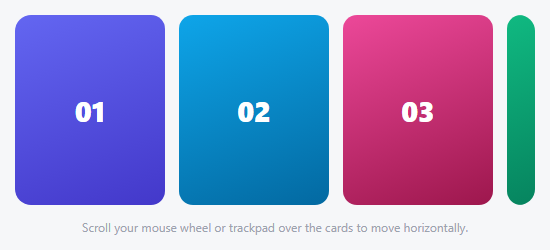
    <div class="nss-slide" style="background:linear-gradient(160deg,#6366f1,#4338ca)">1</div>
    <div class="nss-slide" style="background:linear-gradient(160deg,#0ea5e9,#0369a1)">2</div>
    <div class="nss-slide" style="background:linear-gradient(160deg,#ec4899,#9d174d)">3</div>
    <div class="nss-slide" style="background:linear-gradient(160deg,#10b981,#047857)">4</div>
    <div class="nss-slide" style="background:linear-gradient(160deg,#f59e0b,#b45309)">5</div>
  </div>
  <div class="nss-dots" id="nssDots"></div>
</div>*{box-sizing:border-box;margin:0;padding:0}
body{font-family:system-ui,-apple-system,sans-serif;background:#f6f7f9;min-height:100vh;display:flex;align-items:center;justify-content:center;padding:24px}
.nss-wrap{width:100%;max-width:420px}
.nss-track{display:flex;overflow-x:auto;scroll-snap-type:x mandatory;border-radius:16px;scrollbar-width:none}
.nss-track::-webkit-scrollbar{display:none}
.nss-slide{flex:0 0 100%;scroll-snap-align:center;height:240px;display:flex;align-items:center;justify-content:center;font-size:56px;font-weight:800;color:#fff}
.nss-dots{display:flex;justify-content:center;gap:7px;margin-top:14px}
.nss-dot{width:7px;height:7px;border-radius:50%;background:#d1d5db;border:none;cursor:pointer;transition:background .2s,width .2s}
.nss-dot.active{background:#6366f1;width:20px;border-radius:4px}var track = document.getElementById('nssTrack');
var slides = document.querySelectorAll('.nss-slide');
var dotsWrap = document.getElementById('nssDots');
slides.forEach(function (s, i) {
var d = document.createElement('button');
d.className = 'nss-dot';
d.setAttribute('aria-label', 'Go to slide ' + (i + 1));
d.addEventListener('click', function () {
// scrollIntoView respects scroll-snap-align, so this both scrolls AND
// lands exactly on the native snap point — no manual offset math needed.
slides[i].scrollIntoView({ behavior: 'smooth', inline: 'center', block: 'nearest' });
});
dotsWrap.appendChild(d);
});
var dots = document.querySelectorAll('.nss-dot');
// IntersectionObserver watches which slide the native scroll has actually
// settled on, so the dots reflect real scroll position — including from a
// user's own trackpad/touch scroll, not just our own button clicks.
var observer = new IntersectionObserver(function (entries) {
entries.forEach(function (entry) {
if (entry.isIntersecting && entry.intersectionRatio > 0.6) {
var index = Array.prototype.indexOf.call(slides, entry.target);
dots.forEach(function (d, i) { d.classList.toggle('active', i === index); });
}
});
}, { root: track, threshold: [0.6] });
slides.forEach(function (s) { observer.observe(s); });Step by step
How to Use
- 1Paste HTML, CSS, and JSFive full-width slides appear, with the first dot highlighted.
- 2Swipe or scroll the trackNative momentum scrolling moves between slides, snapping cleanly to each one — no JS drag logic involved.
- 3Click a dotThe browser smoothly scrolls to that slide via scrollIntoView, which honors the same snap alignment.
- 4Scroll with a trackpad or mouse wheelWorks identically, since it's genuinely native scrolling, not a simulated gesture.
- 5Add a sixth slideAdd one .nss-slide div — a matching dot is generated automatically and observed for snap detection.
Real-world uses
Common Use Cases
Got questions?
Frequently Asked Questions
For a plain "one slide at a time, swipeable" carousel, native scroll-snap gives momentum, touch, and keyboard scrolling for free from the browser — a JS-driven carousel has to reimplement all three by hand for equivalent behavior, which is only worth it when you need effects scroll-snap can't express (3D, elastic, magnetic, etc).
Change .nss-slide's flex-basis from 100% to a fraction like 50% or 33.33% — scroll-snap-align still works per-slide, so partial-width slides snap just as cleanly.
Yes — give each arrow a click handler that calls track.scrollBy({ left: track.clientWidth, behavior: "smooth" }) (or negative for previous); the snap points still apply since it's still native scrolling.
scrollIntoView already knows to align to the slide's scroll-snap-align setting and animates via the browser's own smooth-scroll implementation — hand-calculating an offset would just be reproducing logic the browser already provides correctly.
Yes — because scrolling is native, the track is keyboard-scrollable by default (Tab into it, then arrow keys or Page Up/Down), and dots are real labeled buttons offering an additional, more discoverable navigation path.