You Might Also Like
Learn Coding Visually
Learn to code with interactive, live-preview playgrounds — HTML, CSS, JavaScript, React & more.
 HTML Playground42 lessons · Click-based · Live preview
 CSS PlaygroundLearn CSS with a live editor
 JavaScript Playground60 lessons · DOM · Async · Canvas
 React PlaygroundLearn React with a live code editor
 GSAP PlaygroundLearn GSAP animation interactively
 SVG Playground44 lessons · shapes · paths · animation
 SCSS Playground45 lessons · Sass modules · tokens
 Tailwind PlaygroundLearn Tailwind CSS with a live editor
 Bootstrap 5 Playground50 lessons · live preview
Nested JSON to Table Mapper — Recursive Flatten to Dot-Notation Columns (JS)
Nested JSON to Table Mapper · Tables · Plain HTML, CSS & JS · Live preview
What's included
Features
About this UI Snippet
Nested JSON to Table Mapper — Real Recursive Flattening to Dot-Notation Columns
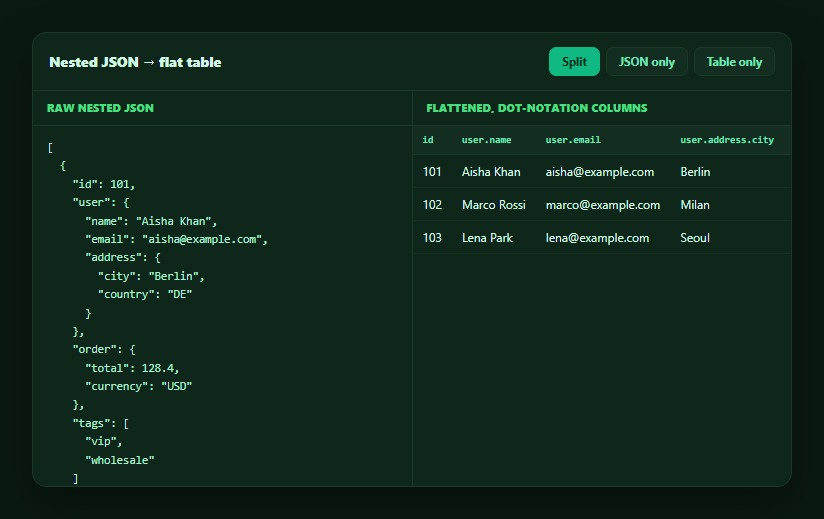
APIs almost never return flat data — a "user" object nests an "address," an order nests line items, and a table needs flat columns. This snippet builds a real recursive flattening function that walks arbitrarily nested JSON and produces dot-notation columns like user.address.city, then renders both the raw source and the flattened result — in plain HTML, CSS, and vanilla JavaScript, no library.
Real recursion, not a fixed number of levels
flatten(obj, prefix, out) calls itself whenever it encounters a nested plain object, appending the current key to a dot-joined prefix and recursing into the child object with that longer prefix. Because it's genuine recursion rather than two or three hardcoded obj.a.b accesses, it flattens objects nested to *any* depth — user.address.city works the same way user.address.geo.lat would if that level existed, with zero extra code.
Handling arrays two different ways
Arrays need their own rule, since "flatten an array" is ambiguous. This implementation checks whether every array element is a primitive: if so (like tags: ['vip', 'wholesale']), it joins them into one readable comma-separated cell rather than exploding them into columns. If the array holds objects, each element is recursively flattened under an indexed path (items.0.sku, items.1.sku), reusing the exact same flatten() call rather than a separate code path — so nested arrays-of-objects flatten correctly too.
A stable column set across heterogeneous rows
Because different records can have different nested shapes (one order has tags, another has none), flattenAll() collects the *union* of every flattened key across all rows into one ordered columns array, and any row missing a given column renders a dash. This is the detail that makes the table usable for real-world JSON, where not every record populates every optional nested field.
Raw JSON and flattened table, side by side
A tab control toggles between a split view (JSON on the left, the flattened table on the right), JSON-only, and table-only — so you can trace exactly which nested value produced which dot-notation column and cell. This traceability is what makes the tool useful for debugging an API response, not just for display.
A generic utility, not display-only
flatten() and flattenAll() are plain functions that return data (a { columns, rows } shape) — they don't touch the DOM. That means the same flattening logic works for CSV export (feed columns/rows into the escaping logic from a CSV export table) or for building a searchable data table on top of arbitrary nested JSON, not just this demo's read-only view.
Build with AI
Build, Understand, Optimize, and Extend It With AI
Rather than hand-flattening a nested API response, paste this snippet's HTML, CSS, and JS into an AI coding assistant like Claude and ask it to explain exactly how flatten() decides between recursing into a nested object versus joining a primitive array into one cell versus recursively flattening an array of objects with indexed paths, and why flattenAll() computes the union of keys across all rows instead of just using the first row's keys. The same assistant can help extend it — ask it to add a configurable maximum flattening depth (stopping and showing raw JSON past that depth), let the user click a column header to jump back to that value's location in the raw JSON pane, or feed the flattened { columns, rows } output straight into a CSV download. Treat the code less like a finished artifact and more like a starting point for a conversation.
Prompt to recreate it
Copy this into your AI assistant of choice to build the effect from scratch, or as a jumping-off point for your own variant:
Build a tool that recursively flattens an array of nested JSON objects into a flat table with dot-notation column headers, in plain HTML, CSS, and JavaScript — no library.

Requirements:
- Implement a genuinely recursive flatten(obj, prefix, out) function: for each key in the object, if its value is a plain nested object, recurse into it with the key appended to a dot-joined prefix (e.g. "user" then "user.address" then "user.address.city"); this must work for arbitrary nesting depth, not just two or three hardcoded levels — test it against at least three levels of nesting.
- Handle arrays with two distinct rules inside the same function: if every element of an array is a primitive value, join them into one readable string for a single flattened cell (do not explode primitive arrays into separate indexed columns); if the array contains objects, flatten each element recursively under an indexed dot-notation path (e.g. "items.0.sku", "items.1.sku") using the same recursive flatten call.
- Implement a flattenAll(records) function that flattens every record in an input array and computes the full ordered union of column keys across ALL flattened rows (not just the first row's keys), so records with different optional nested fields still produce one consistent table where a row missing a given field shows an empty/dash placeholder in that column rather than misaligning columns.
- Render the original nested JSON with JSON.stringify(data, null, 2) in a preformatted block, and render the flattened result as a real HTML table with one column per entry in the computed column union and dot-notation column headers.
- Add a way to toggle between viewing the raw JSON only, the flattened table only, and both side by side, so a user can trace a specific nested value (e.g. a deeply nested city field) to its corresponding flat column and back.
- Keep the flatten/flattenAll functions pure (no DOM manipulation inside them) so they return plain data structures that could be reused elsewhere, such as feeding a CSV export.
Want to tighten it up first? Run this prompt through the AI Prompt Studio to score it across 8 quality dimensions, catch anti-patterns, and tune the wording for Claude, ChatGPT, or Gemini before you paste it in.
Step by step
How to Use
- 1Paste HTML, CSS, and JSSample nested JSON renders on the left; its flattened dot-notation table renders on the right.
- 2Compare a valueFind "Berlin" in the JSON under user.address.city, then find the user.address.city column in the table.
- 3Switch viewsUse the Split / JSON only / Table only tabs to focus on either side.
- 4Note the missing-value dashThe third record has no tags — its tags column renders a dash rather than breaking the row.
- 5Swap in your own JSONReplace the DATA array with your API response; flatten() handles any nesting depth automatically.
- 6Reuse the flattening logicFeed flattenAll()'s { columns, rows } output into a CSV export or a sortable table.
Real-world uses
Common Use Cases
Got questions?
Frequently Asked Questions
Yes. flatten() recurses on itself whenever it meets a nested plain object, extending the dot-joined path each call. There's no hardcoded limit like obj.a.b — a value nested five levels deep (e.g. user.address.geo.coords.lat) flattens correctly with the exact same code path as a two-level nesting.
Two ways, decided per-array. An array where every element is a primitive (numbers, strings) is joined into a single readable comma-separated cell — exploding "tags: [vip, wholesale]" into two columns would be noisy and inconsistent across rows. An array of objects is instead flattened element-by-element into indexed dot-notation paths (e.g. items.0.sku, items.1.sku) using the same recursive flatten() call.
flattenAll() computes the union of every flattened key across all input records for the column list, so a record missing an optional nested field simply renders a dash in that column rather than shifting or breaking the table's column alignment. This makes it robust against real-world JSON where optional fields aren't present on every record.
Yes — flatten() and flattenAll() are pure functions that take and return plain JavaScript data (an object, or a { columns, rows } shape) with no DOM access. You can feed that output into the CSV-escaping logic from a CSV export table, into a sortable/filterable table's row data, or into any other consumer that wants flat records.
Call flattenAll(yourNestedArray) once (in a useMemo/computed) to get { columns, rows }, then render a <thead> from columns and a <tbody> row per entry in rows exactly as in this snippet — the recursive flattening function itself needs no changes since it's framework-agnostic plain JavaScript.