You Might Also Like
Learn Coding Visually
Learn to code with interactive, live-preview playgrounds — HTML, CSS, JavaScript, React & more.
 HTML Playground42 lessons · Click-based · Live preview
 CSS PlaygroundLearn CSS with a live editor
 JavaScript Playground60 lessons · DOM · Async · Canvas
 React PlaygroundLearn React with a live code editor
 GSAP PlaygroundLearn GSAP animation interactively
 SVG Playground44 lessons · shapes · paths · animation
 SCSS Playground45 lessons · Sass modules · tokens
 Tailwind PlaygroundLearn Tailwind CSS with a live editor
 Bootstrap 5 Playground50 lessons · live preview
Table Row Context Menu — Real Right-Click contextmenu Handling (JS)
Table Row Right-Click Context Menu · Tables · Plain HTML, CSS & JS · Live preview
What's included
Features
About this UI Snippet
Table Row Context Menu — Right-Click a Row for a Real Custom Menu
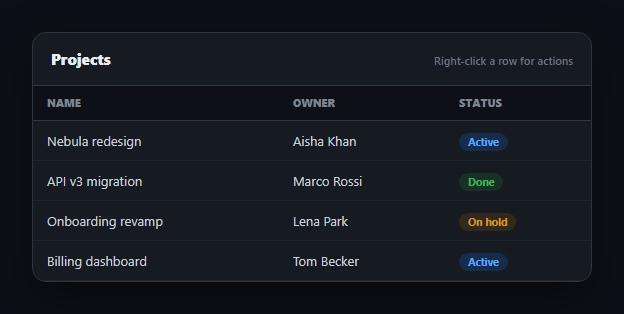
Desktop apps use right-click context menus constantly; most web tables ignore the gesture entirely and let the browser's generic menu appear instead. This snippet intercepts it properly: right-clicking a table row suppresses the native browser menu and opens a real custom one, positioned at the cursor, with Edit, Duplicate, and Delete actions that genuinely mutate the row data and re-render — all in plain HTML, CSS, and vanilla JavaScript.
Intercepting the real contextmenu event
The table body listens for the native contextmenu event and calls e.preventDefault() the moment it fires on a row — this is the one line that actually suppresses the browser's own right-click menu; without it, both menus would fight for the same click. Because it's the genuine contextmenu event (not a click-and-hold hack or a visible "⋮" button), the interaction feels native: right-click anywhere on the row, not just a specific icon, opens the menu.
Positioned at the cursor, clamped to the viewport
openMenu() reads e.clientX/e.clientY and sets the menu's position: fixed coordinates directly to the click point, so it opens exactly where the user right-clicked — then clamps both axes against window.innerWidth/innerHeight so a right-click near the edge of the screen never renders the menu partially off-screen, which is what a naive "always position at cursor" implementation gets wrong.
Real mutations, not decorative buttons
Each menu action operates on the actual ROWS array: Edit prompts for a new name and writes it back to the matching record by id; Duplicate splices a cloned row (with a fresh id) directly after the original; Delete splices the row out entirely. Every action is followed by render(), which rebuilds the table body from the mutated array — so the table you see after clicking Delete has genuinely lost that row from the underlying data, not just visually hidden it.
Closes the way users expect
The menu closes on an outside click, on Escape, on right-clicking elsewhere (so a new right-click doesn't stack a second menu on top), and on scroll (since a fixed-position menu would otherwise drift away from the row it belongs to). This set of dismissal paths is what separates a context menu that feels reliable from one that leaves stray panels floating on screen.
Visual feedback on the target row
The row under the cursor gets an rcm-active highlight while its menu is open, so it's unambiguous which row Edit/Duplicate/Delete will affect — important once a menu is positioned near the cursor rather than anchored to the row itself. Pair this with a selectable table for multi-row bulk actions, or a row detail panel for a left-click drill-down alongside this right-click menu.
Build with AI
Build, Understand, Optimize, and Extend It With AI
Rather than debugging why a homemade right-click menu doesn't suppress the browser's own menu, paste this snippet's HTML, CSS, and JS into an AI coding assistant like Claude and ask it to explain exactly why e.preventDefault() must run inside the contextmenu event handler itself (not some other event) to stop the native menu, and how openMenu() clamps its position against window.innerWidth/innerHeight so the menu never renders off-screen near a viewport edge. The same assistant can help extend it — ask it to add keyboard navigation between menu items with arrow keys and Enter to activate, support a different set of actions depending on the row's status field, or add a confirmation step before Delete fires. Treat the code less like a finished artifact and more like a starting point for a conversation.
Prompt to recreate it
Copy this into your AI assistant of choice to build the effect from scratch, or as a jumping-off point for your own variant:
Build a table where right-clicking a row opens a real custom context menu, in plain HTML, CSS, and JavaScript — no libraries.

Requirements:
- Attach a listener for the genuine native contextmenu event on the table body (not a click-and-hold simulation or a visible button), and call e.preventDefault() inside that handler as soon as a row is identified as the target, so the browser's own right-click menu is genuinely suppressed rather than appearing alongside your custom one.
- On a valid right-click, show a custom menu element positioned with fixed positioning at the exact cursor coordinates (clientX/clientY) from the event — then clamp the computed left/top values against the viewport's width and height (accounting for the menu's own measured dimensions) so the menu never renders partially or fully off-screen when right-clicking near an edge or corner.
- The menu must offer at least three actions — Edit, Duplicate, Delete — and each action must operate on a real underlying JavaScript array of row objects (found by matching the target row's id), not just update the DOM directly: Edit should update a field's value in that array element, Duplicate should insert a cloned object (with a new unique id) into the array, and Delete should remove the object from the array. After any action, re-render the entire table body from the mutated array so the visible table reflects a genuine data change.
- Visually highlight the specific row that the currently-open menu targets, so it's unambiguous which row an action will affect.
- Close the menu on: a click anywhere outside the menu element, pressing the Escape key, and right-clicking on a different row or empty space (without letting two context menus stack on top of each other).
Want to tighten it up first? Run this prompt through the AI Prompt Studio to score it across 8 quality dimensions, catch anti-patterns, and tune the wording for Claude, ChatGPT, or Gemini before you paste it in.
Step by step
How to Use
- 1Paste HTML, CSS, and JSA projects table renders; the custom menu markup starts hidden.
- 2Right-click a rowThe browser's native menu is suppressed; a custom menu opens at your cursor.
- 3Choose EditA prompt lets you rename the row; the table re-renders with the change.
- 4Choose DuplicateA cloned row is inserted directly below the original.
- 5Choose DeleteThe row is removed from the underlying data and the table.
- 6Dismiss the menuClick outside, press Escape, right-click elsewhere, or scroll — all close it.
Real-world uses
Common Use Cases
Got questions?
Frequently Asked Questions
Yes. The table body listens for the real contextmenu event and calls e.preventDefault() as soon as it fires on a row, which is the standard, correct way to stop the browser's own menu from appearing. Without that call, both the native menu and the custom one would try to show simultaneously.
Yes. Each action operates on the real in-memory ROWS array by finding the row's index by id — Edit overwrites its name field, Duplicate splices in a cloned object with a new id, and Delete splices the row out entirely. render() is called afterward to rebuild the table from the mutated array, so the visible change reflects an actual data change, not a CSS hide.
openMenu() clamps the computed left/top position against window.innerWidth and window.innerHeight minus the menu's own measured width and height, so a right-click near the right or bottom edge of the viewport still renders the full menu on-screen instead of clipping off the edge.
Four things: clicking anywhere outside the menu, pressing Escape, right-clicking on a different part of the page (which closes any open menu before deciding whether to open a new one), and scrolling the page (since a fixed-position menu would otherwise drift away from the row it targets).
Keep the menu's open state, position, and target row id in component state; attach an onContextMenu (React) or @contextmenu.prevent (Vue) handler to each row that calls preventDefault and sets that state. The clamping math and the mutate-then-re-render pattern are framework-agnostic — only the state management moves into the framework.