You Might Also Like
Learn Coding Visually
Learn to code with interactive, live-preview playgrounds — HTML, CSS, JavaScript, React & more.
 HTML Playground42 lessons · Click-based · Live preview
 CSS PlaygroundLearn CSS with a live editor
 JavaScript Playground60 lessons · DOM · Async · Canvas
 React PlaygroundLearn React with a live code editor
 GSAP PlaygroundLearn GSAP animation interactively
 SVG Playground44 lessons · shapes · paths · animation
 SCSS Playground45 lessons · Sass modules · tokens
 Tailwind PlaygroundLearn Tailwind CSS with a live editor
 Bootstrap 5 Playground50 lessons · live preview
Table Loading / Empty / Error States — Skeleton, Empty & Retry (HTML CSS JS)
Table Loading / Empty / Error States · Tables · Plain HTML, CSS & JS · Live preview
What's included
Features
About this UI Snippet
Table Loading, Empty & Error States — The Three Paths Every Table Needs
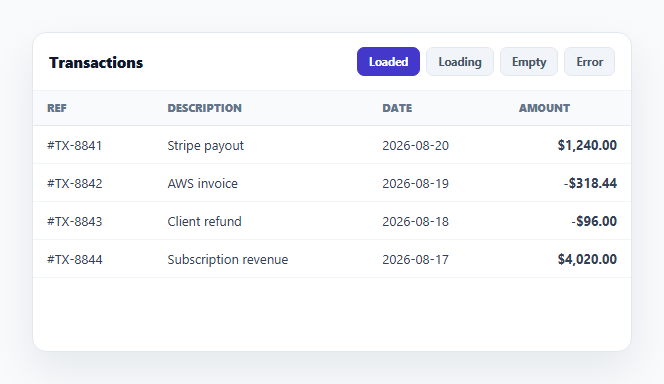
Most table demos only show the happy path — data loaded, rendered, done. Real tables spend meaningful time in three other states: waiting on a request, receiving zero rows back, or failing outright. This snippet builds a single table component that cycles through all four states — loaded, loading, empty, and error — with controls to trigger each, in plain HTML, CSS, and vanilla JavaScript.
A skeleton, not a spinner
The loading state renders five .tls-skel-row placeholder rows, each with differently-sized shimmering bars that echo the loaded table's actual column proportions (a wide description bar, a narrower date bar). A CSS background-position animation on a gradient produces the shimmer. Skeleton placeholders are chosen deliberately over a spinner because they preserve the table's layout while data is in flight — the page doesn't jump when real rows arrive, and the user gets a sense of the shape of what's coming.
A genuine empty state, not a blank table
The empty state isn't "the table with zero rows" (which just looks broken) — it's a dedicated view with an icon, a clear headline, explanatory copy, and a *recovery action*: "Clear filters." That action is real — clicking it calls go('loaded'), actually swapping the view back to data. A well-designed empty state always answers "why is this empty, and what can I do about it," not just "there's nothing here."
A real error state with retry
The error state similarly pairs an icon and message with a functional "Retry" button. Clicking it doesn't just re-show the same error — it transitions to the loading state and, after a simulated delay, resolves into the loaded state, mimicking a real retried network request. This models the actual UX contract of an error state: it must offer a path forward, and that path must be wired to something, not just cosmetic.
One container, one state machine
All four views render into the same #tlsBody container via a single go(state) function, so there's never a case where two states are visible simultaneously or a stale view lingers. The demo controls exist to let you preview every state on demand, but in a real app the same four render*() functions would be called by your actual fetch lifecycle: renderLoading() before the request, then renderLoaded()/renderEmpty()/renderError() depending on the response.
Reusable state-rendering functions
Because renderLoaded, renderLoading, renderEmpty, and renderError are independent functions with no shared mutable UI state beyond the container, you can lift any one of them into a real data-fetching flow directly — swap the demo buttons for actual fetch().then()/.catch() branches. Pair this pattern with a skeleton table if you only need the loading state in isolation, or an empty state component for a full-page (non-table) version of the same idea.
Build with AI
Build, Understand, Optimize, and Extend It With AI
Instead of guessing which loading/empty/error UI pattern to use, paste this snippet's HTML, CSS, and JS into an AI coding assistant like Claude and ask it to explain exactly why the skeleton rows are sized to different percentage widths that mirror the loaded table's real columns instead of using uniform-width bars, and why the empty and error states each include a working recovery action rather than just static messaging. The same assistant is useful for wiring this into a real app — ask it to replace the demo state buttons with actual fetch()/.then()/.catch() calls against your API, add a distinct "slow network" state for requests that are taking unusually long, or add a subtle fade transition between states instead of an instant swap. Treat the code less like a finished artifact and more like a starting point for a conversation.
Prompt to recreate it
Copy this into your AI assistant of choice to build the effect from scratch, or as a jumping-off point for your own variant:
Build a single table component that can render four distinct states — loaded, loading, empty, and error — in plain HTML, CSS, and JavaScript, with buttons to preview each state on demand.

Requirements:
- A loaded state: a real data table rendered from an in-memory array of row records.
- A loading state: at least 4-5 skeleton placeholder rows, each containing multiple shimmering bar elements sized with different percentage widths that echo the loaded table's actual column proportions (not uniform-width bars) — implement the shimmer with a pure CSS keyframe animation on a gradient background-position, no JavaScript animation loop.
- A genuine empty state: not just the table rendered with zero rows, but a distinct view containing an icon, a clear headline, brief explanatory text, and a real, working recovery action button (e.g. "Clear filters") that actually transitions the view back to the loaded state when clicked — it must not be a decorative button that does nothing.
- A genuine error state: a distinct view with an icon, an error headline, brief explanatory text, and a working "Retry" button that, when clicked, transitions to the loading state and then — after a short simulated delay standing in for a real network request — resolves into the loaded state, modeling what a real retried fetch call would do.
- All four states must render into the same single container element via one function that guarantees exactly one state is visible at a time (never two states overlapping, never a stale view left behind from the previous state).
- Add four buttons (or equivalent controls) outside the table that let a developer trigger any of the four states on demand for previewing/testing purposes, with the currently active state visually indicated on its button.
Want to tighten it up first? Run this prompt through the AI Prompt Studio to score it across 8 quality dimensions, catch anti-patterns, and tune the wording for Claude, ChatGPT, or Gemini before you paste it in.
Step by step
How to Use
- 1Paste HTML, CSS, and JSThe table renders in its loaded state with four state buttons above it.
- 2Click LoadingShimmering skeleton placeholder rows replace the table, matching its column widths.
- 3Click EmptyA dedicated empty state appears with an icon, message, and a working Clear filters action.
- 4Click ErrorAn error state appears with a Retry button.
- 5Click RetryIt transitions to loading, then resolves back into the loaded table after a short delay.
- 6Wire it to a real fetchCall renderLoading() before a request and renderLoaded/Empty/Error() based on the real response.
Real-world uses
Common Use Cases
Got questions?
Frequently Asked Questions
A skeleton preserves the table's layout — column widths and row height — while data is in flight, so the page doesn't visibly jump when real rows replace it. A spinner gives no sense of what's coming and often causes a layout shift the moment data arrives. The skeleton bars here are deliberately sized to echo the loaded table's actual columns.
It's a dedicated view — an icon, a clear headline ("No transactions found"), explanatory copy, and a real recovery action (Clear filters) that's wired to actually reset the view back to loaded data. A blank table with a header row and no rows looks like a bug; a proper empty state tells the user why and gives them something to do about it.
Yes — it calls go('loading') to show the skeleton, then after a simulated delay calls go('loaded') to resolve into real data, mimicking what a retried fetch() call would do: show a loading indicator while the new request is in flight, then render whatever it resolves to. In a real app you'd replace the setTimeout with the actual retried request's .then()/.catch().
Call renderLoading() immediately before your fetch() call. In the .then() handler, call renderLoaded() if the response has rows or renderEmpty() if it returns zero rows; in the .catch() handler (or on a non-OK response), call renderError(). The four render functions are already independent and side-effect-free beyond touching the shared container, so they drop into a real fetch lifecycle unchanged.
Model the four states as one status value in state (e.g. 'loading' | 'loaded' | 'empty' | 'error') set by your data-fetching effect, and render a different component/branch for each — the skeleton row markup, empty-state markup, and error-state markup all port directly as JSX/template fragments keyed off that status.