Source Code
<div class="ist-wrap">
  <div class="ist-bar"><h3>Transactions</h3><span class="ist-count" id="istCount"></span></div>
  <div class="ist-scroll" id="istScroll">
    <table class="ist-table">
      <thead><tr><th>ID</th><th>Customer</th><th>Date</th><th class="ist-num">Amount</th></tr></thead>
      <tbody id="istBody"></tbody>
    </table>
    <div class="ist-sentinel" id="istSentinel"><span class="ist-spin"></span>Loading more…</div>
    <div class="ist-end" id="istEnd" hidden>You have reached the end.</div>
  </div>
</div>*{box-sizing:border-box;margin:0;padding:0}
body{font-family:system-ui,-apple-system,sans-serif;background:#f1f5f9;min-height:100vh;display:flex;align-items:center;justify-content:center;padding:24px}
.ist-wrap{background:#fff;border-radius:14px;width:100%;max-width:560px;box-shadow:0 18px 44px rgba(15,23,42,.08);overflow:hidden}
.ist-bar{display:flex;align-items:center;justify-content:space-between;padding:15px 18px;border-bottom:1px solid #f1f5f9}
.ist-bar h3{font-size:15px;font-weight:800;color:#0f172a}
.ist-count{font-size:12px;font-weight:700;color:#94a3b8}
.ist-scroll{max-height:360px;overflow-y:auto;position:relative}
.ist-table{width:100%;border-collapse:collapse;font-size:13px}
.ist-table thead th{position:sticky;top:0;background:#f8fafc;text-align:left;padding:10px 16px;font-size:11px;font-weight:800;text-transform:uppercase;letter-spacing:.03em;color:#64748b;border-bottom:1px solid #e2e8f0;z-index:1}
.ist-num{text-align:right}
.ist-table td{padding:11px 16px;border-bottom:1px solid #f1f5f9;color:#334155}
.ist-table td:last-child{text-align:right;font-weight:700;font-variant-numeric:tabular-nums}
.ist-table tbody tr{animation:istIn .3s ease}
@keyframes istIn{from{opacity:0;transform:translateY(4px)}to{opacity:1;transform:none}}
.ist-sentinel{display:flex;align-items:center;justify-content:center;gap:9px;padding:16px;font-size:12.5px;font-weight:600;color:#94a3b8}
.ist-sentinel.ist-done{display:none}
.ist-spin{width:15px;height:15px;border:2px solid #e2e8f0;border-top-color:#6366f1;border-radius:50%;animation:istSpin .7s linear infinite}
@keyframes istSpin{to{transform:rotate(360deg)}}
.ist-end{padding:16px;text-align:center;font-size:12.5px;color:#cbd5e1;font-weight:600}
.ist-end[hidden]{display:none}var TOTAL = 200, PAGE = 20;
var loaded = 0, loading = false;
var body = document.getElementById('istBody');
var sentinel = document.getElementById('istSentinel');
var scroll = document.getElementById('istScroll');
var NAMES = ['Aisha Khan','Marco Rossi','Lena Park','Tom Becker','Priya Nair','Sara Lind','Diego Sosa','Yuki Tanaka'];
// Simulate fetching a page from a server. Replace with a real fetch(offset,limit).
function fetchPage(offset, limit) {
return new Promise(function (resolve) {
setTimeout(function () {
var rows = [];
for (var i = offset; i < Math.min(offset + limit, TOTAL); i++) {
rows.push({ id: 1000 + i, name: NAMES[i % NAMES.length], date: '2026-06-' + String((i % 28) + 1).padStart(2, '0'), amount: (Math.round((30 + (i * 37) % 500) * 100) / 100) });
}
resolve(rows);
}, 600);
});
}
function appendRows(rows) {
body.insertAdjacentHTML('beforeend', rows.map(function (r) {
return '<tr><td>#' + r.id + '</td><td>' + r.name + '</td><td>' + r.date + '</td><td>$' + r.amount.toFixed(2) + '</td></tr>';
}).join(''));
loaded += rows.length;
document.getElementById('istCount').textContent = loaded + ' of ' + TOTAL;
}
function loadMore() {
if (loading || loaded >= TOTAL) return;
loading = true;
fetchPage(loaded, PAGE).then(function (rows) {
appendRows(rows);
loading = false;
if (loaded >= TOTAL) {
sentinel.classList.add('ist-done');
document.getElementById('istEnd').hidden = false;
observer.disconnect();
}
});
}
// Load the next page whenever the sentinel scrolls into the viewport.
var observer = new IntersectionObserver(function (entries) {
if (entries[0].isIntersecting) loadMore();
}, { root: scroll, rootMargin: '120px' });
observer.observe(sentinel);Learn Coding Visually
Learn to code with interactive, live-preview playgrounds — HTML, CSS, JavaScript, React & more.
 HTML Playground42 lessons · Click-based · Live preview
 CSS PlaygroundLearn CSS with a live editor
 JavaScript Playground60 lessons · DOM · Async · Canvas
 React PlaygroundLearn React with a live code editor
 GSAP PlaygroundLearn GSAP animation interactively
 SVG Playground44 lessons · shapes · paths · animation
 SCSS Playground45 lessons · Sass modules · tokens
 Tailwind PlaygroundLearn Tailwind CSS with a live editor
 Bootstrap 5 Playground50 lessons · live preview
Infinite Scroll Table — Lazy-Load Rows HTML CSS JS
Infinite Scroll Table · Tables · Plain HTML, CSS & JS · Live preview
What's included
Features
About this UI Snippet
Infinite Scroll Table — Lazy-Load Pages of Rows with a Sentinel Observer
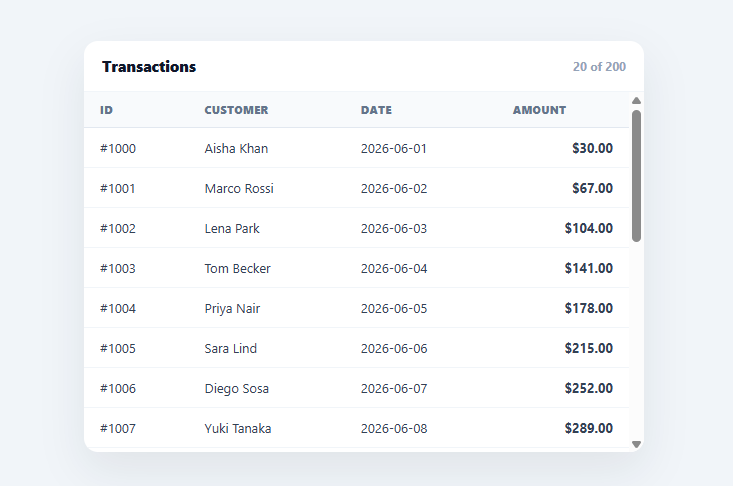
An infinite-scroll table loads rows in pages as the user scrolls toward the bottom, instead of fetching thousands at once — the right pattern for long transaction logs, feeds, and search results where loading everything upfront is slow and wasteful. This snippet builds it in plain HTML, CSS, and vanilla JavaScript with an IntersectionObserver sentinel, a sticky header, a loading spinner, and a proper end state — no library.
A sentinel, not a scroll listener
The next page loads when a sentinel element at the bottom of the list scrolls into view. An IntersectionObserver watches that sentinel (scoped to the scroll container via root, with a rootMargin so loading starts a bit before the user hits the very end). This is the modern replacement for listening to scroll and computing scrollTop + clientHeight >= scrollHeight on every frame — the observer fires only when the sentinel actually appears, off the main thread, so it's both simpler and far more efficient.
Guarded, paged loading
loadMore is guarded by a loading flag and a "have we loaded everything?" check, so overlapping triggers (fast scrolling, the observer firing repeatedly) can't fire duplicate fetches or load past the end. Each call fetches the next PAGE rows from the current offset and appends them. This offset/limit paging is exactly the contract a real backend exposes, so swapping the simulated fetchPage for a real fetch('/api/rows?offset=…&limit=…') is a one-line change.
Appending, not re-rendering
New rows are appended with insertAdjacentHTML('beforeend', …) rather than rebuilding the whole table, so already-rendered rows (and the user's scroll position) are untouched as the list grows. A subtle fade-in animation on new rows signals that more arrived. This append-only approach is what keeps infinite scroll smooth as the dataset reaches hundreds of rows.
Loading and end states
While a page is in flight, a spinner sentinel reads "Loading more…"; when the last page arrives, the sentinel is hidden, an explicit "You have reached the end" message shows, and the observer is disconnected so it stops watching. Telling the user they've reached the end (and stopping the machinery) is the finishing touch that a bare infinite scroll often forgets, leaving a spinner that never resolves.
A sticky header and a count
The header stays pinned with position: sticky as rows scroll beneath it, and a "loaded of total" count gives a sense of progress. The whole thing is a drop-in, dependency-free reference for the sentinel-observer infinite-scroll pattern, applicable to tables, feeds, or any long list. One trade-off worth knowing: because every loaded row stays in the DOM forever, a list that grows into the thousands will eventually slow down scrolling and memory use — past a few hundred rows it's worth combining this sentinel-loading pattern with row virtualization (rendering only the rows currently in or near the viewport) rather than relying on lazy-loading alone.
Build with AI
Build, Understand, Optimize, and Extend It With AI
You do not need to trace the loading guards and observer wiring line by line yourself. Paste this snippet's HTML, CSS, and JS into an AI coding assistant like Claude and ask it to explain exactly why loadMore checks both the loading flag and loaded >= TOTAL before firing, or why the observer is scoped to the scroll container with root and rootMargin rather than watching the whole viewport. The same assistant can help optimize it — ask whether the append-only approach in appendRows will eventually slow down scrolling once thousands of rows have accumulated in the tbody, and whether row virtualization should replace or supplement the sentinel pattern past a certain row count. It is just as useful for extending the table: ask it to add a real fetch-based fetchPage that talks to a paginated REST endpoint, column sorting that resets and reloads from offset zero, or a scroll-to-top button that appears once enough rows have loaded. Treat the code less like a finished artifact and more like a starting point for a conversation.
Prompt to recreate it
Copy this into your AI assistant of choice to build the effect from scratch, or as a jumping-off point for your own variant:
Build an infinite-scroll data table in plain HTML, CSS, and JavaScript using only the IntersectionObserver API for pagination — no scroll event listeners, no libraries.

Requirements:
- A table with a sticky thead (position: sticky, top: 0) inside a scrollable container with a fixed max-height and overflow-y auto, so the header stays visible while rows scroll beneath it.
- A sentinel element placed after the last row, inside the same scroll container, showing a spinner and "Loading more..." text while a page is in flight.
- An IntersectionObserver whose root is the scroll container (not the viewport) and whose rootMargin is a positive value like 120px, so the next page starts loading slightly before the sentinel is actually visible, avoiding a dead-stop pause.
- A paged data-fetching function with the signature fetchPage(offset, limit) that returns a promise, mirroring a real REST API's offset/limit query parameters, simulated here with a setTimeout delay instead of a real network call.
- A loadMore function guarded by two conditions: a boolean loading flag (to prevent duplicate fetches from repeated observer firings) and a check that the loaded count has not already reached the total (to prevent fetching past the end).
- New rows must be appended to the existing tbody using insertAdjacentHTML with beforeend (not by re-rendering the whole table), so already-rendered rows and the user's scroll position are undisturbed as more rows arrive.
- When the last page loads, hide the loading sentinel, reveal a distinct "You have reached the end" message, and call observer.disconnect() so the observer stops watching entirely.
- A header count label that updates to show how many rows have loaded out of the known total after every page.
Want to tighten it up first? Run this prompt through the AI Prompt Studio to score it across 8 quality dimensions, catch anti-patterns, and tune the wording for Claude, ChatGPT, or Gemini before you paste it in.
Step by step
How to Use
- 1Paste HTML, CSS, and JSA transactions table renders its first page and shows a "Loading more…" sentinel.
- 2Scroll downAs you near the bottom, the next page of rows loads and appends automatically.
- 3Watch the countThe header shows "loaded of total" so progress is visible.
- 4Reach the endAfter the last page, an end message shows and loading stops.
- 5Wire to your APIReplace fetchPage with a real fetch('/api/rows?offset=…&limit=…') call.
- 6Tune pagingAdjust PAGE size and the observer rootMargin for earlier or later loading.
Real-world uses
Common Use Cases
Got questions?
Frequently Asked Questions
A scroll listener fires constantly and forces you to compute scrollTop + clientHeight >= scrollHeight on every event, which is wasteful and runs on the main thread. An IntersectionObserver watching a bottom sentinel fires only when that element actually scrolls into view, off the main thread, and a rootMargin lets you start loading before the user hits the very end. It's simpler, faster, and the modern standard for infinite scroll.
loadMore is guarded by a loading boolean and a loaded >= TOTAL check. While a fetch is in flight, loading is true so repeated observer firings (common during fast scrolling) return early; once all rows are loaded it returns early too and the observer is disconnected. This prevents duplicate fetches and loading past the end — the two classic infinite-scroll bugs.
Replace the simulated fetchPage(offset, limit) — which resolves after a timeout — with a real call like fetch('/api/rows?offset=' + offset + '&limit=' + limit).then(r => r.json()). The rest of the code already speaks the offset/limit paging contract that REST APIs expose, appends whatever rows come back, and stops when fewer than a full page (or the known total) is returned.
Rebuilding the whole tbody on each page would discard and recreate already-visible rows, risk losing the scroll position, and get slower as the list grows. insertAdjacentHTML('beforeend', …) appends only the new rows, leaving existing DOM and scroll untouched — which keeps infinite scroll smooth even after hundreds of rows. A fade-in animation marks the newly added rows.
Hold the rows and a loading flag in state, render the tbody from the array, and set up the IntersectionObserver in a useEffect (React), onMounted/onUnmounted (Vue), or ngAfterViewInit/ngOnDestroy (Angular) on a ref to the sentinel, disconnecting on cleanup. On intersect, fetch the next page and append to state. The observer + paging logic is framework-agnostic.