You Might Also Like
Learn Coding Visually
Learn to code with interactive, live-preview playgrounds — HTML, CSS, JavaScript, React & more.
 HTML Playground42 lessons · Click-based · Live preview
 CSS PlaygroundLearn CSS with a live editor
 JavaScript Playground60 lessons · DOM · Async · Canvas
 React PlaygroundLearn React with a live code editor
 GSAP PlaygroundLearn GSAP animation interactively
 SVG Playground44 lessons · shapes · paths · animation
 SCSS Playground45 lessons · Sass modules · tokens
 Tailwind PlaygroundLearn Tailwind CSS with a live editor
 Bootstrap 5 Playground50 lessons · live preview
Live Search Table with Highlighted Matches — Real Substring Highlighting (JS)
Live Search with Highlighted Matches · Tables · Plain HTML, CSS & JS · Live preview
What's included
Features
About this UI Snippet
Live Search Table with Highlighted Matches — Real Substring-Position Highlighting
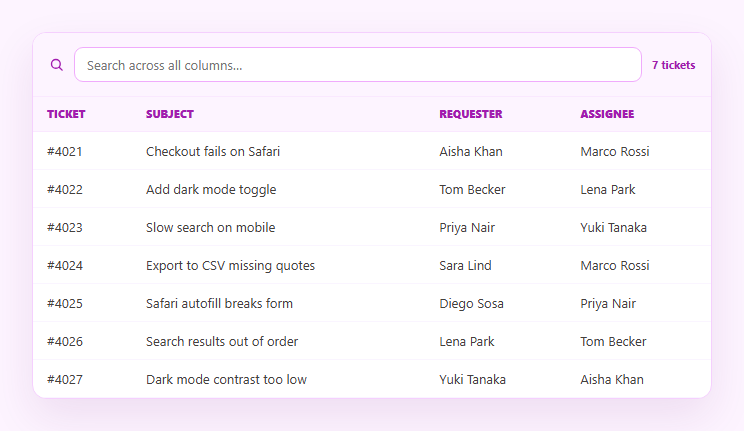
A search box that filters a table is useful; one that also shows *exactly where* the match occurred inside each cell is far more useful, because the user doesn't have to re-scan the row to figure out why it matched. This snippet builds real substring-position highlighting in plain HTML, CSS, and vanilla JavaScript — it finds every occurrence of the query inside each cell's text and wraps only that slice in <mark>, rather than tinting the whole cell or row.
Finding every occurrence, not just the first
highlightAll() walks each cell's text with indexOf in a loop, advancing the search position past each match so it finds *every* non-overlapping occurrence of the query — not just the first. A naive implementation that only highlights the first hit misses repeated terms within the same cell (e.g. "Safari" appearing twice), which looks like a bug the moment a user searches for a common word.
Escape-then-wrap, never innerHTML on raw text
Because the result is injected via innerHTML, every plain-text segment is passed through esc() before being placed in the output string, and only the matched slice is wrapped in <mark>. This escape-then-wrap order means a ticket subject containing < or & renders as literal text instead of being interpreted as markup — the query itself never needs escaping since it's compared against lowercase text and only used to slice the *original* (already-safe-to-escape) string.
Filtering AND highlighting from the same query
A single input drives both behaviors: rows are kept only if *any* column contains the query (case-insensitive), and every kept row's cells run through the same highlighting function. Because filtering and highlighting share one raw/q pair, there's no risk of the visible highlight drifting from what actually caused the row to match.
Real position math, not a CSS trick
The highlighting genuinely locates character offsets with indexOf and slices the string at those offsets — it isn't a background-color applied to a whole <td> or a CSS :contains-style hack (which doesn't exist and couldn't underline a substring anyway). This is the same technique behind real search-result snippets in tools like a code search UI or a command palette.
Count, empty state, and multi-column search
A live "N of M" count and a friendly empty state (echoing back the exact query that matched nothing) round out the interaction. The search runs across every column — ticket number, subject, requester, and assignee — so one input replaces four separate filters. Pair it with a filterable-table when you need independent per-column filters instead of one combined search, or a sortable-table to let users reorder the highlighted results.
Build with AI
Build, Understand, Optimize, and Extend It With AI
Rather than reverse-engineering the highlight loop by hand, paste this snippet's HTML, CSS, and JS into an AI coding assistant like Claude and ask it to explain exactly how highlightAll() finds every non-overlapping occurrence of the query in a cell using indexOf in a loop, and why the escape() call runs on each in-between text segment before the matched slice is wrapped in mark rather than escaping the whole cell up front. The same assistant can help optimize it — ask whether re-scanning and re-joining every cell into a new HTML string on each keystroke would stay fast with thousands of rows, or whether the input should be debounced. It's also useful for extending the search: have it add fuzzy/typo-tolerant matching, highlight matches inside a specific subset of columns only, or make the count update with a subtle animation. Treat the code less like a finished artifact and more like a starting point for a conversation.
Prompt to recreate it
Copy this into your AI assistant of choice to build the effect from scratch, or as a jumping-off point for your own variant:
Build a live-search table in plain HTML, CSS, and JavaScript that filters rows AND highlights the actual matching text inside each cell — no libraries.

Requirements:
- A single search input that filters a data table live on every keystroke, matching case-insensitively against every column in each row (not just one column) — a row is shown if any of its cell values contains the query as a substring.
- For every visible row's cells, implement a real substring-position highlighting function: it must use string search (e.g. indexOf) to find the exact character offset of each occurrence of the query inside the cell's text, then split the string into escaped plain-text segments and matched segments, wrapping only the matched segments in a mark (or span with a highlight class) element. Do not simply apply a background color to the whole cell.
- The highlighting must find every occurrence of the query within a single cell, not just the first — verify this against a cell whose text contains the search term more than once.
- All plain-text segments must be HTML-escaped (escaping <, >, and &) before being inserted via innerHTML, with the escaping happening before the mark-wrapping so no cell data can ever inject real markup, regardless of what characters it contains.
- Show a live "N of M" result count that updates as the user types, and a distinct empty-state message that echoes back the exact search term when zero rows match.
- Clearing the search input must restore the full unfiltered, unhighlighted table.
Want to tighten it up first? Run this prompt through the AI Prompt Studio to score it across 8 quality dimensions, catch anti-patterns, and tune the wording for Claude, ChatGPT, or Gemini before you paste it in.
Step by step
How to Use
- 1Paste HTML, CSS, and JSA ticket table renders with a search box above it.
- 2Type a queryRows filter live to only those containing the text in any column.
- 3Watch the highlightEvery matching substring inside each visible cell is wrapped in a highlighted mark.
- 4Search a repeated wordType a term that appears twice in one cell (e.g. "Safari") — both occurrences highlight.
- 5Clear the inputThe table returns to unfiltered, unhighlighted rows.
- 6Swap in your dataReplace the ROWS array with your own columns; the search and highlight logic is generic.
Real-world uses
Common Use Cases
Got questions?
Frequently Asked Questions
This snippet computes the exact character offset of the query inside each cell's text using indexOf, then slices the string at that offset so only the matching substring is wrapped in a mark element. A whole-cell background tells you the row matched somewhere; this shows exactly which characters matched, which is far more useful when scanning longer text.
Yes. highlightAll() runs indexOf in a loop, advancing the search position past each match it finds, so if a term like "Safari" appears twice in one subject line, both occurrences get wrapped — not just the first. This matters because real user data frequently repeats the searched term.
Yes. Every non-matching text segment is HTML-escaped before being placed in the output string, and only the matched slice is wrapped in <mark> afterward. Because escaping happens first, cell data containing < or & can never be interpreted as markup, even though the result is injected via innerHTML.
Yes — rowMatches() checks whether any column in a row contains the query (case-insensitive substring match), so one search box replaces needing a separate filter per field. If you need independent per-column filters instead, see the filterable table snippet.
Keep the query in component state, derive the filtered rows with a filter/some check, and render each cell by splitting its text around the query's indexOf position into escaped-and-mark-wrapped React elements (or use v-html/[innerHTML] bindings with the same escape-then-wrap string logic in Vue/Angular). The matching and highlight algorithm is framework-agnostic.