Source Code
<div class="st-wrap">
  <div class="st-bar">
    <span class="st-count" id="stCount">No rows selected</span>
    <button type="button" class="st-act" id="stAct" hidden>Delete selected</button>
  </div>
  <table class="st-table">
    <thead><tr>
      <th class="st-cb"><input type="checkbox" id="stAll" aria-label="Select all"></th>
      <th>Name</th><th>Role</th><th class="st-num">Score</th>
    </tr></thead>
    <tbody id="stBody"></tbody>
  </table>
</div>*{box-sizing:border-box;margin:0;padding:0}
body{font-family:system-ui,-apple-system,sans-serif;background:#f1f5f9;min-height:100vh;display:flex;align-items:flex-start;justify-content:center;padding:32px 20px}
.st-wrap{background:#fff;border-radius:14px;width:100%;max-width:540px;box-shadow:0 18px 44px rgba(15,23,42,.08);overflow:hidden}
.st-bar{display:flex;align-items:center;justify-content:space-between;gap:12px;padding:13px 18px;border-bottom:1px solid #f1f5f9;min-height:54px}
.st-count{font-size:13px;font-weight:700;color:#475569}
.st-act{background:#ef4444;color:#fff;border:none;border-radius:8px;padding:7px 13px;font-size:12.5px;font-weight:700;cursor:pointer;font-family:inherit}
.st-act[hidden]{display:none}
.st-act:hover{background:#dc2626}
.st-table{width:100%;border-collapse:collapse;font-size:13px}
.st-table th{text-align:left;padding:10px 16px;background:#f8fafc;border-bottom:1px solid #e2e8f0;font-size:11px;font-weight:800;text-transform:uppercase;letter-spacing:.03em;color:#64748b}
.st-num{text-align:right}
.st-cb{width:42px}
.st-table td{padding:11px 16px;border-bottom:1px solid #f1f5f9;color:#334155}
.st-table td:last-child{text-align:right;font-weight:700;font-variant-numeric:tabular-nums}
.st-table tbody tr{cursor:pointer;transition:background .12s}
.st-table tbody tr:hover{background:#f8fafc}
.st-table tbody tr.st-sel{background:#eef2ff}
.st-table tbody tr.st-sel:hover{background:#e0e7ff}
input[type=checkbox]{width:16px;height:16px;accent-color:#6366f1;cursor:pointer}var ROWS = [
{ id: 1, name: 'Aisha Khan', role: 'Engineer', score: 96 },
{ id: 2, name: 'Marco Rossi', role: 'Designer', score: 88 },
{ id: 3, name: 'Lena Park', role: 'Engineer', score: 91 },
{ id: 4, name: 'Tom Becker', role: 'Sales', score: 74 },
{ id: 5, name: 'Priya Nair', role: 'Engineer', score: 83 },
{ id: 6, name: 'Sara Lind', role: 'Marketing', score: 79 },
];
var body = document.getElementById('stBody');
var allCb = document.getElementById('stAll');
var selected = new Set();
var lastIndex = null; // for shift-click range selection
body.innerHTML = ROWS.map(function (r, i) {
return '<tr data-i="' + i + '"><td class="st-cb"><input type="checkbox" data-i="' + i + '"></td>' +
'<td>' + r.name + '</td><td>' + r.role + '</td><td>' + r.score + '</td></tr>';
}).join('');
function refresh() {
body.querySelectorAll('tr').forEach(function (tr) {
var on = selected.has(+tr.dataset.i);
tr.classList.toggle('st-sel', on);
tr.querySelector('input').checked = on;
});
// Header checkbox is tri-state: checked (all), indeterminate (some), empty (none).
allCb.checked = selected.size === ROWS.length;
allCb.indeterminate = selected.size > 0 && selected.size < ROWS.length;
var n = selected.size;
document.getElementById('stCount').textContent = n ? n + ' row' + (n > 1 ? 's' : '') + ' selected' : 'No rows selected';
document.getElementById('stAct').hidden = n === 0;
}
function toggle(i, on) { if (on) selected.add(i); else selected.delete(i); }
body.addEventListener('click', function (e) {
var tr = e.target.closest('tr');
if (!tr) return;
var i = +tr.dataset.i;
var on = !selected.has(i);
// Shift-click selects the range from the last clicked row to this one.
if (e.shiftKey && lastIndex !== null) {
var lo = Math.min(lastIndex, i), hi = Math.max(lastIndex, i);
for (var k = lo; k <= hi; k++) selected.add(k);
} else {
toggle(i, on);
lastIndex = i;
}
refresh();
});
allCb.addEventListener('change', function () {
if (allCb.checked) ROWS.forEach(function (_, i) { selected.add(i); });
else selected.clear();
lastIndex = null;
refresh();
});
document.getElementById('stAct').addEventListener('click', function () {
// Demo: just clear the selection (wire to your real delete here).
console.log('Delete ids:', [...selected].map(function (i) { return ROWS[i].id; }));
selected.clear();
refresh();
});
refresh();Learn Coding Visually
Learn to code with interactive, live-preview playgrounds — HTML, CSS, JavaScript, React & more.
 HTML Playground42 lessons · Click-based · Live preview
 CSS PlaygroundLearn CSS with a live editor
 JavaScript Playground60 lessons · DOM · Async · Canvas
 React PlaygroundLearn React with a live code editor
 GSAP PlaygroundLearn GSAP animation interactively
 SVG Playground44 lessons · shapes · paths · animation
 SCSS Playground45 lessons · Sass modules · tokens
 Tailwind PlaygroundLearn Tailwind CSS with a live editor
 Bootstrap 5 Playground50 lessons · live preview
Selectable Table — Row Checkbox Selection HTML CSS JS
Selectable Table · Tables · Plain HTML, CSS & JS · Live preview
What's included
Features
About this UI Snippet
Selectable Table — Tri-State Select-All, Shift-Click Ranges, and a Bulk Action Bar
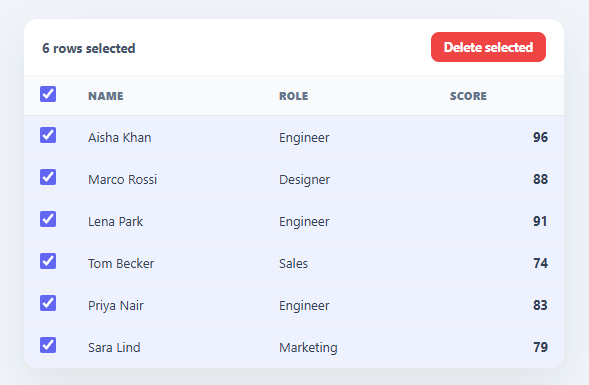
Letting users select rows and act on them in bulk is core to any admin table, and the selection mechanics — a header checkbox that reflects partial selection, shift-click to grab a range, clicking anywhere on a row — are easy to get subtly wrong. This snippet builds a fully correct selectable table in plain HTML, CSS, and vanilla JavaScript, with a tri-state select-all, range selection, a live count, and a bulk action bar — no library.
A tri-state select-all header
The header checkbox has three states, which most implementations miss: checked when every row is selected, *indeterminate* (the dash) when some but not all are, and empty when none are. The snippet sets allCb.indeterminate based on whether the selected count is between zero and the total — the standard way to show partial selection. Without the indeterminate state, the header checkbox lies about what is selected; getting it right is what makes the control trustworthy.
Shift-click range selection
Holding Shift and clicking selects every row between your last click and the current one — the spreadsheet and file-manager convention for grabbing a contiguous block. The snippet remembers the lastIndex clicked and, on a shift-click, adds the whole range between it and the new row to the selection Set. This range gesture is what makes selecting many rows fast; clicking each checkbox individually is tedious for more than a few.
Whole-row click target
Clicking anywhere on a row toggles its selection, not just the checkbox — a much larger, more forgiving hit target. The checkbox stays in sync because all visual state (the checkbox, the row highlight) is derived in one refresh() from the selection Set, the single source of truth. Driving the DOM from the Set rather than reading checkbox states avoids the drift that creeps in when selection lives in the DOM.
Live count and contextual action bar
A toolbar shows the live selection count ("3 rows selected") and reveals a bulk action button only when something is selected — the contextual pattern where actions appear when they become relevant. The action reports the selected row ids (wire it to your real delete, export, or assign), then clears the selection.
Data-driven and drop-in
Rows come from a ROWS array keyed by stable ids, so the selection survives by index and you can map back to real records for the bulk action. It is a clear, dependency-free reference for correct table selection: tri-state header, range selection, Set-as-source-of-truth, and a contextual action bar. One thing to change before shipping against a paginated or sorted table: this demo's selection Set stores row *indices*, which is fine for a static array but breaks the moment rows are re-sorted or a different page is loaded, since index 2 no longer points at the same record — for anything beyond a single static page, store the selected *ids* in the Set instead and look up rows by id when rendering.
Build with AI
Build, Understand, Optimize, and Extend It With AI
You don't need to trace how the tri-state header checkbox and shift-click range selection interact by hand. Paste this snippet's HTML, CSS, and JS into an AI coding assistant like Claude and ask it to explain exactly how allCb.indeterminate is derived from the selected Set's size, or how the shift-click handler computes the range between lastIndex and the newly clicked row. The same assistant is useful for optimizing it, for instance flagging that the selected Set currently stores row indices rather than stable ids, which breaks the moment the table is sorted or paginated, and suggesting the id-based fix. It is just as handy for extending the feature: ask it to add a search box that filters visible rows while preserving selection across the hidden ones, wire the delete action to a real confirmation dialog, or persist the selection across a page reload. Treat the code less like a finished artifact and more like a starting point for a conversation.
Prompt to recreate it
Copy this into your AI assistant of choice to build the effect from scratch, or as a jumping-off point for your own variant:
Build a selectable data table in plain HTML, CSS, and JavaScript, no framework, no libraries.

Requirements:
- Render table rows from a ROWS array where each record carries a stable id, and store the current selection in a single Set that acts as the sole source of truth — every checkbox state and row highlight must be derived from this Set on each refresh, never read back from the DOM.
- Make the header checkbox genuinely tri-state: fully checked when every row is selected, fully unchecked when none are, and set its indeterminate property to true (not just a visual hack) when the selection is a strict subset.
- Clicking anywhere on a row (not only its checkbox) must toggle that row's selection, using a click listener on the table body with closest to find the row.
- Implement shift-click range selection: remember the index of the last row clicked without the shift key, and when a shift-click occurs, select every row between that remembered index and the newly clicked index inclusive, regardless of click order (support clicking backward through the table too).
- Show a live toolbar that displays the current selection count in words (singular versus plural) and reveals a bulk action button only when at least one row is selected, hiding it again when the selection is cleared.
- Clicking the header checkbox must select all rows or clear the selection entirely depending on its current checked state, and must also reset the shift-click range anchor.
- As a documented caveat in a code comment, note that indices are only a valid Set key for a static, unsorted, unpaginated table, and that a table which can be sorted, filtered, or paginated must key the selection Set by row id instead.
Want to tighten it up first? Run this prompt through the AI Prompt Studio to score it across 8 quality dimensions, catch anti-patterns, and tune the wording for Claude, ChatGPT, or Gemini before you paste it in.
Step by step
How to Use
- 1Paste HTML, CSS, and JSA table renders with row checkboxes and a select-all header.
- 2Select rowsClick a row (anywhere) or its checkbox to toggle it; the count and highlight update.
- 3Shift-click a rangeClick one row, then Shift-click another to select everything between them.
- 4Use select-allThe header checkbox selects all, clears all, and shows a dash when only some are selected.
- 5Run a bulk actionThe action button appears when rows are selected; wire it to your real delete/export.
- 6Swap in your dataReplace the ROWS array (keyed by id) with your own records.
Real-world uses
Common Use Cases
Got questions?
Frequently Asked Questions
The header select-all checkbox has three states: checked (all rows selected), unchecked (none), and indeterminate — a dash — when some but not all are selected. Setting allCb.indeterminate = true when the selected count is between 0 and the total is the standard, accessible way to signal a partial selection. Without it, the header checkbox would misleadingly appear empty or checked when only some rows are selected.
The table remembers the index of the last row you clicked (lastIndex). When you Shift-click another row, it computes the low and high of that index and the new one and adds every row in between to the selection Set. This mirrors the spreadsheet/file-manager convention and makes selecting a large contiguous block one gesture instead of many clicks.
Keeping the selection in a Set as the single source of truth, and deriving the checkboxes and row highlights from it in refresh(), prevents the state from drifting. If you read selection straight from the DOM checkboxes, re-renders, sorting, or filtering can desync them. The Set holds the truth; the DOM is just a view of it, so it is always consistent.
Rows carry stable ids, and the selection Set stores indices, so the action maps them back: [...selected].map(i => ROWS[i].id) gives the selected ids. In the action handler, send those ids to your delete/export/assign API, then clear the Set and refresh(). The demo logs the ids and clears — replace that with your real call.
Hold the selection as a Set (or array) of ids in state and derive each row's checked/highlight from it. In React use useState and an onClick that handles shiftKey; in Vue a ref with @click; in Angular a property with (click). Compute the header's checked/indeterminate from the selection size. The selection logic is framework-agnostic — only state and event binding move into the framework.