Source Code
<div class="cet-wrap">
  <div class="cet-bar">
    <h3>Orders</h3>
    <button type="button" class="cet-btn" id="cetCsv">
      <svg width="15" height="15" viewBox="0 0 24 24" fill="none" stroke="currentColor" stroke-width="2.2" stroke-linecap="round" stroke-linejoin="round"><path d="M21 15v4a2 2 0 0 1-2 2H5a2 2 0 0 1-2-2v-4"/><polyline points="7 10 12 15 17 10"/><line x1="12" y1="15" x2="12" y2="3"/></svg>
      Export CSV
    </button>
  </div>
  <table class="cet-table" id="cetTable">
    <thead><tr><th>Order</th><th>Customer</th><th>Date</th><th class="cet-num">Total</th><th>Status</th></tr></thead>
    <tbody id="cetBody"></tbody>
  </table>
  <p class="cet-note" id="cetNote" hidden></p>
</div>*{box-sizing:border-box;margin:0;padding:0}
body{font-family:system-ui,-apple-system,sans-serif;background:#f1f5f9;min-height:100vh;display:flex;align-items:flex-start;justify-content:center;padding:32px 20px}
.cet-wrap{background:#fff;border-radius:14px;width:100%;max-width:620px;box-shadow:0 18px 44px rgba(15,23,42,.08);overflow:hidden}
.cet-bar{display:flex;align-items:center;justify-content:space-between;padding:16px 18px;border-bottom:1px solid #f1f5f9}
.cet-bar h3{font-size:15px;font-weight:800;color:#0f172a}
.cet-btn{display:inline-flex;align-items:center;gap:7px;background:#16a34a;color:#fff;border:none;border-radius:9px;padding:8px 14px;font-size:13px;font-weight:700;cursor:pointer;font-family:inherit;transition:background .15s}
.cet-btn:hover{background:#15803d}
.cet-table{width:100%;border-collapse:collapse;font-size:13px}
.cet-table th{text-align:left;padding:11px 14px;background:#f8fafc;border-bottom:1px solid #e2e8f0;font-size:11px;font-weight:800;text-transform:uppercase;letter-spacing:.03em;color:#64748b}
.cet-num{text-align:right}
.cet-table td{padding:11px 14px;border-bottom:1px solid #f1f5f9;color:#334155}
.cet-table td.cet-total{text-align:right;font-weight:700;font-variant-numeric:tabular-nums}
.cet-table tbody tr:hover{background:#f8fafc}
.cet-pill{font-size:11px;font-weight:700;padding:2px 9px;border-radius:999px}
.cet-paid{background:#dcfce7;color:#15803d}
.cet-pending{background:#fef3c7;color:#b45309}
.cet-refunded{background:#fee2e2;color:#b91c1c}
.cet-note{padding:0 18px 14px;font-size:12px;font-weight:600;color:#16a34a}
.cet-note[hidden]{display:none}var COLUMNS = ['Order', 'Customer', 'Date', 'Total', 'Status'];
var ROWS = [
['#1042', 'Aisha Khan', '2026-06-18', 128.40, 'Paid'],
['#1043', 'Marco "Cosmo" Rossi', '2026-06-18', 64.00, 'Pending'],
['#1044', 'Lena Park', '2026-06-19', 219.99, 'Paid'],
['#1045', 'Tom Becker', '2026-06-20', 12.50, 'Refunded'],
['#1046', 'Priya Nair', '2026-06-21', 540.00, 'Paid'],
];
var body = document.getElementById('cetBody');
function pill(s) {
return '<span class="cet-pill cet-' + s.toLowerCase() + '">' + s + '</span>';
}
body.innerHTML = ROWS.map(function (r) {
return '<tr><td>' + r[0] + '</td><td>' + r[1] + '</td><td>' + r[2] + '</td>' +
'<td class="cet-total">$' + r[3].toFixed(2) + '</td><td>' + pill(r[4]) + '</td></tr>';
}).join('');
// RFC-4180-style escaping: wrap in quotes and double internal quotes when a field
// contains a comma, quote, or newline. Otherwise leave the value as-is.
function csvCell(v) {
var s = String(v);
if (/[",\n]/.test(s)) return '"' + s.replace(/"/g, '""') + '"';
return s;
}
function toCsv(columns, rows) {
var lines = [columns.map(csvCell).join(',')];
rows.forEach(function (r) { lines.push(r.map(csvCell).join(',')); });
return lines.join('\r\n');
}
document.getElementById('cetCsv').addEventListener('click', function () {
var csv = toCsv(COLUMNS, ROWS);
// Prepend a UTF-8 BOM so Excel opens accented characters correctly.
var blob = new Blob(['\ufeff' + csv], { type: 'text/csv;charset=utf-8;' });
var url = URL.createObjectURL(blob);
var a = document.createElement('a');
a.href = url;
a.download = 'orders-' + new Date().toISOString().slice(0, 10) + '.csv';
document.body.appendChild(a);
a.click();
a.remove();
URL.revokeObjectURL(url);
var note = document.getElementById('cetNote');
note.textContent = '✓ Exported ' + ROWS.length + ' rows to CSV';
note.hidden = false;
setTimeout(function () { note.hidden = true; }, 2600);
});Learn Coding Visually
Learn to code with interactive, live-preview playgrounds — HTML, CSS, JavaScript, React & more.
 HTML Playground42 lessons · Click-based · Live preview
 CSS PlaygroundLearn CSS with a live editor
 JavaScript Playground60 lessons · DOM · Async · Canvas
 React PlaygroundLearn React with a live code editor
 GSAP PlaygroundLearn GSAP animation interactively
 SVG Playground44 lessons · shapes · paths · animation
 SCSS Playground45 lessons · Sass modules · tokens
 Tailwind PlaygroundLearn Tailwind CSS with a live editor
 Bootstrap 5 Playground50 lessons · live preview
CSV Export Table — Download Table as CSV (JS)
CSV Export Table · Tables · Plain HTML, CSS & JS · Live preview
What's included
Features
About this UI Snippet
CSV Export Table — Client-Side CSV Download with Correct Escaping & Excel Support
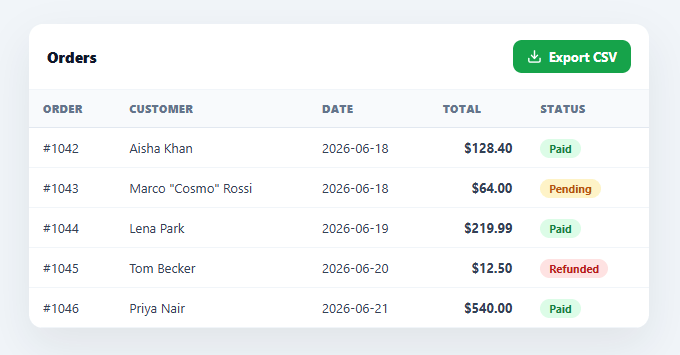
"Export to CSV" is one of the most-requested features in any table or dashboard, and it's deceptively easy to get wrong — naïve string-joining breaks the moment a cell contains a comma, a quote, or a name like Marco "Cosmo" Rossi. This snippet builds a correct, fully client-side CSV export in plain HTML, CSS, and vanilla JavaScript: proper RFC-4180 quoting, a UTF-8 BOM so Excel reads accents correctly, and a Blob download — no server round-trip and no library.
RFC-4180-correct escaping
The heart of the snippet is csvCell(). A value is wrapped in double quotes and has its internal quotes doubled *only* when it contains a comma, a quote, or a newline — exactly the RFC-4180 rule. So Marco "Cosmo" Rossi becomes "Marco ""Cosmo"" Rossi", and a value with an embedded comma stays in one column instead of spilling into the next. This escaping is the single most important part of CSV generation, and the reason a hand-rolled join(',') corrupts real-world data.
A UTF-8 BOM for Excel
The export prepends a UTF-8 byte-order mark (\ufeff) to the file. Without it, Microsoft Excel guesses the encoding and mangles accented and non-Latin characters — "Café" becomes "Café". The BOM tells Excel the file is UTF-8, so names and addresses with accents, umlauts, or non-English scripts open correctly. It's a one-character fix that prevents the most common "the export looks broken in Excel" complaint.
Blob + object URL download
The CSV string is wrapped in a Blob with a text/csv MIME type, turned into an object URL, and downloaded by programmatically clicking a temporary <a download>. The object URL is revoked afterwards to free memory. This is the standard, dependency-free way to generate and download a file entirely in the browser — the user's data never leaves their device, which matters for tables that may hold private or sensitive rows.
Single source of truth for data
The table body and the CSV both derive from the same COLUMNS and ROWS arrays, so what you see is exactly what you export — no risk of the download drifting from the rendered table. The filename includes the current date (orders-2026-06-23.csv) so repeated exports don't overwrite each other, and a small confirmation note appears after each export.
Drop-in for any table
Because the CSV logic is generic over columns and rows, you can point it at any dataset by swapping the arrays, or adapt toCsv() to read from an existing DOM table or your app state. It's a clear, correct reference implementation of the export-to-CSV feature every data table eventually needs. Note that this is intentionally a client-only export of the data already on the page — for a table backed by server-side pagination or filtering, you'd instead call an endpoint that streams the full, unpaginated dataset through the same csvCell() escaping rules, since exporting only the currently-rendered ROWS would silently drop everything outside the current page.
Build with AI
Build, Understand, Optimize, and Extend It With AI
You don't have to memorize the RFC-4180 escaping rule to trust it. Paste this snippet's HTML, CSS, and JS into an AI coding assistant like Claude and ask it to explain exactly what the csvCell regex test is checking for and why the UTF-8 BOM prefix specifically fixes Excel's encoding guess rather than Google Sheets. The same assistant can help optimize it — for instance asking whether building the whole CSV string in memory with array joins will hold up for tens of thousands of rows, or whether a streaming approach is worth it for very large exports. It's also useful for extending the export: ask it to add column selection so users can choose which fields to include, support exporting only filtered or selected rows, or generate an Excel-native .xlsx file instead of CSV for formatting-sensitive reports. Treat the code less like a finished artifact and more like a starting point for a conversation.
Prompt to recreate it
Copy this into your AI assistant of choice to build the effect from scratch, or as a jumping-off point for your own variant:
Build a "table with CSV export" component in plain HTML, CSS, and JavaScript using only the Blob API and a temporary anchor download — no server request, no library.

Requirements:
- Render a table from a shared columns array and a rows array of arrays, so the on-screen table and the exported file are guaranteed to reflect the exact same data.
- Implement a csvCell(value) escaping function that follows RFC-4180: wrap a value in double quotes and double any internal double quotes only when the value contains a comma, a double quote, or a newline; otherwise leave it unescaped. Verify it against a value containing an embedded comma and a value containing an embedded double quote (e.g. a nickname in quotes).
- Join escaped column headers and escaped row values with commas, and join rows with CRLF (\r\n) line endings, not bare newlines.
- Prepend a UTF-8 byte-order-mark character to the final string before creating the Blob, so the file opens with correct accented and non-Latin characters in Microsoft Excel.
- On a button click, wrap the CSV string in a Blob with a text/csv MIME type, create an object URL from it, trigger a download via a temporary anchor element with a download attribute that includes today's date in the filename, then remove the anchor and revoke the object URL.
- Show a small temporary confirmation message after export stating how many rows were exported, auto-dismissing after a couple seconds.
Want to tighten it up first? Run this prompt through the AI Prompt Studio to score it across 8 quality dimensions, catch anti-patterns, and tune the wording for Claude, ChatGPT, or Gemini before you paste it in.
Step by step
How to Use
- 1Paste HTML, CSS, and JSAn orders table renders with an "Export CSV" button in the header.
- 2Click Export CSVA correctly-escaped .csv file downloads instantly, named with today's date.
- 3Open it in Excel or SheetsThe UTF-8 BOM ensures accented characters and commas-in-fields open correctly.
- 4Swap in your dataReplace the COLUMNS and ROWS arrays; the table and the CSV both derive from them.
- 5Adapt the sourcePoint toCsv() at your app state or scrape an existing DOM table to export it.
- 6Customize the filenameEdit the a.download value to change the exported file name or extension.
Real-world uses
Common Use Cases
Got questions?
Frequently Asked Questions
Because real data breaks it. A cell containing a comma (an address), a quote (a nickname like Marco "Cosmo" Rossi), or a newline will corrupt the columns. csvCell() follows RFC-4180: it wraps such values in double quotes and doubles any internal quotes, so every field stays in its own column. Naïve join(',') only works until your data contains one of those characters — which it always eventually does.
Microsoft Excel doesn't assume UTF-8 by default, so accented and non-Latin characters get mangled (Café → Café) when it guesses the wrong encoding. Prepending the byte-order mark \ufeff signals UTF-8, and Excel then opens names, addresses, and any non-English text correctly. It's invisible to other tools like Google Sheets and standard CSV parsers.
No. The CSV is built as a string, wrapped in a Blob, turned into an object URL, and downloaded via a temporary <a download> — entirely in the browser. The user's data never leaves their device, which makes this safe for tables holding private or sensitive rows. The object URL is revoked afterwards to free memory.
toCsv(columns, rows) is generic — pass it any 2D array. To export a rendered DOM table, map over its rows and cells to build the arrays; to export app state, pass your data directly. Keeping the table and CSV derived from one source (as here) guarantees the download always matches what's on screen.
In React, keep the data in state and put the toCsv()/Blob/download logic in the button's onClick handler; in Vue, use a @click method; in Angular, a (click) handler. The escaping, BOM, and Blob-download code is framework-agnostic and runs the same — only the data source moves into component state.