


Learn Coding Visually
Learn to code with interactive, live-preview playgrounds — HTML, CSS, JavaScript, React & more.
 HTML Playground42 lessons · Click-based · Live preview
 CSS PlaygroundLearn CSS with a live editor
 JavaScript Playground60 lessons · DOM · Async · Canvas
 React PlaygroundLearn React with a live code editor
 GSAP PlaygroundLearn GSAP animation interactively
 SVG Playground44 lessons · shapes · paths · animation
 SCSS Playground45 lessons · Sass modules · tokens
 Tailwind PlaygroundLearn Tailwind CSS with a live editor
 Bootstrap 5 Playground50 lessons · live preview
Multi-Layer Scroll Parallax Banner — Free HTML CSS JS Snippet
Multi-Layer Scroll Parallax Banner · Scroll · Plain HTML, CSS & JS · Live preview
What's included
Features
About this UI Snippet
Multi-Layer Scroll Parallax Banner — rAF-Throttled Depth Effect on Scroll
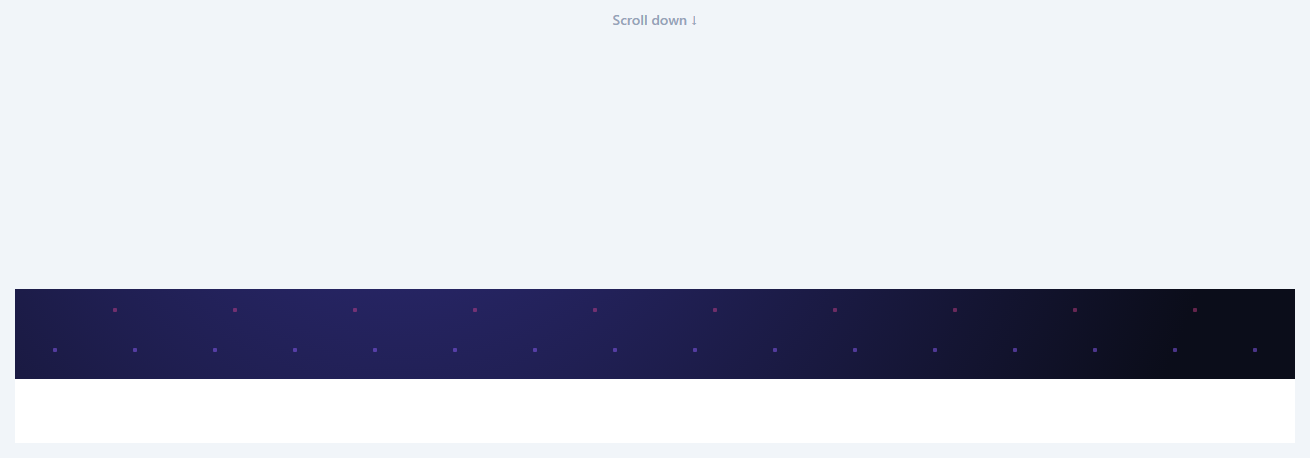
This snippet implements the classic scroll-parallax technique: as the user scrolls past a banner, its background layers move vertically at different rates than the foreground content, producing a sense of depth. It's built with performance as the primary concern, since scroll parallax is one of the easiest effects to make janky if done carelessly.
Three layers, three rates
.sb-parallax-layer-back, -mid, and -front each carry a data-rate attribute (0.2, 0.45, and 0.8 respectively). A rate closer to 0 makes a layer move almost independently of scroll (appearing to hang back, like a distant sky), while a rate closer to 1 makes a layer scroll almost in lockstep with the page (appearing close to the viewer) — this is the inverse relationship real parallax depth relies on.
Never reading layout inside the scroll event
The onScroll handler itself does almost nothing: it just records the container's scrollTop and, if a frame isn't already queued, schedules requestAnimationFrame(applyParallax). All the expensive work — calling getBoundingClientRect() (a layout read) and writing transform styles — happens exclusively inside applyParallax(), which only ever runs once per animation frame no matter how many scroll events fire in between. This is the standard fix for scroll-jank: scroll events can fire dozens of times per frame, but layout reads and style writes should only ever happen once per frame.
Computing each layer's offset
applyParallax() measures the banner's position relative to the scrollable container using getBoundingClientRect(), then for each layer computes translateY = offsetWithinArea * (1 - rate) * -1. As the banner scrolls upward (offset becomes more negative), a layer with a low rate lags behind more, while a layer with a rate near 1 tracks almost exactly with the scroll — producing the layered depth effect.
A self-contained scrollable demo area
Because this snippet needs to demonstrate a scroll effect in an isolated preview, the whole example lives inside its own scrollable .sb-scroll-area container with spacer sections above and below the banner, rather than relying on the full page's scroll — the same rAF-throttling technique applies identically to window scroll in a real page by swapping the scroll listener target.
Build with AI
Build, Understand, Optimize, and Extend It With AI
Hand this snippet's HTML, CSS, and JavaScript to an AI coding assistant like Claude and ask it to adapt "Multi-Layer Scroll Parallax Banner" to your project — restyle it to match your design system, wire it up to real data instead of the static example, or port it to the framework you're building in.
Prompt to recreate it
Copy this into your AI assistant of choice to build the effect from scratch, or as a jumping-off point for your own variant:
Build a scroll component called "Multi-Layer Scroll Parallax Banner" using plain HTML, CSS, and vanilla JavaScript — no framework, no build step.

Requirements:
- Match the structure and behavior of the "Multi-Layer Scroll Parallax Banner" snippet from the UI Snippets Library.
- Keep the markup semantic and the styling self-contained (no external dependencies beyond what the original snippet uses).
- Keep the JavaScript vanilla, with no framework runtime required.
- Make it easy to restyle via CSS custom properties or class overrides so it can be dropped into a real project.
Want to tighten it up first? Run this prompt through the AI Prompt Studio to score it across 8 quality dimensions, catch anti-patterns, and tune the wording for Claude, ChatGPT, or Gemini before you paste it in.
Source Code
<div class="sb-scroll-area" id="sbScrollArea">
  <div class="sb-spacer sb-spacer-top">
    <p>Scroll down ↓</p>
  </div>

  <section class="sb-banner" id="sbBanner">
    <div class="parallax-layer sb-parallax-layer-back" data-rate="0.2"></div>
    <div class="parallax-layer sb-parallax-layer-mid" data-rate="0.45"></div>
    <div class="parallax-layer sb-parallax-layer-front" data-rate="0.8">
      <h2>Depth in Motion</h2>
      <p>A multi-layer scroll parallax banner</p>
    </div>
  </section>

  <div class="sb-spacer sb-spacer-bottom">
    <p>Keep scrolling</p>
  </div>
</div>*{box-sizing:border-box}
body{font-family:system-ui,-apple-system,sans-serif;margin:0}
.sb-scroll-area{height:70vh;min-height:420px;overflow-y:auto;overflow-x:hidden;position:relative;background:#f1f5f9}
.sb-spacer{height:60vh;display:flex;align-items:center;justify-content:center;color:#94a3b8;font-size:14px;font-weight:600}
.sb-banner{position:relative;height:90vh;min-height:360px;overflow:hidden;background:#0b0d1a}
.parallax-layer{position:absolute;left:0;right:0;will-change:transform}
.sb-parallax-layer-back{top:-20%;height:140%;background:radial-gradient(circle at 30% 30%,#312e81,#0b0d1a 70%)}
.sb-parallax-layer-mid{top:-20%;height:140%;background-image:radial-gradient(circle,rgba(139,92,246,.5) 2px,transparent 2.5px),radial-gradient(circle,rgba(236,72,153,.4) 2px,transparent 2.5px);background-size:80px 80px,120px 120px;background-position:0 0,40px 60px}
.sb-parallax-layer-front{top:0;height:100%;display:flex;flex-direction:column;align-items:center;justify-content:center;text-align:center;color:#fff}
.sb-parallax-layer-front h2{font-size:clamp(26px,5vw,44px);font-weight:800;margin:0 0 10px;letter-spacing:-.02em}
.sb-parallax-layer-front p{font-size:14px;color:#c7cbe0;margin:0}var scrollArea = document.getElementById('sbScrollArea');
var banner = document.getElementById('sbBanner');
var layers = Array.prototype.slice.call(document.querySelectorAll('.parallax-layer'));
var ticking = false;
var latestScrollTop = 0;
function applyParallax() {
var bannerRect = banner.getBoundingClientRect();
var areaRect = scrollArea.getBoundingClientRect();
// Offset of the banner relative to the scroll container's viewport
var offsetWithinArea = bannerRect.top - areaRect.top;
layers.forEach(function (layer) {
var rate = parseFloat(layer.getAttribute('data-rate')) || 0;
var translateY = offsetWithinArea * (1 - rate) * -1;
layer.style.transform = 'translate3d(0,' + translateY.toFixed(2) + 'px,0)';
});
ticking = false;
}
function onScroll() {
latestScrollTop = scrollArea.scrollTop;
if (!ticking) {
// Never read layout inside the raw scroll event handler itself --
// the actual transform read/write happens on the next animation frame.
requestAnimationFrame(applyParallax);
ticking = true;
}
}
scrollArea.addEventListener('scroll', onScroll, { passive: true });
applyParallax();Step by step
How to Use
- 1Load the snippetClick "Multi-Layer Scroll Parallax Banner" in the sidebar to load its HTML, CSS, and JS into the editor panels. The preview updates instantly.
- 2Edit the codeModify any panel — HTML, CSS, or JS. The preview refreshes as you type. Use Reset in each panel header to restore the original.
- 3Preview on devicesClick the Mobile (375px), Tablet (768px), or Desktop buttons in the preview header to check responsiveness.
- 4Export in your formatClick "HTML" to download a standalone file, "JSX" for a React component, "Tailwind" for a React + Tailwind CSS component, "Tailwind HTML" for a standalone HTML file with Tailwind CDN, "Vue" for a Vue 3 SFC with <template>/<script setup>/<style scoped>, or "Angular" for a standalone Angular .component.ts file. "Copy all" copies the full code to clipboard.
- 5Save your versionClick "Save as", type a name, and press Enter. Your snippet saves to IndexedDB and appears in the Saved tab.
Real-world uses
Common Use Cases
Got questions?
Frequently Asked Questions
The browser can fire many scroll events within a single animation frame, and reading layout (getBoundingClientRect) inside each one forces repeated synchronous layout recalculation, causing visible jank. Deferring the actual read/write work to a single requestAnimationFrame callback per frame — regardless of how many scroll events fired — keeps the effect smooth.
It ensures only one requestAnimationFrame callback is ever queued at a time. Without it, if ten scroll events fired before the next frame painted, ten redundant rAF callbacks could stack up; the flag collapses them all into a single scheduled update.
Adjust that layer's data-rate attribute. Values near 0 make a layer barely move (appearing far away); values near 1 make it scroll almost with the page (appearing close). The formula (1 - rate) is what converts that rate into an actual pixel offset.