You Might Also Like
Learn Coding Visually
Learn to code with interactive, live-preview playgrounds — HTML, CSS, JavaScript, React & more.
 HTML Playground42 lessons · Click-based · Live preview
 CSS PlaygroundLearn CSS with a live editor
 JavaScript Playground60 lessons · DOM · Async · Canvas
 React PlaygroundLearn React with a live code editor
 GSAP PlaygroundLearn GSAP animation interactively
 SVG Playground44 lessons · shapes · paths · animation
 SCSS Playground45 lessons · Sass modules · tokens
 Tailwind PlaygroundLearn Tailwind CSS with a live editor
 Bootstrap 5 Playground50 lessons · live preview
Indeterminate Bar — Loading Progress Bar HTML CSS JS
Indeterminate Bar · Loaders · Plain HTML, CSS & JS · Live preview
What's included
Features
About this UI Snippet
Indeterminate Progress Bars — Sliding, Two-Dash, Striped, and Determinate
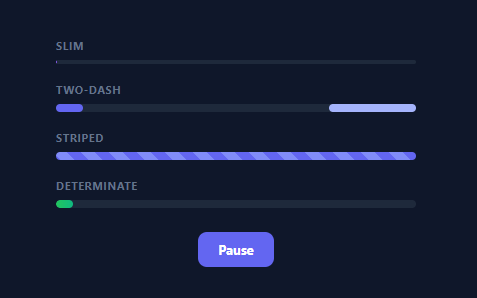
An indeterminate progress bar shows that work is happening when you cannot measure how much is left — the looping animation that says "loading" without a percentage. This snippet collects four progress-bar styles in plain HTML and CSS, plus a determinate bar driven by JavaScript and a pause control, so you can pick the right one for any loading state — no library.
Four loaders, pure CSS
The first three bars are animation-only, no JavaScript: a single sliding fill that grows and shrinks as it sweeps across (the modern Material look), the classic two-dash Material indeterminate (two bars chasing each other with offset timing), and flowing diagonal stripes (a repeating gradient whose background-position animates). Each is a different visual idiom for "indeterminate," and each is achieved entirely with @keyframes on a small element inside an overflow: hidden track. Having them side by side makes it easy to choose the style that fits your UI.
Why animate position and transform, not width repeatedly
The bars animate left/right or background-position in tight loops; the sliding fill also varies its width within the keyframes to get the accelerate-and-stretch feel. Keeping the motion in CSS keyframes means it runs on the compositor, stays smooth, and needs no JavaScript ticking — the right way to do a continuous loading animation versus a JS interval nudging styles every frame.
A determinate bar for when you can measure
The fourth bar is determinate: its width is set from JavaScript to a real percentage with a CSS transition smoothing each change. The demo simulates progress that climbs and restarts, but in practice you would set the width from an upload's loaded/total or a task's completed count. Showing both kinds together highlights the key decision: use indeterminate when you cannot know the total, determinate when you can — and switch to determinate as soon as you can, since a real percentage reassures users more.
One pause control for all
A single button toggles a class that sets animation-play-state: paused on every animated bar, freezing them in place, and the determinate simulation respects the same paused flag. Pausing via animation-play-state (rather than removing the animation) keeps each bar exactly where it stopped and resumes seamlessly — the clean way to pause CSS animations.
Drop-in and adaptable
Each bar is independent, so copy just the style you need. Recolour the gradients, change the track height (a slim variant is included), or adjust the timing. It is a clear, dependency-free reference for indeterminate-loader techniques and the indeterminate-versus-determinate choice every loading UI faces. Accessibility is worth adding on top of the visuals: pair any of these tracks with role="progressbar", and for the determinate bar set aria-valuenow/aria-valuemin/aria-valuemax from the same percentage driving the width so assistive tech reports real progress; the indeterminate bars should omit aria-valuenow entirely, which is the ARIA convention for signalling "busy, but no measurable value."
Build with AI
Build, Understand, Optimize, and Extend It With AI
You do not need to hand-trace every keyframe percentage yourself. Paste this snippet's HTML, CSS, and JS into an AI coding assistant like Claude and ask it to walk through why the ibA and ibB keyframes use different cubic-bezier easing curves and staggered animation-delay values to produce the classic two-dash chase, or why animation-play-state is used for pausing instead of removing the animation class outright. The same assistant is useful for optimizing it — ask whether four simultaneous looping animations on one page could be consolidated, or whether the determinate bar's setInterval-based simulation should instead be driven by real fetch progress events. It is equally useful for extending the set: ask it to add aria-valuenow wiring for the determinate bar, a buffering variant like a video scrubber, or a color-shifting bar that turns from indeterminate to determinate once a real total becomes known. Treat the code less like a finished artifact and more like a starting point for a conversation.
Prompt to recreate it
Copy this into your AI assistant of choice to build the effect from scratch, or as a jumping-off point for your own variant:
Build a set of four loading progress bars in plain HTML, CSS, and JavaScript using only CSS keyframe animations for the indeterminate ones, plus one JavaScript-driven determinate bar — no libraries.

Requirements:
- Bar 1 (sliding fill): a single absolutely positioned fill element inside an overflow-hidden track that animates both its left offset and its width across a single keyframes loop, so it appears to accelerate, stretch, and shrink as it sweeps across, similar to Material Design's indeterminate bar.
- Bar 2 (two-dash chase): two separate absolutely positioned fill elements, each animating its left and right insets on its own keyframes with different cubic-bezier easing curves, and the second element's animation delayed by roughly half the first's duration, so they appear to chase each other continuously.
- Bar 3 (striped flow): a track whose background is a repeating-linear-gradient diagonal stripe pattern, animated purely by shifting background-position in a keyframes loop for a continuous barber-pole scrolling effect.
- Bar 4 (determinate): a fill element whose width is set from JavaScript to a real numeric percentage, with a CSS transition so width changes animate smoothly, driven here by a setInterval that randomly increments progress and resets at 100 percent.
- A single pause and resume button that toggles one class on a shared container, and that class must apply animation-play-state: paused to every animated element in bars 1 through 3 simultaneously, freezing them exactly where they are without resetting position, and the determinate bar's interval must also check this paused state before advancing.
- All four bars must be visually independent and copy-pasteable on their own without needing the others' markup or CSS.
Want to tighten it up first? Run this prompt through the AI Prompt Studio to score it across 8 quality dimensions, catch anti-patterns, and tune the wording for Claude, ChatGPT, or Gemini before you paste it in.
Step by step
How to Use
- 1Paste HTML, CSS, and JSFour progress bars render: sliding, two-dash, striped, and a determinate bar.
- 2Pick a styleCopy the single bar whose look fits your UI — each is self-contained.
- 3Pause and resumeClick the button to freeze all animations via animation-play-state and resume them.
- 4Use indeterminate when unknownShow a looping bar while a request is in flight with no measurable total.
- 5Drive the determinate barSet the determinate fill width from your real progress (loaded/total).
- 6Restyle itChange the gradients, track height, or timing to match your theme.
Real-world uses
Common Use Cases
Got questions?
Frequently Asked Questions
Use an indeterminate bar when you cannot measure how much work remains — a request in flight, a task with no known total — so it just communicates "something is happening." Use a determinate bar when you can compute progress (bytes loaded ÷ total, steps done ÷ steps). Prefer determinate whenever possible and switch to it as soon as a total is known, because a real percentage reassures users far more than an endless loop.
CSS @keyframes animations run on the browser's compositor, stay smooth even when the main thread is busy (which is common during loading), and need no JavaScript loop nudging styles each frame. For a continuous indeterminate loader, that is both more efficient and more reliable than a setInterval/requestAnimationFrame ticking the width — the JS here only drives the determinate bar and the pause toggle.
A button toggles a class on the container that applies animation-play-state: paused to every animated bar. Unlike removing the animation, paused freezes each bar exactly where it is and resumes from that point when unpaused — no jump. The determinate simulation also checks the paused flag so it stops advancing too. It is the clean, jump-free way to pause CSS animations.
Two absolutely-positioned bars animate their left and right insets with offset timing and easing so one shoots across, then the second follows, creating the familiar two-dash chase. It is purely CSS keyframes on each bar with a delay on the second. Copy that one block (the .ib-a/.ib-b rules and keyframes) if that is the style you want.
The indeterminate bars are pure CSS, so they drop in as-is — just render the markup. For the determinate bar, hold the percentage in state and bind the fill width (style width), updating it from your real progress. For pause, toggle the class from state. The animations are framework-agnostic; only the determinate width and pause flag move into the framework.