Learn Coding Visually
Learn to code with interactive, live-preview playgrounds — HTML, CSS, JavaScript, React & more.
 HTML Playground42 lessons · Click-based · Live preview
 CSS PlaygroundLearn CSS with a live editor
 JavaScript Playground60 lessons · DOM · Async · Canvas
 React PlaygroundLearn React with a live code editor
 GSAP PlaygroundLearn GSAP animation interactively
 SVG Playground44 lessons · shapes · paths · animation
 SCSS Playground45 lessons · Sass modules · tokens
 Tailwind PlaygroundLearn Tailwind CSS with a live editor
 Bootstrap 5 Playground50 lessons · live preview
Avatar Status List — Free HTML CSS JS Online Presence List
Avatar Status List · Cards · Plain HTML, CSS & JS · Live preview
What's included
Features
About this UI Snippet
Avatar Status List — Who Is Online, at a Glance
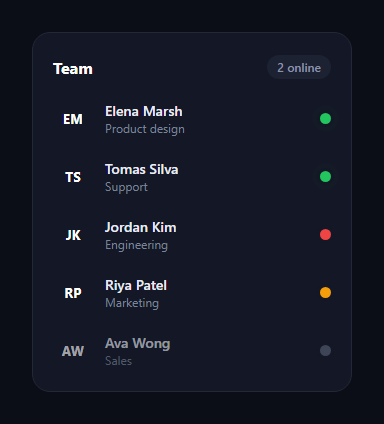
The avatar status list is the team presence panel from chat and collaboration apps — a column of members with initials avatars and a coloured dot showing whether each person is online, busy, away, or offline. This snippet builds it with plain HTML, CSS, and a small vanilla JavaScript sorter, with no images and no avatar service.
Initials avatars from a CSS variable
Each avatar is a circle that shows the member's initials, coloured by a per-row --c custom property set inline in the markup. Using a CSS variable means one rule styles every avatar and the colour is data, not a separate class — so generating avatars from a list is trivial and you never ship avatar images. The circle uses flex centring to keep the initials perfectly aligned at any size.
Status as a single data attribute
A member's presence lives in one data-status attribute on the row (online, busy, away, or offline). CSS attribute selectors then colour the status dot — green, red, amber, or grey — and dim offline rows, all from that one value. Changing someone's status is a single attribute write, and the styling follows automatically.
The pulsing online ring
Online members get a gentle pulse: a @keyframes animation expands a translucent green ring out of the status dot using layered box-shadow (one solid shadow matches the card background to mask the dot edge, the other animates outward and fades). This is the same "live" heartbeat you see on presence indicators, drawing the eye to who's actually available right now without any extra elements.
Auto-sorting by presence
A refresh() function sorts the rows by a presence rank (online first, offline last) and re-appends them in order, so active people always rise to the top of the list — exactly how real presence lists behave. It also counts the online members and updates the header pill. Re-appending existing nodes reorders them without rebuilding the DOM, which is cheap and preserves each row's state.
Interactive demo
Clicking a row cycles its status through the four states and re-sorts, so you can see the list reorder live and the online count update. In a real app you'd drive data-status from a websocket or presence API and call refresh() whenever a member's state changes.
Customizing it
Swap initials for real avatar images, add more statuses (e.g. "in a meeting"), change the dot colours, or remove the auto-sort if you prefer a fixed order. The colour-mix and variable approach makes restyling avatars a one-line change. Pair it with a team presence list, an avatar group, or a comment thread.
Build with AI
Build, Understand, Optimize, and Extend It With AI
Instead of tracing the sort-and-reappend logic by hand, paste this snippet's HTML, CSS, and JS into an AI coding assistant like Claude and ask it to explain exactly why refresh() re-appends existing row elements instead of rebuilding the list's innerHTML, or how the layered box-shadow in the asPulse keyframe simultaneously masks the dot's edge and animates an expanding ring. The same assistant can help optimize it — ask whether re-sorting and re-appending all rows on every single status change is wasteful for a list with hundreds of members, and what a more incremental DOM update would look like. It's also a good partner for extending the list: ask it to animate rows sliding to their new position instead of jumping instantly, add a search/filter box above the list, or wire data-status updates to a real websocket presence feed with a debounced refresh. Treat the code less like a finished artifact and more like a starting point for a conversation.
Prompt to recreate it
Copy this into your AI assistant of choice to build the effect from scratch, or as a jumping-off point for your own variant:
Build a "team presence list" in plain HTML, CSS, and JavaScript — no framework, no library.

Requirements:
- A list of rows, each showing an initials avatar colored by a per-row CSS custom property, a name and role, and a status indicator dot — with the member's presence state stored in a single data-status attribute on the row (accepting at least four values: online, busy, away, offline) rather than separate boolean flags or classes.
- Use CSS attribute selectors keyed off that single data-status value to control the dot's color and to reduce the opacity of offline rows — no per-status JavaScript styling logic.
- Give only the online status dot a continuously looping pulse animation built from layered box-shadow values in a CSS keyframe: one shadow layer must stay fixed to visually mask the dot's edge against the card background, while the other expands outward and fades to transparent, so it reads as a heartbeat ring rather than a resizing dot.
- Write a refresh function that reads all current row elements, sorts them by a presence-priority ranking (online first, offline last), and reorders the actual DOM nodes by re-appending them in the new sorted order — not by destroying and rebuilding the list's HTML — and have it also recompute and display a live count of members currently online.
- Wire a click handler on the list container (using event delegation, not one listener per row) that cycles a clicked row's data-status attribute through all four states in order and calls the refresh function afterward, so the reordering and online count are visibly demonstrated interactively.
Want to tighten it up first? Run this prompt through the AI Prompt Studio to score it across 8 quality dimensions, catch anti-patterns, and tune the wording for Claude, ChatGPT, or Gemini before you paste it in.
Step by step
How to Use
- 1Paste HTML, CSS, and JSA team list renders sorted by presence.
- 2Note the dotsColor-coded status with a pulse on online members.
- 3Read the countThe header pill shows how many are online.
- 4Click a rowIts status cycles and the list re-sorts live.
- 5Change a statusEdit the data-status attribute on a row.
- 6Use real avatarsReplace initials with an img in the avatar.
Real-world uses
Common Use Cases
Got questions?
Frequently Asked Questions
Each row sets a --c custom property inline, and one CSS rule colours every avatar from that variable. The colour is data rather than a class, so generating avatars from a list is trivial and no avatar images are shipped. The initials are centred with flexbox so they stay aligned at any size.
Online members get a keyframes animation that expands a translucent green ring out of the status dot using layered box-shadow — one solid shadow matches the card background to mask the dot edge, and the other animates outward and fades. It is the live heartbeat seen on presence indicators, with no extra DOM.
A refresh function sorts rows by a presence rank (online first, offline last) and re-appends them in that order. Re-appending existing nodes reorders them without rebuilding the DOM, which is cheap and preserves each row's state. It also counts online members and updates the header pill.
Drive each row's data-status from a websocket or presence API and call refresh whenever a member's state changes. CSS handles all the visual updates from the attribute, so your code only writes one value per member and the dots, dimming, pulse, sort order, and count follow automatically.
Render rows from a members array, outputting data-status and the --c style per member, and sort the array by presence rank before rendering. Compute the online count from the array. Update statuses from your realtime source in state. The avatar, dot, and pulse CSS port unchanged; in Tailwind use arbitrary keyframes for the pulse.