You Might Also Like
Learn Coding Visually
Learn to code with interactive, live-preview playgrounds — HTML, CSS, JavaScript, React & more.
 HTML Playground42 lessons · Click-based · Live preview
 CSS PlaygroundLearn CSS with a live editor
 JavaScript Playground60 lessons · DOM · Async · Canvas
 React PlaygroundLearn React with a live code editor
 GSAP PlaygroundLearn GSAP animation interactively
 SVG Playground44 lessons · shapes · paths · animation
 SCSS Playground45 lessons · Sass modules · tokens
 Tailwind PlaygroundLearn Tailwind CSS with a live editor
 Bootstrap 5 Playground50 lessons · live preview
AI Diff Review Card — Free Code Change Accept/Reject Snippet
AI Diff Review Card · Cards · Plain HTML, CSS & JS · Live preview
What's included
Features
About this UI Snippet
AI Diff Review Card — Red/Green Diff with Confidence and Accept/Reject
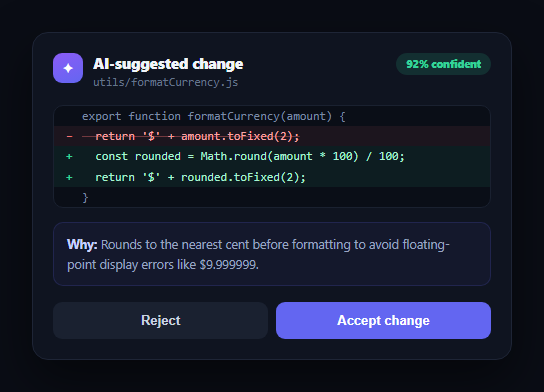
AI coding assistants and autonomous agents increasingly propose code changes rather than making them silently — and the review moment is where trust is won or lost. This snippet builds a self-contained diff review card in plain HTML, CSS, and vanilla JavaScript: a red/green line-by-line diff, a confidence badge, a plain-language explanation of *why* the change was made, and clear Accept/Reject actions.
A line-typed diff, not a diff library
Each line in the DIFF array is tagged del, add, or ctx (context). renderDiff() maps that into a gutter marker (−, +, or blank) and a colored background — red with strikethrough for removed lines, green for added lines, muted for unchanged context — the same visual language as GitHub and every major code review tool, without pulling in a diffing library. Because it's just data, generating this from a real diff (e.g. from Git or an LLM's structured output) is a straightforward mapping step.
A confidence badge that sets expectations
The 92% badge in the header signals the AI's own certainty about the suggestion, letting a reviewer calibrate how carefully to check it — a low-confidence change deserves more scrutiny than a high-confidence one. This is the same trust-calibration idea behind this library's AI confidence badge, applied specifically to code suggestions.
Explaining the "why," not just the "what"
Below the diff, a reason panel states in plain language why the change was suggested — here, a floating-point rounding bug — rather than leaving the reviewer to reverse-engineer intent from the code alone. This single addition is often what separates an AI suggestion a developer trusts enough to accept quickly from one they ignore.
Decisive actions with a visible outcome
Accepting or rejecting hides the action row and shows a clear result message, so the card visibly reflects the reviewer's decision rather than staying in an ambiguous "still pending" state. Pair it with an AI action approval card for non-code AI actions, or an AI review summary card to summarize a batch of decisions like this one.
Customizing it
Swap the hard-coded DIFF array for a real diff parsed from your AI backend's output, add a "view full file" expand action, or add a third "request changes" option that opens a comment field instead of a binary accept/reject.
Build with AI
Build, Understand, Optimize, and Extend It With AI
You don't have to work out the diff-rendering logic by hand. Paste this snippet's HTML, CSS, and JS into an AI coding assistant like Claude and ask it to explain how the DIFF array's type field drives both the gutter marker and the background color for each line, and why escaping the code text before inserting it as innerHTML matters when the diff content could come from an untrusted AI response. The same assistant can help optimize it — ask whether very long diffs should virtualize or truncate with a "show more" control, or whether syntax highlighting should be layered on top of the existing diff coloring. It's also useful for extending the card: ask it to add a third "request changes" action with a comment field, support multiple file diffs in one card with tabs, or animate the transition from pending to decided state. Treat the code less like a finished artifact and more like a starting point for a conversation.
Prompt to recreate it
Copy this into your AI assistant of choice to build the effect from scratch, or as a jumping-off point for your own variant:
Build an "AI diff review card" in plain HTML, CSS, and JavaScript with no framework or library.

Requirements:
- A card header showing an AI icon, a file name, and a confidence percentage badge indicating how certain the AI is about its suggested change.
- A code diff area driven entirely from a JavaScript array of line objects, each tagged as removed, added, or unchanged context — render removed lines with a red background, strikethrough text, and a minus-sign gutter marker; added lines with a green background, normal text, and a plus-sign gutter marker; and context lines muted with no gutter marker, all in a monospace font.
- HTML-escape the code text before inserting it into the page, since the diff content should be treated as untrusted data that could contain angle brackets or ampersands.
- A plain-language "reason" panel below the diff explaining in one or two sentences why the AI suggested this specific change, not just restating what changed.
- Accept and Reject buttons that, when clicked, hide the action buttons and reveal a clear result message confirming which decision was made (e.g. "Change applied" vs "Change discarded") — the card should visibly move from a pending state to a decided state.
- Use a dark theme with a violet accent for the header icon and confidence badge, monospace font for code, and system-ui font for everything else.
Want to tighten it up first? Run this prompt through the AI Prompt Studio to score it across 8 quality dimensions, catch anti-patterns, and tune the wording for Claude, ChatGPT, or Gemini before you paste it in.
Step by step
How to Use
- 1Paste HTML, CSS, and JSA diff review card renders with a red/green line diff and a confidence badge.
- 2Read the reason panelA plain-language explanation states why the AI suggested the change.
- 3Click Accept or RejectThe action buttons hide and a result message confirms the decision.
- 4Edit the DIFF arrayChange the del/add/ctx lines to show a different suggested change.
- 5Change the confidence valueUpdate the badge text and color to reflect the AI's certainty.
- 6Wire up real actionsReplace decide() with calls to apply or discard the change via your API.
Real-world uses
Common Use Cases
Got questions?
Frequently Asked Questions
The DIFF array already encodes each line's type (removed, added, or unchanged context) rather than computing a diff at render time. renderDiff() simply maps each type to a gutter marker and a CSS class. If you need to diff two arbitrary strings client-side, you would still want a small diffing algorithm — this snippet assumes the diff is already known, which is typically true when an AI backend returns a structured suggestion.
Confidence helps a reviewer calibrate scrutiny — a change the AI is 98% confident about (a straightforward bug fix) usually needs a quick glance, while a 60% confidence change (a larger refactor) deserves a closer read. Surfacing that number turns a binary "trust it or don't" into a more honest, gradated signal.
Replace the accept button's decide("accepted") call with a request to your backend or version control API that applies the underlying patch, then call decide("accepted") once that request succeeds (or decide with an error state if it fails).
Yes — extend DIFF to include a hunk header type (showing something like @@ -12,3 +12,4 @@) between groups of lines, and add a small amount of spacing or a divider between hunks in renderDiff(). The accept/reject actions can stay scoped to the whole suggestion or be split per hunk depending on your workflow.
Pass the diff lines and confidence as props, render them with a map/v-for/*ngFor, and lift the accept/reject decision to a callback prop so the parent can apply or discard the underlying patch. The escapeHtml step becomes unnecessary since JSX/templates escape text content by default.