You Might Also Like
Learn Coding Visually
Learn to code with interactive, live-preview playgrounds — HTML, CSS, JavaScript, React & more.
 HTML Playground42 lessons · Click-based · Live preview
 CSS PlaygroundLearn CSS with a live editor
 JavaScript Playground60 lessons · DOM · Async · Canvas
 React PlaygroundLearn React with a live code editor
 GSAP PlaygroundLearn GSAP animation interactively
 SVG Playground44 lessons · shapes · paths · animation
 SCSS Playground45 lessons · Sass modules · tokens
 Tailwind PlaygroundLearn Tailwind CSS with a live editor
 Bootstrap 5 Playground50 lessons · live preview
Vanilla-Tilt 3D Card Grid — Free Tilt.js Hover Effect Snippet
Vanilla-Tilt 3D Card Grid · Cards · Plain HTML, CSS & JS · Live preview
What's included
Features
About this UI Snippet
Vanilla-Tilt 3D Card Grid — Tilt, Glare & Gyroscope from One init() Call
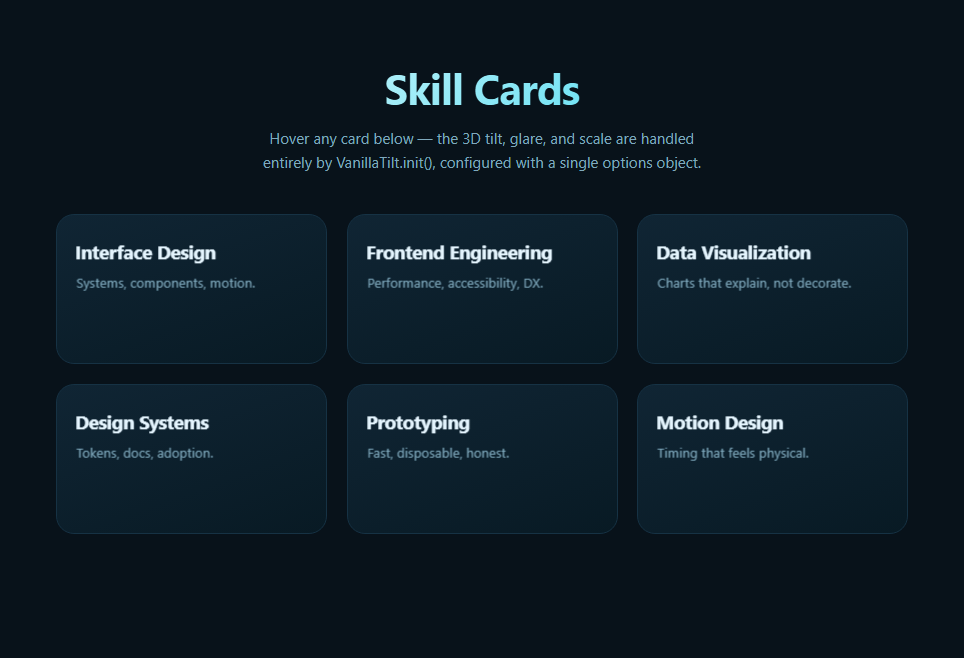
VanillaTilt.js packages the mouse-driven 3D tilt effect — the same family of interaction as 3D Card Tilt — into a small dependency-free library, so instead of writing your own mousemove handler and rotation math, you call VanillaTilt.init() once with a set of elements and an options object, and the library owns the pointer tracking, the transform application, and the reset-on-leave behavior for every card at once.
One init call, a whole grid
VanillaTilt.init(document.querySelectorAll('.vtg-card'), { ... }) attaches the tilt behavior to every card in a single call — there's no per-card event wiring in this file's JavaScript at all. Internally, VanillaTilt does the same kind of getBoundingClientRect()-based offset calculation as a hand-written tilt effect, but it also manages a shared render loop, easing, and cleanup so the same options object scales from one card to a hundred without any additional code.
The options that shape the feel
max: 14 caps rotation at 14 degrees; perspective: 900 sets how dramatic the 3D foreshortening looks (lower values feel more extreme); scale: 1.04 adds a subtle zoom while hovering; speed: 400 controls how quickly the card eases back to flat on mouse-leave. Each of these mirrors a concept from a hand-rolled tilt effect, just exposed as a named, documented option instead of inline math.
Built-in glare and gyroscope
Two features VanillaTilt adds beyond a basic hand-rolled tilt: glare: true overlays a moving highlight that tracks the cursor, simulating light reflecting off the card's surface (conceptually similar to the .glow element in 3D Card Tilt, but generated and positioned by the library); and gyroscope: true lets the same tilt respond to device orientation on supported mobile browsers, so the effect isn't purely a desktop-hover feature.
3D depth inside each card
The heading and paragraph inside each card use transform: translateZ(30px) and translateZ(20px) respectively, combined with transform-style: preserve-3d on the card. Because the card itself is being rotated in 3D by VanillaTilt, child elements pushed forward on the Z-axis appear to float above the card's surface as it tilts — a detail that reads as genuine depth rather than a flat rotated rectangle.
When to reach for a library versus hand-rolling it
If you need one distinctive tilt effect with full control over the easing curve or glow behavior, hand-writing it (as in 3D Card Tilt) keeps the code self-contained and dependency-free. If you need the same tilt applied consistently across many cards, with glare and gyroscope support out of the box, VanillaTilt's declarative options object is less code to maintain. Pair this grid with Feature Cards or a Tilt Glow Card hero for a showcase page.
Build with AI
Build, Understand, Optimize, and Extend It With AI
You don't have to read through VanillaTilt's source to understand its options. Paste this snippet's HTML, CSS, and JS into an AI coding assistant like Claude and ask it to explain exactly what each option in the VanillaTilt.init() call controls — max, speed, perspective, scale, glare, max-glare, and gyroscope — and how they interact to produce the overall feel of the tilt. The same assistant can help you tune it, for instance asking whether a max of 14 degrees is appropriate for a dense grid of many small cards versus a few large feature cards, or whether gyroscope: true could cause unwanted motion on a mobile page that also uses scroll-based effects. It's also useful for extending the grid: ask it to stagger each card's tilt initialization with a slight entrance delay, add a subtle border-glow color tied to a data attribute per card, or combine this tilt with a scroll-reveal entrance like Scroll Reveal Grid. Treat the code less like a finished artifact and more like a starting point for a conversation.
Prompt to recreate it
Copy this into your AI assistant of choice to build the effect from scratch, or as a jumping-off point for your own variant:
Build a grid of 3D-tilting cards in plain HTML, CSS, and JavaScript using the VanillaTilt.js library loaded from a CDN — the tilt, glare, and reset behavior must come entirely from the library's own options, with no manual mousemove/mouseleave handlers written by hand.

Requirements:
- A responsive CSS grid of at least six cards, each with a heading and short description, styled with a dark background and transform-style: preserve-3d so child elements can be pushed forward with translateZ to appear layered above the card surface.
- Every card element must be selectable by VanillaTilt (either via a data-tilt attribute or a shared class/selector) and initialized with a single VanillaTilt.init() call targeting all cards at once — do not attach any custom pointer event listeners.
- Configure the init call's options object with: a maximum tilt angle (max) around 10-15 degrees, a perspective distance, a reset speed in milliseconds, a slight hover scale greater than 1, glare enabled with a capped max-glare opacity, and gyroscope enabled for mobile device-tilt support.
- The heading and paragraph text inside each card should use translateZ to sit visually above the card's base plane once it's tilted, demonstrating genuine 3D depth rather than a flat rotated rectangle.
- Ensure the grid reflows responsively (for example with repeat(auto-fit, minmax(...))) so the tilt effect still looks correct at different card counts per row.
Want to tighten it up first? Run this prompt through the AI Prompt Studio to score it across 8 quality dimensions, catch anti-patterns, and tune the wording for Claude, ChatGPT, or Gemini before you paste it in.
Step by step
How to Use
- 1Add the VanillaTilt CDN scriptInclude vanilla-tilt.min.js from the CDN panel.
- 2Paste HTML, CSS, and JSA six-card skill grid renders, each marked with data-tilt.
- 3Hover a cardIt tilts toward the cursor with a moving glare highlight.
- 4Move the cursor across itRotation follows cursor position smoothly in real time.
- 5Move the cursor awayThe card eases back to flat over 400ms.
- 6Adjust the options objectChange max, speed, glare, or scale to retune the feel.
Real-world uses
Common Use Cases
Got questions?
Frequently Asked Questions
The mechanics are conceptually the same as a hand-written version like 3D Card Tilt — pointer offset from the element's center drives rotateX/rotateY — but VanillaTilt handles the event listeners, easing, glare rendering, and gyroscope support for every matched element automatically from one options object, so you don't maintain that logic yourself or repeat it per card.
When glare: true, VanillaTilt creates and positions its own overlay element inside each tilted card that brightens on the side facing the simulated light source (which tracks the cursor), fading in and out as the card rotates. max-glare caps how opaque that overlay can become, so you can keep the highlight subtle or make it a dominant visual element.
With gyroscope: true, VanillaTilt listens to the device orientation API on supported mobile browsers and drives the same rotateX/rotateY transform from the phone's physical tilt instead of a mouse position — so the effect degrades gracefully from mouse-hover on desktop to device-tilt on mobile rather than simply not working at all.
Because the card has transform-style: preserve-3d, child elements can be positioned along the Z-axis within the same 3D space the card itself is rotating in. Pushing the heading and paragraph forward with translateZ makes them appear to float slightly above the card's base surface as it tilts, reinforcing the depth illusion beyond what rotation alone would produce.
Install the vanilla-tilt npm package (or keep the CDN script), import it, and call VanillaTilt.init() inside a mount effect (useEffect, onMounted, or ngAfterViewInit) targeting refs to your card elements. Call VanillaTilt.destroy() on each element in the cleanup function to remove its listeners when the component unmounts, especially important in list views where cards are added and removed dynamically.