You Might Also Like
Learn Coding Visually
Learn to code with interactive, live-preview playgrounds — HTML, CSS, JavaScript, React & more.
 HTML Playground42 lessons · Click-based · Live preview
 CSS PlaygroundLearn CSS with a live editor
 JavaScript Playground60 lessons · DOM · Async · Canvas
 React PlaygroundLearn React with a live code editor
 GSAP PlaygroundLearn GSAP animation interactively
 SVG Playground44 lessons · shapes · paths · animation
 SCSS Playground45 lessons · Sass modules · tokens
 Tailwind PlaygroundLearn Tailwind CSS with a live editor
 Bootstrap 5 Playground50 lessons · live preview
Howler Audio Player + Visualizer — Free JS Audio Card Snippet
Howler Audio Player + Visualizer · Cards · Plain HTML, CSS & JS · Live preview
What's included
Features
About this UI Snippet
Howler Audio Player + Visualizer — Play/Seek Controls With a Simulated Bar Graph
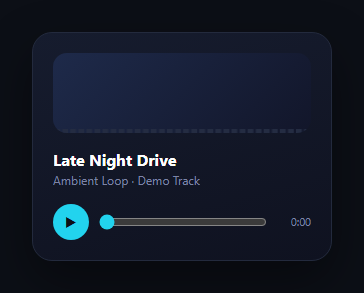
Howler.js wraps the Web Audio API (falling back to HTML5 audio automatically) behind a small, consistent API — new Howl({ src, loop }), .play(), .pause(), .seek(), .playing(), .duration() — so a play/pause/seek card doesn't need to hand-manage an <audio> element's quirks across browsers. This snippet pairs that real Howler-driven transport with a canvas bar visualizer, and is explicit about a limitation worth understanding: Howler doesn't expose raw frequency data out of the box, so the bars here are a convincing simulation driven by howl.playing(), not a true FFT analysis.
Real Howler transport controls
The play button toggles between howl.play()/howl.pause() and checks howl.playing() to decide which; the range input calls howl.seek() on change and reads howl.seek()/howl.duration() on every animation frame to keep the scrubber and time label in sync while playing. All of that is exactly how you'd wire Howler in production — nothing about the transport is simulated.
Why the visualizer is simulated, and how to make it real
Howler doesn't ship a frequency analyser; getting real bars requires reaching into the Web Audio graph yourself — creating an AnalyserNode, connecting the Howl instance's underlying audio node to it (howl._sounds[0]._node, an internal but commonly-used escape hatch), and reading analyser.getByteFrequencyData() each frame. Since this snippet ships without a guaranteed-available audio source (a hosted sample URL can go stale), the visualizer instead draws bars whose height follows a sine wave plus jitter, gated entirely by howl.playing() (or a demo flag if the audio fails to load) — visually convincing, honestly labeled in the comments as a stand-in, and never dependent on the audio actually decoding.
Never a blank or broken card
howl.on('loaderror', ...) sets a flag that keeps the play button and visualizer fully functional even if the sample URL is unreachable — clicking still toggles a demo playing state and animates the bars, so the card never looks broken even when the network does something unexpected. This is the same never-blank principle used for Rive interactive icon's fallback SVG.
Where this fits
For a genuine waveform rendered from decoded audio data rather than a live bar visualizer, see audio waveform visualizer; for a full player layout, see music player or podcast player; for recording rather than playback, see voice memo recorder.
Customizing it
Swap the src array for your own hosted file, and if you need a real spectrum instead of the sine simulation, add the AnalyserNode wiring described above and replace the bar-height calculation in draw() with analyser.getByteFrequencyData(dataArray) values.
Build with AI
Build, Understand, Optimize, and Extend It With AI
You don't have to take it on faith that this visualizer is simulated rather than real. Paste this snippet's HTML, CSS, and JS into an AI coding assistant like Claude and ask it to point out exactly which parts of the code are genuine Howler.js transport control (play, pause, seek, duration) versus the sine-wave-plus-jitter math in draw() that stands in for real frequency data, and why howl.playing() alone is enough to gate that simulation convincingly. The same assistant can help you upgrade it — asking how to create a Web Audio AnalyserNode from Howler's shared AudioContext, connect a specific Howl instance's internal audio node to it, and replace the sine calculation with real getByteFrequencyData() values. It's also useful for hardening the loaderror fallback further, for instance asking how to retry a failed load or surface a clearer error message to the user instead of silently falling into demo mode. Treat the code less like a finished artifact and more like a starting point for a conversation.
Prompt to recreate it
Copy this into your AI assistant of choice to build the effect from scratch, or as a jumping-off point for your own variant:
Build a compact audio player card with play/pause/seek controls using Howler.js (load it from a CDN), plus a canvas-based bar visualizer, being explicit in code and comments about which parts use real audio data and which are simulated.

Requirements:
- A card with a canvas element for the visualizer, a title/subtitle, a round play/pause button, a range input for seeking, and a time label.
- Instantiate a single Howl with an audio source URL and html5 playback mode, and wire the play button to call the instance's play/pause methods, checking its playing() method to decide which action to take and to update the button's icon.
- Wire the range input so dragging it updates a live time label immediately, and releasing it (on change, not input) calls the Howl instance's seek method to jump playback to that percentage of its duration.
- On every animation frame, if the audio is actively playing and the user isn't currently dragging the seek input, read the current playback position and duration to keep the seek bar's value and the time label in sync automatically.
- Attach a loaderror handler to the Howl instance so that if the audio source fails to load (which must not throw or leave the card visually broken), the play button and visualizer continue to function using an internal demo-playing boolean flag instead of the real playing() state.
- Implement the bar visualizer using a canvas 2D context, redrawing roughly 32 bars every animation frame with heights computed from a sine wave plus randomness whose amplitude is driven by whichever playing state is currently active (real or demo) — do not use the Web Audio API's AnalyserNode for this version, but add a code comment explaining that swapping in a real AnalyserNode connected to the Howl instance's internal audio node and reading getByteFrequencyData() is the production path for true frequency-based bars.
Want to tighten it up first? Run this prompt through the AI Prompt Studio to score it across 8 quality dimensions, catch anti-patterns, and tune the wording for Claude, ChatGPT, or Gemini before you paste it in.
Step by step
How to Use
- 1Add the Howler CDNInclude howler.min.js from the CDN panel.
- 2Paste HTML, CSS, and JSA player card with a canvas visualizer renders.
- 3Click playHowler starts playback; bars animate to the play state.
- 4Drag the seek barhowl.seek() jumps playback to that position.
- 5Swap the audio sourceReplace the src URL with your own hosted file.
- 6Add a real analyser (optional)Wire AnalyserNode for true FFT-driven bars.
Real-world uses
Common Use Cases
Got questions?
Frequently Asked Questions
No, and the code comments say so directly: Howler doesn't expose frequency data out of the box, so the bars are a sine-wave-plus-jitter simulation gated by howl.playing(). It's a visually convincing stand-in, not an FFT analysis. Getting real bars requires wiring a Web Audio AnalyserNode to the Howl instance's underlying audio node and reading getByteFrequencyData() each frame, which the about section explains how to add.
Howler's loaderror event sets a flag that keeps the card fully interactive: the play button still toggles a demo playing state and the visualizer still animates its simulated bars, so the player never looks broken or frozen. The seek bar and real transport calls are simply skipped while that flag is set, since there's no decoded audio to seek within.
The visualizer's draw() function runs every animation frame via requestAnimationFrame, and while audio is playing (and the user isn't actively dragging the slider) it reads howl.seek() and howl.duration(), converts that to a percentage, and writes it into the range input's value along with the formatted time label — the same loop that redraws the bars keeps the scrubber in sync at no extra cost.
It tells Howler to use an HTML5 Audio element instead of decoding the full file via Web Audio, which avoids some autoplay-policy and CORS-decoding restrictions for streamed or cross-origin sources, at the cost of losing access to Web Audio features like a real AnalyserNode for that sound. For a player where you plan to add real frequency analysis later, you'd typically drop html5: true and use the Web Audio path instead.
Create an AnalyserNode from Howler's shared AudioContext (Howler.ctx), connect the specific Howl instance's audio node (accessible internally via howl._sounds[0]._node, an unofficial but widely used path) into it, and each animation frame call analyser.getByteFrequencyData(dataArray) to get real per-frequency-bin amplitude values, then draw bars scaled from that array instead of the sine-wave calculation this snippet uses.