Source Code
<div class="ptr-card">
<div class="ptr-head">
<div class="ptr-progress"><div class="ptr-progress-bar" id="ptrProgressBar"></div></div>
<span class="ptr-step-label" id="ptrStepLabel">Question 1 of 3</span>
</div>
<div class="ptr-questions" id="ptrQuestions">
<div class="ptr-q" data-q="0">
<h3>How many people need access?</h3>
<div class="ptr-options">
<button type="button" class="ptr-opt" data-q="0" data-v="solo">Just me</button>
<button type="button" class="ptr-opt" data-q="0" data-v="small">2–9 people</button>
<button type="button" class="ptr-opt" data-q="0" data-v="large">10+ people</button>
</div>
</div>
<div class="ptr-q" data-q="1" hidden>
<h3>Do you need SSO or audit logs?</h3>
<div class="ptr-options">
<button type="button" class="ptr-opt" data-q="1" data-v="yes">Yes, required</button>
<button type="button" class="ptr-opt" data-q="1" data-v="no">No, not needed</button>
</div>
</div>
<div class="ptr-q" data-q="2" hidden>
<h3>How many projects per month?</h3>
<div class="ptr-options">
<button type="button" class="ptr-opt" data-q="2" data-v="low">Under 5</button>
<button type="button" class="ptr-opt" data-q="2" data-v="mid">5–30</button>
<button type="button" class="ptr-opt" data-q="2" data-v="high">30+</button>
</div>
</div>
</div>
<div class="ptr-result" id="ptrResult" hidden>
<span class="ptr-result-tag">Recommended for you</span>
<h3 id="ptrResultTier">Team</h3>
<p id="ptrResultPrice">$79/mo</p>
<p class="ptr-result-why" id="ptrResultWhy"></p>
<button type="button" class="ptr-restart" id="ptrRestart">Start over</button>
</div>
</div>*{box-sizing:border-box;margin:0;padding:0}
body{font-family:system-ui,-apple-system,sans-serif;background:#0a0d16;min-height:100vh;display:flex;align-items:center;justify-content:center;padding:24px}
.ptr-card{background:#111524;border:1px solid #1f2438;border-radius:18px;padding:26px;width:100%;max-width:400px;box-shadow:0 20px 50px rgba(0,0,0,.45)}
.ptr-head{margin-bottom:22px}
.ptr-progress{height:5px;border-radius:99px;background:#1c2136;overflow:hidden;margin-bottom:8px}
.ptr-progress-bar{height:100%;width:33.33%;background:linear-gradient(90deg,#38bdf8,#818cf8);border-radius:99px;transition:width .3s ease}
.ptr-step-label{font-size:11px;color:#6b7292;font-weight:600}
.ptr-q h3{font-size:17px;font-weight:700;color:#f0f2fb;margin-bottom:16px;line-height:1.35}
.ptr-options{display:flex;flex-direction:column;gap:9px}
.ptr-opt{font-family:inherit;text-align:left;background:#171c2e;border:1.5px solid #262c47;border-radius:11px;padding:13px 15px;color:#d3d6ec;font-size:13.5px;font-weight:600;cursor:pointer;transition:border-color .15s,background .15s,transform .1s}
.ptr-opt:hover{border-color:#4c5378;background:#1c2238}
.ptr-opt:active{transform:scale(.98)}
.ptr-result{text-align:center;padding-top:4px}
.ptr-result-tag{display:inline-block;font-size:10.5px;font-weight:800;letter-spacing:.06em;text-transform:uppercase;color:#38bdf8;background:rgba(56,189,248,.12);padding:5px 11px;border-radius:999px;margin-bottom:14px}
.ptr-result h3{font-size:26px;font-weight:800;color:#f0f2fb;margin-bottom:4px}
.ptr-result p{font-size:14px;color:#8890b8;margin-bottom:14px}
.ptr-result-why{font-size:12.5px;color:#9ba1c9;line-height:1.5;background:#171c2e;border:1px solid #262c47;border-radius:11px;padding:12px 14px;margin-bottom:18px !important}
.ptr-restart{font-family:inherit;width:100%;background:none;border:1.5px solid #262c47;border-radius:10px;padding:11px;color:#9ba1c9;font-size:12.5px;font-weight:700;cursor:pointer;transition:border-color .15s}
.ptr-restart:hover{border-color:#4c5378}var TOTAL_QUESTIONS = 3;
var answers = {};
var current = 0;
var progressBar = document.getElementById('ptrProgressBar');
var stepLabel = document.getElementById('ptrStepLabel');
var questionsWrap = document.getElementById('ptrQuestions');
var resultEl = document.getElementById('ptrResult');
var resultTierEl = document.getElementById('ptrResultTier');
var resultPriceEl = document.getElementById('ptrResultPrice');
var resultWhyEl = document.getElementById('ptrResultWhy');
var restartBtn = document.getElementById('ptrRestart');
// Real decision logic: maps the three answers to a specific tier + reason.
function recommend(a) {
if (a.people === 'large' || a.sso === 'yes') {
return {
tier: 'Enterprise',
price: 'Custom pricing',
why: a.sso === 'yes'
? 'SSO and audit logs are Enterprise-only features, regardless of team size.'
: 'Teams of 10 or more get volume pricing, SSO, and priority support on Enterprise.'
};
}
if (a.people === 'small' || a.projects === 'high') {
return {
tier: 'Team',
price: '$79/mo',
why: a.projects === 'high'
? '30+ projects a month needs Team\'s higher usage limits and collaboration tools.'
: 'A 2\u20139 person team fits Team\'s shared workspace and seat limits.'
};
}
if (a.projects === 'mid') {
return {
tier: 'Pro',
price: '$29/mo',
why: 'Solo use with 5\u201330 projects a month is exactly what Pro\'s limits are built for.'
};
}
return {
tier: 'Starter',
price: '$9/mo',
why: 'Solo use with under 5 projects a month fits comfortably inside Starter.'
};
}
function updateProgress() {
var pct = Math.min(current, TOTAL_QUESTIONS) / TOTAL_QUESTIONS * 100;
progressBar.style.width = pct + '%';
stepLabel.textContent = current < TOTAL_QUESTIONS
? 'Question ' + (current + 1) + ' of ' + TOTAL_QUESTIONS
: 'Done';
}
function showQuestion(index) {
questionsWrap.querySelectorAll('.ptr-q').forEach(function (q) {
q.hidden = Number(q.dataset.q) !== index;
});
}
function finish() {
var result = recommend(answers);
questionsWrap.hidden = true;
resultEl.hidden = false;
resultTierEl.textContent = result.tier;
resultPriceEl.textContent = result.price;
resultWhyEl.textContent = result.why;
}
questionsWrap.querySelectorAll('.ptr-opt').forEach(function (btn) {
btn.addEventListener('click', function () {
var q = Number(btn.dataset.q);
var v = btn.dataset.v;
if (q === 0) answers.people = v;
if (q === 1) answers.sso = v;
if (q === 2) answers.projects = v;
current = q + 1;
updateProgress();
if (current < TOTAL_QUESTIONS) {
showQuestion(current);
} else {
finish();
}
});
});
restartBtn.addEventListener('click', function () {
answers = {};
current = 0;
questionsWrap.hidden = false;
resultEl.hidden = true;
showQuestion(0);
updateProgress();
});
showQuestion(0);
updateProgress();Learn Coding Visually
Learn to code with interactive, live-preview playgrounds — HTML, CSS, JavaScript, React & more.
 HTML Playground42 lessons · Click-based · Live preview
 CSS PlaygroundLearn CSS with a live editor
 JavaScript Playground60 lessons · DOM · Async · Canvas
 React PlaygroundLearn React with a live code editor
 GSAP PlaygroundLearn GSAP animation interactively
 SVG Playground44 lessons · shapes · paths · animation
 SCSS Playground45 lessons · Sass modules · tokens
 Tailwind PlaygroundLearn Tailwind CSS with a live editor
 Bootstrap 5 Playground50 lessons · live preview
Pricing Tier Recommender Quiz — Free 3-Question Plan Picker (HTML/CSS/JS)
Pricing Tier Recommender Quiz · Pricing · Plain HTML, CSS & JS · Live preview
What's included
Features
About this UI Snippet
Pricing Tier Recommender Quiz — Recommend a Plan From Real Answers, Not a Guess
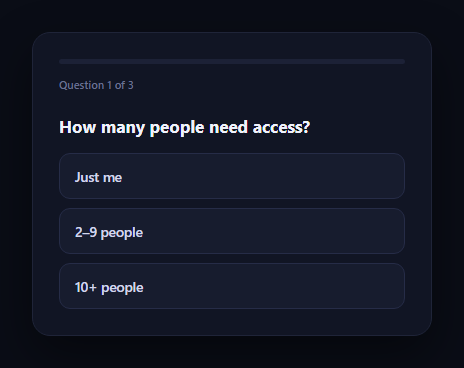
A pricing page with four tiers asks visitors to self-diagnose which one fits — a task most people skip. This snippet replaces that guesswork with a three-question quiz that walks someone through team size, whether they need SSO or audit logs, and monthly project volume, then recommends one specific tier from a real decision function evaluated over their answers, not a random pick or a static default.
A pure decision function, not a lookup table
recommend(a) is a plain function that takes the collected { people, sso, projects } answers and returns a tier through ordered conditional checks: any SSO requirement or a 10+ person team forces Enterprise regardless of other answers; a 2–9 person team or 30+ projects a month lands on Team; mid-volume solo use lands on Pro; everything else falls through to Starter. Because it's a function over real input, the same three answers always produce the same tier — there's no randomness and no answer combination that falls through without a result.
One question at a time, with progress
Only one question is visible at once (.ptr-q[hidden] toggled by index), with a progress bar and a "Question X of 3" label that update as current advances. This keeps the quiz feeling short and sequential rather than presenting all three questions in a wall at once — the pattern that keeps completion rates high on real onboarding quizzes.
A reasoned result, not just a name
The result screen doesn't just name a tier — resultWhyEl states the specific reason, built inside recommend() itself, referencing whichever answer actually drove the decision ("SSO and audit logs are Enterprise-only" vs. "a 2–9 person team fits Team's shared workspace"). Explaining the *why* is what makes a recommendation feel earned rather than arbitrary, and it doubles as a preview of the tier's actual selling points.
Answers accumulate in one object
Every click writes into a single answers object keyed by question (people, sso, projects), so recommend() always evaluates the full, current answer set — restarting via the button simply resets that object and the step index, with no leftover state from a previous run.
Where it fits
Place it above a pricing card grid so the recommended tier can be highlighted, follow it with a plan selector to confirm the choice, or route an Enterprise result straight to an enterprise pricing contact flow.
Customizing it
Add more questions, change the tier thresholds, or have recommend() return a confidence score alongside the tier so borderline cases can show a runner-up option too.
Build with AI
Build, Understand, Optimize, and Extend It With AI
You don't have to design the decision logic from scratch. Paste this snippet's HTML, CSS, and JS into an AI coding assistant like Claude and ask it to explain exactly how recommend() uses ordered conditional checks over the collected answers object to guarantee every possible combination of answers resolves to exactly one tier, with no gaps and no randomness — and why checking SSO need before team size (rather than after) changes which tier a small team that needs SSO ends up in. The same assistant can help you extend it: ask how to add a fourth question and update the decision function's branches to account for it, how to return a confidence score or runner-up tier for borderline answer combinations, or how to persist the answers in the URL so a shared link can pre-fill the quiz. Treat the code less like a finished artifact and more like a starting point for a conversation.
Prompt to recreate it
Copy this into your AI assistant of choice to build the effect from scratch, or as a jumping-off point for your own variant:
Build a "pricing tier recommender" quiz in plain HTML, CSS, and JavaScript with no framework or library.

Requirements:
- Present exactly three multiple-choice questions one at a time (only the current question visible, others hidden), each with 2-3 button options, plus a progress bar and a "Question X of N" label that both update as the user advances.
- Collect each answer into a single shared state object keyed by question topic (e.g. team size, a required-feature yes/no, and a usage-volume question) as the user clicks through.
- After the last question, call a pure decision function that takes the full answers object and returns a specific recommended tier name, its price, and a short explanation of why — using real ordered conditional logic over the actual answer values (not Math.random, not always defaulting to the same tier, and not leaving any answer combination unhandled).
- Make sure the decision function is exhaustive: write out by hand (in a comment or by testing) every realistic combination of answers and confirm each one resolves to exactly one of your tiers, with a final unconditional fallback case as a safety net.
- Make the "why" explanation reference the specific answer that actually drove the recommendation (e.g. name the feature requirement or the team size that triggered that tier), not a generic message that's the same regardless of which path was taken.
- Add a restart control that clears the answers object and returns to the first question with no leftover state from the previous run.
Want to tighten it up first? Run this prompt through the AI Prompt Studio to score it across 8 quality dimensions, catch anti-patterns, and tune the wording for Claude, ChatGPT, or Gemini before you paste it in.
Step by step
How to Use
- 1Paste HTML, CSS, and JSQuestion 1 of 3 renders with a progress bar at 0%.
- 2Answer each questionThe progress bar and step label advance after each click.
- 3See the recommendationrecommend() evaluates all three answers into one specific tier.
- 4Read the reasoningThe result explains which answer drove the recommendation.
- 5Try different pathsRestart and answer differently — the tier changes accordingly.
- 6Wire up real tiersEdit recommend() with your own thresholds and plan names.
Real-world uses
Common Use Cases
Got questions?
Frequently Asked Questions
It's a pure function, recommend(a), that evaluates the three collected answers through ordered conditional checks — no randomness anywhere. Any SSO requirement or a 10+ person team always forces Enterprise; a 2\u20139 person team or 30+ monthly projects always lands on Team; mid-volume solo use always lands on Pro; everything else falls through to Starter. The same answers always produce the same result.
SSO is checked with priority — a.sso === 'yes' recommends Enterprise regardless of team size, because SSO and audit logs are gated to that tier in this quiz's logic. The why text explicitly states that reason rather than the team-size reason, so the explanation always matches the answer that actually mattered.
Yes. The conditional chain in recommend() is exhaustive: Enterprise catches large teams or SSO need, Team catches small teams or high project volume, Pro catches mid volume, and the final return is an unconditional Starter fallback. There's no answer combination that falls through without producing a tier.
A bare tier name feels arbitrary; stating the specific reason (built inside recommend() itself, referencing whichever answer triggered that branch) makes the recommendation feel earned and gives a preview of that tier's actual value, which is more persuasive than a plan name alone.
Move answers and current into component state, and call the same pure recommend(answers) function once the last question is answered — it needs no DOM access and returns a plain {tier, price, why} object you render directly. The step-progression and restart logic map to standard state updates.