You Might Also Like
Learn Coding Visually
Learn to code with interactive, live-preview playgrounds — HTML, CSS, JavaScript, React & more.
 HTML Playground42 lessons · Click-based · Live preview
 CSS PlaygroundLearn CSS with a live editor
 JavaScript Playground60 lessons · DOM · Async · Canvas
 React PlaygroundLearn React with a live code editor
 GSAP PlaygroundLearn GSAP animation interactively
 SVG Playground44 lessons · shapes · paths · animation
 SCSS Playground45 lessons · Sass modules · tokens
 Tailwind PlaygroundLearn Tailwind CSS with a live editor
 Bootstrap 5 Playground50 lessons · live preview
Audio Buffering Visualizer — Equalizer Bars for Audio Loading States
Audio Buffering Visualizer · Loaders · Plain HTML, CSS & JS · Live preview
What's included
Features
About this UI Snippet
Audio Buffering Visualizer — A Waiting Pattern That Resolves Into Playback
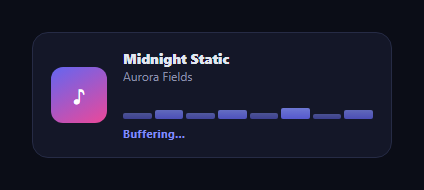
Audio players need a loading state that fits their context — an equalizer-style bar visual rather than a generic spinner, since bars already read as "sound" to anyone who's seen a music app. This snippet gives an audio player two distinct bar-animation states: a gentle, irregular "buffering" pattern while audio loads, and a confident, fuller-swing "playing" pattern once it's ready — deliberately different motions, not the same animation just recolored.
Two states, two different keyframes
Buffering uses abWait, a shallow oscillation between 20% and 45% height with each of the 8 bars given its own animation-delay (0.03s–0.22s) and its own animation-duration (0.9s–1.4s) — genuinely irregular per-bar timing rather than an evenly-staggered sequence, so the bars pulse somewhat chaotically, like they're waiting rather than performing. Once ready, abReady's abPlay keyframe swings each bar between 25% and a full 100% height on a snappier, uniform 0.7s cycle with tighter, evenly-spaced delays — a confident, rhythmic equalizer motion that reads as active music, not uncertainty.
Why irregular timing matters for "waiting"
Uniform timing (every bar identical except for a linear stagger) reads as controlled and purposeful — appropriate for playback, wrong for buffering. Giving buffering bars mismatched durations and delays that don't follow a clean sequence is what makes the pattern feel tentative and provisional, distinct from the wave loader's clean, evenly-staggered wave or the dots loader's wave variant — those communicate general-purpose "loading," while this specifically communicates "audio, buffering."
A real state transition, not a fixed animation
JavaScript adds the .ab-buffering class on load and, after a timeout standing in for the audio actually having buffered enough to play, swaps it for .ab-ready while updating the status label from "Buffering…" to "Now playing." In a real player you'd trigger that swap from the media element's own canplaythrough or waiting/playing events rather than a fixed delay.
Audio-specific, not video-shaped
Unlike a video buffering overlay (a full-frame spinner over the video canvas), this is built for an audio player's compact, persistent UI — album art, track/artist text, and inline equalizer bars that fit a mini-player or now-playing bar. Pair it with a music player shell or an audio waveform visualizer for a real, signal-driven playing state.
Build with AI
Build, Understand, Optimize, and Extend It With AI
Instead of eyeballing what makes the two bar patterns feel different, paste this snippet's HTML, CSS, and JS into an AI coding assistant like Claude and ask it to explain exactly how giving each buffering bar a mismatched animation-duration and animation-delay (rather than a clean linear stagger) produces a tentative "waiting" read, compared to the ready state's faster, uniform, taller-swinging equalizer motion — and why that distinction in motion character matters more than just changing color between the two states. The same assistant can help optimize it, for example checking whether the fixed 2.6-second setTimeout should be replaced with real HTMLMediaElement event listeners (waiting, canplaythrough, playing) for accurate state tracking. It's also useful for extending the pattern: ask it to drive the bar heights from the audio element's actual buffered TimeRanges for a real, non-decorative buffering percentage, add a third "error/stalled" bar pattern, or make the bar count and player layout configurable. Treat the code less like a finished artifact and more like a starting point for a conversation.
Prompt to recreate it
Copy this into your AI assistant of choice to build the effect from scratch, or as a jumping-off point for your own variant:
Build an audio player buffering visualizer in plain HTML, CSS, and JavaScript with two visually and mechanically distinct equalizer-bar animation states — no library, no video context.

Requirements:
- A compact music-player-style layout: album art placeholder, track name, artist name, a row of 8 vertical equalizer bars, and a status text label.
- A "buffering" bar animation state where each of the 8 bars oscillates in a shallow height range (roughly 20% to 45% of the bar's max height) with DELIBERATELY MISMATCHED per-bar animation-duration and animation-delay values (not a clean evenly-spaced linear stagger) so the motion reads as irregular and tentative, like the bars are waiting rather than performing.
- A separate "ready/playing" bar animation state with its own distinct keyframe: a taller height swing (roughly 25% to 100%), a faster and uniform animation duration across all bars, and evenly-spaced delays, so it reads as confident, rhythmic equalizer motion clearly distinguishable from the buffering state, not just the same animation sped up or recolored.
- JavaScript that starts the player in the buffering state, then after a delay (structured so a real HTMLMediaElement's waiting/canplaythrough/playing events could trigger this instead) swaps to the ready state and updates the status label text and its styling to reflect the transition.
- Style it specifically as an audio player UI (album art, track/artist metadata) rather than a video-buffering overlay, so it is clearly built for an audio-specific context distinct from a video loading spinner.
Want to tighten it up first? Run this prompt through the AI Prompt Studio to score it across 8 quality dimensions, catch anti-patterns, and tune the wording for Claude, ChatGPT, or Gemini before you paste it in.
Step by step
How to Use
- 1Paste HTML, CSS, and JSA mini music player renders with bars pulsing in the buffering pattern.
- 2Watch the buffering barsNotice each bar has its own timing — a gentle, irregular "waiting" motion.
- 3Wait for the transitionAfter ~2.6s the status changes to "Now playing" and the bars switch patterns.
- 4Compare the two motionsThe ready state swings taller and faster with tighter, uniform timing.
- 5Wire to real media eventsTrigger the class swap from your <audio> element's waiting/canplaythrough/playing events.
- 6Restyle the playerChange the album art gradient, bar colors, or bar count.
Real-world uses
Common Use Cases
Got questions?
Frequently Asked Questions
They use separate CSS keyframes: buffering (abWait) oscillates each bar in a shallow 20-45% height range with mismatched, non-sequential per-bar durations and delays, giving it an irregular, tentative feel. Playing (abPlay) swings bars in a much taller 25-100% range on a faster, uniform 0.7s cycle with evenly-spaced delays, reading as confident, rhythmic motion. They are genuinely different animations, not the same keyframe recolored or resized.
Uniform, evenly-staggered motion reads as controlled and purposeful, which is the wrong signal for "still loading, please wait." Giving each buffering bar its own slightly mismatched duration and delay — rather than a clean linear stagger — makes the motion feel provisional and uncertain, distinguishing it from a confident playback visualizer or a generic wave loader.
Listen for your <audio> or <video> element's waiting event to add the buffering class, and its canplaythrough or playing event to swap to the ready class — replace the fixed setTimeout with these real event listeners so the visual accurately reflects actual buffering state rather than a guessed delay.
A video buffering indicator is typically a full-frame spinner overlaid on the video canvas itself, since video has a large visual area to darken and overlay. This snippet is built for an audio player's compact, always-visible mini-UI — album art plus inline equalizer bars — which stays visible in a persistent now-playing bar rather than overlaying full-screen content.
Track a status state ('buffering' or 'ready') and derive the bars container's class from it, updating it inside your audio element's event handlers (onWaiting, onCanPlayThrough/onPlaying in React's <audio> props, or the equivalent native event listeners in Vue/Angular). The keyframes and per-bar delay/duration CSS need no changes.