You Might Also Like
Learn Coding Visually
Learn to code with interactive, live-preview playgrounds — HTML, CSS, JavaScript, React & more.
 HTML Playground42 lessons · Click-based · Live preview
 CSS PlaygroundLearn CSS with a live editor
 JavaScript Playground60 lessons · DOM · Async · Canvas
 React PlaygroundLearn React with a live code editor
 GSAP PlaygroundLearn GSAP animation interactively
 SVG Playground44 lessons · shapes · paths · animation
 SCSS Playground45 lessons · Sass modules · tokens
 Tailwind PlaygroundLearn Tailwind CSS with a live editor
 Bootstrap 5 Playground50 lessons · live preview
Progress Bar with Milestone Labels — Position-Aware Loading Bar in HTML CSS JS
Progress Bar with Milestone Labels · Loaders · Plain HTML, CSS & JS · Live preview
What's included
Features
About this UI Snippet
Progress Bar with Milestone Labels — Labels That React to Real Progress, Not a Timer
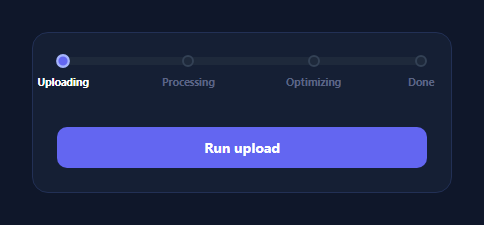
A milestone progress bar labels specific points along a bar — "Uploading," "Processing," "Optimizing," "Done" — so users know not just how much is done, but what's happening at each stage. The part that's easy to get wrong is making those labels light up on a fixed animation schedule instead of the bar's actual value; this snippet computes every milestone's state from a real comparison against the current progress percentage, so it stays correct even if progress speeds up, stalls, or jumps.
Milestones as data, not fixed CSS positions
A MILESTONES array holds { pct, label } pairs — a position along the 0–100 track and its label. Both the tick dot and the text label for each milestone are generated from this array and placed with style.left = pct + '%', so the milestone positions live in one place and the track adapts automatically if you add, remove, or reposition a milestone.
Real position-vs-progress comparison
The core logic is applyProgress(progress), called every time the real progress value changes: for every milestone, it checks progress >= pct and toggles a mp-hit class accordingly — a live comparison, recomputed from the actual current value, not a setTimeout per milestone assuming a fixed pace. Crucially, this means if you drive progress from a real upload's loaded/total, a milestone lights up the instant the bar visually reaches it, correctly handling any pace — fast, slow, uneven, or paused.
A "current" stage, not just done/not-done
Beyond the binary hit/not-hit state, the code also computes which milestone is the *current* one — the highest milestone whose position is at or below the current progress, as long as 100% hasn't been reached — and highlights just that label differently (mp-current, shown in full white). That third state is what lets a user glance at the bar and know not just "which stages are complete" but "which stage is happening right now," which two-state hit/miss labeling can't convey.
Driving it from anything
The demo simulates progress with a random-increment setInterval, but applyProgress(progress) is the only function that needs calling — wire it to a real upload's progress event, a multi-step task's completion count, or any 0–100 value, and the fill width, tick states, and label states all stay correct automatically. Pair it with an upload progress bar for the raw percentage, or a segmented progress bar for a discrete-step alternative.
Build with AI
Build, Understand, Optimize, and Extend It With AI
Rather than assuming the milestone highlighting is timed, paste this snippet's HTML, CSS, and JS into an AI coding assistant like Claude and ask it to explain exactly how applyProgress() derives every milestone's hit state from a live progress >= pct comparison rather than a per-milestone animation delay, and how the separate "current milestone" calculation (the highest hit milestone below 100%) differs from simple hit/miss binary state. The same assistant can help optimize it — for instance asking whether recalculating every milestone's state on every progress update is efficient enough for very frequent progress events (like a fast-firing upload progress handler), or whether it should be throttled. It's also useful for extending the pattern: ask it to support milestones with a range instead of a single point (a start and end percentage for a named phase), add a tooltip showing estimated time per stage, or animate the current milestone's label with a subtle pulse to draw more attention to it. Treat the code less like a finished artifact and more like a starting point for a conversation.
Prompt to recreate it
Copy this into your AI assistant of choice to build the effect from scratch, or as a jumping-off point for your own variant:
Build a progress bar with labeled milestones in plain HTML, CSS, and JavaScript where each milestone's visual state is computed from a real comparison against the current progress value — no library, no fixed per-milestone timing.

Requirements:
- Define milestones as a data array of objects, each with a position percentage (0-100) along the bar and a text label (e.g. Uploading at 0, Processing at 35, Optimizing at 70, Done at 100). Generate both the tick markers on the bar and the text labels below it from this single array, positioned absolutely at their pct value — do not hard-code the tick/label positions in CSS.
- Write one function that takes the current real progress value (0-100) and: sets the fill bar's width to that value, and for every milestone in the array, determines whether it has been "hit" purely by checking if progress is greater than or equal to that milestone's own position — this must be a live comparison recomputed on every call, not a CSS animation or JavaScript timeout tied to elapsed time.
- Separately compute which single milestone is the "current" one — defined as the highest-position milestone that has been hit, as long as progress has not yet reached 100 — and apply a visually distinct style to just that one label (different from both the hit style and the not-yet-reached style), so there are three distinguishable states: upcoming, hit/completed, and currently active.
- Demonstrate the logic is correct regardless of pace by driving progress from a demo button that increments it by a randomized, uneven amount on an interval (not a fixed linear increment), and confirm the milestones activate at the correct moments regardless of how unevenly progress advances.
- Give the fill bar a smooth CSS transition on width, and give each tick marker a smooth transition on its own hit-state styling (a subtle scale and color change) so activation feels responsive rather than instant and jarring.
Want to tighten it up first? Run this prompt through the AI Prompt Studio to score it across 8 quality dimensions, catch anti-patterns, and tune the wording for Claude, ChatGPT, or Gemini before you paste it in.
Step by step
How to Use
- 1Paste HTML, CSS, and JSA bar with 4 labeled milestones renders at 0%.
- 2Click "Run upload"Progress climbs at an uneven pace; milestones light up as the bar reaches them.
- 3Watch the current stageThe active milestone's label turns fully white while progress is between it and the next.
- 4Edit MILESTONESAdd, remove, or reposition { pct, label } entries — the bar adapts automatically.
- 5Drive it from real dataCall applyProgress(yourRealPercentage) from your actual task's progress updates.
- 6Restyle itChange the tick size, fill gradient, or label typography.
Real-world uses
Common Use Cases
Got questions?
Frequently Asked Questions
Every call to applyProgress(progress) compares the real current progress value against each milestone's own pct position with progress >= pct, and toggles that milestone's hit class based purely on that comparison. There is no timer or animation schedule per milestone — the state is recomputed live from the actual value every time progress changes.
Nothing breaks, because milestone state is derived fresh from the current value on every call rather than assuming a fixed pace. If progress stalls at 50%, the "Processing" milestone (at 35%) stays lit and "Optimizing" (at 70%) stays unlit correctly for as long as it stalls; if progress later jumps straight to 90%, both intermediate milestones correctly activate at once.
Hit just means progress has reached or passed that milestone's position — multiple milestones can be hit simultaneously. Current is the single highest milestone that's been hit but where progress hasn't yet reached 100%, representing "the stage happening right now" rather than "the stages already completed," and is highlighted with a distinct, brighter style.
Edit the MILESTONES array — each entry is just { pct, label }. Positions don't need to be evenly spaced; put them wherever your real process's stages actually occur (e.g. a slow initial stage might justify placing its milestone further along than a naive even split). The tick and label rendering, plus all the hit/current logic, adapt automatically.
Keep MILESTONES as static config and hold progress in component state. Derive each milestone's hit/current class from progress >= milestone.pct directly in the render (a computed property in Vue, a derived value in React), rather than porting the imperative classList.toggle calls — the comparison logic is the same, just expressed declaratively.