You Might Also Like
Learn Coding Visually
Learn to code with interactive, live-preview playgrounds — HTML, CSS, JavaScript, React & more.
 HTML Playground42 lessons · Click-based · Live preview
 CSS PlaygroundLearn CSS with a live editor
 JavaScript Playground60 lessons · DOM · Async · Canvas
 React PlaygroundLearn React with a live code editor
 GSAP PlaygroundLearn GSAP animation interactively
 SVG Playground44 lessons · shapes · paths · animation
 SCSS Playground45 lessons · Sass modules · tokens
 Tailwind PlaygroundLearn Tailwind CSS with a live editor
 Bootstrap 5 Playground50 lessons · live preview
Invoice Line Items Table — Free Editable Billing Table (HTML/CSS/JS)
Invoice Line Items Table · Tables · Plain HTML, CSS & JS · Live preview
What's included
Features
About this UI Snippet
Invoice Line Items Table — Live-Recalculating Editable Billing Table
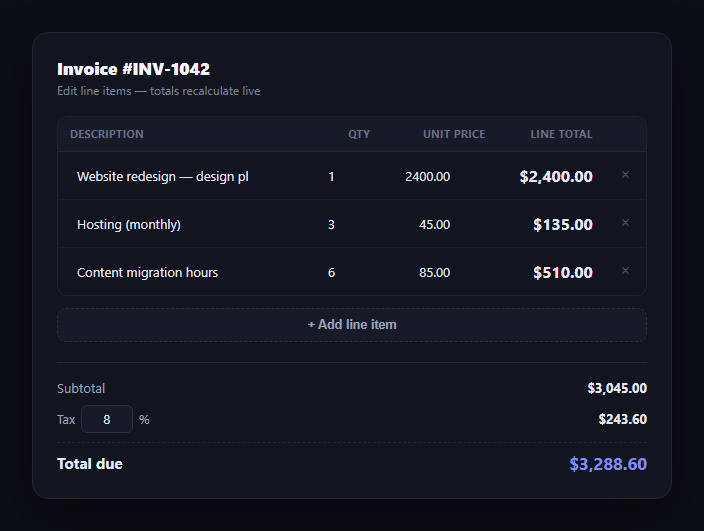
Billing and invoicing screens all share the same core interaction: a table of line items where quantity times unit price gives a line total, and every edit needs to ripple through to the subtotal, the tax, and the grand total instantly. This snippet builds that editable invoice table in plain HTML, CSS, and vanilla JavaScript — no framework, no library, just an items array and a render function.
Data-driven rows, not DOM patching
Every line item lives in an items array of { id, desc, qty, price } objects. Adding a row pushes to the array and calls render(); deleting filters it out and re-renders. Each row gets a stable id (from an incrementing sequence, not its array index) stamped as a data-id attribute, so edits and deletes always target the correct underlying item even after other rows have been added or removed.
Two recalculation paths, same result
Typing in an existing row's quantity or price field updates that one item's line total directly (a cheap, targeted DOM write) and then calls renderTotals() — it doesn't re-render the whole table on every keystroke, which would steal focus from the input you're typing in. Adding or removing a row, where the whole list shape changes, calls the full render() instead. Both paths end at the same renderTotals() function, so the totals are always consistent no matter which path triggered them.
Live tax math
The tax rate is itself an editable input, not a fixed percentage. renderTotals() sums every line item's qty * price into a subtotal, reads the current tax rate, computes tax as subtotal * (rate / 100), and total as subtotal plus tax — all three recompute on every relevant input event, so changing the tax rate from 8% to 10% updates the total immediately without a save step.
Guardable inputs
Quantity and price both clamp to a minimum of zero and fall back to zero on invalid input (Number(value) || 0), so a cleared or malformed field can't produce NaN propagating through the totals. This is the same defensive pattern worth using in any editable numeric table.
Where it fits
Pair it with a proration preview card for subscription upgrades, an invoice preview for the final read-only bill, or a checkout form for the payment step. It's also a clean reference alongside a general-purpose editable table for any grid that needs computed columns rather than plain data entry.
Build with AI
Build, Understand, Optimize, and Extend It With AI
You don't have to work out the recalculation logic here on your own. Paste this snippet's HTML, CSS, and JS into an AI coding assistant like Claude and ask it to explain why the table uses a stable id per row instead of array index to match input events back to the correct item, and why editing an existing cell patches just that row's line-total text instead of calling the full render() (hint: focus). The same assistant can help you harden it — ask whether the Number(value) || 0 fallback correctly handles every edge case, including a user pasting a formatted number like "1,200", or whether the delete button needs a confirmation step for rows with a large line total. It's also useful for extending the pattern: ask it to add a discount-percentage column, support multiple tax rates per line item, or persist edits to a backend on blur instead of only in memory. Treat the code less like a finished artifact and more like a starting point for a conversation.
Prompt to recreate it
Copy this into your AI assistant of choice to build the effect from scratch, or as a jumping-off point for your own variant:
Build an editable invoice line-items table in plain HTML, CSS, and JavaScript with no framework or library.

Requirements:
- Store line items in a plain array of objects, each with a stable id (from an incrementing counter, not the array index), a description, a quantity, and a unit price.
- Render one table row per item with editable description (text), quantity (number), and unit price (number) inputs, plus a read-only computed line-total cell (quantity × unit price) and a delete button.
- When a quantity or price input changes, update only that row's line-total cell directly (don't re-render the whole table, which would lose input focus) and then recompute the totals section.
- When a row is added or deleted, the item list changes shape, so re-render the full table body from the array, then recompute totals.
- Match every input and delete event back to its item by the row's stable id (read from a data attribute), never by array position, so edits are correct even after other rows have been added or removed.
- Add a totals section below the table with a subtotal (sum of every line total), an editable tax-rate percentage input, a computed tax amount (subtotal × rate/100), and a total due (subtotal + tax) — all of it must recompute live whenever any line item or the tax rate changes.
- Clamp quantity and price to a minimum of zero and fall back to zero for invalid or empty input so the totals can never show NaN.
- Format every money value with thousands separators and exactly two decimal places.
Want to tighten it up first? Run this prompt through the AI Prompt Studio to score it across 8 quality dimensions, catch anti-patterns, and tune the wording for Claude, ChatGPT, or Gemini before you paste it in.
Step by step
How to Use
- 1Paste HTML, CSS, and JSA three-line invoice renders with totals already calculated.
- 2Edit a quantity or priceThat row's line total and every total below update instantly.
- 3Add a line itemClick "+ Add line item" for a new zero-value row ready to edit.
- 4Delete a rowClick the × button; totals recalculate from the remaining rows.
- 5Change the tax rateEdit the % field in the totals section to see tax and total react live.
- 6Wire up real dataPopulate the items array from your invoicing API and submit it on save.
Real-world uses
Common Use Cases
Got questions?
Frequently Asked Questions
Each row's quantity and price live in an items array, and an input listener on the table body updates the matching item (matched by a stable id, not row position) and writes that row's new qty * price directly to its line-total cell, then calls renderTotals() to update the subtotal, tax, and total below.
If rows are added or deleted, array indices shift, but a stable id (assigned once from an incrementing counter) always points to the correct item even after other rows change. Matching edits by id instead of index avoids a class of bugs where an edit silently applies to the wrong row.
Tax rate is a plain percentage input. renderTotals() sums every line item's qty times price into a subtotal, then computes tax as subtotal * (rate / 100), and total as subtotal + tax. All three values recompute on every input event, whether it's a line-item edit or a tax-rate change.
Quantity and price inputs run through Number(value) || 0 and are clamped to a minimum of zero, so an empty field, a stray letter, or a negative number can never produce NaN or a negative total propagating through the math.
Move the items array into component state (useState in React, a reactive ref in Vue) and derive subtotal, tax, and total with useMemo or a computed property. Bind each input's onChange/@input to update the matching item by id, and let the framework's reactivity replace the manual innerHTML re-render.