You Might Also Like
Learn Coding Visually
Learn to code with interactive, live-preview playgrounds — HTML, CSS, JavaScript, React & more.
 HTML Playground42 lessons · Click-based · Live preview
 CSS PlaygroundLearn CSS with a live editor
 JavaScript Playground60 lessons · DOM · Async · Canvas
 React PlaygroundLearn React with a live code editor
 GSAP PlaygroundLearn GSAP animation interactively
 SVG Playground44 lessons · shapes · paths · animation
 SCSS Playground45 lessons · Sass modules · tokens
 Tailwind PlaygroundLearn Tailwind CSS with a live editor
 Bootstrap 5 Playground50 lessons · live preview
Role Permission Matrix — Free HTML CSS JS Snippet
Role Permission Matrix · Tables · Plain HTML, CSS & JS · Live preview
What's included
Features
About this UI Snippet
Role Permission Matrix — Cascading Inheritance, Three-State Cells & a Single Source of Truth
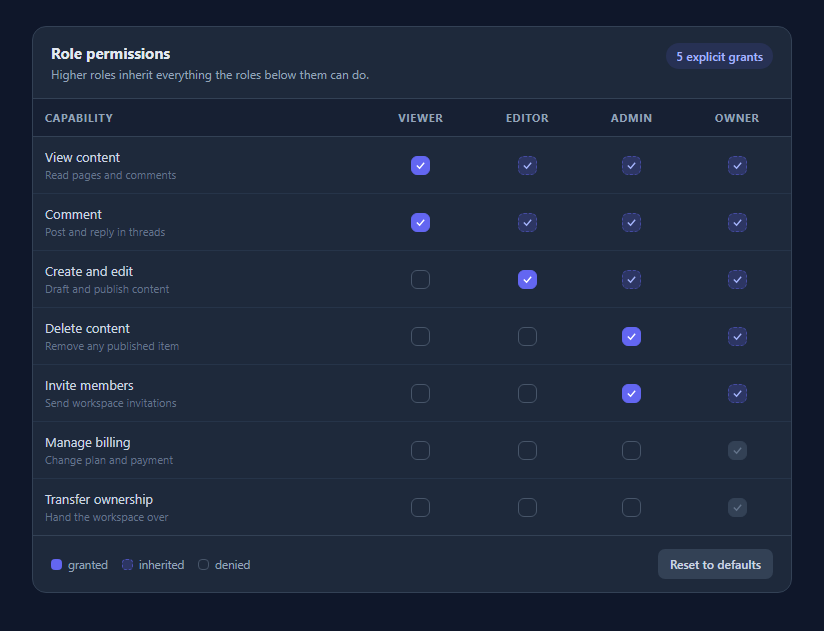
A permission matrix looks like a grid of independent checkboxes and almost never behaves like one. Real role systems are hierarchical: if an Editor can publish, an Admin and an Owner can publish too, and a UI that lets you tick "Admin can publish" while leaving "Owner can publish" unticked is describing a system that cannot exist. This snippet models the hierarchy honestly, and the result is both simpler to reason about and much smaller to store.
One number per capability, not one boolean per cell
The entire state is state[capabilityId] = lowestRoleIndexGranted. A four-role, seven-capability grid is twenty-eight cells but only seven numbers. Whether any given cell is on is derived with one comparison — roleIndex >= state[capId] — so inheritance is not something the code maintains, it is something the data model makes impossible to violate. There is no synchronisation step, no cascade function to call after an edit, and no way for the grid to enter an inconsistent state.
Three visual states for three different meanings
A cell is granted (solid indigo, clickable, this is where the capability starts), inherited (dashed and muted, not clickable, it is on because a lower role has it), or denied (empty outline). Collapsing inherited into granted is the mistake that makes these grids confusing, because the user clicks to turn off an Admin permission, watches it stay on, and concludes the UI is broken. Showing inheritance as visually distinct and explicitly non-interactive — with a tooltip naming the role it comes from — answers the question before it is asked.
Clicking has one rule
Clicking an empty cell sets the floor to that role, which immediately grants every role above it. Clicking the current floor revokes the capability entirely by pushing the floor past the last role. Every other cell is inherited and inert. That is the whole interaction model, and because it is expressed as a single assignment before a full re-render, there are no partial-update bugs.
Locked rows for capabilities you do not control
Billing and ownership transfer are marked locked in the capability data and render as permanently-on, disabled cells with an explanatory title. Most real permission systems have a handful of these — capabilities fixed by the plan, by legal requirement, or by the platform — and the matrix needs a way to display them as genuinely immovable rather than as settings the user will try and fail to change.
Rendered from data, accessible by default
Roles and capabilities are two arrays at the top of the file; adding a role is one string and adding a capability is one object with a name, a hint and a minimum role. Cells are real <button> elements rather than styled divs, so they are keyboard-focusable and reachable by tab, carry aria-pressed reflecting their granted state, and use the disabled attribute for inherited and locked cells so assistive technology reports them as unavailable rather than merely looking that way.
Build with AI
Build, Understand, Optimize, and Extend It With AI
Paste this snippet into an AI assistant like Claude and ask it to add a diff view that compares the current matrix against the saved defaults and lists every change in plain English — "Editors can now delete content", "Admins can no longer invite members" — which is exactly what an access-review workflow needs before anyone clicks save. Other natural extensions: add capability groups with collapsible section headers so a long list stays navigable; add a per-role column summary counting total capabilities; support custom roles inserted between the built-in ones, which tests whether your index-based model holds up; or build the read-only documentation variant that renders the same data with all interaction removed.
Prompt to recreate it
Copy this into your AI assistant of choice to build the effect from scratch, or as a jumping-off point for your own variant:
Build a role permission matrix in plain HTML, CSS, and JavaScript — no frameworks or libraries.

Requirements:
- Model roles as an ordered array from least to most privileged, and capabilities as an array of objects with an id, display name, short hint, and a default minimum role index.
- Store state as ONE number per capability: the index of the lowest role explicitly granted it. Do not store a boolean per cell. Derive whether any cell is on with the comparison roleIndex >= grantedFloor, so inheritance is a property of the data model rather than something the code has to synchronise.
- Render three visually distinct cell states: granted (the floor itself — solid, clickable), inherited (on because a lower role has it — dashed/muted, disabled, with a tooltip naming the source role), and denied (empty outline, clickable).
- Clicking an empty cell sets the floor to that role, cascading to every higher role. Clicking the current floor revokes the capability entirely by pushing the floor past the last role. Inherited cells must not be clickable.
- Support capabilities marked as locked, which render as permanently granted, disabled cells with an explanatory title — for permissions fixed by plan or platform.
- Use real <button> elements for cells so they are keyboard focusable, set aria-pressed to reflect granted state, use the disabled attribute for inherited and locked cells, and show a visible :focus-visible ring.
- Show a counter of explicit grants (floors), a legend explaining the three states, and a Reset button restoring each capability's default minimum role.
- Style it as a dark settings table with a left capability column showing name plus hint, centred role columns, and a horizontally scrollable wrapper.
Want to tighten it up first? Run this prompt through the AI Prompt Studio to score it across 8 quality dimensions, catch anti-patterns, and tune the wording for Claude, ChatGPT, or Gemini before you paste it in.
Step by step
How to Use
- 1Read the grid as a hierarchyRoles run left to right from least to most privileged. A capability granted at one role is automatically available to every role to its right, which is what the dashed inherited cells are showing you.
- 2Click an empty cell to grantGranting a capability at Editor immediately fills Admin and Owner as inherited, because a permission system where a higher role has less access than a lower one is not a state you want to be able to express.
- 3Click the solid cell to revokeThe solid indigo cell is the floor — the role where the capability starts. Clicking it removes the capability from every role at once, since there is no longer any role granting it.
- 4Notice what you cannot clickInherited cells are disabled and explain themselves on hover, naming the role the permission comes from. To change them you move the floor, which is the only edit the model allows.
- 5Watch the explicit grant countThe pill in the header counts floors rather than filled cells, so it reports how many real decisions have been made rather than how many boxes happen to be ticked.
- 6Reset to the defaultsEvery capability carries a default minimum role in its data. Reset restores all of them at once, which is the escape hatch that makes exploring the grid safe.
Real-world uses
Common Use Cases
Got questions?
Frequently Asked Questions
Because the state it represents cannot exist. If Editors can publish, an Admin — who is strictly more privileged — must be able to publish too. Inherited cells are disabled and their tooltip names the role the permission comes from; to change them you move the floor by clicking the solid cell or a lower one.
Each capability stores one number: the index of the lowest role granted it. A cell is on when its role index is greater than or equal to that number. There is no cascade routine and no per-cell storage, so the grid cannot drift into an inconsistent state between renders.
Add a string to the ROLES array or an object to CAPS with id, name, hint and min (the default lowest role). Everything else — headers, cells, inheritance, the counter — is generated from those two arrays, so no logic changes are needed. Set locked: true on a capability to render it as a fixed, non-editable row.
Then this is the wrong shape and you want independent checkboxes per cell, with state stored as a set of role-capability pairs. Most role systems are hierarchical in practice, but capability-based systems where roles are genuinely orthogonal exist, and forcing them into a floor model would misrepresent them.
Cells are real button elements, so they are in the tab order and activate with Enter or Space, with a visible focus ring via :focus-visible. Granted state is exposed through aria-pressed, and inherited and locked cells use the disabled attribute so screen readers announce them as unavailable rather than simply rendering them greyed out.
Yes, and it ports unusually cleanly because the state is a small plain object. Hold state as { capabilityId: lowestRoleIndex } in component state, render cells with a derived has(cap, role) helper, and handle clicks by setting one key. Since the whole grid is a pure function of that object, the framework re-render replaces the manual render() call with no other changes.