Source Code
<section class="tph-hero">
  <div id="tphCanvas" class="tph-canvas"></div>

  <div class="tph-content">
    <span class="tph-pill">tsParticles · interactive</span>
    <h1>Build atmosphere,<br>not just a background.</h1>
    <p>Move your cursor through the field — particles react. Click to push them away.</p>
    <div class="tph-actions">
      <button class="tph-cta">Start free</button>
      <button class="tph-ghost">See how it works</button>
    </div>
    <div class="tph-presets" id="tphPresets">
      <button class="tph-chip is-on" data-preset="web">Constellation</button>
      <button class="tph-chip" data-preset="snow">Snowfall</button>
      <button class="tph-chip" data-preset="bubbles">Bubbles</button>
    </div>
  </div>
</section>*{box-sizing:border-box;margin:0;padding:0}
body{font-family:system-ui,-apple-system,sans-serif;background:#05060f;color:#fff;min-height:100vh}
.tph-hero{position:relative;min-height:100vh;display:flex;align-items:center;justify-content:center;overflow:hidden;background:radial-gradient(120% 90% at 50% 0%,#161c3a 0%,#080a17 55%,#05060f 100%)}
.tph-canvas{position:absolute;inset:0;z-index:0}
.tph-content{position:relative;z-index:1;text-align:center;padding:32px 24px;max-width:680px;pointer-events:none}
.tph-content>*{pointer-events:auto}
.tph-pill{display:inline-block;font-size:11px;font-weight:700;letter-spacing:.14em;text-transform:uppercase;color:#7dd3fc;background:rgba(125,211,252,.1);border:1px solid rgba(125,211,252,.3);padding:6px 13px;border-radius:99px;margin-bottom:20px;backdrop-filter:blur(6px)}
.tph-content h1{font-size:clamp(32px,6.4vw,58px);font-weight:800;line-height:1.08;letter-spacing:-.03em;background:linear-gradient(180deg,#fff,#a5b4fc);-webkit-background-clip:text;background-clip:text;color:transparent}
.tph-content p{font-size:clamp(14px,2.4vw,17px);color:#95a0c4;margin-top:16px;line-height:1.65}
.tph-actions{display:flex;gap:12px;justify-content:center;flex-wrap:wrap;margin-top:28px}
.tph-cta{padding:13px 26px;border:none;border-radius:12px;background:linear-gradient(135deg,#6366f1,#0ea5e9);color:#fff;font:700 14px system-ui;cursor:pointer;box-shadow:0 14px 30px -12px rgba(99,102,241,.9);transition:transform .16s}
.tph-cta:hover{transform:translateY(-2px)}
.tph-ghost{padding:13px 24px;border:1px solid rgba(255,255,255,.2);border-radius:12px;background:rgba(255,255,255,.05);color:#dbe3fb;font:600 14px system-ui;cursor:pointer;backdrop-filter:blur(8px);transition:background .16s,border-color .16s}
.tph-ghost:hover{background:rgba(255,255,255,.11);border-color:rgba(255,255,255,.36)}
.tph-presets{display:flex;gap:8px;justify-content:center;flex-wrap:wrap;margin-top:38px}
.tph-chip{padding:8px 16px;border-radius:99px;border:1px solid rgba(255,255,255,.14);background:rgba(255,255,255,.04);color:#9aa5c8;font:600 12px system-ui;cursor:pointer;backdrop-filter:blur(6px);transition:color .16s,border-color .16s,background .16s}
.tph-chip:hover{color:#fff;background:rgba(255,255,255,.1)}
.tph-chip.is-on{border-color:#7dd3fc;color:#bae6fd;background:rgba(125,211,252,.14)}var base = {
fullScreen: { enable: false },
detectRetina: true,
fpsLimit: 60,
background: { color: 'transparent' },
interactivity: {
// Bind to the window, not the canvas: the hero copy sits on top and would
// otherwise block every pointer event from ever reaching the particles.
detectsOn: 'window',
events: {
onHover: { enable: true, mode: 'grab' },
onClick: { enable: true, mode: 'repulse' },
resize: true
},
modes: {
grab: { distance: 170, links: { opacity: 0.55 } },
repulse: { distance: 150, duration: 0.5 }
}
}
};
var PRESETS = {
web: {
particles: {
number: { value: 70, density: { enable: true, area: 900 } },
color: { value: ['#7dd3fc', '#a5b4fc', '#f0abfc'] },
links: { enable: true, distance: 140, color: '#6366f1', opacity: 0.25, width: 1 },
move: { enable: true, speed: 0.9, outModes: { default: 'bounce' } },
size: { value: { min: 1, max: 3 } },
opacity: { value: { min: 0.3, max: 0.8 } }
}
},
snow: {
particles: {
number: { value: 160, density: { enable: true, area: 800 } },
color: { value: '#e0f2fe' },
links: { enable: false },
shape: { type: 'circle' },
move: { enable: true, speed: 1.4, direction: 'bottom', straight: false, outModes: { default: 'out' } },
size: { value: { min: 1, max: 4 } },
opacity: { value: { min: 0.2, max: 0.85 } },
wobble: { enable: true, distance: 14, speed: 8 }
}
},
bubbles: {
particles: {
number: { value: 46, density: { enable: true, area: 900 } },
color: { value: ['#38bdf8', '#818cf8', '#f472b6'] },
links: { enable: false },
move: { enable: true, speed: 1.6, direction: 'top', outModes: { default: 'out' } },
size: { value: { min: 4, max: 16 } },
opacity: { value: { min: 0.08, max: 0.28 } },
stroke: { width: 1, color: 'rgba(255,255,255,.28)' }
}
}
};
function merge(preset) {
return Object.assign({}, base, preset);
}
function load(name) {
tsParticles.load({ id: 'tphCanvas', options: merge(PRESETS[name]) });
}
load('web');
document.getElementById('tphPresets').addEventListener('click', function (e) {
var chip = e.target.closest('.tph-chip');
if (!chip) return;
document.querySelectorAll('.tph-chip').forEach(function (c) { c.classList.remove('is-on'); });
chip.classList.add('is-on');
load(chip.dataset.preset);
});Learn Coding Visually
Learn to code with interactive, live-preview playgrounds — HTML, CSS, JavaScript, React & more.
 HTML Playground42 lessons · Click-based · Live preview
 CSS PlaygroundLearn CSS with a live editor
 JavaScript Playground60 lessons · DOM · Async · Canvas
 React PlaygroundLearn React with a live code editor
 GSAP PlaygroundLearn GSAP animation interactively
 SVG Playground44 lessons · shapes · paths · animation
 SCSS Playground45 lessons · Sass modules · tokens
 Tailwind PlaygroundLearn Tailwind CSS with a live editor
 Bootstrap 5 Playground50 lessons · live preview
tsParticles Interactive Hero — Particle Background Snippet
tsParticles Interactive Hero · Heroes · Plain HTML, CSS & JS · Live preview
What's included
Features
About this UI Snippet
tsParticles Interactive Hero — Reactive Particle Backgrounds Done Right
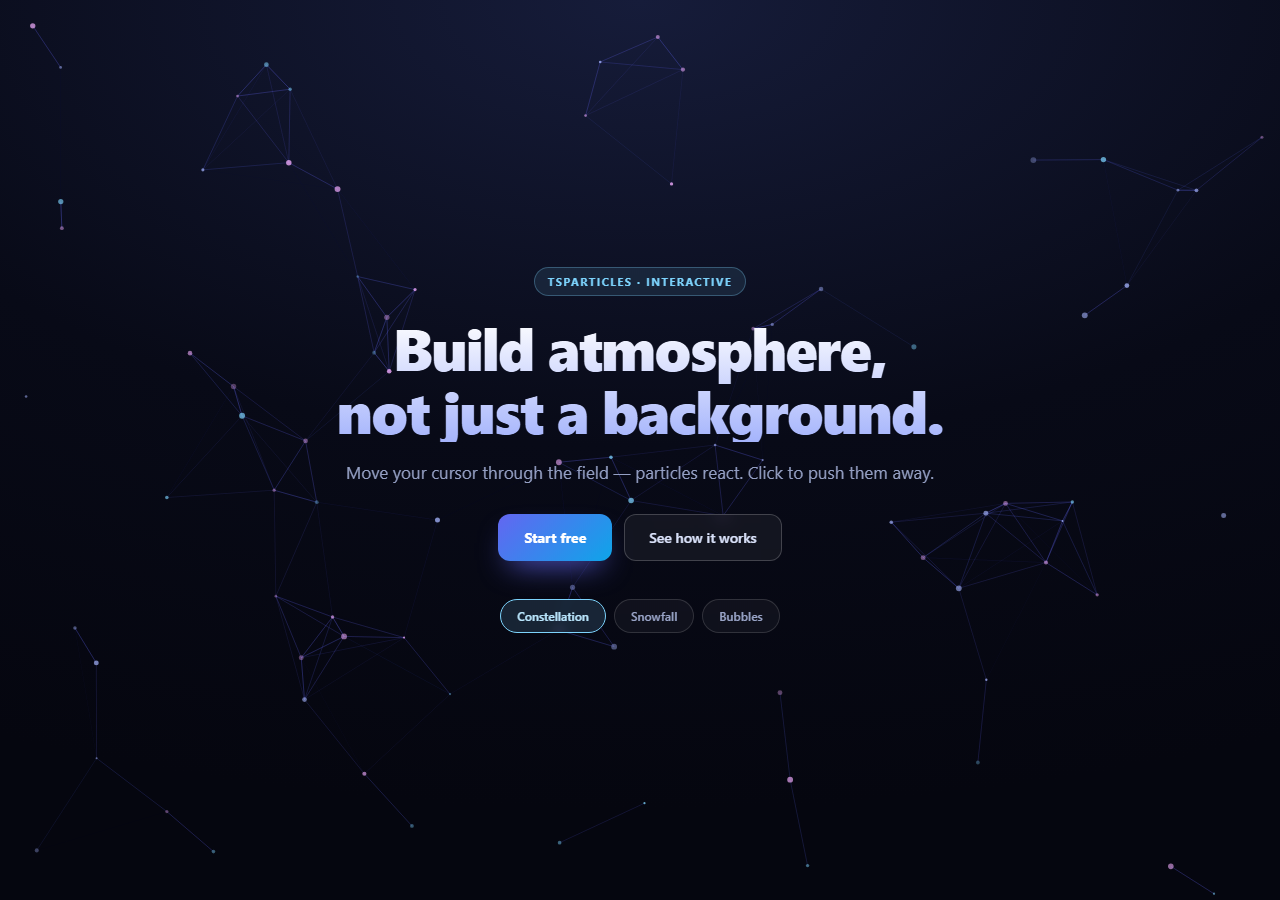
Particle backgrounds have a bad reputation, and it is earned. The abandoned particles.js is still pasted into new projects a decade after its last commit, usually at a density that melts laptops, usually behind text it makes unreadable, and usually with interactivity that silently does nothing.
tsParticles is the maintained successor — a full rewrite in TypeScript with the same configuration shape but real performance controls. This snippet is a production-shaped hero built on it: a reactive particle field, headline copy layered cleanly on top, and three switchable presets that swap the entire field live.
The mistake that breaks most particle heroes
Here is the bug almost everyone ships:
detectsOn: 'window'
By default, tsParticles listens for pointer events on its own canvas. In a real hero, that canvas sits *behind* a content block containing the headline, paragraph, and buttons — so the content block intercepts every mousemove before it reaches the canvas. The particles look interactive in the library's isolated demo and are completely inert on your actual page. Binding detection to the window instead means the particle field tracks the cursor no matter what is layered above it.
The CSS handles the other half of the same problem:
.tph-content { pointer-events: none } .tph-content > * { pointer-events: auto }
The content wrapper becomes transparent to the pointer while its children — the buttons and chips — stay clickable. Without this the invisible gaps around the headline still swallow hover.
Layering, and why fullScreen is disabled
fullScreen: { enable: false } is the second non-obvious requirement. Left on, tsParticles appends its own position: fixed canvas at the document level, which ignores your section entirely and floats over the whole page. Disabling it makes the library render into the element you name, and .tph-canvas { position: absolute; inset: 0; z-index: 0 } keeps it inside the hero where a z-index: 1 content layer can sit above it.
Composing presets instead of duplicating config
Each preset defines only its particles block. Everything shared — interactivity modes, retina detection, the FPS cap — lives in a single base object, and merge() combines them with Object.assign({}, base, preset). Switching presets is then one call:
tsParticles.load({ id: 'tphCanvas', options: merge(PRESETS[name]) })
Calling load() again on the same container id replaces the running instance, so there is no manual teardown and no risk of stacking two animation loops. This composition also means a change to the hover behavior applies to all three presets at once — the kind of thing that rots fast when configs are copy-pasted.
What the three presets actually demonstrate
Constellation is the classic: links.enable draws lines between particles within 140px, and the grab hover mode temporarily brightens links from the cursor to nearby nodes. Note the movement uses outModes: 'bounce' so particles stay in frame and the link mesh remains dense.
Snowfall turns links off entirely, sets direction: 'bottom', and switches to outModes: 'out' so particles leave the bottom edge and respawn at the top. The detail that sells it is wobble, which adds lateral drift so flakes sway rather than falling on rails.
Bubbles inverts the direction to 'top', drops the count to 46, and pushes size up to a 4–16 range with very low opacity (0.08–0.28) plus a faint stroke — large translucent circles read as bubbles where small opaque ones read as dust.
Performance controls that matter
number.density: { enable: true, area: 900 } is the single most important setting here. Without density, a fixed count of 70 particles means a phone renders the same 70 particles as a 4K monitor — crowded on one, sparse on the other. Density treats the count as *per 900px² of canvas*, so the field looks equally dense at every viewport and phones genuinely draw fewer particles.
fpsLimit: 60 caps the loop so a 144Hz display does not burn 2.4× the battery for motion nobody perceives, and detectRetina: true renders at device pixel ratio so particles are not blurry on high-DPI screens.
Reusing it
Swap the colors to your brand and pick the preset that matches the mood — constellation for technical products, snow for seasonal campaigns, bubbles for something softer. Keep density enabled, keep the FPS cap, and keep contrast high enough that the headline is readable over the busiest part of the field. It pairs naturally with a particle network if you would rather ship the same look without a dependency, or an aurora background for a calmer alternative.
Build with AI
Build, Understand, Optimize, and Extend It With AI
Most of what makes this hero work is configuration that is invisible until it is wrong, which is ideal material for a conversation. Paste the HTML, CSS, and JS into an AI assistant like Claude and ask it to explain exactly why detectsOn: 'window' is required here and what the symptom would be with the default canvas detection — then delete it and confirm the particles go inert under the headline. Ask the same about fullScreen: false, and about why the content wrapper uses pointer-events: none while its direct children use pointer-events: auto. For optimization, ask how number.density with an area value changes the particle count between a phone and a desktop, and whether fpsLimit 60 is doing anything measurable on a 120Hz display. To extend it: have it add a prefers-reduced-motion check that loads a static field, build a fourth preset driven by your brand colors, connect the particle color to a light/dark theme toggle, or pause the animation when the hero scrolls out of view using an IntersectionObserver. Treat the code less like a finished artifact and more like a starting point for a conversation.
Prompt to recreate it
Copy this into your AI assistant of choice to build the effect from scratch, or as a jumping-off point for your own variant:
Build a full-screen marketing hero with an interactive tsParticles background (v2 from a CDN, global tsParticles) in plain HTML, CSS, and JavaScript.

Requirements:
- The particle canvas must render INSIDE the hero section, not over the whole page: set fullScreen: { enable: false } and pass the id of a container div that is absolutely positioned with inset: 0 and a z-index below the copy.
- Headline, paragraph, and buttons must sit in a content layer above the canvas — and the particles must STILL react to the cursor. Solve this two ways at once: set interactivity.detectsOn to 'window' so pointer detection is not blocked by the overlaid content, and in CSS give the content wrapper pointer-events: none while its direct children get pointer-events: auto so buttons remain clickable. Add a comment explaining why.
- Interactivity: hover uses the 'grab' mode with a distance around 170, click uses 'repulse'. Enable resize handling.
- Provide three switchable presets driven by chip buttons, where each preset defines ONLY its particles block and is merged over one shared base config object containing the interactivity, fpsLimit, detectRetina and fullScreen settings — do not duplicate the shared settings per preset:
  1. Constellation: ~70 particles, links enabled at ~140px distance, slow movement with outModes 'bounce' so particles stay in frame and the link mesh stays dense.
  2. Snowfall: ~160 particles, links disabled, direction 'bottom', outModes 'out' so flakes exit the bottom and respawn, plus the wobble option enabled so they sway laterally instead of falling on rails.
  3. Bubbles: ~46 particles, direction 'top', large size range (about 4 to 16), very low opacity (roughly 0.08 to 0.28) and a faint stroke, so they read as bubbles rather than dust.
- Switch presets by simply calling tsParticles.load() again with the same container id — it replaces the running instance, so no manual destroy is needed.
- Include the performance settings that matter and be prepared to justify them: number.density enabled with an area value so the particle count scales with canvas size instead of being fixed across all viewports, fpsLimit of 60, and detectRetina true.
- Style the hero as a premium dark landing page: radial gradient backdrop, gradient-clipped headline text, a primary gradient CTA and a glass ghost button.
Want to tighten it up first? Run this prompt through the AI Prompt Studio to score it across 8 quality dimensions, catch anti-patterns, and tune the wording for Claude, ChatGPT, or Gemini before you paste it in.
Step by step
How to Use
- 1Add the tsParticles CDNInclude the tsparticles bundle from the CDN panel — one script, global tsParticles.
- 2Paste HTML, CSS, and JSA full-screen hero renders with the constellation field behind the copy.
- 3Move your cursorLinks reach toward the pointer even though the copy sits above the canvas.
- 4Click the backgroundParticles repulse outward from the click point.
- 5Switch presetsConstellation, snowfall, and bubbles each reload the field in place.
- 6Rebrand itChange the color arrays and gradient — everything else stays put.
Real-world uses
Common Use Cases
Got questions?
Frequently Asked Questions
Because tsParticles listens on its own canvas by default, and your content block sits above it and intercepts pointer events first. Setting detectsOn: "window" in the interactivity config makes the field track the cursor regardless of what is layered on top. Pair it with pointer-events: none on the content wrapper and pointer-events: auto on its children so buttons still work.
Left enabled, tsParticles injects a position: fixed canvas at document level that covers the entire page and ignores your section. Disabling it renders into the element whose id you pass to load(), so the canvas can be absolutely positioned inside the hero with content layered above it.
A fixed count renders the same number of particles on a phone as on a 4K monitor — crowded on one, sparse on the other. Setting density with an area value treats the count as particles per unit of canvas area, so the field looks equally dense everywhere and small screens genuinely draw fewer particles.
Calling tsParticles.load() again with the same container id replaces the existing instance rather than adding a second one, so no manual destroy is needed. Each preset supplies only its particles block and is merged over a shared base config, so interactivity settings stay identical across all three.
bounce reflects particles off the canvas edges so they stay in frame, which keeps a linked constellation dense. out lets them leave and respawn on the opposite side, which is what makes snow fall downward off the bottom and bubbles rise off the top.
Call tsParticles.load in a mount effect with the container id, and call the returned container instance destroy() in cleanup so a remount does not leave an orphaned loop. Keep the preset name in state and re-run load when it changes. Official react-tsparticles and vue3-particles wrappers exist and handle that lifecycle for you; the options object is identical either way.