You Might Also Like
Learn Coding Visually
Learn to code with interactive, live-preview playgrounds — HTML, CSS, JavaScript, React & more.
 HTML Playground42 lessons · Click-based · Live preview
 CSS PlaygroundLearn CSS with a live editor
 JavaScript Playground60 lessons · DOM · Async · Canvas
 React PlaygroundLearn React with a live code editor
 GSAP PlaygroundLearn GSAP animation interactively
 SVG Playground44 lessons · shapes · paths · animation
 SCSS Playground45 lessons · Sass modules · tokens
 Tailwind PlaygroundLearn Tailwind CSS with a live editor
 Bootstrap 5 Playground50 lessons · live preview
Column Widths That Persist — Real Drag Resize + localStorage (JS)
Column Widths That Persist (localStorage) · Tables · Plain HTML, CSS & JS · Live preview
What's included
Features
About this UI Snippet
Persistent Column Widths — Real Drag Resizing Saved to localStorage
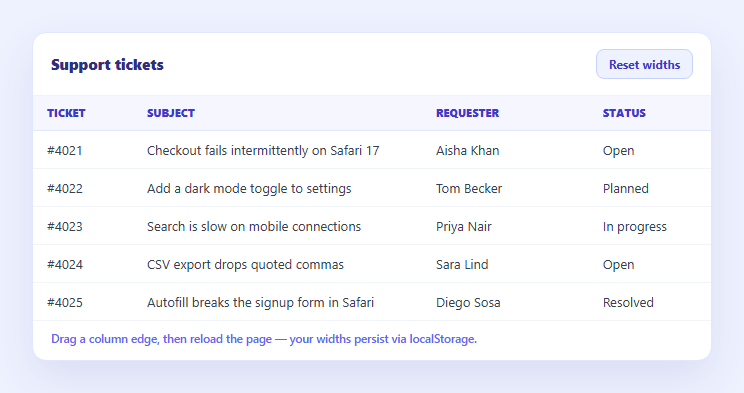
Letting users resize table columns is only half the feature — if the widths reset every time they reload the page, it barely feels like a preference at all. This snippet builds genuine pointer-drag column resizing in plain HTML, CSS, and vanilla JavaScript, and actually writes the resulting widths to localStorage, reading them back on load so a user's column layout survives a refresh or a return visit days later.
Real pointer-drag resizing, not a decorative handle
Each header renders a thin .crp-handle at its right edge. A pointerdown on a handle records the starting cursor X and the column's current width (read from its live <col> element via getBoundingClientRect), and setPointerCapture ensures the drag keeps tracking even if the cursor leaves the handle's small hit area. pointermove then computes delta = e.clientX - startX and sets the <col>'s width directly, clamped to a MIN_WIDTH floor so a column can never be dragged to zero or negative width. Using <col> elements inside a <colgroup> (rather than styling every <td> individually) is what lets one width change apply to the entire column in one place.
Genuine localStorage read and write
On pointerup, endDrag() reads every column's *current* width off its <col> element into a plain { key: widthPx } object and calls localStorage.setItem('crp-column-widths-v1', JSON.stringify(widths)) — a real write to persistent browser storage, not an in-memory variable that resets on reload. On load, loadWidths() reads that same key back with localStorage.getItem and JSON.parses it, wrapped in a try/catch since storage can throw in private browsing or when disabled — falling back to each column's default width if nothing was saved or parsing fails.
A sensible key and JSON structure
The storage key is namespaced and versioned (crp-column-widths-v1), and the stored value is a flat object keyed by column identifier rather than array index — so adding, removing, or reordering columns in a future version doesn't silently apply stale widths to the wrong column. This is a small but important design choice: an index-keyed structure (widths[2] = 180) would misassign every saved width the moment a column is added.
Confirms the persistence, doesn't just claim it
A status line beneath the table explicitly states whether widths were restored from a previous visit or nothing is saved yet, and updates immediately after a drag to confirm the save happened — so the persistence isn't just present in the code, it's visibly confirmed in the UI, which matters for a feature that's otherwise invisible until the user reloads.
Reset and defaults
A "Reset widths" button clears the stored key and re-renders from each column's default width, giving users an escape hatch if they resize columns into an awkward layout. Pair this with a table column resize snippet if you want resizing without persistence, or a resizable columns table for a broader resizing reference.
Build with AI
Build, Understand, Optimize, and Extend It With AI
Instead of guessing why a homemade column resizer forgets its widths on reload, paste this snippet's HTML, CSS, and JS into an AI coding assistant like Claude and ask it to explain exactly how pointer capture keeps the drag tracking correctly even when the cursor moves off the thin handle element, and why the persisted JSON structure is keyed by column name rather than array index. The same assistant can help extend it — ask it to also persist column order (via drag-and-drop reordering) in the same localStorage entry, add a "fit to content" double-click action on a handle, or sync the saved widths across tabs using the storage event so two open tabs of the same table stay in sync. Treat the code less like a finished artifact and more like a starting point for a conversation.
Prompt to recreate it
Copy this into your AI assistant of choice to build the effect from scratch, or as a jumping-off point for your own variant:
Build a data table with real pointer-drag column resizing whose widths persist across page reloads via localStorage, in plain HTML, CSS, and JavaScript — no libraries.

Requirements:
- Render the table using a <colgroup> with one <col> element per column, each with an inline width style, so a single width change per column resizes every cell in that column at once, and add a thin drag-handle element to the right edge of each header cell.
- Implement real drag resizing using pointer events: on pointerdown over a handle, record the starting cursor X position and the column's current live width (read from its <col> element's bounding rect), and call setPointerCapture so the drag continues tracking correctly even if the cursor moves off the thin handle. On pointermove during an active drag, compute the cursor's horizontal delta since the drag started and set the corresponding <col>'s width to the starting width plus that delta, clamped to a sensible minimum width so a column can never be dragged to zero or a negative size.
- On pointerup (ending the drag), read the current width of every column from its <col> element into a plain JavaScript object keyed by a stable column identifier (not array index), and write that object to localStorage under a specific, namespaced key using JSON.stringify — this must be a genuine localStorage.setItem call, not just updating an in-memory variable.
- On page load, before rendering, read that same localStorage key back with getItem and JSON.parse, and apply any saved widths to their matching columns by looking them up by the same stable column identifier used when saving — columns with no saved width should fall back to a sensible coded default. Wrap both the read and write in try/catch so the feature degrades gracefully (falling back to defaults, or just not persisting) if localStorage throws, such as in private browsing.
- Add a "Reset widths" button that clears the saved localStorage entry and re-renders every column at its default width.
- Verify the persistence actually works by resizing a column, reloading the page (or simulating a reload by re-running the load logic), and confirming the resized width is restored — not just that resizing itself works within a single session.
Want to tighten it up first? Run this prompt through the AI Prompt Studio to score it across 8 quality dimensions, catch anti-patterns, and tune the wording for Claude, ChatGPT, or Gemini before you paste it in.
Step by step
How to Use
- 1Paste HTML, CSS, and JSA tickets table renders with drag handles on the right edge of each header.
- 2Drag a column edgeThe column resizes live as you drag, clamped to a minimum width.
- 3Release the dragThe current widths of every column are written to localStorage immediately.
- 4Reload the pageYour custom widths are read back from localStorage and applied on load.
- 5Check the status lineIt confirms whether widths were restored from a previous visit.
- 6Click Reset widthsClears the saved localStorage entry and returns every column to its default width.
Real-world uses
Common Use Cases
Got questions?
Frequently Asked Questions
It really saves to localStorage. On pointerup, endDrag() reads each column's live width and calls localStorage.setItem with a JSON-stringified object under the key crp-column-widths-v1 — open your browser's DevTools Application/Storage tab after dragging a column and you'll see the entry written there, and it survives closing the tab.
Both the read and write paths are wrapped in try/catch. loadWidths() falls back to an empty object (so every column uses its coded default width) if reading throws or the value can't be parsed, and saveWidths() silently no-ops if writing throws — so resizing still works visually for the current session even if persistence isn't available.
An index-keyed structure like widths[2] breaks the moment a column is added, removed, or reordered — index 2 might now be a completely different column, and it would silently apply the wrong saved width. Keying by each column's stable identifier (e.g. "subject") means a saved width always reapplies to the correct column even if the table's column order changes later.
On pointerdown over a handle, the code records the starting cursor X and the column's current width. On every pointermove during the drag, it computes how far the cursor has moved (delta) and sets the <col> element's width to the starting width plus that delta, clamped to a minimum. Because all cells in a column share one <col> element inside a <colgroup>, this single width update resizes the whole column at once.
Keep the widths object in component state, initialize it from localStorage.getItem in an effect/lifecycle hook on mount, attach pointerdown/pointermove/pointerup handlers to each resize handle that update that state, and call localStorage.setItem on pointerup. Bind each <col>'s width style to the corresponding state value — the drag math and storage calls are framework-agnostic.