You Might Also Like
Learn Coding Visually
Learn to code with interactive, live-preview playgrounds — HTML, CSS, JavaScript, React & more.
 HTML Playground42 lessons · Click-based · Live preview
 CSS PlaygroundLearn CSS with a live editor
 JavaScript Playground60 lessons · DOM · Async · Canvas
 React PlaygroundLearn React with a live code editor
 GSAP PlaygroundLearn GSAP animation interactively
 SVG Playground44 lessons · shapes · paths · animation
 SCSS Playground45 lessons · Sass modules · tokens
 Tailwind PlaygroundLearn Tailwind CSS with a live editor
 Bootstrap 5 Playground50 lessons · live preview
Sticky Product Bar — Free HTML CSS JS PDP Snippet
Sticky Product Bar · Navigation · Plain HTML, CSS & JS · Live preview
What's included
Features
About this UI Snippet
Sticky Product Bar — Scroll-Triggered Add-to-Cart Bar with IntersectionObserver
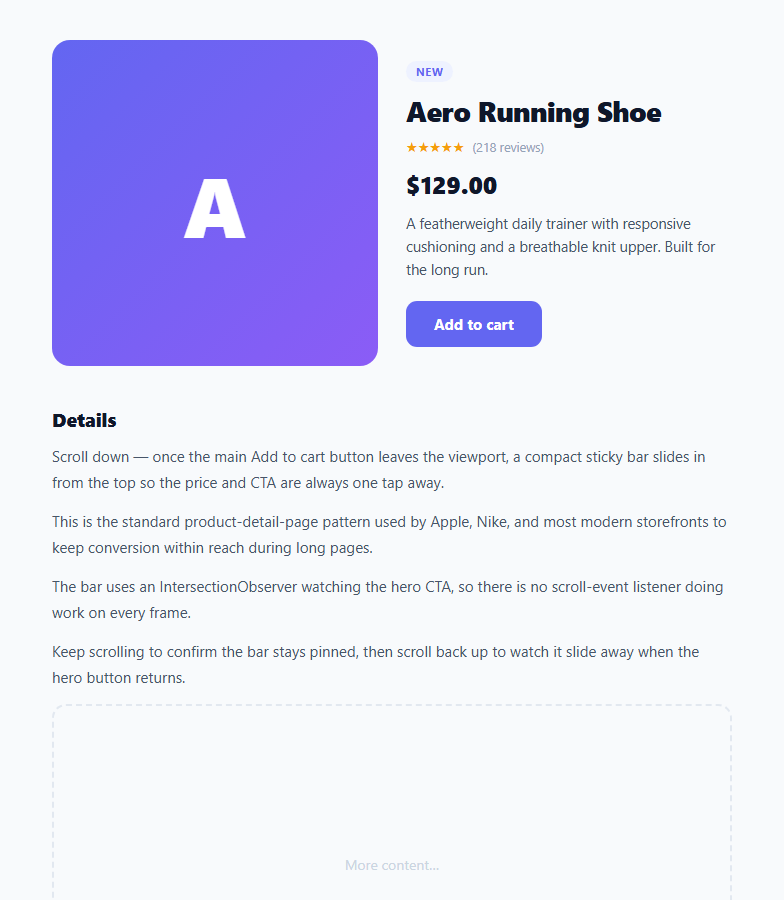
On a long product detail page, the Add to cart button at the top scrolls out of sight, and a shopper who has just decided to buy now has to scroll back up to find it. The sticky product bar fixes this: once the main CTA leaves the viewport, a compact bar slides in from the top of the screen showing the product thumbnail, name, price, and an Add to cart button — keeping the purchase action one tap away no matter how far the shopper has scrolled. Apple, Nike, and most modern storefronts use this pattern. This component builds it in HTML, CSS, and vanilla JavaScript using IntersectionObserver — no scroll-event handler.
Why IntersectionObserver instead of a scroll listener
The naive way to do this is a scroll event that checks the CTA's position on every frame. That runs JavaScript continuously while scrolling and is a classic cause of jank. IntersectionObserver is the modern alternative: you tell the browser to watch the hero CTA and notify you only when its visibility crosses a threshold. The browser does this off the main thread and fires the callback just twice — when the button leaves the viewport and when it returns. The bar toggles its visible class on !entry.isIntersecting, so it appears exactly when the main CTA is gone and hides when it comes back.
The slide-in transition
The bar is position: fixed at the top with z-index: 50 and starts hidden with transform: translateY(-100%) — pushed entirely above the viewport. Adding the visible class animates it to translateY(0) with a cubic-bezier(0.32, 0.72, 0, 1) easing that gives a quick, slightly springy slide. Because it animates transform (not top or height), the motion is GPU-accelerated and smooth. The reverse — sliding back up when the hero CTA returns — uses the same transition automatically.
The frosted-glass bar
The bar has a translucent white background with backdrop-filter: saturate(180%) blur(12px), the frosted-glass effect that lets page content blur through behind it — the same treatment as the iOS and macOS toolbars. This keeps the bar visually light while still separating it from the content scrolling underneath. A subtle bottom border defines its edge.
A compact, truncating layout
Inside, a small gradient thumbnail sits beside the product name and price, with the CTA pushed to the right by justify-content: space-between. The product name uses white-space: nowrap with text-overflow: ellipsis so a long title truncates cleanly rather than wrapping and breaking the bar's single-line height. This mirrors the hero section above, which has the full product image, rating stars, description, and the primary CTA the observer is watching.
Synced CTAs
Both the hero CTA and the bar CTA are wired to the same action — here a simple "Added ✓" confirmation that resets after 1.4 seconds. In production both would call your real add-to-cart logic. Because they share a handler, the shopper gets identical behaviour whether they click the button in the hero or in the sticky bar.
Customisation
Point the observer at whatever element marks "the CTA is gone" — it watches .spb-cta here, but you could watch the whole hero section instead. Adjust rootMargin to make the bar appear a little before or after the CTA fully leaves (e.g. -80px 0px 0px 0px triggers it 80px sooner). Swap the #6366f1 accent and the gradient thumbnail for your brand, replace the placeholder letters with a real product image, and connect both CTAs to your cart. On mobile (under 600px) the hero stacks to one column while the bar stays pinned.
Build with AI
Build, Understand, Optimize, and Extend It With AI
You don't have to work out the observer mechanics by hand. Paste this snippet's HTML, CSS, and JS into an AI coding assistant like Claude and ask it to explain exactly why the bar toggles on !entry.isIntersecting rather than entry.isIntersecting directly, and how rootMargin could be adjusted to make the bar appear before the hero CTA fully leaves the viewport. The same assistant can help optimize it — for instance whether observing the whole hero section instead of just the button changes the trigger feel, or whether a single shared click handler bound to both CTAs risks double-firing if a user rapid-clicks. It's also useful for extending the bar: ask it to add a quantity stepper into the sticky bar itself, show a low-stock indicator, or animate the thumbnail image swapping when the shopper picks a different variant on the page. Treat the code less like a finished artifact and more like a starting point for a conversation.
Prompt to recreate it
Copy this into your AI assistant of choice to build the effect from scratch, or as a jumping-off point for your own variant:
Build a scroll-triggered "sticky add-to-cart bar" for a product page in plain HTML, CSS, and JavaScript using only the IntersectionObserver API — no scroll event listener, no polling.

Requirements:
- A product hero section containing an image, name, price, and a primary Add to cart button, followed by long body content below it.
- A separate compact bar, fixed to the top of the viewport, hidden by default via a transform that translates it fully above the viewport, containing a small thumbnail, truncated product name (single line, ellipsis overflow), price, and its own Add to cart button.
- Create exactly one IntersectionObserver instance, observing only the hero's Add to cart button (not the whole hero, and not a scroll position calculation), with a callback that toggles a visible class on the compact bar based on the negation of entry.isIntersecting for that observed element.
- The compact bar's visible class must animate it to translateY(0) using a CSS transition with a springy cubic-bezier easing, so it slides down as soon as the hero button scrolls out of view and slides back up automatically when it returns.
- Give the bar a translucent background with backdrop-filter blur and saturation so it reads as a frosted glass layer above scrolling content.
- Attach the same click handler to both the hero CTA and the bar CTA (e.g. iterate over both elements) so their behavior — such as a temporary "Added" confirmation state that reverts after a short delay — never has to be duplicated.
- Make the rootMargin and/or threshold on the observer easy to tune so the bar's appearance point can be shifted earlier or later without touching the rest of the logic.
Want to tighten it up first? Run this prompt through the AI Prompt Studio to score it across 8 quality dimensions, catch anti-patterns, and tune the wording for Claude, ChatGPT, or Gemini before you paste it in.
Step by step
How to Use
- 1Paste the HTML, CSS, and JSA product hero renders with an image, rating, price, and an Add to cart button, followed by body content.
- 2Scroll downOnce the hero's Add to cart button leaves the viewport, a frosted sticky bar slides in from the top with the product name, price, and CTA.
- 3Scroll back upWhen the hero button returns to view, the bar slides back up out of sight.
- 4Click either CTABoth the hero and bar buttons run the same add-to-cart action and show an "Added ✓" confirmation.
- 5Tune the triggerPoint the IntersectionObserver at a different element or adjust rootMargin to make the bar appear earlier or later.
- 6Brand itSwap the accent colour and gradient thumbnail for a real product image and wire the CTAs to your cart logic.
Real-world uses
Common Use Cases
Got questions?
Frequently Asked Questions
A scroll listener runs JavaScript on every scroll frame and constantly reads element positions, which causes layout thrashing and jank on long pages. IntersectionObserver lets the browser watch the element's visibility off the main thread and call you back only when it crosses the threshold — here just twice, when the CTA leaves and re-enters the viewport. It is more performant and far less code than a throttled scroll handler.
Adjust the observer's rootMargin. A negative top margin like rootMargin: '-80px 0px 0px 0px' shrinks the observed area so isIntersecting flips to false 80px sooner, showing the bar a little earlier. Positive values delay it. You can also raise the threshold (e.g. 0.5) to trigger when only half the CTA is still visible rather than waiting for it to leave entirely.
Yes — call observer.observe() on the hero element (.spb-hero) rather than the CTA. The bar will then show once the entire hero leaves the viewport instead of just the button. Choose whichever element best represents the moment the shopper has scrolled past the primary buy action; watching the CTA itself is usually the most precise.
Because the bar is position: fixed, it sits above the content and only appears after the user has scrolled past the hero, so it does not push anything down or cover the top of the page on load. If you keep it visible from the top instead, add padding-top to the page equal to the bar height so content is not hidden beneath it.
Create the IntersectionObserver in an effect (useEffect / onMounted / ngAfterViewInit), observing a ref to the hero CTA, and store the resulting visible boolean in state bound to the bar's .visible class. Crucially, disconnect the observer in the cleanup (useEffect return / onUnmounted / ngOnDestroy) to avoid leaks. The fixed positioning, transform slide, and frosted-glass CSS port unchanged; both CTAs call your shared add-to-cart handler.