You Might Also Like
Learn Coding Visually
Learn to code with interactive, live-preview playgrounds — HTML, CSS, JavaScript, React & more.
 HTML Playground42 lessons · Click-based · Live preview
 CSS PlaygroundLearn CSS with a live editor
 JavaScript Playground60 lessons · DOM · Async · Canvas
 React PlaygroundLearn React with a live code editor
 GSAP PlaygroundLearn GSAP animation interactively
 SVG Playground44 lessons · shapes · paths · animation
 SCSS Playground45 lessons · Sass modules · tokens
 Tailwind PlaygroundLearn Tailwind CSS with a live editor
 Bootstrap 5 Playground50 lessons · live preview
Pull to Refresh — Mobile Gesture HTML CSS JS Snippet
Pull to Refresh · Loaders · Plain HTML, CSS & JS · Live preview
What's included
Features
onStart/onMove/onEnd read from e.touches or e.clientY, so the same gesture works on phones and is demoable with a mouse on desktop.scroll.scrollTop is 0, so pulling never conflicts with normal mid-list scrolling..dragging class disables the list transition during the drag so it tracks the finger, then restores it for a smooth snap-back.onEnd triggers a refresh only when the damped distance crosses 70px; shorter pulls fade out and snap back..fresh keyframe, making the reload visible and satisfying.About this UI Snippet
Pull to Refresh — Rubber-Band Drag, Distance-Rotated Spinner & Release Threshold
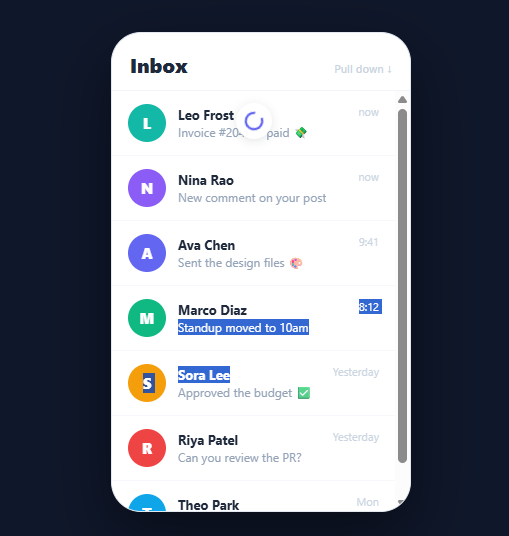
Pull-to-refresh is one of the most recognised gestures in mobile UI — drag a list down past its top and release to reload. Getting it to feel native is all in the details: the content should follow the finger with resistance (a rubber-band effect), the spinner should reveal and rotate in proportion to how far you have pulled, and a release past a threshold should trigger the refresh while a release short of it should snap back. This snippet implements the complete gesture in plain HTML, CSS, and vanilla JavaScript, working with both touch and mouse so you can demo it on desktop.
Guarding the gesture to the top
The gesture must only start when the list is already scrolled to the top — otherwise dragging would fight normal scrolling. onStart checks scroll.scrollTop > 0 and bails if the user is mid-list. It records the start Y coordinate from either e.touches[0].clientY (touch) or e.clientY (mouse), so the same handlers serve both input types.
Rubber-band drag with damping
onMove computes the raw pull distance, ignores upward movement, and applies a 0.5 damping factor (pull * 0.5) capped at 90px. That damping is what makes the pull feel elastic rather than 1:1 — the further you drag, the more resistance you feel, exactly like a native scroll view overscroll. During the drag the list gets a .dragging class that disables its CSS transition, so it tracks the finger instantly; on release the transition is restored so the snap-back animates smoothly. e.preventDefault() is called on the cancelable touch-move to stop the page from scrolling while pulling.
Distance-mapped spinner
The spinner's opacity ramps from 0 to 1 as the damped distance approaches the threshold, its vertical position follows the pull, and — the satisfying touch — its icon rotates proportionally to distance (distance * 4 degrees). So the spinner visibly winds up as you pull, giving continuous feedback before you even release.
Threshold, refresh, and animated insert
On onEnd, if the damped pull crossed THRESHOLD (70px), doRefresh runs: the spinner locks into a CSS spin animation, holds at a fixed position, and after a simulated 1.1s load it prepends a new message that animates in with a highlighted .fresh keyframe, then hides the spinner. A release that did not cross the threshold simply fades the spinner out and lets the list snap back — no refresh.
Replace the setTimeout with your real data fetch and prepend the returned items. Pair this with an infinite scroll list for load-more-at-bottom, a skeleton loader during the fetch, or an activity feed as the list content.
Build with AI
Build, Understand, Optimize, and Extend It With AI
You don't have to work out the gesture math by hand. Paste this snippet's HTML, CSS, and JS into an AI coding assistant like Claude and ask it to explain exactly why onMove multiplies the raw pull distance by a 0.5 damping factor and caps it at 90px instead of moving the list 1:1 with the finger, or how the .dragging class disabling the CSS transition during the drag and re-enabling it on release produces both instant tracking and a smooth snap-back from the same transform property. The same assistant can help optimize it, for instance checking whether the mousemove listener attached to the whole window is safe to leave running when the user isn't actively dragging, or whether preventDefault on touchmove could be scoped more precisely. It's just as useful for extending the gesture: ask it to replace the simulated setTimeout fetch with a real API call and error state, add a maximum-pull haptic-style bounce, or support a custom pull threshold per list. Treat the code less like a finished artifact and more like a starting point for a conversation.
Prompt to recreate it
Copy this into your AI assistant of choice to build the effect from scratch, or as a jumping-off point for your own variant:
Build a mobile "pull to refresh" gesture in plain HTML, CSS, and JavaScript with no framework and no libraries, supporting both touch and mouse input.

Requirements:
- A scrollable list container and a spinner element absolutely positioned above the list's content, hidden (zero opacity) by default.
- Gesture handlers that read the starting Y coordinate from either e.touches[0].clientY (touch) or e.clientY (mouse) so the same start/move/end functions serve both input types, and that only begin tracking a pull when the scroll container's scrollTop is exactly 0 — the gesture must never engage while the user is scrolled into the middle of the list.
- During the drag, compute the raw distance pulled, ignore any upward movement, then apply a damping factor (roughly 0.5) and cap the result at a fixed maximum (e.g. 90px) before applying it as a translateY transform to the list — this damping must make the drag feel like it has increasing resistance rather than following the finger 1:1.
- While dragging, the list's CSS transition must be disabled (via a class toggle) so the transform tracks the pointer instantly; on release, the transition must be re-enabled so the list either snaps back to zero or animates to a fixed "refreshing" position.
- The spinner's opacity, vertical position, and icon rotation angle must all be derived continuously from the current damped pull distance during the drag, so it visibly winds up before the user even releases.
- On release, if the damped distance crossed a fixed threshold (e.g. 70px), lock the spinner into a continuous CSS spin animation, wait a short simulated delay, then prepend a new item to the top of the list with its own entrance animation before hiding the spinner; if the threshold was not crossed, simply fade the spinner out and let the list snap back with no refresh triggered.
Want to tighten it up first? Run this prompt through the AI Prompt Studio to score it across 8 quality dimensions, catch anti-patterns, and tune the wording for Claude, ChatGPT, or Gemini before you paste it in.
Step by step
How to Use
- 1Paste HTML, CSS, and JSA phone-style "Inbox" with five message rows appears; the header hints "Pull down ↓".
- 2Drag the list downPress and drag downward from the top — the list follows your finger with elastic resistance and a spinner reveals above it.
- 3Watch the spinner wind upAs you pull, the spinner fades in, moves down, and its icon rotates proportionally to how far you have dragged.
- 4Release past the thresholdDrag past about 70px and let go — the spinner locks into a continuous spin while a refresh runs.
- 5See the fresh itemAfter ~1.1s a new message is prepended to the top with a highlighted slide-in animation, and the spinner hides.
- 6Release earlyPull only a little and release — the spinner fades out and the list springs back with no refresh.
Real-world uses
Common Use Cases
Got questions?
Frequently Asked Questions
In doRefresh, replace the setTimeout with your request (fetch('/api/messages')). On resolve, prepend the returned items to the list and then hide the spinner. Keep the refreshing flag set until the request finishes so a second pull cannot start mid-refresh, and handle errors by hiding the spinner and showing a retry message.
A 1:1 drag feels rigid and lets users pull the content arbitrarily far. The 0.5 damping (capped at 90px) creates the elastic resistance of a native scroll view — the list moves less the harder you pull — which signals the boundary and makes the threshold feel intentional rather than arbitrary.
The onStart guard only begins the gesture when scrollTop is 0, and onMove ignores upward movement. preventDefault is called only on the cancelable touch-move while actively pulling, so once the user scrolls into the list normally, native scrolling is untouched.
Always provide a non-gesture alternative: a visible "Refresh" button in the header that calls doRefresh directly. The gesture is an enhancement, not the only path. Announce new items via an aria-live="polite" region so screen-reader users hear that the list updated.
In React, attach the touch/mouse listeners in a useEffect with a ref to the scroll container and store pull distance in a ref (not state) to avoid re-renders per frame; clean up listeners on unmount. In Vue, use onMounted/onUnmounted and template refs. In Angular, bind in ngAfterViewInit with @ViewChild. The damping math and spinner CSS port unchanged.