Source Code
<section class="hpc-hero">
  <div class="hpc-copy">
    <span class="hpc-eyebrow">Build your plan</span>
    <h1 class="hpc-h1">Configure it your way,<br>see the price update live</h1>
    <p class="hpc-sub">Pick a tier, choose your seats, and toggle add-ons — the preview card and price recalculate instantly as you go.</p>
  </div>

  <div class="hpc-panel">
    <div class="hpc-group">
      <span class="hpc-group-label">Plan</span>
      <div class="hpc-pills" id="hpcTierPills">
        <button type="button" class="hpc-pill active" data-tier="starter" data-price="9">Starter</button>
        <button type="button" class="hpc-pill" data-tier="growth" data-price="29">Growth</button>
        <button type="button" class="hpc-pill" data-tier="scale" data-price="79">Scale</button>
      </div>
    </div>

    <div class="hpc-group">
      <span class="hpc-group-label">Seats: <b id="hpcSeatsVal">5</b></span>
      <input type="range" id="hpcSeats" class="hpc-slider" min="1" max="50" step="1" value="5">
    </div>

    <div class="hpc-group">
      <span class="hpc-group-label">Add-ons</span>
      <div class="hpc-addons" id="hpcAddons">
        <label class="hpc-addon"><input type="checkbox" data-price="15" data-name="Advanced analytics"><span>Advanced analytics</span><b>+$15/mo</b></label>
        <label class="hpc-addon"><input type="checkbox" data-price="10" data-name="Priority support"><span>Priority support</span><b>+$10/mo</b></label>
        <label class="hpc-addon"><input type="checkbox" data-price="25" data-name="Custom domain"><span>Custom domain</span><b>+$25/mo</b></label>
      </div>
    </div>

    <div class="hpc-preview" id="hpcPreview">
      <div class="hpc-preview-top">
        <span class="hpc-preview-tier" id="hpcPreviewTier">Starter</span>
        <span class="hpc-preview-seats" id="hpcPreviewSeats">5 seats</span>
      </div>
      <ul class="hpc-preview-addons" id="hpcPreviewAddons"></ul>
      <div class="hpc-price-row">
        <span class="hpc-price" id="hpcTotal">$54</span>
        <span class="hpc-price-sub">/month, billed monthly</span>
      </div>
      <a href="#" class="hpc-cta">Start with this plan</a>
    </div>
  </div>
</section>*{box-sizing:border-box;margin:0;padding:0}
body{font-family:system-ui,-apple-system,sans-serif;background:#f4f5fb;color:#151726}
.hpc-hero{min-height:100vh;display:flex;flex-direction:column;align-items:center;justify-content:center;gap:44px;padding:72px 20px}
.hpc-copy{text-align:center;max-width:600px;display:flex;flex-direction:column;align-items:center;gap:14px}
.hpc-eyebrow{font-size:12px;font-weight:700;letter-spacing:.08em;text-transform:uppercase;color:#6366f1}
.hpc-h1{font-size:clamp(28px,4.6vw,46px);font-weight:800;line-height:1.14;letter-spacing:-.02em}
.hpc-sub{font-size:15.5px;color:#5b5f78;line-height:1.65;max-width:480px}
.hpc-panel{width:min(680px,94vw);background:#fff;border:1px solid #e6e7f2;border-radius:20px;padding:28px;box-shadow:0 30px 70px rgba(20,20,50,.08);display:flex;flex-direction:column;gap:22px}
.hpc-group{display:flex;flex-direction:column;gap:10px}
.hpc-group-label{font-size:12.5px;font-weight:700;color:#5b5f78;text-transform:uppercase;letter-spacing:.04em}
.hpc-group-label b{color:#151726;font-size:13.5px;text-transform:none}
.hpc-pills{display:flex;gap:8px;flex-wrap:wrap}
.hpc-pill{border:1.5px solid #e2e3f0;background:#fff;color:#5b5f78;font-family:inherit;font-size:13.5px;font-weight:700;padding:9px 16px;border-radius:9px;cursor:pointer;transition:border-color .15s,color .15s,background .15s}
.hpc-pill:hover{border-color:#6366f1}
.hpc-pill.active{background:#6366f1;border-color:#6366f1;color:#fff}
.hpc-slider{width:100%;accent-color:#6366f1;height:6px;cursor:pointer}
.hpc-addons{display:flex;flex-direction:column;gap:8px}
.hpc-addon{display:flex;align-items:center;gap:10px;border:1.5px solid #edeef7;border-radius:10px;padding:10px 12px;cursor:pointer;transition:border-color .15s,background .15s;font-size:13.5px}
.hpc-addon:has(input:checked){border-color:#6366f1;background:#f5f5ff}
.hpc-addon input{accent-color:#6366f1;width:16px;height:16px;flex-shrink:0}
.hpc-addon span{flex:1;font-weight:600;color:#151726}
.hpc-addon b{color:#5b5f78;font-weight:700;font-size:12.5px}
.hpc-preview{border-radius:16px;background:linear-gradient(135deg,#151726,#252840);color:#fff;padding:22px}
.hpc-preview-top{display:flex;align-items:center;justify-content:space-between;margin-bottom:12px}
.hpc-preview-tier{font-weight:800;font-size:15px}
.hpc-preview-seats{font-size:12.5px;color:#b7b9d6}
.hpc-preview-addons{list-style:none;display:flex;flex-direction:column;gap:6px;margin-bottom:16px;min-height:8px}
.hpc-preview-addons li{font-size:12.5px;color:#d3d5ee;display:flex;justify-content:space-between}
.hpc-preview-addons:empty{margin-bottom:0}
.hpc-price-row{display:flex;align-items:baseline;gap:8px;margin-bottom:16px}
.hpc-price{font-size:32px;font-weight:800;transition:transform .15s}
.hpc-price.bump{transform:scale(1.06)}
.hpc-price-sub{font-size:12.5px;color:#b7b9d6}
.hpc-cta{display:block;text-align:center;background:#6366f1;color:#fff;font-weight:700;font-size:14.5px;padding:12px;border-radius:10px;text-decoration:none;transition:background .15s}
.hpc-cta:hover{background:#818cf8}
@media(max-width:480px){.hpc-panel{padding:20px}}// Genuinely reactive configurator: every input (tier, seats, add-ons) recomputes
// the total price and re-renders the preview card, not just a display swap.
var tierPills = document.querySelectorAll('#hpcTierPills .hpc-pill');
var seatsInput = document.getElementById('hpcSeats');
var seatsVal = document.getElementById('hpcSeatsVal');
var addonInputs = document.querySelectorAll('#hpcAddons input');
var previewTier = document.getElementById('hpcPreviewTier');
var previewSeats = document.getElementById('hpcPreviewSeats');
var previewAddons = document.getElementById('hpcPreviewAddons');
var totalEl = document.getElementById('hpcTotal');
var state = { tierName: 'Starter', tierPrice: 9, seats: 5 };
function selectedTierPill() {
return document.querySelector('#hpcTierPills .hpc-pill.active');
}
function recalc() {
var tierPrice = parseFloat(selectedTierPill().dataset.price);
var seats = parseInt(seatsInput.value, 10);
var perSeatCost = tierPrice * seats;
var addonsTotal = 0;
var addonNames = [];
addonInputs.forEach(function (input) {
if (input.checked) {
addonsTotal += parseFloat(input.dataset.price);
addonNames.push({ name: input.dataset.name, price: input.dataset.price });
}
});
var total = perSeatCost + addonsTotal;
previewTier.textContent = selectedTierPill().textContent;
previewSeats.textContent = seats + (seats === 1 ? ' seat' : ' seats');
previewAddons.innerHTML = addonNames.map(function (a) {
return '<li><span>' + a.name + '</span><span>+$' + a.price + '</span></li>';
}).join('');
totalEl.textContent = '$' + total.toFixed(0);
totalEl.classList.remove('bump');
// Force reflow so the bump animation can retrigger on every recalculation.
void totalEl.offsetWidth;
totalEl.classList.add('bump');
}
tierPills.forEach(function (pill) {
pill.addEventListener('click', function () {
tierPills.forEach(function (p) { p.classList.remove('active'); });
pill.classList.add('active');
recalc();
});
});
seatsInput.addEventListener('input', function () {
seatsVal.textContent = seatsInput.value;
recalc();
});
addonInputs.forEach(function (input) {
input.addEventListener('change', recalc);
});
recalc();Learn Coding Visually
Learn to code with interactive, live-preview playgrounds — HTML, CSS, JavaScript, React & more.
 HTML Playground42 lessons · Click-based · Live preview
 CSS PlaygroundLearn CSS with a live editor
 JavaScript Playground60 lessons · DOM · Async · Canvas
 React PlaygroundLearn React with a live code editor
 GSAP PlaygroundLearn GSAP animation interactively
 SVG Playground44 lessons · shapes · paths · animation
 SCSS Playground45 lessons · Sass modules · tokens
 Tailwind PlaygroundLearn Tailwind CSS with a live editor
 Bootstrap 5 Playground50 lessons · live preview
Hero with Interactive Product Configurator — Free HTML CSS JS Snippet
Hero with Interactive Product Configurator · Heroes · Plain HTML, CSS & JS · Live preview
What's included
Features
About this UI Snippet
Hero Section with Product Configurator — Live Plan, Seats & Add-On Pricing
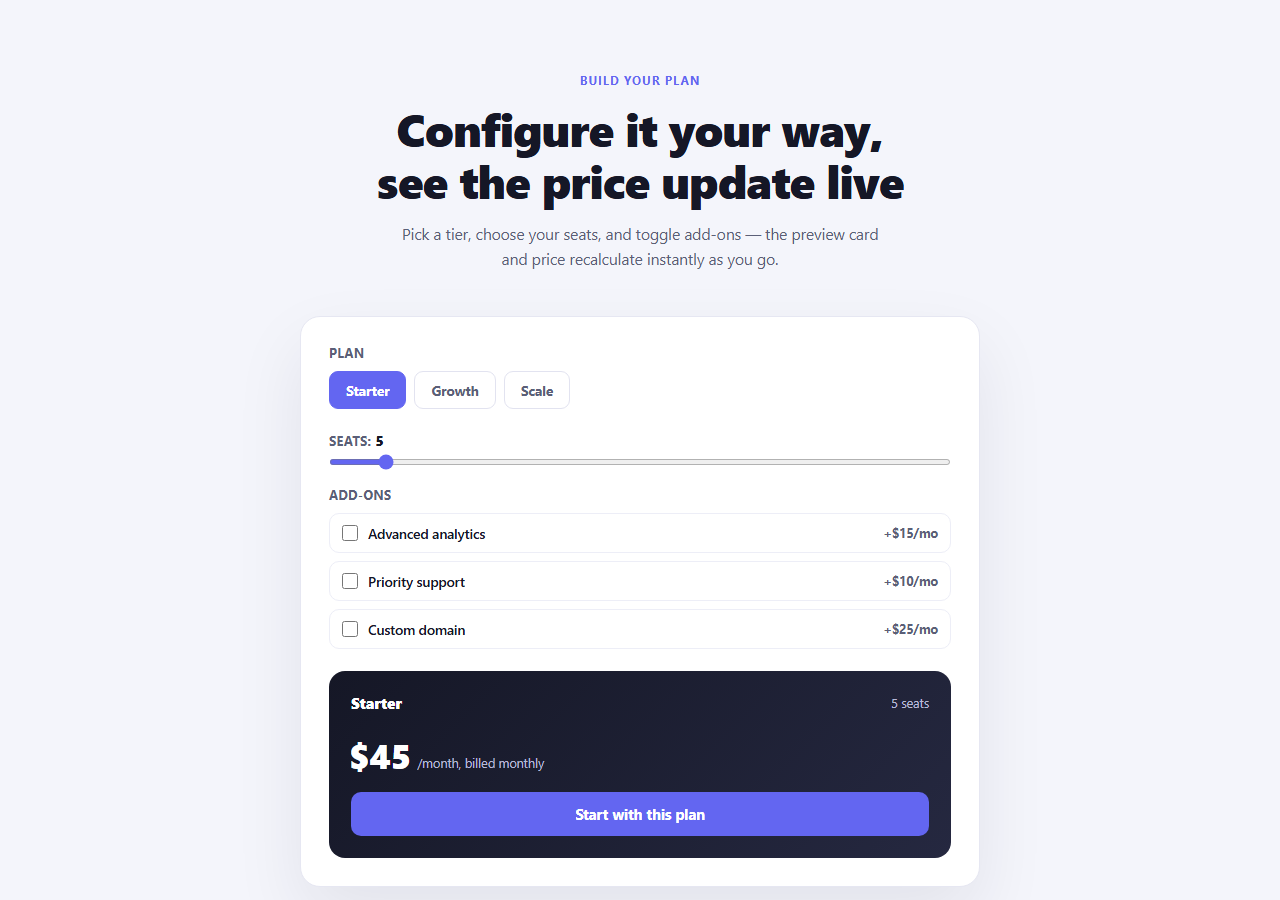
Most pricing heroes just link out to a pricing page. This one lets a visitor actually configure a plan right there above the fold — pick a tier, drag a seats slider, toggle add-ons — and watch a preview card and total price recompute on every change, with zero page navigation and zero guessing about what the final number will look like.
One `recalc()` function, three independent inputs
The tier pills, the seats <input type="range">, and the add-on checkboxes are three completely different input types, but they all funnel into a single recalc() call. That function reads the currently active tier's data-price, multiplies it by the seat count, sums the data-price of every checked add-on, and writes the combined total into #hpcTotal. Because every input handler calls the same function rather than each maintaining its own partial update, there's no risk of the seats slider updating the price while a tier change leaves it stale — the whole total is always recomputed from scratch off the current DOM state.
Per-seat pricing, not flat pricing
The base cost isn't just the tier's price — it's tierPrice * seats, so dragging the seats slider changes the total proportionally to the selected tier. This mirrors how most real per-seat SaaS pricing works, and it's why the preview updates noticeably when you go from 5 seats to 30 rather than staying flat.
A preview card that lists exactly what you picked
previewAddons.innerHTML is rebuilt from an array assembled during the same recalc() pass — only the add-ons currently checked are listed, each showing its own price. Nothing is toggled with CSS visibility; the list content itself is regenerated every time, so removing an add-on removes its line entirely rather than hiding it.
The price "bump" micro-interaction
After updating the number, the code removes and immediately re-adds a .bump class on #hpcTotal, forcing a reflow (void totalEl.offsetWidth) in between so the CSS transform: scale transition retriggers even if the class was already present from the previous change — without the forced reflow, adding the same class twice in a row would be a no-op and the animation wouldn't replay.
Reading state straight from the DOM
Rather than keeping a separate JavaScript object in sync with every checkbox and slider, recalc() reads selectedTierPill(), seatsInput.value, and each add-on's .checked state directly at calculation time. This keeps the DOM as the single source of truth and avoids the class of bugs where a JS-side price object drifts out of sync with what's actually rendered.
Customizing it
Add more tiers by adding another .hpc-pill with its own data-tier/data-price, or more add-ons by adding another .hpc-addon checkbox with data-price/data-name. Change the per-seat multiplier logic in recalc() if your pricing model is flat-rate instead of per-seat, or add a currency formatter if you need commas or a non-USD symbol. Pair it with a full pricing add-on selector further down the page for visitors who scroll past the hero wanting more detail.
Build with AI
Build, Understand, Optimize, and Extend It With AI
Rather than puzzling through how three different input types stay in sync, paste this snippet's HTML, CSS, and JS into an AI coding assistant like Claude and ask it to explain exactly why recalc() re-reads every input's current state from the DOM on each call instead of maintaining a separate JavaScript state object, and what class of bug that pattern avoids. The same assistant can help you extend it — ask it to add a monthly/annual billing toggle that multiplies the total and shows a savings badge, persist the visitor's configuration to the URL as query parameters so a shared link reopens with the same selections, or animate the seats slider's thumb with a live tooltip showing the current seat count as it's dragged. It's also useful for hardening the approach: ask whether the pricing data should move into a single JS array (rather than living in data attributes) once the number of tiers and add-ons grows large, or how to add currency formatting for non-USD locales. Treat the code less like a finished artifact and more like a starting point for a conversation.
Prompt to recreate it
Copy this into your AI assistant of choice to build the effect from scratch, or as a jumping-off point for your own variant:
Build a hero section in plain HTML, CSS, and vanilla JavaScript containing a live, interactive product/plan configurator — no library, no framework.

Requirements:
- A hero headline and subheading above a configurator panel containing: a row of selectable "tier" pill buttons each with its own price, a range slider for number of seats with a live label showing the current value, and a list of add-on checkboxes each with its own price and name.
- A preview card that shows the currently selected tier's name, the current seat count, an itemized list of only the currently checked add-ons (with their prices), and a single total price.
- The total price must be calculated as the selected tier's price multiplied by the number of seats, plus the sum of every checked add-on's price — and it must recompute correctly no matter which control (tier, slider, or checkbox) was just changed, by reading all three inputs' current state directly rather than maintaining three separately-updated partial totals.
- Every change to any control (clicking a tier pill, dragging the slider, checking or unchecking an add-on) must immediately re-render both the preview card's add-on list and the total price — no submit button, no page reload.
- Add a small "bump" scale animation on the total price element that replays on every recalculation, including consecutive recalculations that would otherwise apply the same CSS class twice in a row (explain in a comment how forcing a reflow makes the animation retrigger correctly in that case).
- Keep the whole thing responsive down to a narrow mobile viewport.
Want to tighten it up first? Run this prompt through the AI Prompt Studio to score it across 8 quality dimensions, catch anti-patterns, and tune the wording for Claude, ChatGPT, or Gemini before you paste it in.
Step by step
How to Use
- 1Click a tier pillStarter, Growth, or Scale — the preview card and price update immediately.
- 2Drag the seats sliderThe seat count label and the total price recalculate on every drag movement, not just on release.
- 3Toggle an add-on checkboxThe preview card's add-on list and the total both update to reflect exactly what's checked.
- 4Watch the price bumpEvery recalculation retriggers a small scale animation on the total to draw the eye to the change.
- 5Add your own tiers or add-onsCopy a .hpc-pill or .hpc-addon element and set its own data-price attribute.
- 6Export in your formatClick "HTML" for a standalone file, "JSX" for a React component, or "Tailwind" for a React + Tailwind version.
Real-world uses
Common Use Cases
Got questions?
Frequently Asked Questions
Every input — the tier pills, the seats range slider, and the add-on checkboxes — calls the same recalc() function on change. That function reads the currently selected tier's data-price, the slider's current value, and every checkbox's checked state fresh from the DOM each time, then recomputes the whole total from scratch rather than trying to apply a partial update.
Per-seat. The base cost is tierPrice multiplied by the number of seats selected on the slider, so increasing the seat count scales the total proportionally to whichever tier is active, matching how most real per-seat SaaS pricing works.
previewAddons.innerHTML is regenerated from an array built during the same recalc() pass containing only the currently checked add-ons. Rebuilding the list (rather than toggling visibility on pre-rendered items) guarantees the preview never shows a stale add-on that was unchecked, and keeps the DOM small since nothing invisible lingers.
Reading offsetWidth forces the browser to flush any pending style changes (a synchronous reflow) before the .bump class is re-added. Without it, if .bump was already present from the previous recalculation, adding the exact same class again is a no-op in the browser's eyes and the CSS transition would not replay.
Add another button.hpc-pill inside #hpcTierPills with its own data-tier and data-price attributes. No JavaScript changes are needed — the click handler is attached via a forEach over all .hpc-pill elements, so a new pill is wired up automatically.
Yes — in recalc(), replace the line computing perSeatCost (tierPrice * seats) with just tierPrice, and either remove the seats slider entirely or keep it purely informational without factoring it into the total.