You Might Also Like
Learn Coding Visually
Learn to code with interactive, live-preview playgrounds — HTML, CSS, JavaScript, React & more.
 HTML Playground42 lessons · Click-based · Live preview
 CSS PlaygroundLearn CSS with a live editor
 JavaScript Playground60 lessons · DOM · Async · Canvas
 React PlaygroundLearn React with a live code editor
 GSAP PlaygroundLearn GSAP animation interactively
 SVG Playground44 lessons · shapes · paths · animation
 SCSS Playground45 lessons · Sass modules · tokens
 Tailwind PlaygroundLearn Tailwind CSS with a live editor
 Bootstrap 5 Playground50 lessons · live preview
File Tree Explorer — Free HTML CSS JS Snippet
File Tree Explorer · Navigation · Plain HTML, CSS & JS · Live preview
What's included
Features
About this UI Snippet
File Tree Explorer — Animated Collapsible Folders, Per-Extension Icons & Arrow-Key Navigation in Vanilla JS
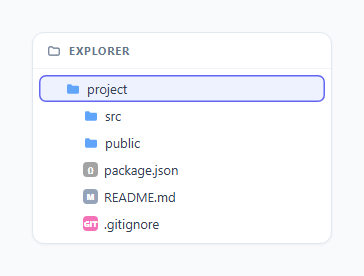
Most "collapsible tree" tutorials fake the animation with display: none, which snaps open and closed with no transition at all, or they skip keyboard support entirely and only work with a mouse. This snippet builds a VS-Code-style file explorer that does neither: folders slide open and closed with a real measured height transition, every folder row has a rotating chevron, files get a small colored icon keyed off their extension, and the whole tree is fully operable with arrow keys the way a real IDE sidebar is.
The height:auto transition problem, solved
CSS cannot transition to or from height: auto (or max-height: none) because the browser has no fixed numeric value to interpolate toward — "auto" is a layout instruction, not a length. The common broken fix is to hardcode a max-height guess like 500px, which either clips tall folders or leaves a visible empty gap under short ones once the transition finishes. This snippet uses the standard measure-then-transition technique instead: when a folder opens, animateHeight() reads the child list's scrollHeight — which reports the element's true rendered content height even while its max-height is still clamped to 0px, because scrollHeight measures the content box regardless of overflow clipping — and sets max-height to that exact pixel value. Now the CSS transition has two concrete numbers (0px and, say, 184px) to animate between, so it plays smoothly. A transitionend listener then swaps max-height to none once the animation finishes, so if a nested child folder opens later and the list needs to grow taller, it is not clipped by a now-stale fixed pixel value.
Closing needs an extra frame, not just a class removal
Collapsing is trickier than opening. If max-height is currently none, setting it directly to 0px skips the transition entirely, because the browser has no starting numeric value to animate from. The fix is to first set max-height to the current scrollHeight (a real pixel number, functionally a no-op visually since the content is already that tall), force the browser to acknowledge that value on the next animation frame, and only then set max-height to 0px on a second nested requestAnimationFrame. That double rAF is a deliberate paint-cycle wait: the first frame lets the browser commit the "start" height as a real style, and the second frame issues the "end" height as a separate change the transition engine can actually interpolate, rather than both writes collapsing into the same layout pass and skipping the animation.
Per-extension icons via a lookup table
Icons are resolved with a plain object, EXT_ICONS, mapping a lowercased file extension (js, css, html, json, md, png) to a background color and short label, with a default fallback for anything unrecognized. iconFor() splits the filename on '.', takes the last segment as the extension, and looks it up — a pattern that is trivial to extend by adding new keys, and cheap enough to run on every file row at render time with no caching needed.
Roving tabindex and arrow-key navigation
Only one row in the whole tree has tabIndex = 0 at any moment (the currently focused one); every other row sits at tabIndex = -1 so Tab moves focus into and out of the tree as a single stop, not once per row. setFocus() moves both the .focused CSS class and the actual DOM focus() call together. The keydown handler on the tree root computes a flat, order-preserved list of only the currently visible rows via visibleRows() — walking up each row's ancestor .children containers and checking whether the owning folder is open — so ArrowDown/ArrowUp always step to the next visually-adjacent row, skipping collapsed subtrees entirely rather than jumping into hidden content. ArrowRight either expands a closed folder or, if already open, moves focus into its first child (mirroring how VS Code, Windows Explorer, and macOS Finder's list view all behave). ArrowLeft either collapses an open folder in place or, if it is already collapsed (or is a file), moves focus up to the parent folder row — the standard "collapse or go up" behavior every desktop file browser implements.
Why this beats a display:none tree
Because the animation is driven by real max-height values rather than a hard show/hide toggle, the chevron rotation, the slide transition, and the eventual none/0px cleanup are all handled by ordinary CSS transitions with no JavaScript animation loop and no risk of layout thrashing from repeated reflows — the browser's compositor handles the interpolation once the two endpoint values are set.
Build with AI
Build, Understand, Optimize, and Extend It With AI
Hand this snippet's JS to an AI assistant like Claude and ask it to walk through exactly why the collapse animation needs two nested requestAnimationFrame calls instead of one — it is one of the more counterintuitive parts of the CSS height-transition trick and worth understanding before reusing the pattern elsewhere. It is also worth asking whether visibleRows() could be made more efficient by caching the flat visible list and only invalidating it when a folder toggles, instead of recomputing it from the DOM on every single key press. For extending the snippet, ask for drag-and-drop file moving between folders, a search/filter box that auto-expands only the folders containing a match, or multi-select with Shift+Click and Ctrl+Click the way a real file manager supports.
Prompt to recreate it
Copy this into your AI assistant of choice to build the effect from scratch, or as a jumping-off point for your own variant:
Build a VS-Code-style collapsible file/folder tree in plain HTML, CSS, and JavaScript, driven by a nested JS data object — no external tree library.

Requirements:
- A recursive renderer that walks a nested { name, type: 'folder'|'file', children } object and builds nested <ul>/<li> rows, with folders getting a rotating chevron icon and files getting a small colored icon looked up from a lookup table keyed by file extension (cover at least .js, .css, .html, .json, .md, .png with a default fallback).
- Folder expand/collapse must use a REAL height animation, not display:none: on open, set the child list's max-height to its measured scrollHeight so the CSS transition has a real pixel value to animate to, then once the transition ends swap max-height to none so nested content can grow later without being clipped.
- On collapse, first set max-height back to the current scrollHeight (undoing the 'none' value with an equal real number so there is no visual jump), wait a rendered frame via requestAnimationFrame, then set max-height to 0px on a second frame so the transition actually plays instead of snapping shut instantly.
- Full keyboard support using a roving tabindex (only the focused row is tabbable): ArrowDown/ArrowUp move focus to the next/previous VISIBLE row (skipping rows inside collapsed folders), ArrowRight expands a closed folder or moves focus into its first child if already open, ArrowLeft collapses an open folder or moves focus to the parent row otherwise, and Enter/Space toggles a focused folder.
- A visible focus indicator (like an inset ring) on the currently focused row, separate from hover styling.
- Explain in a code comment why CSS cannot transition directly to/from height: auto and how the scrollHeight + max-height approach works around that limitation.
Want to tighten it up first? Run this prompt through the AI Prompt Studio to score it across 8 quality dimensions, catch anti-patterns, and tune the wording for Claude, ChatGPT, or Gemini before you paste it in.
Step by step
How to Use
- 1Click any folder row to expand itThe chevron rotates 90 degrees and the child list visibly slides open using a measured max-height transition, not an instant display-none swap.
- 2Click an open folder again to collapse itThe children animate shut over roughly 220ms, and the chevron rotates back to its resting horizontal position in sync.
- 3Notice the per-file-type icon colorsJavaScript files get a yellow JS badge, CSS files a blue badge, HTML files an orange bracket badge, and unrecognized extensions fall back to a neutral gray dot — all driven by one lookup table.
- 4Click a row, then use the arrow keysThe clicked row gets a visible indigo focus ring. Press ArrowDown/ArrowUp to move to the next or previous visible row, skipping anything inside a collapsed folder.
- 5Press ArrowRight on a folderIf the folder is closed it expands; if it is already open, focus jumps straight into its first child row — exactly like VS Code's sidebar.
- 6Press ArrowLeft to collapse or step upOn an open folder it collapses in place; on a file or an already-closed folder it moves focus up to the parent folder instead.
Real-world uses
Common Use Cases
Got questions?
Frequently Asked Questions
display: none has no animatable intermediate state — the element is either fully in the layout or completely removed from it between one frame and the next, so there is no way to transition it; folders would snap open and shut instantly with zero animation. The max-height + scrollHeight approach gives the browser two real numeric endpoints to interpolate between, which is the only way to get a genuine slide transition without a JavaScript-driven frame-by-frame height loop.
If max-height is currently none (set after the open transition finished) and you set it straight to 0px, the browser has no valid starting number to transition from and the change applies instantly with no animation. The fix sets max-height to the current scrollHeight first (a real, already-true value), waits one frame for the browser to commit that as the transition's starting point, and only then sets it to 0px on a second frame so the transition engine has two concrete values to animate between.
Add a key to the EXT_ICONS object, e.g. ts: { color: "#3178c6", text: "TS" }. The iconFor() function automatically looks up any extension present in the object and falls back to EXT_ICONS.default for anything not listed, so no other code needs to change.
Yes. In React, model open/closed state per node with useState (or a Set of open node ids) instead of the row._meta object, and run the max-height measurement inside a useLayoutEffect that fires after the relevant node re-renders so scrollHeight reflects the just-updated DOM; there is no interval or animation frame loop to clean up since it is CSS-transition-driven. In Vue, the same open/closed state can live in reactive() with the measurement done in a watcher's nextTick callback. In Angular, do the scrollHeight read inside ngAfterViewChecked guarded by a dirty flag so it only measures when the open state actually changed.
Yes. visibleRows() rebuilds the flat, top-to-bottom list of only currently-visible rows on every key press by checking each row's ancestor .children containers for open state, so ArrowDown/ArrowUp always skip over anything inside a collapsed subtree at any depth, and ArrowLeft correctly walks up through multiple nesting levels one parent at a time.