You Might Also Like
Learn Coding Visually
Learn to code with interactive, live-preview playgrounds — HTML, CSS, JavaScript, React & more.
 HTML Playground42 lessons · Click-based · Live preview
 CSS PlaygroundLearn CSS with a live editor
 JavaScript Playground60 lessons · DOM · Async · Canvas
 React PlaygroundLearn React with a live code editor
 GSAP PlaygroundLearn GSAP animation interactively
 SVG Playground44 lessons · shapes · paths · animation
 SCSS Playground45 lessons · Sass modules · tokens
 Tailwind PlaygroundLearn Tailwind CSS with a live editor
 Bootstrap 5 Playground50 lessons · live preview
Back in Stock Notify Me Form — Free Email Capture Widget (HTML/CSS/JS)
Back in Stock Notify Me Form · Forms · Plain HTML, CSS & JS · Live preview
What's included
Features
About this UI Snippet
Back in Stock Notify Me Form — Capture Demand Without Losing the Sale
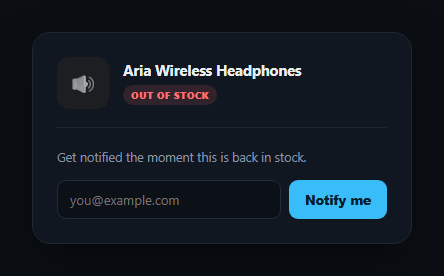
An out-of-stock page is a moment of lost intent — the shopper wanted to buy, and a plain "sold out" message sends them away for good. A "notify me when available" form turns that lost sale into a captured lead, but only if the form is trustworthy: it needs to validate the email before submitting, confirm clearly that the request went through, and let the shopper fix a typo without starting over. This snippet builds that complete three-state flow in plain HTML, CSS, and vanilla JavaScript.
Inline validation before submission
The form validates on submit with a simple email-shape regex, and — this is the detail that matters — once an invalid attempt has shown an error, the input re-validates on every keystroke so the error clears itself the moment the address becomes valid, rather than requiring a second submit click to discover the error is gone. No network request or backend is simulated; validation is purely client-side shape-checking, which is exactly what should happen before you ever hit an API.
A success state that repeats the email back
After a valid submit, the form swaps for a confirmation view that explicitly echoes the submitted address — "We'll email you@example.com the moment it's back" — rather than a generic "Thanks, you're signed up." Repeating the value back is what lets a shopper immediately notice if they made a typo, instead of finding out weeks later when the notification never arrives.
An edit path back, not a dead end
Right below the confirmation, an "Wrong email? Edit" link returns to the form with the previously entered address still filled in and selected, ready to be corrected and resubmitted. This is a small but important piece of forgiving form design — a mistake shouldn't require abandoning the whole flow and starting from a blank field.
Where it fits
Pair it with a product card or product quick view for the surrounding product context, a waitlist signup for a similar pre-launch capture pattern, or a promo-code-input for the same inline-validation-plus-confirmation approach applied to a different field.
Customizing it
Swap the regex for a stricter validator, add a debounced "check availability" call to confirm the product is genuinely still out of stock before showing the form, or extend the success state with a secondary CTA to browse similar in-stock products.
Build with AI
Build, Understand, Optimize, and Extend It With AI
You don't have to design the validate-confirm-edit flow from scratch. Paste this snippet's HTML, CSS, and JS into an AI coding assistant like Claude and ask it to explain why the error only clears itself on keystrokes after a failed submit (rather than validating on every keystroke from the start, which can feel naggy before the user has even finished typing), and why the success state explicitly echoes the submitted email address instead of showing a generic thank-you message. The same assistant can help you harden it — ask whether the current regex is too permissive or too strict for real-world email addresses, and how you'd add a debounced server-side check to catch a typo'd but well-formed domain (like "gmial.com"). It's also useful for extending the form: ask it to add a loading state for the real API call this snippet doesn't simulate, persist the submitted state in localStorage so a returning visitor sees "you're already on the list," or add an unsubscribe/cancel-notification option. Treat the code less like a finished artifact and more like a starting point for a conversation.
Prompt to recreate it
Copy this into your AI assistant of choice to build the effect from scratch, or as a jumping-off point for your own variant:
Build a "back in stock, notify me" email capture form in plain HTML, CSS, and JavaScript with no framework or library.

Requirements:
- Show an out-of-stock product header (name, image/icon placeholder, an "Out of stock" tag) above the form.
- The form has a single email input and a submit button. On submit, prevent the default page reload and validate the email against a reasonable email-shape check.
- If invalid, show an inline error message below the input and visually mark the input as invalid (e.g. a red outline) — do not let the form proceed to a success state.
- Once an invalid submission has shown the error, re-validate on every keystroke in the input and automatically clear the error and invalid styling the moment the value becomes valid, without requiring another submit click.
- On a valid submit, hide the form and show a distinct success view that explicitly repeats the submitted email address back to the user (e.g. "We'll email you at [address] the moment it's back"), not just a generic confirmation message.
- In the success view, include an "edit" link or button that returns to the form with the previously submitted email address still filled in (and ideally selected/focused), so the user can correct a typo without retyping the whole address.
- Keep the three states — form, error, and success — mutually exclusive, and make sure no page reload or console error occurs during the whole flow.
Want to tighten it up first? Run this prompt through the AI Prompt Studio to score it across 8 quality dimensions, catch anti-patterns, and tune the wording for Claude, ChatGPT, or Gemini before you paste it in.
Step by step
How to Use
- 1Paste HTML, CSS, and JSAn out-of-stock product card renders with a Notify me form.
- 2Submit with a bad emailAn inline error appears and the input outlines in red.
- 3Start typing a valid addressThe error clears automatically as soon as it's valid.
- 4Submit a valid emailThe form swaps for a success state that echoes the address back.
- 5Click "Wrong email? Edit"You return to the form with your previous entry pre-filled and selected.
- 6Wire up the backendReplace the local success-state swap with a real API call in the submit handler.
Real-world uses
Common Use Cases
Got questions?
Frequently Asked Questions
On submit, the value is trimmed and tested against a basic email-shape regex (something@something.something). If it fails, the input gets an invalid outline and an inline error shows. If it passes, the form immediately swaps to the success state — there's no simulated network delay since this snippet handles only client-side shape validation.
Once an invalid submission has shown the error, an input listener re-checks the value on every keystroke and removes the error and invalid styling as soon as the address becomes valid — so the shopper isn't stuck staring at a stale error message after they've already fixed it, and doesn't need to click submit again just to clear it.
Echoing the exact address back ("We'll email you@example.com...") is what lets a shopper catch a typo immediately, while they're still on the page, instead of discovering weeks later that the restock notification never arrived because of a mistyped domain.
Clicking it hides the success view and re-shows the form, then focuses and selects the email input's existing text — so the shopper can either overwrite the whole thing or fix a small typo, without needing to re-type an address that was already mostly correct.
Track two booleans in state — hasError and isSubmitted (or a single status enum with 'form' | 'error' | 'success' values) — and conditionally render the three views. The isValidEmail() regex function and the submit handler's logic port over unchanged; only the DOM hidden-attribute toggles become conditional rendering.