More Forms Snippets
Front-End Coding Playgrounds
Learn to code with interactive, live-preview playgrounds — HTML, CSS, JavaScript, React & more.
 HTML Playground42 lessons · Click-based · Live preview
 CSS PlaygroundLearn CSS with a live editor
 JavaScript Playground60 lessons · DOM · Async · Canvas
 React PlaygroundLearn React with a live code editor
 GSAP PlaygroundLearn GSAP animation interactively
 SVG Playground44 lessons · shapes · paths · animation
 SCSS Playground45 lessons · Sass modules · tokens
 Tailwind PlaygroundLearn Tailwind CSS with a live editor
 Bootstrap 5 Playground50 lessons · live preview
Avatar Generator — Initials Avatars with Deterministic Color
Avatar Generator · Forms · Plain HTML, CSS & JS · Live preview
What's included
Features
About this UI Snippet
Avatar Generator — Initials and Deterministic Color from a Name
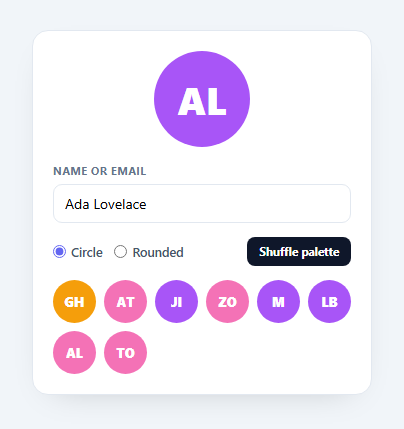
An avatar generator turns a name or email into a coloured initials avatar — the fallback every app shows when a user hasn't uploaded a photo. The two things that make it good are correct initials and a colour that's deterministic (the same person always gets the same colour). This snippet builds both, with shape and palette options, in plain HTML, CSS, and vanilla JavaScript with no images or canvas.
Initials that handle real input
Names come in messy: "Ada Lovelace", "[email protected]", "Zoë", a single word, a handle like "team-ops". The initials() function splits on spaces, @, dots, underscores, and hyphens, drops empties, and takes the first letter of the first and last parts (or the first two letters of a single word). So emails become "JA", multi-word names become first+last, and edge cases degrade gracefully to a sensible one or two letters rather than breaking.
Deterministic color from a hash
The colour isn't random — it's chosen by hashing the name to a number and indexing into a palette (hash(name) % palette.length). A simple, stable string hash means the same name always maps to the same colour across reloads, sessions, and devices, so a user's avatar is recognisable everywhere. The sample grid demonstrates this: every name keeps its colour, and different names spread across the palette.
Shape and palette options
A toggle switches between circle and rounded-square avatars, and a shuffle button cycles curated palettes — so you can match the generator to your brand. Because the colour is derived from the palette by hash, changing palettes instantly recolours every avatar consistently.
Pure CSS rendering, no canvas
Each avatar is just a flex box with a background colour and centred text, so it's crisp at any size, theme-able with CSS, and trivially exportable (no canvas-to-image step). That makes it cheap to render hundreds of them in a list.
Portable and dependency-free
The hash, initials, and colour functions are pure and reusable — drop them into a user list, a comment thread, or a presence indicator. It's a clean reference for the initials-avatar pattern that libraries like boring-avatars or Gravatar fallbacks implement, with no dependency and full control.
Build with AI
Build, Understand, Optimize, and Extend It With AI
Rather than working through the bit-shift hash by hand, paste this snippet's HTML, CSS, and JS into an AI coding assistant like Claude and ask it to explain exactly how the hash function's h << 5 - h + charCode formula distributes different strings across the palette array, or why initials() splits on spaces, @, dots, underscores, and hyphens instead of just spaces. The same assistant can help optimize it — ask whether the hash could collide often enough on a real user base that visually similar names end up with the same color, and how you'd widen the palette or combine the hash with a secondary seed to reduce that. It's also useful for extending the generator: ask it to render a subtle gradient background instead of a flat color, add a photo-upload fallback that only shows the initials avatar when no image is set, or export the same functions as a tiny reusable npm-style module. Treat the code less like a finished artifact and more like a starting point for a conversation.
Prompt to recreate it
Copy this into your AI assistant of choice to build the effect from scratch, or as a jumping-off point for your own variant:
Build a deterministic "initials avatar generator" in plain HTML, CSS, and JavaScript — no canvas, no images, no external avatar library.

Requirements:
- A pure string-hashing function that converts any input string into a stable non-negative integer using bitwise operations (not Math.random, not a network call), such that the exact same input string always produces the exact same output number across page loads and sessions.
- An initials-extraction function that splits a name or email on whitespace, @, periods, underscores, and hyphens, filters out empty pieces, and returns the first letter of the first and last remaining pieces uppercased for multi-part input, or the first two letters for single-word input, falling back to a placeholder character for empty input.
- A color-selection function that uses the hash of the input string modulo the length of a chosen color palette array to pick a color, so the same name always resolves to the same color from whichever palette is currently active.
- A shape toggle (circle vs rounded-square) that re-renders both a large preview avatar and a grid of several sample avatars for different names, demonstrating that different names get visually distinct but individually consistent colors.
- A "shuffle palette" button that cycles through at least three predefined color palette arrays, instantly recoloring every visible avatar (both the main preview and the sample grid) according to the new palette while keeping each name's relative color assignment consistent within that palette.
- Render every avatar as a plain flex-centered div with a background color and text content — no canvas element, no generated image, no SVG text.
Step by step
How to Use
- 1Paste HTML, CSS, and JSAn avatar generator renders with a name field and a sample grid.
- 2Type a name or emailThe initials and color update as you type.
- 3Pick a shapeToggle between circle and rounded-square avatars.
- 4Shuffle the paletteCycle curated palettes to match your brand.
- 5Note determinismThe same name always gets the same color.
- 6Reuse the functionsLift initials() and colorFor() into your user list.
Real-world uses
Common Use Cases
Got questions?
Frequently Asked Questions
The name is split on spaces, @, dots, underscores, and hyphens, and empty pieces are dropped. With two or more parts it takes the first letter of the first and last parts (so "Ada Lovelace" becomes AL and "[email protected]" becomes JA). With a single word it takes the first two letters. Anything empty falls back to a question mark, so messy real-world input never breaks the avatar.
So a given person always has the same avatar color everywhere — in a list, a comment, a header — which makes them recognizable. The color is picked by hashing the name to a number and indexing into a palette, and because the hash is stable, the same string always yields the same color across reloads and devices. Random colors would change on every render and lose that identity.
Yes. Replace the PALETTES arrays with your brand colors; the generator indexes into the active palette by the name hash, so your colors are distributed deterministically across users. The shuffle button cycles palettes for previewing, but in production you would usually fix one palette that matches your design system.
A CSS avatar is just a colored box with centered text, so it is crisp at any size, themeable, accessible (real text), and cheap to render in bulk — a list of hundreds costs almost nothing. Canvas or generated images add a rasterization step, fixed resolution, and export complexity. For initials avatars, CSS is simpler and better in every way that matters here.
Keep hash, initials, and colorFor as pure functions and call them in a small Avatar component that takes a name prop and renders a styled box with the computed color and initials. Because the functions are deterministic, the same name always renders identically, which also makes them safe for server rendering. Tailwind users apply the shape and sizing with utilities and set the background via an inline style.