You Might Also Like
Learn Coding Visually
Learn to code with interactive, live-preview playgrounds — HTML, CSS, JavaScript, React & more.
 HTML Playground42 lessons · Click-based · Live preview
 CSS PlaygroundLearn CSS with a live editor
 JavaScript Playground60 lessons · DOM · Async · Canvas
 React PlaygroundLearn React with a live code editor
 GSAP PlaygroundLearn GSAP animation interactively
 SVG Playground44 lessons · shapes · paths · animation
 SCSS Playground45 lessons · Sass modules · tokens
 Tailwind PlaygroundLearn Tailwind CSS with a live editor
 Bootstrap 5 Playground50 lessons · live preview
Webhook Event Tester — Free Developer Test Event UI Snippet
Webhook Event Tester · Dashboards · Plain HTML, CSS & JS · Live preview
What's included
Features
About this UI Snippet
Webhook Event Tester — Payload Preview, Send Button, and a Color-Coded Log
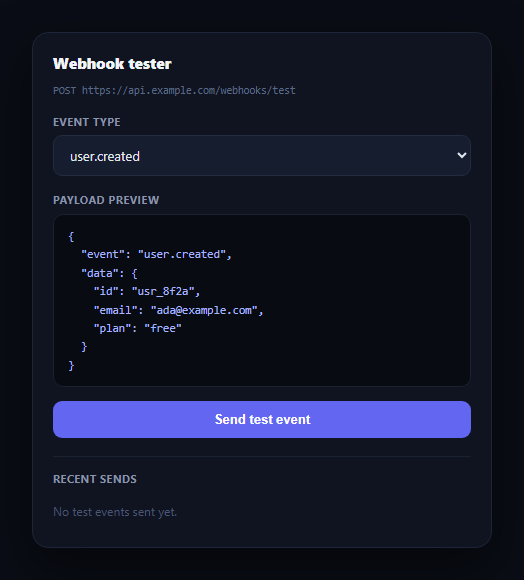
Every platform with webhooks needs a way for developers to test their endpoint without waiting for a real event to occur — pick an event type, see exactly what payload will be sent, fire it off, and see how the endpoint responded. This snippet builds that developer tool UI in plain HTML, CSS, and vanilla JavaScript: an event picker, a live JSON payload preview, a send button, and a scrolling log of past test sends with color-coded status codes.
Payload preview that updates live
Selecting a different event type in the dropdown immediately swaps the JSON preview below it, generated from a PAYLOADS lookup keyed by event name and rendered with JSON.stringify(payload, null, 2) for readable indentation. A developer can see exactly what their endpoint will receive before committing to a send — no guessing, no separate documentation lookup.
A log that reads like a real request history
Every send prepends a new entry to the log rather than appending, so the most recent test is always at the top, matching how request logs conventionally read. Each entry shows the status code in a colored pill (green for 2xx, amber for 4xx, red for 5xx — the same convention used across this library's log viewer stream), the event name, and a timestamp, with the log capped to a handful of visible entries so it doesn't grow unbounded.
Simulated but realistic response distribution
The demo's send handler doesn't call a real endpoint — it randomly picks a status code weighted toward success (2xx most often, 4xx occasionally, 5xx rarely), which mirrors the actual distribution a healthy webhook integration should see, while still surfacing every color state for the demo. A real integration would replace this with the actual HTTP response from the developer's endpoint.
Where this fits in a developer product
Place it in an API dashboard next to a rate limit status panel so developers can both test event delivery and monitor their remaining quota, or next to an API key manager as part of a broader developer console.
Customizing it
Wire the send button to an actual fetch call against the developer's configured endpoint URL, add a response body/headers viewer per log entry, or let developers edit the payload JSON directly before sending a custom test event.
Build with AI
Build, Understand, Optimize, and Extend It With AI
You don't have to work out the payload-preview and log-ordering logic by hand. Paste this snippet's HTML, CSS, and JS into an AI coding assistant like Claude and ask it to explain how updatePreview() keeps the JSON display in sync with the select element purely by reading its current value, and why new log entries are inserted at the front of the list rather than appended to the end. The same assistant can help optimize it — ask whether the log should persist to localStorage so test history survives a page reload, or whether a very active testing session should paginate rather than cap the log at a fixed count. It's also useful for extending the tool: ask it to add a raw response body/headers viewer per log entry, let developers edit the payload JSON before sending a custom event, or wire the send button to a real fetch call against a configurable endpoint URL with proper error handling. Treat the code less like a finished artifact and more like a starting point for a conversation.
Prompt to recreate it
Copy this into your AI assistant of choice to build the effect from scratch, or as a jumping-off point for your own variant:
Build a "webhook event tester" developer tool UI in plain HTML, CSS, and JavaScript with no framework or library.

Requirements:
- A dropdown to pick a webhook event type (e.g. user.created, payment.succeeded, payment.failed, subscription.cancelled), where selecting an option immediately updates a below JSON payload preview to show a representative example payload for that specific event, pulled from a JavaScript lookup object keyed by event name and formatted with readable indentation.
- A "Send test event" button that, on click, disables itself and shows a brief loading label, then after a short simulated delay adds a new entry to a log list.
- The log must insert new entries at the top of the list (most recent first, matching how request logs are conventionally read), cap the visible list to a small fixed number of entries by removing the oldest once the cap is exceeded, and show an empty-state message when no events have been sent yet.
- Each log entry must show a color-coded HTTP status code pill (green for 2xx, amber for 4xx, red for 5xx), the event name that was sent, and a timestamp.
- The simulated response in this demo should weight its randomly chosen status code toward success (2xx most of the time) with occasional 4xx and rare 5xx results, so the log shows a realistic distribution while still demonstrating every status color.
- Use a dark, developer-console-style theme with monospace font for the JSON preview, status codes, and endpoint label, and system-ui font elsewhere.
Want to tighten it up first? Run this prompt through the AI Prompt Studio to score it across 8 quality dimensions, catch anti-patterns, and tune the wording for Claude, ChatGPT, or Gemini before you paste it in.
Step by step
How to Use
- 1Paste HTML, CSS, and JSA webhook tester card renders with a user.created payload preview.
- 2Change the event typeThe JSON preview updates immediately to match the selected event.
- 3Click Send test eventAfter a brief delay, a color-coded log entry appears at the top of the list.
- 4Read the status colorsGreen is 2xx success, amber is 4xx client error, red is 5xx server error.
- 5Send several eventsThe log keeps the most recent entries, dropping the oldest past six.
- 6Wire up a real endpointReplace the simulated response with an actual fetch call to the developer's endpoint URL.
Real-world uses
Common Use Cases
Got questions?
Frequently Asked Questions
The select element's change event calls updatePreview(), which looks up the chosen event name in the PAYLOADS object and re-renders it with JSON.stringify(payload, null, 2). There's no separate state to keep synchronized — the preview is always a direct read of the currently selected value.
Request and event logs are conventionally read most-recent-first, since that's the entry a developer usually cares about right after clicking send. insertBefore(entry, logList.firstChild) prepends each new entry, and older entries beyond a small cap are removed so the list stays scannable.
Replace the setTimeout-based simulation in the click handler with an actual fetch(endpointUrl, { method: 'POST', body: JSON.stringify(payload) }) call, read the real response.status, map it into the same s2xx/s4xx/s5xx tier used for the status pill color, and call addLogEntry with that real result.
Add a new option to the select element and a matching key in the PAYLOADS object with a representative example payload for that event. No other code changes are required — the preview and send logic both read from the same selected value.
Track the selected event and the log entries array as component state, derive the JSON preview from the selected event with a computed value, and append new entries to the front of the log array on send (using your framework's real fetch call instead of the simulated timeout). The status-tier mapping is a small pure function that ports unchanged.