You Might Also Like
Learn Coding Visually
Learn to code with interactive, live-preview playgrounds — HTML, CSS, JavaScript, React & more.
 HTML Playground42 lessons · Click-based · Live preview
 CSS PlaygroundLearn CSS with a live editor
 JavaScript Playground60 lessons · DOM · Async · Canvas
 React PlaygroundLearn React with a live code editor
 GSAP PlaygroundLearn GSAP animation interactively
 SVG Playground44 lessons · shapes · paths · animation
 SCSS Playground45 lessons · Sass modules · tokens
 Tailwind PlaygroundLearn Tailwind CSS with a live editor
 Bootstrap 5 Playground50 lessons · live preview
Live Log Viewer — Free HTML CSS JS Snippet
Live Log Viewer · Dashboards · Plain HTML, CSS & JS · Live preview
What's included
Features
About this UI Snippet
Live Log Viewer — Scroll-Anchored Autoscroll, Level Filtering & a Bounded Ring Buffer
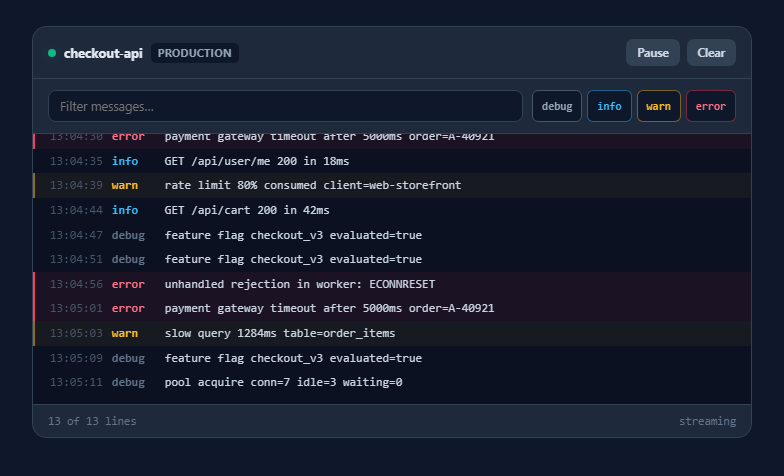
A log viewer is deceptively hard to get right, and the difficulty is never the rendering. It is that the component has to guess whether the reader wants to follow the stream or read something further up — and every implementation that gets this wrong becomes unusable at exactly the moment it matters, when something is going wrong and lines are arriving fast.
Auto-follow derived from scroll position, not a toggle
The rule here is the one every good terminal uses: if the viewport is within 40 pixels of the bottom, the viewer is following and new lines scroll into view. Scroll up by more than that and following stops immediately, so the line you are reading stays put no matter how much arrives underneath. Scroll back to the bottom and following resumes on its own. There is no checkbox, because a checkbox makes the reader manage state that their scroll position already expresses unambiguously. When new lines arrive while detached, a "New logs" pill appears rather than yanking the view.
A ring buffer so memory stays flat
Streams do not end, so an append-only viewer grows without limit until the tab dies. logs is capped at 400 entries and shift() drops the oldest as new ones arrive, which bounds both the array and the DOM. This is the single most important line in a long-lived log component, and the one most often missing from hand-rolled versions that were only ever tested for a minute.
One string build per frame, not one node append per line
Rendering rebuilds the visible list as a single HTML string and assigns it once. Appending elements individually forces layout work per line and gets visibly slow when a burst arrives or a filter changes. Building a string and writing it once is both simpler and dramatically faster at this scale, and it makes filtering — which changes which lines exist rather than adding to them — the same code path as streaming.
Escaping before highlighting, in that order
Search matches are wrapped in <mark>, which means the renderer writes HTML. The escape runs first, over the raw message, and the <mark> tags are inserted into the already-escaped string afterwards. Doing it the other way round — highlighting then escaping — would escape your own markup, and skipping the escape entirely would let any log line containing angle brackets inject nodes into the page. Log messages routinely contain user-supplied data, so this ordering is a security property, not a formatting detail.
Filters that compose
Level toggles and the text search are applied together in one visible() filter, and the footer reports "N of M lines" so it is always clear that a quiet console means an active filter rather than a dead stream. Level chips carry their own colour when active, so the filter row doubles as the legend for the lines below it.
Build with AI
Build, Understand, Optimize, and Extend It With AI
Paste this snippet into an AI assistant like Claude and ask it to replace the simulated timer with a real EventSource connection, including reconnect-with-backoff and a visible connection state on the status dot — that turns the demo into something you could actually point at a service. Other natural extensions: add windowed rendering so the buffer can hold tens of thousands of lines while only the visible slice is in the DOM; add structured-log support that parses JSON messages and lets you filter on a field rather than a substring; add a "copy visible lines" action that respects the current filters; or add timestamp-range selection so a user can pin the view to the minute an incident started.
Prompt to recreate it
Copy this into your AI assistant of choice to build the effect from scratch, or as a jumping-off point for your own variant:
Build a live streaming log viewer in plain HTML, CSS, and JavaScript — no frameworks or libraries.

Requirements:
- A fixed-height scrollable console that receives new log lines on an irregular timer, each with a level (debug/info/warn/error), a timestamp and a message.
- Implement auto-follow derived from scroll position, NOT a checkbox: measure scrollHeight - scrollTop - clientHeight on scroll and treat anything within about 40px of the bottom as "following". While following, new lines scroll into view; once the user scrolls up, the viewport must not move even as lines arrive.
- While detached, show a floating "New logs" pill that re-attaches and jumps to the bottom when clicked. Scrolling back to the bottom must re-attach automatically and hide the pill.
- Cap the log buffer with a ring buffer (shift the oldest past a maximum such as 400 lines) so memory and DOM size stay flat for a stream that never ends.
- Render by building one HTML string for the visible lines and assigning it once, rather than appending nodes per line — so streaming and filtering use the same code path.
- Provide four independent level toggle chips, coloured to match the lines they control so the filter row doubles as a legend, plus a text search that filters messages and highlights the matched substring with <mark>.
- IMPORTANT: HTML-escape the message FIRST, then insert the <mark> tags into the escaped string. Never highlight before escaping, and never skip escaping — log messages routinely contain user-supplied data.
- Show a footer reading "N of M lines" so a filtered view is never mistaken for a stalled stream, plus Pause/Resume and Clear controls and a pulsing live-status dot that greys out when paused.
- Style it as a dark terminal panel with monospace lines, coloured level labels, and a coloured left border plus tinted background on warn and error rows.
Want to tighten it up first? Run this prompt through the AI Prompt Studio to score it across 8 quality dimensions, catch anti-patterns, and tune the wording for Claude, ChatGPT, or Gemini before you paste it in.
Step by step
How to Use
- 1Watch the streamLines arrive at irregular intervals with a level, timestamp and message, and the pulsing green dot in the header indicates a live connection. Warnings and errors carry a coloured left border so they are findable while scrolling.
- 2Scroll up to detachScrolling more than 40px from the bottom stops auto-follow instantly, so the line you are reading stays under your cursor while new lines continue to accumulate below.
- 3Use the New logs pill to catch upWhile detached, arriving lines surface a pill at the bottom of the console. Clicking it re-attaches and jumps to the newest line; scrolling back down manually does the same thing.
- 4Filter by levelThe four level chips toggle independently and are coloured to match the lines they control, so the filter row is also the legend. Turning off debug and info is the fastest way to see only what went wrong.
- 5Search within messagesTyping filters to matching lines and highlights the matched substring inside each one. The footer shows "N of M lines" so a filtered view is never mistaken for a stalled stream.
- 6Pause or clearPause stops the stream and greys the status dot while keeping everything already received. Clear empties the buffer and re-attaches to the bottom.
Real-world uses
Common Use Cases
Got questions?
Frequently Asked Questions
It measures the distance from the bottom on every scroll event — scrollHeight minus scrollTop minus clientHeight — and treats anything within 40 pixels as "following". That single derived boolean drives everything: new lines only scroll into view while it is true, and the New logs pill only appears while it is false. Scrolling back to the bottom re-attaches automatically.
Because a stream has no end. Without a cap, both the array and the DOM grow until the tab becomes unresponsive — a bug that never shows up in a short test and always shows up in production. shift() drops the oldest line as each new one arrives, keeping memory and render cost flat regardless of how long the viewer is left open. Raise MAX_LINES if you need more scrollback.
Yes, because of the ordering. The message is HTML-escaped first, and the <mark> tags are inserted into the already-escaped string afterwards. If you highlighted first you would escape your own markup; if you skipped escaping, a log line containing a script tag would execute. Log messages frequently contain user input, so this ordering matters.
Replace the push() timer with your transport and call push() with real records. For Server-Sent Events, new EventSource(url).onmessage pushes each parsed payload; for WebSockets, do the same in onmessage. Nothing else changes — the buffer, filtering, follow behaviour and rendering are all independent of where the lines came from.
Because filtering and streaming then share one code path. Appending is only cheaper when nothing is filtered, and it forces a full rebuild anyway the moment a level toggle or search term changes. At a few hundred lines, one string build plus one innerHTML write is fast enough that the simpler model wins; for tens of thousands of lines you would move to windowed rendering.
Yes. Keep the log array in a ref rather than state and batch renders, since a high-frequency stream calling setState per line will re-render far more often than the screen repaints. Keep the derived following boolean in a ref too, read scroll geometry from a ref to the console element, and perform the scroll-to-bottom in a layout effect after the new lines have been committed.