Source Code
<section class="tjh-hero">
  <div class="tjh-eyebrow">✦ Now hiring</div>
  <h1 class="tjh-heading">We build for<br><span id="tjhTyped" class="tjh-typed"></span><span class="tjh-caret" aria-hidden="true"></span></h1>
  <p class="tjh-sub">One product team, five very different customers — the headline cycles through who we ship for, typed and deleted in a loop by Typed.js.</p>
  <div class="tjh-actions">
    <button class="tjh-btn tjh-primary">See open roles</button>
    <button class="tjh-btn tjh-ghost">Our story →</button>
  </div>
</section>*{box-sizing:border-box;margin:0;padding:0}
body{font-family:system-ui,-apple-system,sans-serif;background:#0b0a17;color:#eceafd;min-height:100vh}
.tjh-hero{max-width:680px;margin:0 auto;padding:14vh 24px;text-align:center}
.tjh-eyebrow{display:inline-flex;align-items:center;gap:6px;font-size:12px;font-weight:700;letter-spacing:.08em;text-transform:uppercase;color:#a5b4fc;background:rgba(99,102,241,.14);border:1px solid rgba(99,102,241,.3);padding:5px 14px;border-radius:20px;margin-bottom:26px}
.tjh-heading{font-size:clamp(32px,6.5vw,58px);font-weight:800;line-height:1.18;letter-spacing:-.02em;margin-bottom:22px;min-height:2.4em}
.tjh-typed{background:linear-gradient(135deg,#818cf8,#e879f9);-webkit-background-clip:text;-webkit-text-fill-color:transparent;background-clip:text}
.tjh-caret{display:inline-block;width:3px;height:.85em;background:#e879f9;margin-left:4px;vertical-align:-.1em;animation:tjhBlink 1s steps(1) infinite}
@keyframes tjhBlink{50%{opacity:0}}
.tjh-sub{color:#9691c4;font-size:16px;line-height:1.7;max-width:520px;margin:0 auto 34px}
.tjh-actions{display:flex;gap:14px;justify-content:center}
.tjh-btn{padding:13px 26px;border:none;border-radius:10px;font-size:15px;font-weight:600;cursor:pointer;font-family:inherit}
.tjh-primary{background:linear-gradient(135deg,#6366f1,#c026d3);color:#fff;box-shadow:0 4px 20px rgba(99,102,241,.35)}
.tjh-primary:hover{transform:translateY(-2px)}
.tjh-ghost{background:rgba(255,255,255,.06);color:#eceafd;border:1px solid rgba(255,255,255,.14)}
.tjh-ghost:hover{background:rgba(255,255,255,.12)}// Typed.js takes an options object with a strings array and manages the
// entire type-delete-type loop, including the cursor, itself — this is
// the whole animation, no manual setInterval/substring logic required.
const typed = new Typed('#tjhTyped', {
strings: [
'ambitious founders.',
'enterprise teams.',
'solo builders.',
'design partners.',
'the next big idea.',
],
typeSpeed: 48,
backSpeed: 28,
backDelay: 1400,
startDelay: 300,
loop: true,
smartBackspace: true,
showCursor: false, // using our own CSS-animated caret instead of Typed's
});Learn Coding Visually
Learn to code with interactive, live-preview playgrounds — HTML, CSS, JavaScript, React & more.
 HTML Playground42 lessons · Click-based · Live preview
 CSS PlaygroundLearn CSS with a live editor
 JavaScript Playground60 lessons · DOM · Async · Canvas
 React PlaygroundLearn React with a live code editor
 GSAP PlaygroundLearn GSAP animation interactively
 SVG Playground44 lessons · shapes · paths · animation
 SCSS Playground45 lessons · Sass modules · tokens
 Tailwind PlaygroundLearn Tailwind CSS with a live editor
 Bootstrap 5 Playground50 lessons · live preview
Typed.js Multi-String Hero — Free Typewriter Headline Snippet
Typed.js Multi-String Hero · Heroes · Plain HTML, CSS & JS · Live preview
What's included
Features
About this UI Snippet
Typed.js Multi-String Hero — Cycling Headlines with a Real Typewriter Loop
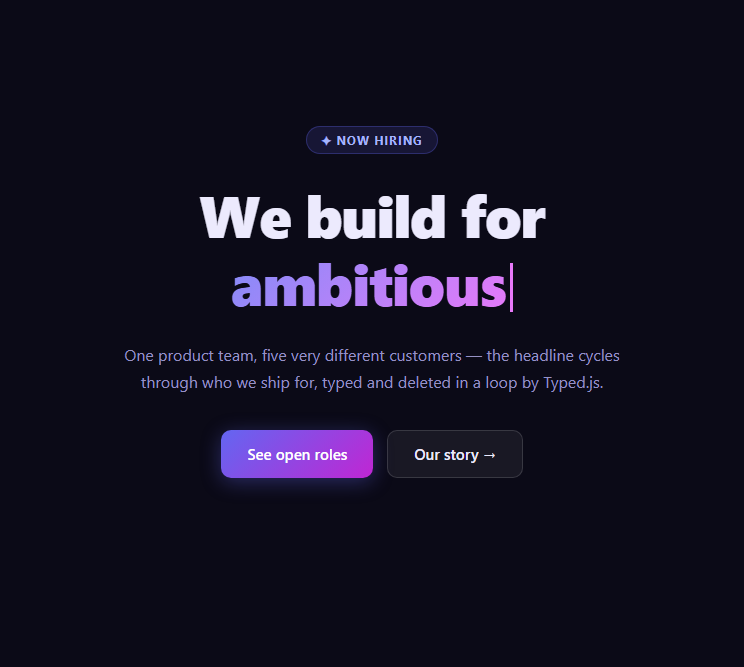
A rotating headline is a common way to communicate that one product serves several different audiences without needing five separate hero sections. This snippet uses Typed.js — a small, purpose-built typewriter animation library — to cycle a hero headline through five phrases, each one typed out, held briefly, and deleted before the next begins, all driven by a single strings array.
One options object, a full animation loop
new Typed('#tjhTyped', { strings: [...], typeSpeed: 48, backSpeed: 28, backDelay: 1400, loop: true }) is the entire animation. Typed.js owns the interval-based logic of adding one character at a time, pausing once a string is fully typed, deleting characters at a different (usually faster) speed, and moving to the next string in the array — looping back to the first once the array is exhausted. Compare this to Typewriter or Split Text, which build a single-string typing effect from scratch; this snippet gets the equivalent behavior across an arbitrary number of strings from one constructor call.
Independent type and delete speeds
typeSpeed: 48 and backSpeed: 28 are deliberately different — text usually reads better typing in a bit slower than it deletes, since deletion is meant to feel like a quick "clearing" gesture rather than a mirrored typing animation. backDelay: 1400 is the pause after a string finishes typing and before deletion starts, giving the reader time to actually read the phrase rather than watching it vanish immediately.
smartBackspace and why it matters here
Because two of this hero's phrases share no common prefix while others might, smartBackspace: true tells Typed.js to only delete the characters that differ between the current string and the next one, rather than deleting the entire string down to nothing and retyping from scratch. For phrases that do share a prefix, this produces a subtly smarter, faster transition; when there's no shared prefix (as here) it behaves the same as a full backspace.
A custom CSS caret instead of Typed's own
Typed.js can render its own blinking cursor span, but this snippet sets showCursor: false and supplies a separate .tjh-caret element animated with a plain CSS @keyframes blink instead — this keeps the caret's exact color, width, and blink timing fully controllable in CSS rather than through Typed's cursor options, and avoids any layout shift from Typed inserting and removing its own cursor markup.
Customizing it
Add or remove phrases in the strings array, tune typeSpeed/backSpeed/backDelay for a snappier or more deliberate rhythm, or pair this hero with a Hero Section layout below featuring the specific audience the current phrase describes.
Build with AI
Build, Understand, Optimize, and Extend It With AI
You don't have to write the typing/deleting interval logic by hand. Paste this snippet's HTML, CSS, and JS into an AI coding assistant like Claude and ask it to explain exactly how Typed.js sequences through the strings array using typeSpeed, backSpeed, and backDelay, and what smartBackspace changes about the deletion behavior when consecutive phrases share a prefix. The same assistant can help you tune the rhythm — asking whether the current 48ms type speed and 1400ms read pause feel right for a five-phrase rotation, or whether shorter phrases should get a shorter backDelay than longer ones. It's also useful for extending the hero: ask it to defer starting the Typed.js instance until the hero scrolls into view using an IntersectionObserver, swap the custom CSS caret's color per phrase, or add a fade transition between phrases in addition to the type/delete effect. Treat the code less like a finished artifact and more like a starting point for a conversation.
Prompt to recreate it
Copy this into your AI assistant of choice to build the effect from scratch, or as a jumping-off point for your own variant:
Build a hero section with a headline that cycles through multiple strings using a realistic type-then-delete animation, powered by the Typed.js library loaded from a CDN.

Requirements:
- A hero section with an eyebrow label, a large heading containing an empty inline span reserved for the typed text plus a separately styled blinking caret element, a supporting paragraph, and two call-to-action buttons.
- Initialize a single new Typed(selector, options) instance targeting the empty span, passing an array of at least five distinct phrases as the strings option.
- Configure typeSpeed and backSpeed as two different numeric values (typing should generally feel a bit slower than deleting), a backDelay controlling how long a fully-typed phrase pauses before deletion begins, and loop: true so the cycle repeats indefinitely through all phrases.
- Enable smartBackspace so that if two consecutive phrases in the array happen to share a prefix, Typed.js only deletes the differing suffix rather than deleting the entire phrase down to nothing.
- Disable Typed.js's own built-in cursor (showCursor: false) and instead implement a separate caret element styled and animated purely with CSS (a simple opacity blink via @keyframes), positioned immediately after the typed text span.
- Apply a CSS gradient text effect (background-clip: text) to the typed span so the cycling phrase itself is visually distinct from the static portion of the headline.
Want to tighten it up first? Run this prompt through the AI Prompt Studio to score it across 8 quality dimensions, catch anti-patterns, and tune the wording for Claude, ChatGPT, or Gemini before you paste it in.
Step by step
How to Use
- 1Add the Typed.js CDN scriptInclude typed.umd.js from the CDN panel.
- 2Paste HTML, CSS, and JSA hero with an empty typed span and blinking caret renders.
- 3Watch the headline typeThe first phrase types out character by character.
- 4Watch it pause, then deleteAfter backDelay, it backspaces before typing the next phrase.
- 5Let it loopAll five phrases cycle continuously since loop is true.
- 6Edit the strings arrayReplace the five phrases with your own audiences or value props.
Real-world uses
Common Use Cases
Got questions?
Frequently Asked Questions
The strings array is processed in order: Typed.js types out the current string one character at a time at typeSpeed, waits for backDelay once fully typed, deletes it at backSpeed, then advances to the next string in the array. Once the last string has been typed, deleted, and loop is true, it restarts from the first string, creating a continuous cycle.
Without it, Typed.js deletes a finished string down to zero characters before typing the next one from scratch. With smartBackspace: true, if the next string in the array shares a prefix with the current one, Typed.js only deletes the differing suffix and types the new suffix — producing a faster, subtly smarter-feeling transition for phrases that share common wording.
Typed.js can render and animate its own cursor element automatically, but this snippet opts out of that (showCursor: false) and instead renders a separate .tjh-caret span animated with a plain CSS @keyframes blink. This gives full control over the caret's exact width, color, and blink timing directly in CSS rather than through Typed's more limited cursor styling options.
Yes — instead of constructing new Typed(...) immediately on page load, wrap the construction in an IntersectionObserver callback watching the hero section, and only call new Typed('#tjhTyped', {...}) once the hero becomes visible. This defers the animation start until a visitor actually scrolls to it.
Install the typed.js npm package (or keep the CDN script), import Typed, and construct new Typed(selector, options) inside a mount effect (useEffect, onMounted, or ngAfterViewInit) targeting a ref to the span element. Call the returned instance's .destroy() method in the cleanup function to stop the typing loop and remove its DOM manipulation when the component unmounts.