Source Code
<div class="bsc-card">
  <div class="bsc-head">
    <h3>Build your bundle</h3>
    <p>Uncheck anything you don't need — the price updates live</p>
  </div>

  <ul class="bsc-items" id="bscItems">
    <li class="bsc-item" data-price="15" data-bundle="10.50">
      <label>
        <input type="checkbox" class="bsc-check" checked />
        <span class="bsc-item-info">
          <span class="bsc-item-name">Design System Kit</span>
          <span class="bsc-item-desc">200+ components, Figma + code</span>
        </span>
      </label>
      <span class="bsc-item-price">$15</span>
    </li>
    <li class="bsc-item" data-price="22" data-bundle="15.40">
      <label>
        <input type="checkbox" class="bsc-check" checked />
        <span class="bsc-item-info">
          <span class="bsc-item-name">Icon Pack Pro</span>
          <span class="bsc-item-desc">1,200 icons, SVG + web font</span>
        </span>
      </label>
      <span class="bsc-item-price">$22</span>
    </li>
    <li class="bsc-item" data-price="18" data-bundle="12.60">
      <label>
        <input type="checkbox" class="bsc-check" checked />
        <span class="bsc-item-info">
          <span class="bsc-item-name">Illustration Set</span>
          <span class="bsc-item-desc">80 editable scenes, SVG</span>
        </span>
      </label>
      <span class="bsc-item-price">$18</span>
    </li>
  </ul>

  <div class="bsc-summary">
    <div class="bsc-row">
      <span>Individual total</span>
      <span class="bsc-strike" id="bscIndividual">$55.00</span>
    </div>
    <div class="bsc-row bsc-bundle-row">
      <span>Bundle price</span>
      <b id="bscBundle">$38.50</b>
    </div>
    <div class="bsc-savings" id="bscSavings">You save $16.50 <span id="bscSavingsPct">(30%)</span></div>
  </div>
</div>*{box-sizing:border-box;margin:0;padding:0}
body{font-family:system-ui,-apple-system,sans-serif;background:#0c0a14;min-height:100vh;display:flex;align-items:center;justify-content:center;padding:24px}
.bsc-card{background:#141222;border:1px solid #2a2444;border-radius:18px;padding:24px;width:100%;max-width:420px;box-shadow:0 20px 50px rgba(0,0,0,.45)}
.bsc-head h3{font-size:18px;font-weight:800;color:#f5f3fd}
.bsc-head p{font-size:12px;color:#8f89b3;margin-top:4px;margin-bottom:18px}
.bsc-items{list-style:none;display:flex;flex-direction:column;gap:8px;margin-bottom:18px}
.bsc-item{display:flex;align-items:center;justify-content:space-between;gap:10px;background:#1a1730;border:1px solid #2e2850;border-radius:11px;padding:11px 13px;transition:opacity .15s}
.bsc-item:has(.bsc-check:not(:checked)){opacity:.45}
.bsc-item label{display:flex;align-items:center;gap:10px;cursor:pointer;flex:1;min-width:0}
.bsc-check{width:17px;height:17px;flex-shrink:0;accent-color:#a855f7;cursor:pointer}
.bsc-item-info{display:flex;flex-direction:column;gap:1px;min-width:0}
.bsc-item-name{font-size:13px;font-weight:700;color:#ede9fb}
.bsc-item-desc{font-size:10.5px;color:#7f7aa3}
.bsc-item-price{font-size:12.5px;font-weight:700;color:#a3a0c9;white-space:nowrap}
.bsc-summary{display:flex;flex-direction:column;gap:8px;padding:14px 15px;background:#1a1730;border:1px solid #2e2850;border-radius:12px}
.bsc-row{display:flex;align-items:baseline;justify-content:space-between;font-size:12.5px;color:#8f89b3}
.bsc-strike{text-decoration:line-through;text-decoration-color:#4a4370}
.bsc-bundle-row{padding-top:8px;border-top:1px dashed #2e2850;font-size:14px;color:#ede9fb;font-weight:700}
.bsc-bundle-row b{color:#c4b5fd;font-size:19px;font-variant-numeric:tabular-nums}
.bsc-savings{text-align:center;font-size:12.5px;font-weight:700;color:#4ade80;background:rgba(74,222,128,.1);border-radius:8px;padding:8px;margin-top:2px}
.bsc-savings span{font-weight:800}var itemEls = Array.prototype.slice.call(document.querySelectorAll('.bsc-item'));
var individualEl = document.getElementById('bscIndividual');
var bundleEl = document.getElementById('bscBundle');
var savingsEl = document.getElementById('bscSavings');
var savingsPctEl = document.getElementById('bscSavingsPct');
function fmtMoney(n) {
return '$' + n.toLocaleString(undefined, { minimumFractionDigits: 2, maximumFractionDigits: 2 });
}
function render() {
var selected = itemEls.filter(function (el) {
return el.querySelector('.bsc-check').checked;
});
// Individual total: sum of each selected item's standalone price.
var individualTotal = selected.reduce(function (sum, el) {
return sum + Number(el.dataset.price);
}, 0);
// Bundle total: sum of each selected item's price WITHIN the bundle
// (its proportional share of the discounted bundle price).
var bundleTotal = selected.reduce(function (sum, el) {
return sum + Number(el.dataset.bundle);
}, 0);
var savings = individualTotal - bundleTotal;
var savingsPct = individualTotal > 0 ? Math.round((savings / individualTotal) * 100) : 0;
individualEl.textContent = fmtMoney(individualTotal);
bundleEl.textContent = fmtMoney(bundleTotal);
if (selected.length === 0) {
savingsEl.hidden = true;
} else {
savingsEl.hidden = false;
savingsEl.innerHTML = 'You save ' + fmtMoney(savings) + ' <span id="bscSavingsPct">(' + savingsPct + '%)</span>';
}
}
itemEls.forEach(function (el) {
el.querySelector('.bsc-check').addEventListener('change', render);
});
render();Learn Coding Visually
Learn to code with interactive, live-preview playgrounds — HTML, CSS, JavaScript, React & more.
 HTML Playground42 lessons · Click-based · Live preview
 CSS PlaygroundLearn CSS with a live editor
 JavaScript Playground60 lessons · DOM · Async · Canvas
 React PlaygroundLearn React with a live code editor
 GSAP PlaygroundLearn GSAP animation interactively
 SVG Playground44 lessons · shapes · paths · animation
 SCSS Playground45 lessons · Sass modules · tokens
 Tailwind PlaygroundLearn Tailwind CSS with a live editor
 Bootstrap 5 Playground50 lessons · live preview
Bundle Savings Card — Free Product Bundle Discount Widget (HTML/CSS/JS)
Bundle Savings Card · Pricing · Plain HTML, CSS & JS · Live preview
What's included
Features
About this UI Snippet
Bundle Savings Card — Real Savings Math That Updates as Items Are Toggled
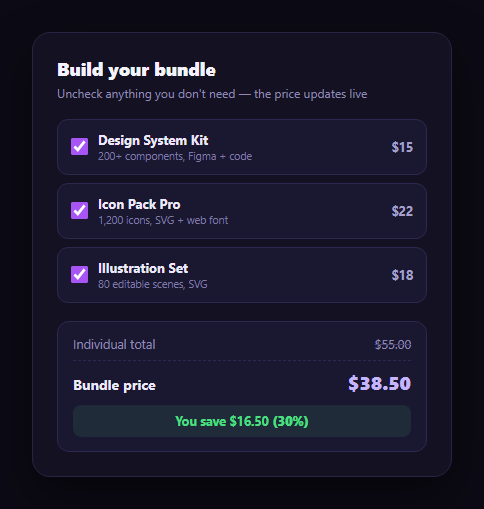
Bundle pricing pages usually show one fixed "buy all 3 for $X" price and let it go stale the moment a customer only wants two of the three items. This snippet keeps the math honest: three products with real individual prices, a discounted bundle price, and a savings figure that recalculates correctly the instant an item is checked or unchecked.
Two prices per item, not one
Each product carries both data-price (its standalone price) and data-bundle (its proportional share of the discounted bundle price) as data attributes. The three products are $15, $22, and $18 individually — summing to $55 — and their bundle-share prices are $10.50, $15.40, and $12.60, which sum to exactly $38.50, the full bundle price. Because every item carries its own bundle-share price, removing an item removes *its own* discounted share too, not an arbitrary fraction of the total.
Verified 30% off, at every level
$55 individually vs. $38.50 bundled is a $16.50 saving, and $16.50 ÷ $55 = 30% — exactly the discount rate applied. Because each item's bundle price is that same item's individual price × 0.7 ($15 × 0.7 = $10.50, $22 × 0.7 = $15.40, $18 × 0.7 = $12.60), the 30% savings percentage stays mathematically consistent whether all three items are selected or only one — uncheck any two and the remaining item alone still shows the same 30% saving, because the math is proportional rather than a single fixed discount applied to a fixed set.
Full recompute on every toggle
render() filters to the currently checked items, sums their standalone prices for the individual total and their bundle-share prices for the bundle total, and derives both the dollar savings and the percentage fresh — never adjusting a previous total in place. Toggling an item off immediately drops both the crossed-out individual total and the bundle total by that item's own two prices.
A clear before/after presentation
The individual total is shown with a strikethrough next to the bold bundle price, and a separate savings callout states both the dollar amount and the percentage — the same before/after pattern as a pricing card's struck-through price, applied to a multi-item bundle instead of a single plan.
Where it fits
Pair it with an annual savings badge if the bundle also has a monthly/annual choice, follow it with a promo code input for stacking an extra discount, or place it beside a pricing card grid as an add-on bundle offer.
Customizing it
Swap in your real products and prices — keep each item's bundle-share price proportional to its individual price if you want the savings percentage to stay constant across selections, or make it non-proportional if certain items should carry a bigger discount than others.
Build with AI
Build, Understand, Optimize, and Extend It With AI
You don't have to re-derive the proportional-discount math by hand. Paste this snippet's HTML, CSS, and JS into an AI coding assistant like Claude and ask it to explain exactly why storing a separate bundle-share price per item (rather than dividing one shared discount evenly, or applying it only to the full set) is what keeps the savings percentage constant no matter which items are checked, and how render() derives the individual total, bundle total, dollar savings, and percentage fresh from the currently selected items on every toggle. The same assistant can help you verify the arithmetic — ask it to confirm $15 + $22 + $18 = $55.00, that the three bundle-share prices sum to $38.50, and that $16.50 divided by $55.00 is exactly 30% — or extend the widget: ask how to let a non-proportional discount apply (where some items keep a bigger share of the total discount than others), how to enforce a minimum-two-items rule before showing bundle pricing at all, or how to animate the totals when they change. Treat the code less like a finished artifact and more like a starting point for a conversation.
Prompt to recreate it
Copy this into your AI assistant of choice to build the effect from scratch, or as a jumping-off point for your own variant:
Build a "bundle savings card" in plain HTML, CSS, and JavaScript with no framework or library.

Requirements:
- List exactly three products, each with a checkbox (checked by default), a name, a short description, its own standalone individual price, and its own separate bundle-share price stored as data attributes on that product's element.
- Choose the three individual prices and a single overall bundle discount percentage, then compute each item's bundle-share price as individual price × (1 − discount) so that summing all three bundle-share prices equals the advertised full bundle price exactly (verify this arithmetic before finalizing your example numbers).
- Show an "individual total" (the sum of standalone prices for checked items only, displayed with a strikethrough) and a "bundle price" (the sum of bundle-share prices for checked items only, displayed prominently) plus a savings callout stating both the dollar amount saved and the percentage saved.
- On every checkbox change, recompute both totals and the savings figures from scratch by filtering to the currently checked items and summing their two respective prices — do not increment/decrement a running total in place.
- Confirm in your own testing that the savings percentage stays the same (matching your chosen discount rate) regardless of which subset of items is checked, since each item's bundle-share price is a consistent proportion of its individual price.
- Add a fallback: if every item is unchecked, hide the savings callout entirely rather than showing a "$0.00 (0%)" line, and visually de-emphasize (e.g. dim) any unchecked item's row.
Want to tighten it up first? Run this prompt through the AI Prompt Studio to score it across 8 quality dimensions, catch anti-patterns, and tune the wording for Claude, ChatGPT, or Gemini before you paste it in.
Step by step
How to Use
- 1Paste HTML, CSS, and JSAll three items are checked; totals show $55.00 vs. $38.50.
- 2Uncheck an itemBoth totals drop by that item's own two prices.
- 3Read the savings line"You save $16.50 (30%)" recalculates for whatever is selected.
- 4Verify the math$55.00 − $38.50 = $16.50, and $16.50 / $55.00 = 30%.
- 5Uncheck everythingThe savings callout hides rather than showing a $0.00 saving.
- 6Wire up real productsSet each item's data-price and proportional data-bundle price.
Real-world uses
Common Use Cases
Got questions?
Frequently Asked Questions
Each item stores its own bundle-share price (its individual price × 0.7) rather than the page applying one discount to whatever total happens to be selected. Design System Kit is $15 individually and $10.50 in the bundle, Icon Pack Pro is $22 and $15.40, and Illustration Set is $18 and $12.60 — those three bundle-share prices sum to exactly $38.50, the full bundle price.
Because every item's bundle-share price is exactly 70% of its individual price, the 30% discount is proportional rather than a single fixed amount spread across whatever is selected. Whether all three items are checked or only one, that item's individual price minus its bundle-share price is always 30% of its individual price, so the percentage line stays consistent.
render() detects zero selected items and hides the entire savings callout rather than showing a "You save $0.00 (0%)" line, which would read as broken. The individual and bundle totals both show $0.00 in that state.
The individual total sums each selected item's standalone price: $15 + $22 + $18 = $55.00. The bundle total sums each item's bundle-share price: $10.50 + $15.40 + $12.60 = $38.50. Savings is the difference, $55.00 − $38.50 = $16.50, and the percentage is $16.50 divided by $55.00, which is exactly 30%.
Model items as an array of {name, description, price, bundlePrice, selected} objects. Derive individualTotal and bundleTotal with a memoized reduce over the selected items, and savings/savingsPct as further derived values — the arithmetic is pure and needs no DOM access at all.