Source Code
<div class="wrap">
  <div class="label">
    <div class="lbl-title">Nutrition Facts</div>
    <div class="servings">
      <div class="serv-row"><span>8 servings per container</span></div>
      <div class="serv-row bold"><span>Serving size</span><span>2/3 cup (55g)</span></div>
    </div>
    <div class="thick-rule"></div>
    <div class="amount-row"><span class="tiny-bold">Amount per serving</span></div>
    <div class="calories-row">
      <span class="cal-label">Calories</span>
      <span class="cal-val">230</span>
    </div>
    <div class="med-rule"></div>
    <div class="dv-head"><span>% Daily Value*</span></div>
    <div class="nutri-row"><span><b>Total Fat</b> 8g</span><span class="dv">10%</span></div>
    <div class="nutri-row indent"><span>Saturated Fat 1g</span><span class="dv">5%</span></div>
    <div class="nutri-row indent"><span><i>Trans</i> Fat 0g</span><span class="dv"></span></div>
    <div class="nutri-row"><span><b>Cholesterol</b> 0mg</span><span class="dv">0%</span></div>
    <div class="nutri-row"><span><b>Sodium</b> 160mg</span><span class="dv">7%</span></div>
    <div class="nutri-row"><span><b>Total Carbohydrate</b> 37g</span><span class="dv">13%</span></div>
    <div class="nutri-row indent"><span>Dietary Fiber 4g</span><span class="dv">14%</span></div>
    <div class="nutri-row indent"><span>Total Sugars 12g</span><span class="dv"></span></div>
    <div class="nutri-row indent2"><span>Includes 10g Added Sugars</span><span class="dv">20%</span></div>
    <div class="nutri-row"><span><b>Protein</b> 3g</span><span class="dv"></span></div>
    <div class="thick-rule"></div>
    <div class="vita-row"><span>Vitamin D 2mcg</span><span class="dv">10%</span></div>
    <div class="vita-row"><span>Calcium 260mg</span><span class="dv">20%</span></div>
    <div class="vita-row"><span>Iron 8mg</span><span class="dv">45%</span></div>
    <div class="vita-row last"><span>Potassium 235mg</span><span class="dv">6%</span></div>
    <div class="thin-rule"></div>
    <div class="footnote">* The % Daily Value (DV) tells you how much a nutrient in a serving of food contributes to a daily diet. 2,000 calories a day is used for general nutrition advice.</div>
  </div>
</div>
* { box-sizing: border-box; margin: 0; padding: 0; }
body { font-family: system-ui, sans-serif; background: #e2e8f0; min-height: 100vh; display: flex; align-items: center; justify-content: center; padding: 24px; }
.wrap { width: 100%; max-width: 320px; }
.label { background: #fff; border: 1px solid #000; padding: 8px 12px; font-family: Helvetica, Arial, sans-serif; color: #000; }
.lbl-title { font-size: 34px; font-weight: 900; letter-spacing: -1.5px; line-height: 1; padding-bottom: 4px; border-bottom: 1px solid #000; }
.servings { padding: 2px 0; }
.serv-row { display: flex; justify-content: space-between; font-size: 13px; padding: 1px 0; }
.serv-row.bold { font-weight: 800; }
.thick-rule { height: 11px; background: #000; margin: 2px 0; }
.med-rule { height: 5px; background: #000; margin: 2px 0; }
.thin-rule { height: 1px; background: #000; margin: 3px 0; }
.amount-row { padding: 1px 0; }
.tiny-bold { font-size: 11px; font-weight: 800; }
.calories-row { display: flex; justify-content: space-between; align-items: flex-end; border-bottom: 4px solid #000; padding-bottom: 2px; }
.cal-label { font-size: 22px; font-weight: 900; }
.cal-val { font-size: 38px; font-weight: 900; line-height: 0.9; }
.dv-head { display: flex; justify-content: flex-end; font-size: 12px; font-weight: 800; padding: 3px 0; border-bottom: 1px solid #000; }
.nutri-row { display: flex; justify-content: space-between; font-size: 13px; padding: 3px 0; border-bottom: 1px solid #000; }
.nutri-row b { font-weight: 800; }
.nutri-row.indent { padding-left: 18px; }
.nutri-row.indent2 { padding-left: 34px; font-size: 12px; }
.dv { font-weight: 800; }
.vita-row { display: flex; justify-content: space-between; font-size: 13px; padding: 3px 0; border-bottom: 1px solid #000; }
.vita-row.last { border-bottom: none; }
.footnote { font-size: 10px; line-height: 1.35; padding-top: 4px; }Learn Coding Visually
Learn to code with interactive, live-preview playgrounds — HTML, CSS, JavaScript, React & more.
 HTML Playground42 lessons · Click-based · Live preview
 CSS PlaygroundLearn CSS with a live editor
 JavaScript Playground60 lessons · DOM · Async · Canvas
 React PlaygroundLearn React with a live code editor
 GSAP PlaygroundLearn GSAP animation interactively
 SVG Playground44 lessons · shapes · paths · animation
 SCSS Playground45 lessons · Sass modules · tokens
 Tailwind PlaygroundLearn Tailwind CSS with a live editor
 Bootstrap 5 Playground50 lessons · live preview
Nutrition Facts Label — Free HTML CSS Snippet
Nutrition Label · Cards · Plain HTML & CSS · Live preview
What's included
Features
About this UI Snippet
Nutrition Facts Label — FDA-Style Layout in Pure HTML & CSS
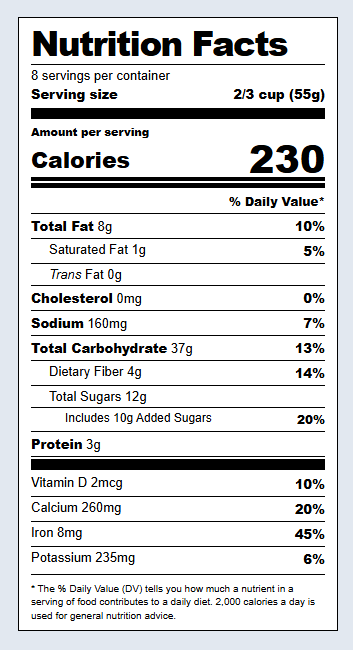
The FDA Nutrition Facts label is one of the most recognisable information designs in the world, with a strict, federally-specified layout. Like the boarding pass, this snippet recreates a real-world document — the modern (2016-revised) Nutrition Facts panel — in pure HTML and CSS — the oversized Calories figure, the characteristic thick black rules, nutrient indentation, right-aligned % Daily Values, and the footnote — accurate enough for food packaging mockups, recipe sites, and e-commerce grocery listings beside a product card.
The signature rule hierarchy
The label's visual structure comes from horizontal rules of different weights, which the snippet reproduces with dedicated divs: an 11px thick black bar separates the major sections, a 5px medium rule sits above Calories, a 4px border under the Calories row, and 1px hairlines divide individual nutrients. This deliberate weight hierarchy is what makes the label instantly recognisable and is mandated by FDA design specifications.
The typographic emphasis
The FDA label uses font weight and size to encode importance. "Nutrition Facts" is set in heavy condensed type with tight negative letter-spacing. The Calories number is enormous (the single most prominent value, reflecting its dietary importance after the 2016 redesign). Main nutrients are bold; sub-nutrients are regular weight and indented. The snippet matches these conventions with font-weight and font-size rather than colour, exactly as the printed label does.
Nutrient indentation
Sub-nutrients nest under their parents through left padding: Saturated and Trans Fat indent under Total Fat, Fiber and Sugars under Total Carbohydrate, and Added Sugars indent further still. This indentation communicates the nutritional hierarchy — that saturated fat is a component of total fat — purely through horizontal offset.
The % Daily Value column
The right-aligned % Daily Value column lets consumers gauge how a serving fits into a 2,000-calorie reference diet. Values are bold and consistently aligned to the right edge using flex justify-content: space-between on each row. Rows without a DV (like Trans Fat and Protein) simply leave the cell empty, matching the real label.
Why pure CSS matters here
Because the label is entirely HTML and CSS with no images, every value is real text — selectable, translatable, screen-reader accessible, and editable from data. A label rendered as an image fails all of these. This makes the snippet suitable for dynamically generated labels where the numbers come from a product database or a recipe nutrition calculation.
Build with AI
Build, Understand, Optimize, and Extend It With AI
You don't need to eyeball every rule weight against the real label by hand. Paste this snippet's HTML and CSS into an AI coding assistant like Claude and ask it to explain exactly why the thick-rule, med-rule, and thin-rule divs use those specific pixel heights, or how the nutri-row and indent classes combine padding-left values to encode the parent-child relationship between nutrients like Total Fat and Saturated Fat purely through spacing. The same assistant can help you optimize it — since this snippet ships with no JavaScript at all, ask whether the label should become data-driven, generating every row from a nutrition object rather than hardcoded markup, so it stays correct if the FDA reference daily values change. It is equally useful for extending it: ask it to add a Supplement Facts variant, compute the percent Daily Value column automatically from raw nutrient amounts, or build a print stylesheet that matches exact FDA point sizes for packaging. Treat the code less like a finished artifact and more like a starting point for a conversation.
Prompt to recreate it
Copy this into your AI assistant of choice to build the effect from scratch, or as a jumping-off point for your own variant:
Build an FDA-style "Nutrition Facts" label in pure HTML and CSS only, with no JavaScript, matching the modern 2016-revised layout exactly.

Requirements:
- A bordered panel with a heavy condensed "Nutrition Facts" title using negative letter-spacing, sitting above a servings-per-container line and a bold serving-size line.
- A distinct rule hierarchy built from plain divs of different fixed heights: an especially thick black bar (around 10-11px) separating major sections, a medium bar (around 5px) directly above the Calories row, a heavier border (around 4px) under the Calories row, and 1px hairline rules between individual nutrient rows.
- An oversized Calories number, visually the largest text on the label, right beside a smaller bold "Calories" label, aligned using flexbox with the numeral much larger in font-size than every other value.
- A percent Daily Value column that is right-aligned on every nutrient and vitamin row using flexbox justify-content: space-between, bold-weighted, and left empty (not zero) on rows like Trans Fat and Protein that have no established daily value.
- Sub-nutrient indentation done purely with left padding: Saturated Fat and Trans Fat indented one level under Total Fat, Dietary Fiber and Total Sugars indented one level under Total Carbohydrate, and Added Sugars indented a second level further under Total Sugars, with a smaller font size at that deepest level.
- A vitamins and minerals section (Vitamin D, Calcium, Iron, Potassium) separated from the macronutrients by the thick rule, each row following the same right-aligned percent format, with no bottom border on the very last row.
- A small footnote paragraph at the bottom explaining what percent Daily Value means, in a font size noticeably smaller than every other row.
- Every number and label must be real selectable text, not an image, so the whole label could later be generated from a data object.
Want to tighten it up first? Run this prompt through the AI Prompt Studio to score it across 8 quality dimensions, catch anti-patterns, and tune the wording for Claude, ChatGPT, or Gemini before you paste it in.
Step by step
How to Use
- 1Update the serving infoEdit the servings per container and serving size at the top. These are the reference basis for every value below.
- 2Set the caloriesChange the large Calories number to match your product or recipe per serving.
- 3Fill in the nutrientsUpdate each nutrient row with its amount (grams or milligrams) and its % Daily Value. Keep main nutrients bold and sub-nutrients in the indented rows.
- 4Update vitamins and mineralsEdit the Vitamin D, Calcium, Iron, and Potassium rows — the four required micronutrients on the modern label — with amounts and daily values.
- 5Generate from dataFor dynamic labels, bind each value to a product or recipe nutrition object. Compute % Daily Values by dividing each nutrient amount by its FDA reference daily intake and rounding.
- 6Export for your frameworkClick "JSX" for a React component that accepts a nutrition prop object. Click "Vue" for a Vue 3 SFC. Click "Tailwind" for a React + Tailwind version.
Real-world uses
Common Use Cases
Got questions?
Frequently Asked Questions
It faithfully reproduces the visual layout of the modern (2016-revised) FDA Nutrition Facts label — the rule weights, the oversized Calories, indentation, and the % Daily Value column. For actual regulatory compliance on packaging, the FDA specifies exact typefaces (Helvetica/Arial), minimum point sizes, and precise measurements that you should verify against the current Code of Federal Regulations. Use this as an accurate, accessible visual template; confirm exact print specifications before producing real food packaging.
Each percentage is the nutrient amount divided by its FDA reference Daily Value, times 100, rounded to a whole number. The reference DVs for a 2,000-calorie diet include: Total Fat 78g, Saturated Fat 20g, Cholesterol 300mg, Sodium 2,300mg, Total Carbohydrate 275g, Dietary Fiber 28g, Added Sugars 50g, Calcium 1,300mg, Iron 18mg, Potassium 4,700mg, and Vitamin D 20mcg. For example, 8g of fat is 8/78 ≈ 10%. Store these reference values and compute the column from your amounts to keep everything consistent.
A text-based label is selectable, translatable by the browser, readable by screen readers, crisp at any zoom or print resolution, and — most importantly — generatable from data. An image of a label is none of these: it cannot adapt to different products, fails accessibility checks, and blurs when scaled. Building it in HTML and CSS means a single component renders a correct, accessible label for any product whose nutrition data you have.
Accept a nutrition prop object with serving info, calories, an array of nutrients (each with name, amount, unit, dailyValue, and indent level), and the vitamins. Render the fixed structural rules as static elements and map over the nutrient array to emit the rows, applying an indent class based on each nutrient's level. Compute the % Daily Values inside the component from the amounts and a reference-DV lookup so the label stays consistent with the source data.