You Might Also Like
Learn Coding Visually
Learn to code with interactive, live-preview playgrounds — HTML, CSS, JavaScript, React & more.
 HTML Playground42 lessons · Click-based · Live preview
 CSS PlaygroundLearn CSS with a live editor
 JavaScript Playground60 lessons · DOM · Async · Canvas
 React PlaygroundLearn React with a live code editor
 GSAP PlaygroundLearn GSAP animation interactively
 SVG Playground44 lessons · shapes · paths · animation
 SCSS Playground45 lessons · Sass modules · tokens
 Tailwind PlaygroundLearn Tailwind CSS with a live editor
 Bootstrap 5 Playground50 lessons · live preview
Mortgage Calculator — Free HTML CSS JS Snippet
Mortgage Calculator · Forms · Plain HTML, CSS & JS · Live preview
What's included
Features
About this UI Snippet
Mortgage Calculator — Monthly Payment, Amortization Breakdown & Payoff Date
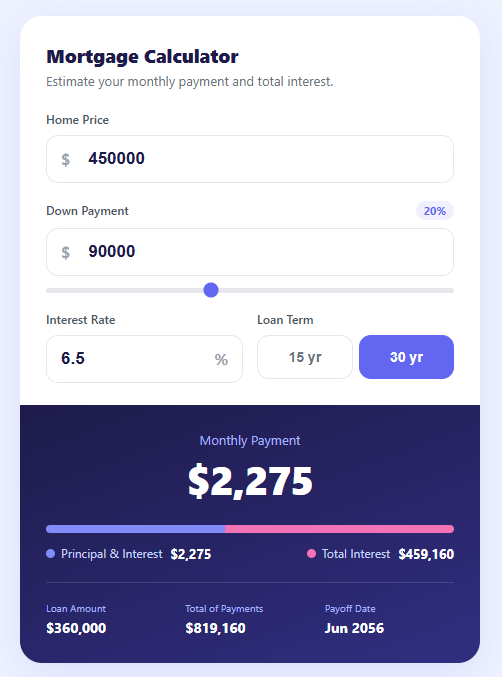
A mortgage calculator is one of the highest-intent finance widgets on the web — home buyers use it to estimate affordability before they ever contact a lender. It shares its build with the tip calculator and BMI calculator. This snippet provides a complete, accurate mortgage calculator with a home price input, a down payment field linked to a percentage slider, an interest rate input, 15- and 30-year term toggle buttons, a large monthly payment display, a principal-vs-interest split bar, and a totals grid showing loan amount, total of payments, and a computed payoff date.
The amortization formula
The core calculation uses the standard fixed-rate mortgage formula: M = P · r(1+r)ⁿ / ((1+r)ⁿ − 1), where P is the loan principal (home price minus down payment), r is the monthly interest rate (annual rate ÷ 12 ÷ 100), and n is the total number of payments (years × 12). The snippet guards against the zero-interest edge case by falling back to simple division (loan ÷ n) when r is 0, avoiding a divide-by-zero from the (1+r)ⁿ − 1 denominator.
The linked down payment slider
The down payment dollar input and the percentage range slider stay in sync bidirectionally. Typing a dollar amount recalculates the percentage label and moves the slider via the calc() function. Dragging the slider calls syncDown(), which converts the percentage back to a dollar figure based on the current home price. This dual-control pattern is common in finance UIs because some users think in dollars and others in percentages.
The principal/interest split bar
The horizontal split bar visualises how much of the total payments go to principal versus interest over the life of the loan. The principal segment width is calculated as (loan ÷ totalPaid) × 100 percent, and the interest segment fills the remainder. On a 30-year loan, interest often exceeds the principal — making this bar a powerful, immediate teaching tool that static numbers cannot match.
The computed payoff date
The payoff date is derived by cloning the current date and advancing it by n months with setMonth(). It formats as a short month-year string via toLocaleDateString. This grounds the abstract loan term in a concrete future date, which research shows increases user engagement with financial planning tools.
Number formatting
All currency values use toLocaleString('en-US') for thousands separators and Math.round() to drop cents, keeping the display clean. font-variant-numeric: tabular-nums ensures digits stay mono-width so the large monthly payment figure does not shift horizontally as the user types.
Build with AI
Build, Understand, Optimize, and Extend It With AI
Instead of re-deriving the amortization math yourself, paste this snippet's HTML, CSS, and JS into an AI coding assistant like Claude and ask it to walk through exactly how the calc() function's zero-interest branch avoids a divide-by-zero in the (1+r)^n - 1 denominator, and why the down payment dollar field and the percentage range input have to call each other's sync functions rather than sharing one handler. The same assistant can help optimize it, for example checking whether recalculating and rewriting nine DOM nodes on every keystroke in the price field is wasteful compared to batching the writes, or whether the payoff-date math using setMonth() handles edge cases like leap years correctly. It's also useful for extending the calculator: ask it to add property tax, homeowners insurance, and a PMI line that only appears below 20% down, or add an amortization schedule table users can expand year by year. Treat the code less like a finished artifact and more like a starting point for a conversation.
Prompt to recreate it
Copy this into your AI assistant of choice to build the effect from scratch, or as a jumping-off point for your own variant:
Build a live "mortgage calculator" in plain HTML, CSS, and JavaScript using only the standard fixed-rate amortization formula — no calculation library, no backend.

Requirements:
- Inputs for home price, down payment (as a dollar amount), interest rate (annual percentage), and a loan term chosen between two toggle buttons (15-year and 30-year), all recalculating on every input event with no submit button.
- The down payment dollar input and a percentage range slider (0-50%) must stay bidirectionally synced: typing a dollar amount must update the slider's position and a displayed percentage label, and dragging the slider must recompute and write back the corresponding dollar amount based on the current home price.
- Compute the monthly principal-and-interest payment using the exact formula M = P * r(1+r)^n / ((1+r)^n - 1), where P is home price minus down payment, r is the monthly rate (annual rate / 12 / 100), and n is total number of payments (years * 12); handle the zero-interest-rate case with a simple division fallback instead of letting the formula divide by zero.
- Display the monthly payment prominently, plus a horizontal two-segment bar showing the proportion of total payments that goes to principal versus total interest over the life of the loan, with the segment widths computed from the actual totals (not hardcoded).
- Show a totals section with the loan amount, the total of all payments over the full term, and a computed payoff date obtained by advancing today's date forward by the total number of months.
- Format every currency value with thousands separators and no decimal places, and keep the numeric characters from shifting width as they update.
Want to tighten it up first? Run this prompt through the AI Prompt Studio to score it across 8 quality dimensions, catch anti-patterns, and tune the wording for Claude, ChatGPT, or Gemini before you paste it in.
Step by step
How to Use
- 1Enter the home priceType the property price in the Home Price field. Every result recalculates instantly as you type — there is no Calculate button to press.
- 2Set the down paymentEnter a dollar amount directly, or drag the percentage slider below the field. The two controls stay in sync — the percentage label updates as you type dollars, and the dollar field updates as you drag.
- 3Adjust the interest rateType the annual interest rate as a percentage (for example 6.5). Use a rate from a current lender quote or a national average for an estimate.
- 4Choose the loan termToggle between 15-year and 30-year terms. Watch how the shorter term raises the monthly payment but dramatically shrinks the total interest in the split bar.
- 5Read the resultsThe monthly payment shows at the top. The split bar and legend break down principal versus total interest. The totals grid shows the loan amount, total of all payments, and the payoff date.
- 6Export for your frameworkClick "JSX" for a React component using useState for inputs and useMemo for the derived calculations. Click "Vue" for a Vue 3 SFC with computed properties.
Real-world uses
Common Use Cases
Got questions?
Frequently Asked Questions
Yes — it uses the exact fixed-rate amortization formula that banks use for principal and interest: M = P · r(1+r)ⁿ / ((1+r)ⁿ − 1). The result matches any standard mortgage amortization schedule to the cent. Note that it calculates principal and interest only; a real monthly housing payment (PITI) also includes property tax, homeowners insurance, and possibly PMI and HOA fees, which you would add as separate inputs.
Add three more inputs: annual property tax, annual insurance, and a PMI rate. Convert the annual figures to monthly (÷ 12) and add them to the principal-and-interest result for the full PITI payment. For PMI, apply it only when the down payment is under 20% of the home price: if ((down / price) < 0.2) pmiMonthly = loan * pmiRate / 100 / 12. Most loans drop PMI automatically once 20% equity is reached.
Two functions keep them linked. calc() runs on every dollar input and recomputes the percentage (down / price × 100), updating the label and slider position. syncDown(pct) runs when the slider moves and converts the percentage back to dollars (price × pct / 100), updating the dollar field. Because both call calc() at the end, every result stays consistent regardless of which control the user touched.
Store price, down, rate, and term in useState. Compute the loan, monthly payment, total interest, and payoff date inside a useMemo that depends on those four values, so the math only re-runs when an input changes. For the linked slider, derive the percentage from down / price for display, and on slider change call setDown(Math.round(price * pct / 100)). Render currency with value.toLocaleString("en-US").