You Might Also Like
Learn Coding Visually
Learn to code with interactive, live-preview playgrounds — HTML, CSS, JavaScript, React & more.
 HTML Playground42 lessons · Click-based · Live preview
 CSS PlaygroundLearn CSS with a live editor
 JavaScript Playground60 lessons · DOM · Async · Canvas
 React PlaygroundLearn React with a live code editor
 GSAP PlaygroundLearn GSAP animation interactively
 SVG Playground44 lessons · shapes · paths · animation
 SCSS Playground45 lessons · Sass modules · tokens
 Tailwind PlaygroundLearn Tailwind CSS with a live editor
 Bootstrap 5 Playground50 lessons · live preview
Staggered Skeleton List Reveal — Wave-Animated Loading List
Staggered Skeleton List Reveal · Loaders · Plain HTML, CSS & JS · Live preview
What's included
Features
About this UI Snippet
Staggered Skeleton List Reveal — A Loading Wave Computed Per Row
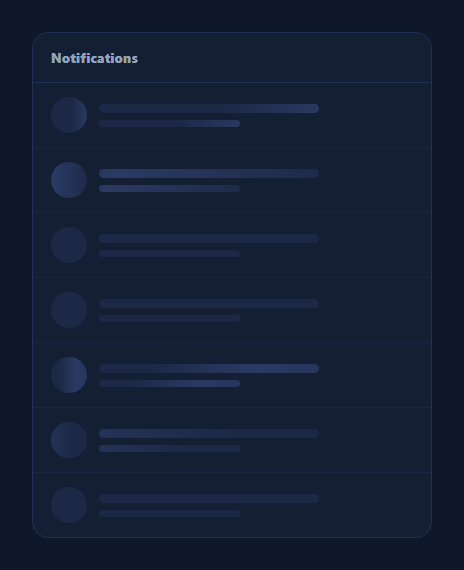
A standard skeleton loader list has every row shimmer in perfect unison — functional, but visually flat. This snippet builds a 7-row skeleton list where each row's shimmer animation-delay is set from its own index, so the pulse visibly rolls down the list top-to-bottom instead of every bar flashing together, giving the loading state itself a sense of motion and direction.
A real per-row delay, computed not hand-written
Rows are generated in a loop, and each row's shimmer elements get el.style.animationDelay = (i * STAGGER_MS) + 'ms', where i is that row's actual index and STAGGER_MS is a single tunable constant (90ms by default). This is a computed value tied to position in the list, not seven separately hand-tuned CSS rules — add an eighth row and it automatically gets the next delay in the sequence with zero extra CSS.
Why this reads as a wave
Because every row shares the same 1.6s shimmer keyframe but starts at a different point along it, at any instant you're seeing seven different phases of the same animation simultaneously — row 1 might be near its brightest point while row 4 is still dark, and that phase difference scrolling down the list is what your eye reads as motion travelling downward, similar to how a stadium wave works from many people doing the identical motion at slightly offset times.
Row anatomy
Each row pairs a circular avatar placeholder with two text-line placeholders of different widths (a wider "title" line, a narrower "subtitle" line) — the standard notification/comment/message-row skeleton shape. All three elements per row share one animation-delay, so the avatar and its two lines pulse together as a unit while differing from the row above and below.
Tunable and data-driven
Change ROWS to render any list length, or STAGGER_MS to make the wave travel faster (a tighter, snappier ripple) or slower (a more languid roll). Because the delay is computed from the loop index rather than written as CSS nth-child rules, this pattern scales to lists of any length without touching the stylesheet. Pair it with a skeleton card grid for a grid variant, or a skeleton table for tabular data.
Build with AI
Build, Understand, Optimize, and Extend It With AI
Rather than eyeballing how the ripple effect is produced, paste this snippet's HTML, CSS, and JS into an AI coding assistant like Claude and ask it to explain exactly why setting each row's animation-delay from its real loop index — rather than writing separate nth-child CSS rules — is what lets the stagger pattern scale automatically to any list length, and why every row sharing one identical shimmer keyframe but starting at different phase offsets is what produces the top-to-bottom wave illusion. The same assistant can help optimize it, for example checking whether inline style-based delays versus CSS custom properties set per row perform differently at very large row counts. It's also useful for extending the pattern: ask it to reverse the wave direction, make the stagger accelerate rather than stay linear down the list, or add a companion fade-in when the real content replaces each skeleton row (staggered the same way). Treat the code less like a finished artifact and more like a starting point for a conversation.
Prompt to recreate it
Copy this into your AI assistant of choice to build the effect from scratch, or as a jumping-off point for your own variant:
Build a skeleton loading list in plain HTML, CSS, and JavaScript where the shimmer animation visibly ripples down the list rather than every row flashing in perfect unison — no library.

Requirements:
- Generate a configurable number of list rows dynamically in JavaScript from a loop (not hand-written as static HTML), each row containing a circular avatar placeholder and two text-line placeholders of different widths.
- Every placeholder element must use a CSS keyframe shimmer animation (an oversized gradient background whose background-position animates on an infinite loop) — identical duration and easing for every row.
- In the JavaScript loop that builds each row, compute a real animation-delay value from that row's own index (for example index times a fixed millisecond constant) and apply it via the element's style property to every shimmer element within that row, so the avatar and both text lines in a row share one delay while each row differs from the row above and below it.
- Confirm that because the delay is computed from the loop index rather than hard-coded per row in CSS, changing the total row count automatically produces correctly staggered delays for every row with no additional CSS rules.
- Expose one easily editable constant controlling the stagger interval in milliseconds, so the wave's speed (how tightly rows follow each other) can be tuned without touching the per-row logic.
- Style it as a realistic notification or comment list card, with each row separated by a thin divider.
Want to tighten it up first? Run this prompt through the AI Prompt Studio to score it across 8 quality dimensions, catch anti-patterns, and tune the wording for Claude, ChatGPT, or Gemini before you paste it in.
Step by step
How to Use
- 1Paste HTML, CSS, and JS7 skeleton rows render inside a card, each pulsing in sequence.
- 2Watch the waveThe shimmer visibly rolls from the top row to the bottom, not all at once.
- 3Change the row countEdit the ROWS constant — delays are computed automatically for any count.
- 4Adjust the wave speedChange STAGGER_MS to make the ripple faster or slower.
- 5Swap the row shapeEdit the innerHTML template to match your real list item layout.
- 6Replace with real contentOnce data loads, swap the skeleton rows for actual list items.
Real-world uses
Common Use Cases
Got questions?
Frequently Asked Questions
In the JS loop that builds the rows, each row's shimmer elements get their animationDelay style property set to (i * STAGGER_MS) + 'ms', where i is that row's real index in the loop. This is a genuine computed value, not seven hand-written CSS nth-child rules, so it automatically scales to any ROWS count.
All rows share the identical shimmer keyframe and duration, but because each starts at a different point along that cycle, at any given instant the rows are all at different phases of the same animation — some brighter, some darker. That phase gradient moving down the list is what the eye perceives as a wave travelling top-to-bottom, the same principle behind a stadium wave.
Adjust the STAGGER_MS constant. A smaller value (e.g. 40ms) tightens the gap between rows so the wave feels quick and snappy; a larger value (e.g. 150ms) spreads it out into a slower, more visible roll. The shimmer's own 1.6s duration in the CSS keyframe can also be changed independently.
Yes — because the delay is computed from the loop index rather than written as fixed CSS selectors, rendering 3 rows or 20 rows both work correctly with zero CSS changes. Just change the ROWS constant or drive the loop from your real expected item count.
Render an array of placeholder objects (Array.from({length: rowCount})) and map over it, applying animationDelay: index * staggerMs + 'ms' as an inline style on each row's shimmer elements — the same computed-delay technique, just expressed through the framework's templating instead of a DOM loop.