You Might Also Like
Learn Coding Visually
Learn to code with interactive, live-preview playgrounds — HTML, CSS, JavaScript, React & more.
 HTML Playground42 lessons · Click-based · Live preview
 CSS PlaygroundLearn CSS with a live editor
 JavaScript Playground60 lessons · DOM · Async · Canvas
 React PlaygroundLearn React with a live code editor
 GSAP PlaygroundLearn GSAP animation interactively
 SVG Playground44 lessons · shapes · paths · animation
 SCSS Playground45 lessons · Sass modules · tokens
 Tailwind PlaygroundLearn Tailwind CSS with a live editor
 Bootstrap 5 Playground50 lessons · live preview
Live Log Stream Panel — Free HTML CSS JS Snippet
Live Log Stream Panel · Dashboards · Plain HTML, CSS & JS · Live preview
What's included
Features
About this UI Snippet
Live Log Stream Panel — Auto-Scrolling Terminal Log Feed with Severity Filters in Vanilla JS
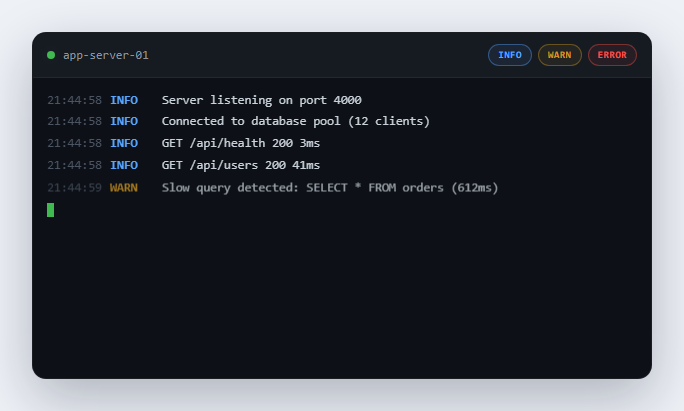
Any tool that streams data in real time — a server log viewer, a CI build console, a chat feed, a live sports ticker — runs into the exact same UX problem: should the view auto-scroll to show new content, or respect that the user has deliberately scrolled up to read something older? Auto-scrolling unconditionally is hostile, because it yanks the view away from whatever the user was reading the instant a new line arrives. Never auto-scrolling is equally bad, because the user has to manually scroll down constantly just to keep up. This snippet implements the standard, correct solution — pause auto-scroll the moment the user scrolls away from the bottom, and resume it only when they explicitly ask to — on top of a simulated log feed with severity color-coding and live filter toggles.
Detecting "at the bottom" with scrollTop math
The entire auto-scroll-pause mechanism rests on one function, isAtBottom(), which checks whether logBody.scrollTop + logBody.clientHeight >= logBody.scrollHeight - SCROLL_THRESHOLD. scrollTop is how far the content has been scrolled down from the top, clientHeight is the visible height of the scrollable box, and scrollHeight is the total height of all the content including what is currently off-screen. Adding scrollTop and clientHeight together gives the pixel position of the bottom edge of the visible viewport within the full content; if that position is close enough to scrollHeight (the very end of the content), the user is effectively at the bottom. The SCROLL_THRESHOLD constant (24px) exists because exact pixel equality is unreliable — sub-pixel rendering and rounding in different browsers means scrollTop + clientHeight almost never equals scrollHeight exactly even when the user is visibly at the bottom, so a small tolerance window is required.
Checking bottom state before appending, not after
Every time a new log line is about to be added, appendLine() calls isAtBottom() and stores the result in wasAtBottom before inserting the new DOM node. This ordering matters: checking after insertion would always report "not at bottom" for a viewer who was at the bottom a moment ago, because the newly taller scrollHeight has already pushed the current scrollTop away from the new true bottom. Capturing the scroll state immediately before the DOM mutation is what correctly answers "was the user watching the live edge right before this line arrived" — the only question that determines whether to auto-scroll.
The manual-scroll flag and the Jump to Latest button
A separate scroll event listener on the log container continuously re-evaluates isAtBottom() independent of new lines arriving, and sets a userScrolledUp boolean flag accordingly. That flag is the tie-breaker appendLine() checks alongside wasAtBottom: even if the container happens to measure as "at bottom" for a stray render, an explicit history-reading gesture from the user takes priority. Whenever the container is not at the bottom, a floating "Jump to latest" pill fades into view; clicking it sets logBody.scrollTop = logBody.scrollHeight, clears userScrolledUp, and hides the button again — a single, obvious way back to live-tailing after reading backlog.
Filtering without breaking the stream
The INFO/WARN/ERROR chips do not remove log lines from the DOM or stop new ones from arriving — they toggle a .hidden-level class via CSS display: none on matching .log-line elements. This is deliberate: the streaming setTimeout loop in streamNext() keeps running and keeps appending every scripted line regardless of filter state, so toggling a filter mid-stream never causes lines to be lost or the timer to desync — it only changes what is currently rendered. Newly arriving lines respect the current filter state immediately because appendLine() checks activeLevels[entry.level] and applies .hidden-level at creation time, so a filtered-out severity never even flashes into view before disappearing.
Severity styling and the ERROR flash
Each line's level string doubles as both a CSS class (.log-line.info, .warn, .error) driving its text color, and a lookup key into the activeLevels filter object — one string, two responsibilities, no duplicated mapping tables. ERROR lines additionally receive a .flash class that layers a second @keyframes animation fading a red background tint out over 900ms, purely to draw the eye to the highest-severity events the instant they appear, the same way real observability tools like Datadog or Sentry pulse-highlight new critical alerts.
Build with AI
Build, Understand, Optimize, and Extend It With AI
Paste this snippet into an AI assistant like Claude and ask it to explain precisely why isAtBottom() is checked before inserting a new line rather than after — it is a one-line-timing detail that is easy to get backwards and silently break auto-scroll. From there, ask for a search box that filters lines by text content in addition to severity, a "pause stream" button that stops new lines from arriving at all (versus just not auto-scrolling to them), or a way to persist unread-while-scrolled-up line counts on the Jump to Latest button.
Prompt to recreate it
Copy this into your AI assistant of choice to build the effect from scratch, or as a jumping-off point for your own variant:
Build a live streaming log console panel in plain HTML, CSS, and JavaScript that simulates a real-time server log feed — no backend, no frameworks.

Requirements:
- A dark terminal-style panel with a scrollable log body that new lines are appended to over time via a scripted array and setTimeout (standing in for a real WebSocket/SSE connection), with randomized delay between lines so it doesn't feel mechanically uniform.
- Each log line must be color-coded by severity: INFO in a neutral/blue tone, WARN in amber, ERROR in red, with ERROR lines getting a brief one-time flash/pulse background animation the moment they appear.
- Implement auto-scroll-to-newest that PAUSES the instant the user manually scrolls up to read older lines, using the standard scrollTop + clientHeight >= scrollHeight - threshold check performed right before each new line is appended (not after, and not only on a scroll event).
- When auto-scroll is paused, show a "Jump to latest" button that, when clicked, scrolls to the bottom and immediately resumes auto-scrolling for all subsequent new lines.
- Add filter toggle chips for INFO, WARN, and ERROR that hide or show matching lines already in the log via a CSS class, without stopping, slowing, or desyncing the background stream of new incoming lines.
- Include a blinking block-style cursor element pinned at the very end of the log to suggest where the next line will land, animated with a CSS step-end blink.
Want to tighten it up first? Run this prompt through the AI Prompt Studio to score it across 8 quality dimensions, catch anti-patterns, and tune the wording for Claude, ChatGPT, or Gemini before you paste it in.
Step by step
How to Use
- 1Watch new log lines stream in automaticallyLines arrive every half-second to just over a second, each fading and sliding in slightly, color-coded blue for INFO, amber for WARN, and red for ERROR.
- 2Notice ERROR lines flash red when they landA brief red background pulse fades out over about a second on any new ERROR line, drawing your eye to it immediately without needing to read the text first.
- 3Scroll up to read earlier log historyAs soon as you scroll away from the bottom, incoming lines stop yanking your view back down — they keep arriving silently at the bottom while you read undisturbed further up.
- 4Watch the "Jump to latest" button appearA green pill fades in at the bottom of the panel the moment you are not viewing the newest line, giving you an obvious way back to the live edge.
- 5Click "Jump to latest" to resume auto-scrollThe panel snaps to the bottom, the button disappears, and auto-scroll resumes immediately for every subsequent incoming line.
- 6Toggle the INFO, WARN, or ERROR filter chipsClick a chip to hide or show that severity — matching lines already in the panel disappear or reappear instantly, and the log keeps streaming new lines in the background the whole time.
Real-world uses
Common Use Cases
Got questions?
Frequently Asked Questions
Replace the streamNext() setTimeout loop with a WebSocket onmessage handler (or an EventSource onmessage for Server-Sent Events) that calls appendLine({ level, msg }) for each incoming real log entry, using the level your backend reports (info/warn/error). Everything else — the bottom-detection, the Jump to Latest button, and the filter chips — works identically because they operate purely on the DOM and scroll state, with no dependency on where the log entry originated.
Browsers do not guarantee that scrollTop + clientHeight equals scrollHeight exactly even when a user is visually at the very bottom of a scrollable element, due to sub-pixel layout rounding that varies by browser and zoom level. A small tolerance (24px here) treats "close enough to the bottom" as "at the bottom," which matches what a real user perceives and avoids auto-scroll flickering on/off near the boundary.
No. Filter chips only add or remove a hidden-level CSS class (display: none) on matching lines already in the DOM — the underlying streamNext() timer and LOG_SCRIPT index keep advancing regardless of filter state, so no lines are ever skipped or dropped, they are just visually hidden until you toggle the filter back on.
Yes. Keep the log entries themselves in component state (an array you append to) so the framework handles rendering, but keep userScrolledUp and the scroll-position bookkeeping in a ref (React useRef, Vue ref outside reactivity, or a plain Angular class field) since they are imperative scroll-tracking values, not render data. Attach the scroll listener and start the streaming timer inside useEffect / onMounted / ngAfterViewInit, and make sure to remove the scroll listener and clear the pending setTimeout in the cleanup function (React effect cleanup, onUnmounted, or ngOnDestroy) so the simulated stream does not keep running after the component unmounts.
terminal-window renders static, pre-scripted terminal chrome (the traffic-light dots, title bar, and a fixed command-and-output replay) with no scrolling behavior to manage. This panel is purpose-built around the mechanics of an actually-streaming feed: detecting whether the user is at the bottom, pausing auto-scroll on manual scroll-up, surfacing a Jump to Latest control, and letting severity filters hide or show lines without interrupting the stream — concerns terminal-window does not address at all.