More Dashboards Snippets
Front-End Coding Playgrounds
Learn to code with interactive, live-preview playgrounds — HTML, CSS, JavaScript, React & more.
 HTML Playground42 lessons · Click-based · Live preview
 CSS PlaygroundLearn CSS with a live editor
 JavaScript Playground60 lessons · DOM · Async · Canvas
 React PlaygroundLearn React with a live code editor
 GSAP PlaygroundLearn GSAP animation interactively
 SVG Playground44 lessons · shapes · paths · animation
 SCSS Playground45 lessons · Sass modules · tokens
 Tailwind PlaygroundLearn Tailwind CSS with a live editor
 Bootstrap 5 Playground50 lessons · live preview
Week View Scheduler Calendar — HTML CSS JS Snippet
Week View Scheduler · Dashboards · Plain HTML, CSS & JS · Live preview
What's included
Features
About this UI Snippet
Week View Scheduler — Time-Grid Math, Absolutely Positioned Events, Cross-Day Pointer Dragging & 30-Minute Snapping
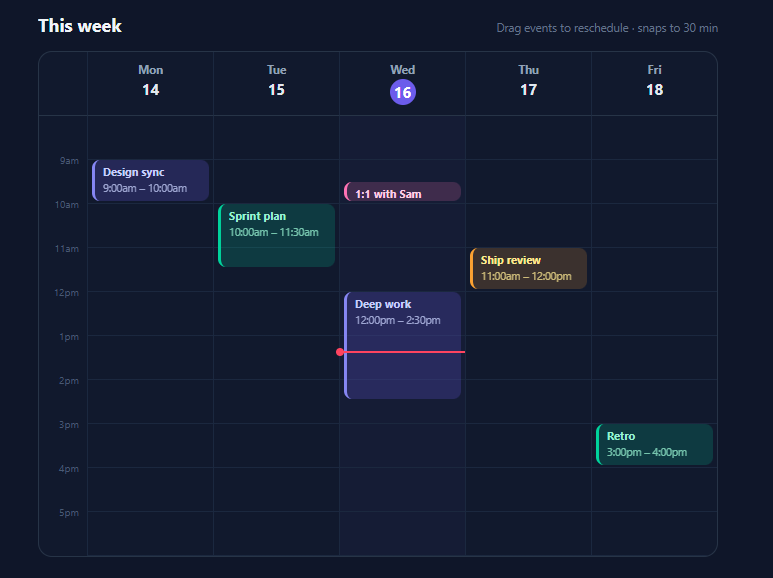
"React week calendar" and "scheduler UI" are perennial high-volume searches because the component looks intimidating — yet the entire mechanism is one coordinate transform applied in both directions. This snippet builds a Google-Calendar-style week view in vanilla HTML, CSS, and JavaScript: a time-gutter grid over five day columns, events absolutely positioned from plain { day, start, dur } data, drag-to-reschedule that moves events across days and snaps to 30 minutes, live time labels during the drag, and a red now-line. Reading it demystifies every calendar library you will ever use.
The frame: one grid, hour lines for free
The calendar is a single CSS Grid — 48px repeat(5, 1fr) — whose first row holds day headers and second row holds the time area: a gutter plus five position: relative day columns, each calc(var(--hour-h) * 10) tall for a 10-hour day. Two custom properties (--hour-h: 44px, --start-hour: 8) define the whole coordinate system, mirrored by HOUR_H/START constants in JS. The horizontal hour lines cost zero elements: a repeating-linear-gradient on each column paints a 1px line every --hour-h pixels — the same trick as lined-paper CSS, and it stays in sync with the row height by construction. Gutter labels are positioned spans at (hour − START) × HOUR_H, translated −50% to centre on their line.
Events as data, position as a pure function
Events live in an array of { id, title, day, start, dur, color } with times as *fractional hours* (9.5 = 9:30) — the representation that makes all math trivial. render() maps each event to an absolutely positioned block inside its day column: top = (start − START) × HOUR_H, height = dur × HOUR_H. That linear transform *is* the entire layout engine of every calendar you've used. Blocks are colour-coded with the tinted-translucent-plus-accent-left-border recipe, show title and a live time range, and clip overflow for short events. Because position is a pure function of data, re-rendering after any data change is always correct — there is no positional state to desync.
Dragging: the inverse transform, plus column hit-testing
Rescheduling inverts the same math. On pointerdown over an event, the handler records the grab offset within the block (so the block doesn't jump to align its top with the cursor) and captures the pointer — the capture is what lets a drag continue smoothly even when the pointer crosses column borders or leaves the calendar momentarily. On pointermove, two independent resolutions happen: horizontally, the pointer is hit-tested against each column's getBoundingClientRect() to find the day, and crossing into a new column immediately re-parents the block (a live preview of the day change); vertically, pointer-y converts back to fractional hours — START + (clientY − colTop − offsetY) / HOUR_H — then snaps via Math.round(h / SNAP) × SNAP and clamps so events can't escape the day (END − dur as the ceiling). The event's *data* is updated during the drag and the block restyled from it, so the time label in the block updates live — and pointerup has nothing left to compute: the array already holds the new schedule, which is exactly where a PATCH /events/:id call belongs.
The now-line and honest scope
A red 2px line with a dot marks the current time in today's column, positioned by the same transform from new Date() and refreshed every minute (the demo pins it mid-morning outside working hours so it's always visible). Deliberately out of scope — and flagged as the extension points they are: overlapping-event side-by-side packing (a column-assignment pass over sorted events), drag-to-create (pointer-down on empty column space), and resize handles (same vertical math applied to dur). The 30-minute SNAP constant, day range, and hour span are all single-value edits.
Build with AI
Build, Understand, Optimize, and Extend It With AI
This snippet is deliberately a chassis, and an AI assistant is the right tool for bolting on the parts your product needs — but start by proving the chassis to yourself: paste it into Claude and ask it to walk one drag gesture end-to-end (pointerdown offset capture, the column hit-test, the inverse transform, snap, clamp, data commit), then ask what breaks without setPointerCapture and without the grabOffset — both answers are felt immediately if you try them. Then request the three canonical extensions in order of value: the lane-packing pass for overlapping events (ask for the greedy interval-partitioning inside render() so collisions re-pack live during drags), drag-to-create on empty column space reusing the existing transform, and bottom-edge resize handles that apply the same vertical math to dur. For real data, hand it your event API's shape and ask for the mapping to fractional day/start/dur including timezone normalisation — the one scheduling problem the UI layer genuinely cannot absorb — and the debounced PATCH at the marked persist point. If you're on React, ask for the state-driven port with the snapped-value throttle preserved; that guard is the difference between smooth and janky.
Prompt to recreate it
Copy this into your AI assistant of choice to build the effect from scratch, or as a jumping-off point for your own variant:
Build a Google-Calendar-style week view scheduler in plain HTML, CSS, and JavaScript — a time grid with draggable, snapping event blocks. No libraries.

Requirements:
- One CSS Grid frame (48px time gutter + five equal day columns) with a day-header row where today's date sits in an accent circle; define the coordinate system with two custom properties (--hour-h: 44px, --start-hour: 8) mirrored by JS constants, columns 10 hours tall for an 8am–6pm day.
- Paint hour lines with a repeating-linear-gradient on the columns (zero extra elements, inherently synced to --hour-h), and generate gutter time labels (9am…5pm) positioned at (hour − START) × HOUR_H with a −50% translate.
- Events are plain data — { id, title, day 0–4, start, dur, color } with times as FRACTIONAL hours (9.5 = 9:30) — rendered by a pure function into absolutely positioned blocks: top = (start − START) × HOUR_H, height = dur × HOUR_H, styled as tinted translucent cards with accent left borders, a bold title, and a live time-range line; include six varied demo events, one 30 minutes, one 2.5 hours.
- Implement drag-to-reschedule with pointer events and setPointerCapture (comment why native drag & drop is wrong for continuous positional feedback): record the grab offset within the block so it never jumps to the cursor; hit-test the pointer against column rects each move and re-parent the block the moment it crosses into a new day; convert pointer-y back to hours with the inverse transform, snap via Math.round(h / 0.5) × 0.5, clamp to [START, END − dur], and update the block's position AND its time label live from the mutated data — pointerup then only cleans up, with a comment marking it as the PATCH persist point since the data already holds the new schedule.
- Add touch-action: none on blocks, a dragging lift state (shadow, brightness, z-index), a red now-line with a dot in today's column positioned by the same transform and refreshed each minute (pin it mid-morning when outside working hours so the demo always shows it), and a subtle tint on today's column.
- Comment the two marked extension points: greedy lane-packing for overlapping events and drag-to-create on empty column space.
Step by step
How to Use
- 1Drag events around the weekGrab any event block: it lifts with a shadow, and as you drag vertically it snaps to 30-minute increments with the time label in the block updating live. Drag horizontally across day columns and the event hops between days the moment the pointer crosses a border. Events clamp to the 8am–6pm day — try pushing Deep Work past 6pm and it stops at the last slot that fits its duration.
- 2Feed it your eventsThe EVENTS array is the entire input: { id, title, day (0–4), start, dur, color } with times as fractional hours — convert real dates with d.getHours() + d.getMinutes()/60 and day from getDay(). After any change, call render(). The persist point is marked in pointerup: the array already holds the new day/start, so send PATCH /events/:id with those two fields there.
- 3Change the visible hours and snapThree constants govern the grid: START/END (with --start-hour and the ×10 column height in CSS — keep them in sync, or derive the CSS custom properties from JS on load), HOUR_H matching --hour-h, and SNAP (0.5 = 30min; 0.25 for 15-minute precision). For a 7-day week, add two day-col divs and headers and widen repeat(5,…) to repeat(7,…) — the JS discovers columns, so nothing else changes.
- 4Add drag-to-createOn pointerdown over empty column space (e.target.closest(".day-col") but not .event), create a new event at the snapped pointer hour with dur: SNAP, then let pointermove grow its dur using the same inverse transform applied to height instead of top. Open your event-details form on pointerup. This reuses every function already in the file.
- 5Handle overlapping eventsWhen two events share time, pack them side by side: for each day, sort events by start, greedily assign each to the first "lane" whose last event ended before this one starts, then set left/width per lane (left: laneIndex/laneCount*100%, width: 100%/laneCount). Run it inside render() per column — it is ~15 lines and turns the demo into a production-complete day layout. Google Calendar's algorithm is exactly this.
- 6Export and composeClick JSX for React — events in state, blocks rendered from the array with style props from the transform, drag handlers updating state (see FAQ). Compose with the Calendar Widget for month-view navigation, Time Slot Picker and Availability Scheduler for booking flows, and the Schedule Table for a read-only variant.
Real-world uses
Common Use Cases
Got questions?
Frequently Asked Questions
One linear transform, applied forward for rendering and inverted for interaction. Forward: an event starting at hour h paints at top = (h − START) × HOUR_H, with height = dur × HOUR_H — with START = 8 and HOUR_H = 44, the 9:30 one-on-one sits at (9.5 − 8) × 44 = 66px. Inverse: a pointer at clientY converts to h = START + (clientY − columnTop − grabOffset) / HOUR_H, after which Math.round(h / 0.5) × 0.5 snaps to half-hours and a clamp to [START, END − dur] keeps the block inside the day. Fractional hours are what keep both directions one-liners: 9:30 as 9.5 means no minutes-handling anywhere except the fmt() display function, durations add without carrying, and snapping is a single rounding expression. The grabOffset subtraction is the detail that makes dragging feel right — it preserves where within the block you grabbed, so the block moves with your hand instead of jumping its top edge to the cursor.
Because scheduling needs continuous positional feedback, which is the opposite of what native DnD provides. HTML5 drag & drop is built around discrete drop targets: you get a browser-rendered ghost image you cannot restyle mid-drag, no reliable per-pixel coordinates on some platforms, and no way to live-update the block's time label or snap position during the gesture. Pointer events give raw coordinates every frame, so the block itself moves, snaps, relabels, and re-parents across columns in real time — and setPointerCapture routes all subsequent moves to the captured element even when the pointer is over a different column, another event, or briefly outside the calendar, which is precisely the cross-column case this UI lives on. touch-action: none on the blocks completes the setup by stopping mobile browsers from hijacking the gesture for scrolling. The rule of thumb across this library: native DnD for discrete-slot reordering (the [Dashboard Widget Grid] case), pointer events for continuous spatial manipulation like this.
With the lane-packing algorithm every major calendar uses, run per column at render time. Sort the column's events by start; walk them maintaining a list of lanes, each remembering when its last event ends; place each event into the first lane whose last end ≤ this start (they don't collide), or open a new lane if none fits. The number of lanes any event's time range intersects determines its width: with laneCount concurrent lanes, set left: (laneIndex / laneCount) × 100% and width: calc(100%/laneCount − 8px), keeping the 4px side insets. This greedy interval-partitioning is ~15 lines, provably uses the minimum lanes, and handles the classic Google-Calendar visual (two meetings side by side, a third overlapping both squeezing to thirds). Run it inside render() so dragging into a collision re-packs live — and if your domain forbids overlaps entirely (rooms, machines), skip packing and instead reject the drop in pointermove by not committing the data change when a scan finds a collision.
React: events become state, blocks render from the array with style={{ top: (ev.start-START)*HOUR_H, height: ev.dur*HOUR_H }} and key={ev.id}, and the drag handlers update state instead of the DOM — but throttle the pointermove commits: update a ref during the gesture and flush to state only when the snapped value actually changes (this snippet's if (h !== ev.start) guard is that throttle, and it matters more in React where each commit re-renders). Re-parenting across columns falls out of render automatically since each column filters events by day — no appendChild needed, which is the main structural simplification. Angular mirrors it with a signal array, @for per column filtered by day, and handlers via host listeners; run pointermove outside the zone if profiling shows change-detection pressure. Tailwind: the frame is grid grid-cols-[48px_repeat(5,1fr)] bg-slate-900 border border-slate-700 rounded-xl overflow-hidden; day columns relative border-l border-slate-800 with the hour-line repeating gradient as an arbitrary value or a config utility; events are absolute inset-x-1 rounded-lg border-l-[3px] p-1.5 text-[10.5px] cursor-grab touch-none with per-colour classes like bg-indigo-500/20 border-indigo-400 text-indigo-200 and a data-[dragging]:shadow-2xl data-[dragging]:brightness-115 data-[dragging]:z-10 lift.