More Dashboards Snippets
Front-End Coding Playgrounds
Learn to code with interactive, live-preview playgrounds — HTML, CSS, JavaScript, React & more.
 HTML Playground42 lessons · Click-based · Live preview
 CSS PlaygroundLearn CSS with a live editor
 JavaScript Playground60 lessons · DOM · Async · Canvas
 React PlaygroundLearn React with a live code editor
 GSAP PlaygroundLearn GSAP animation interactively
 SVG Playground44 lessons · shapes · paths · animation
 SCSS Playground45 lessons · Sass modules · tokens
 Tailwind PlaygroundLearn Tailwind CSS with a live editor
 Bootstrap 5 Playground50 lessons · live preview
Dashboard Widget Grid — Drag & Drop HTML CSS JS
Dashboard Widget Grid · Dashboards · Plain HTML, CSS & JS · Live preview
What's included
Features
About this UI Snippet
Dashboard Widget Grid — HTML5 Drag & Drop Reordering, Live Reflow Preview, Span Toggling & localStorage Layout Persistence
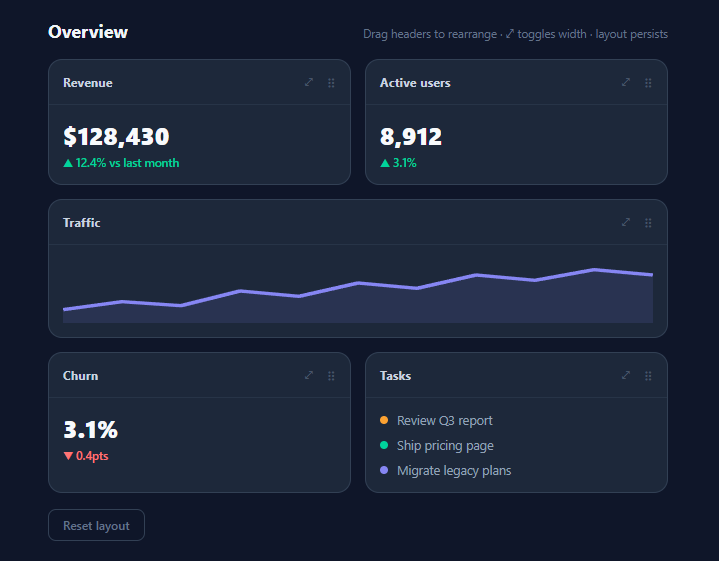
"Let users arrange their own dashboard" is one of the most-requested SaaS features and one of the most over-engineered — teams reach for gridster clones and 40KB drag libraries when the core interaction fits in ~60 lines of vanilla JavaScript over CSS Grid. This snippet is a working customisable dashboard: five widgets (KPI cards, an SVG sparkline, a task list) in a two-column grid that users reorder by dragging, resize between single and double width, and whose layout survives reload via localStorage — with the drag preview done the honest way, by live-reflowing the real grid.
Reordering with the native drag & drop API
Widgets carry draggable="true", and all five drag events are handled by *delegation on the grid* — no per-widget listeners, so widgets added later just work. The mechanics tour the API's quirks, each handled and commented: dragstart stores the dragged node and applies the dimming class inside requestAnimationFrame (applied synchronously, the browser would capture the *dimmed* widget as the drag image — the classic gotcha); it also calls setData(), without which Firefox refuses to start the drag at all. dragover must call preventDefault() to declare the grid a valid drop zone — the API's most notorious trap, since omitting it silently makes drops impossible.
The live-reflow preview
Instead of painting insertion lines or ghost placeholders, dragover computes whether the pointer sits in the leading or trailing portion of the hovered widget and immediately moves the dragged node there with before()/after(). Because the container is CSS Grid, the whole dashboard *reflows in real time* — the user watches the actual final layout at every instant of the drag, wide widgets pushing rows around exactly as they will on drop. This is both simpler than placeholder systems (no synthetic elements to manage) and more truthful (the preview cannot differ from the result, because it *is* the result). Drop and dragend then only need to clean up classes and persist. The hovered widget gets a ring via .drop-target, and the dragged one dims to 35% with a dashed border.
Span toggling and the responsive fallback
Each widget header carries a ⤢ button toggling the .wide class — grid-column: span 2 — turning a KPI card into a full-row panel; CSS Grid absorbs the change and re-wraps neighbours automatically, no position math anywhere. The demo ships the sparkline widget wide by default to show mixed spans reordering correctly. Below 440px the grid collapses to one column and neutralises spans (grid-column: auto), because dragging 2-across layouts on a phone-width screen is noise; production dashboards typically also disable dragging there.
Persistence as an ordered id list
The layout serialises to the minimal truthful form: an ordered array of { id, wide } mapped from grid.children. restore() replays it by appendChild-ing each found widget in saved order — appending an existing node *moves* it, so restoration is a no-copy reorder — and silently skips ids that no longer exist, which is exactly the forward-compatibility you need when widgets ship and retire across releases. Saving happens at the two mutation points (dragend, span toggle), and a reset button clears the key. Swapping localStorage for a PATCH /me/dashboard call turns this into per-user server-side layout with no other changes — the serialised shape is already the API payload.
Build with AI
Build, Understand, Optimize, and Extend It With AI
The most useful thing an AI assistant can do with this snippet is stress your mental model of native drag & drop: paste it into Claude and ask what breaks if you remove the requestAnimationFrame around the dragging class, the setData call, and the dragover preventDefault — three one-line deletions with three different failure modes, and predicting them before asking is a genuine test of understanding. For product work, the requests that pay off: convert the DOM-moving handlers into the state-splicing React version with stable keys (ask it to explain why the literal port corrupts React's reconciliation — the answer generalises to all DOM-mutating vanilla patterns); add a widget catalogue drawer whose items drag INTO the grid using the setData id payload that is already there; and swap localStorage for a debounced PATCH with a schema version field. If your dashboard needs true 2D placement with resize handles and collision pushing, ask the assistant for an honest feature-by-feature comparison of extending this versus adopting gridstack or react-grid-layout — knowing where the 60-line version's edge is beats discovering it in production.
Prompt to recreate it
Copy this into your AI assistant of choice to build the effect from scratch, or as a jumping-off point for your own variant:
Build a customisable dashboard widget grid in plain HTML, CSS, and JavaScript — drag to reorder with a live grid-reflow preview, width toggling, and persisted layout. Native HTML5 drag & drop only, no libraries.

Requirements:
- A two-column CSS Grid of five widgets, each with a unique data-id, draggable="true", a header row (title, a ⤢ width-toggle button, a grip glyph, grab/grabbing cursors), and varied bodies: two KPI cards with tabular-nums figures and coloured delta lines, one default-wide panel containing an SVG sparkline with a filled area, one more KPI, and a task list with coloured status dots.
- Handle ALL drag events by delegation on the grid container so future widgets need zero registration, and handle the API's three classic gotchas with comments: apply the dragged-dimming class inside requestAnimationFrame so the browser's drag ghost captures the undimmed widget; call dataTransfer.setData in dragstart because Firefox refuses to start drags with an empty data store; and call preventDefault in dragover because drops are silently impossible without it.
- Implement the live-reflow preview: in dragover, resolve the hovered widget, decide leading/trailing from the pointer's fractional position within it, and immediately move the dragged node there with before()/after() so CSS Grid re-renders the true final layout — including span-2 cascade effects — at every instant; style the dragged widget at reduced opacity with a dashed border and give the hovered widget an accent ring.
- The ⤢ button toggles a .wide class (grid-column: span 2) via one delegated click handler; a media query below 440px collapses to one column and neutralises spans.
- Persist on dragend and on width toggle as an ordered array of { id, wide } in localStorage; restore on load by appendChild-ing matched widgets in saved order (moving, not cloning), silently skipping ids that no longer exist; include a "Reset layout" button that clears the key and reloads.
- Comment where a server PATCH would replace localStorage and why the ordered-id shape (intent, not geometry) is what makes saved layouts survive widgets being added or removed across releases.
Step by step
How to Use
- 1Rearrange the dashboardGrab any widget by its header and drag over the grid: the dragged card dims, the hovered card shows an indigo ring, and the layout reflows live so you always see the true final arrangement — including how the wide Traffic panel pushes rows. Release to drop. Click ⤢ on any widget to toggle it between single and double width. Reload the page: your arrangement is back. Reset layout restores the default.
- 2Add your own widgetsA widget is one markup block: .widget with a unique data-id and draggable="true", a .w-head (title + ⤢ + grip glyph), and a .w-body with anything inside — chart, table, feed. Because all drag handling is delegated to the grid, new widgets need zero JS registration. Give charts intrinsic height (like the sparkline's fixed 64px) so rows stay stable during reflow.
- 3Persist server-side instead of locallyReplace the localStorage lines in save()/restore() with your API: save() POSTs the [{ id, wide }] array to /me/dashboard (debounce it ~500ms if users fiddle a lot); restore() awaits the GET before replaying. Keep the skip-unknown-ids behaviour — it is what lets you remove a widget type in a release without corrupting saved layouts — and treat absent ids in the saved list as "new widgets append at the end", which restore() already does implicitly.
- 4Restrict the drag handleCurrently the whole widget is draggable (headers styled as the grab affordance). To make ONLY the header start drags — so text inside widget bodies stays selectable — set draggable="true" on .w-head instead of .widget, and in dragstart use e.target.closest(".widget") exactly as now to resolve the card. This is the right call for widgets containing tables or copyable content.
- 5Extend to more sizes or columnsFor a 3- or 4-column dashboard, change grid-template-columns and let .wide span 2 of them; add a .tall class with grid-row: span 2 and a second toggle for two-axis sizing — CSS Grid's auto-placement handles the packing (add grid-auto-flow: dense if you want holes backfilled, with the caveat that dense placement can visually reorder against DOM order). The persistence array extends naturally with a tall flag.
- 6Export and composeClick JSX for React — hold the layout array in state, render widgets from it with a stable key, and on drop splice the array instead of moving DOM nodes (see the FAQ for why). Fill the widgets from this library: Metric Card Grid KPIs, Sparkline Chart, Activity Feed, Donut Chart — and pair with the Dashboard Layout shell and Container Query Card so widgets restyle themselves when spans change.
Real-world uses
Common Use Cases
Got questions?
Frequently Asked Questions
Both are API-order quirks. When a drag starts, the browser synchronously snapshots the element to use as the ghost image that follows the cursor — and it takes that snapshot after your dragstart handler runs. Apply opacity: 0.35 synchronously and the ghost itself is captured dimmed and dashed, which looks broken; deferring the class one frame with requestAnimationFrame lets the browser capture the pristine widget while the in-grid original still dims immediately after. setData exists because Firefox implements the spec strictly: a drag with an empty data store is considered vacuous and never starts (Chrome is lenient). Setting any payload — the widget id is the natural choice — makes the drag universal, and the id payload is also what you would read in a cross-container drop (dragging a widget from a catalogue panel into the grid).
Because in a grid with mixed spans, only the real layout engine can tell the truth. An insertion line says "it will go between these two" — but with a 2-column grid containing span-2 widgets, inserting one card can re-wrap every subsequent row, and a line cannot communicate that cascade; users drop, the layout jumps to something the line never showed, and the interaction feels lying. Moving the dragged node live makes CSS Grid itself render the preview: what you see mid-drag is by construction identical to the drop result, wide-widget cascades included. The costs are real but small: DOM mutation on every dragover crossing (throttled naturally by the over-a-new-widget check), and the node moving means dragend must not assume original position — which this code never does. The alternative placeholder approach earns its complexity only when the dragged item must stay visually in place while a ghost travels, as in cross-window drags.
By storing intent, not geometry, and restoring defensively. The saved layout is just an ordered list of widget ids with a wide flag — no coordinates, no indexes into anything. restore() walks that list and, for each id, moves the matching live widget into position via appendChild (which relocates rather than clones) — and simply skips ids with no matching element, so a widget you removed in v2 disappears from saved layouts harmlessly instead of corrupting them. New widgets added since the save were never in the list, so they are never moved: they retain their DOM order and end up after the restored ones — a sensible "new things appear at the end" default. The one upgrade worth adding for server-side persistence is a schema version field alongside the array, so a future layout format (say, adding a tall flag or multi-column coordinates) can migrate old payloads explicitly rather than by inference.
In React, do not port the DOM-moving approach literally — React owns the DOM, and nodes you relocate behind its back get clobbered on the next render. Instead, invert it: hold layout as state ([{ id, wide }]), render widgets by mapping with key={id}, and translate the drag handlers to state updates — dragover computes the target index exactly as here (closest widget + leading/trailing test) but calls a reorder(draggedId, targetIndex) that splices the array, letting React re-render the new order; because keys are stable, React moves the same DOM nodes and the live-reflow preview behaves identically. Persistence becomes a useEffect on the layout state. Angular mirrors this with a signal array and @for (track widget.id), or you can adopt the CDK's DragDropModule which implements the placeholder pattern natively. Tailwind styling maps directly: the grid is grid grid-cols-2 gap-3.5 max-[440px]:grid-cols-1; widgets are bg-slate-800 border border-slate-700 rounded-xl overflow-hidden with data-[dragging]:opacity-35 data-[dragging]:border-dashed and data-[target]:border-indigo-500 data-[target]:ring-[3px] data-[target]:ring-indigo-500/25 variants; wide is col-span-2 max-[440px]:col-auto.