You Might Also Like
Learn Coding Visually
Learn to code with interactive, live-preview playgrounds — HTML, CSS, JavaScript, React & more.
 HTML Playground42 lessons · Click-based · Live preview
 CSS PlaygroundLearn CSS with a live editor
 JavaScript Playground60 lessons · DOM · Async · Canvas
 React PlaygroundLearn React with a live code editor
 GSAP PlaygroundLearn GSAP animation interactively
 SVG Playground44 lessons · shapes · paths · animation
 SCSS Playground45 lessons · Sass modules · tokens
 Tailwind PlaygroundLearn Tailwind CSS with a live editor
 Bootstrap 5 Playground50 lessons · live preview
Git Diff Stat Summary — Free GitHub-Style Diffstat UI
Git Diff Stat Summary · Dashboards · Plain HTML, CSS & JS · Live preview
What's included
Features
About this UI Snippet
Git Diff Stat Summary — Diffstat Bars With an Expandable Line-Level Preview
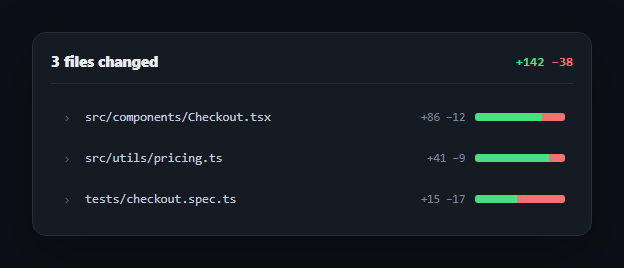
GitHub's pull request file list — a colored bar chip showing each file's insertion/deletion ratio next to its name — communicates change size at a glance without opening a single file. This snippet rebuilds that diffstat pattern, plus a click-to-expand line-level preview, entirely in vanilla HTML/CSS/JS. It pairs naturally with a code diff viewer or code comparison widget in a PR review dashboard.
The diffstat bar is two flex children, not a chart
Each file's bar is a flex container with two children — .gds-diffbar-add and .gds-diffbar-del — each given an inline width percentage representing that file's share of insertions versus deletions. No canvas, no SVG: two colored <span>s inside a display: flex container naturally lay out side by side proportional to their widths, which is the entire visual technique behind GitHub's diffstat.
Totals are a separate, deliberately unlinked number
The header's +142 −38 total is written directly in the markup rather than summed from the per-file stats in JS. In a real implementation you'd compute it server-side from the actual diff and inject both the total and the per-file numbers from the same source — the point of keeping them as plain text here is that this snippet's job is the *display* pattern, not diff computation.
One accordion, not independent toggles
Clicking a file's row expands its line-level diff preview and collapses any other currently-open file — the click handler loops through every toggle button, closing all others, before opening (or closing) the one that was clicked. This keeps the panel compact even with many changed files, rather than letting every diff expand independently and pushing the total height very tall.
Colored diff lines follow git's own convention
Inside the expanded preview, each line carries a .ctx, .add, or .del class — context lines stay neutral, added lines get a green tint with a + prefix, removed lines get a red tint with a - prefix — the same visual language as git diff in a terminal or GitHub's own file view, so it reads as instantly familiar to anyone who has looked at a diff before.
Wiring it to real diff data
Replace the hardcoded file list and diff lines with output from your git provider's API (GitHub's compare API, GitLab's diff API, or a local git diff --numstat and git diff parse) — compute each file's add/delete percentage for the bar width, and split the unified diff into context/add/del lines by their leading +/-/space character.
Build with AI
Build, Understand, Optimize, and Extend It With AI
You don't have to work out the diffstat visualization or the accordion logic on your own. Paste this snippet's HTML, CSS, and JS into an AI coding assistant like Claude and ask it to explain exactly how two flex children with inline-percentage widths recreate GitHub's diffstat bar without any chart library, and why the accordion closes every other file's diff before opening the clicked one rather than letting each file toggle independently. The same assistant can help optimize it — asking whether looping through all toggle buttons on every click is efficient enough for a PR with hundreds of changed files, or how you'd virtualize the file list if it grew very long. It's also useful for extending the panel: ask it to wire real diff data from git diff --numstat and a unified diff parse, add a "collapse all / expand all" control, or add a file-type icon and syntax highlighting inside the expanded diff lines. Treat the code less like a finished artifact and more like a starting point for a conversation.
Prompt to recreate it
Copy this into your AI assistant of choice to build the effect from scratch, or as a jumping-off point for your own variant:
Build a "git diff stat summary" panel in plain HTML, CSS, and JavaScript with no library or CDN dependency.

Requirements:
- A header showing the total number of files changed and a total insertions/deletions count (e.g. +142 -38) in git's conventional green/red coloring.
- A list of changed files, each row showing the filename, a per-file +N -N stat, and a "diffstat" bar built from two adjacent flex/inline-block colored segments (green for insertions, red for deletions) whose widths are set as inline-style percentages representing that file's insertion-to-deletion ratio — no canvas, SVG, or charting library.
- Each file row must be a clickable toggle (a real button, with aria-expanded kept in sync) that expands a line-level diff preview below it, showing individual lines styled as context (neutral), added (green background, + prefix), or removed (red background, - prefix), matching git's own diff coloring convention. Expanded panels must use the HTML hidden attribute, not just CSS display, when collapsed.
- Implement single-open accordion behavior: expanding one file's diff preview must automatically collapse any other file's diff preview that was previously open, so at most one file's line-level diff is visible at a time.
- Include a small chevron icon on each row that visually rotates to reflect that row's expanded/collapsed state, and use a consistent monospaced font for filenames, stats, and diff line text throughout.
Want to tighten it up first? Run this prompt through the AI Prompt Studio to score it across 8 quality dimensions, catch anti-patterns, and tune the wording for Claude, ChatGPT, or Gemini before you paste it in.
Step by step
How to Use
- 1Paste HTML, CSS, and JSA three-file diff summary renders with colored insertion/deletion bars.
- 2Click a file rowIts line-level diff preview expands below it, with added/removed lines colored and prefixed.
- 3Click another fileThe previous diff collapses automatically — only one stays open at a time.
- 4Feed in real dataReplace the file list and diff lines with parsed output from git diff --numstat and git diff.
- 5Compute bar widthsSet each file's add/delete bar width as its share of that file's total changed lines.
- 6Sum the header totalCompute +142 −38 from the sum of every file's insertions and deletions.
Real-world uses
Common Use Cases
Got questions?
Frequently Asked Questions
Each bar is a flex container with two child spans — one for insertions, one for deletions — each given an inline-style width percentage representing that file's insertion/deletion ratio. Because they sit inside a display: flex container, the two colored segments naturally lay out side by side proportional to their widths, with no canvas, SVG, or chart dependency involved.
The click handler loops through every toggle button and forces aria-expanded to false (and hides the diff) on every file except the one just clicked, before toggling that one. This single-open accordion pattern keeps the panel's total height manageable even when many files changed, rather than letting every expanded diff stack up.
Run git diff --numstat to get each file's insertion and deletion counts, then compute addPercent = insertions / (insertions + deletions) * 100 and delPercent = 100 - addPercent for that file's bar. Set those as the inline width styles on the two bar segments. The header total is simply the sum of insertions and deletions across all files.
Split the diff text by newline. Any line starting with + (but not +++) is an added line, any line starting with - (but not ---) is a removed line, and any other line is context — apply the matching .add, .del, or .ctx class to each line's element. Strip or keep the leading +/- character depending on whether you want it shown as part of the line text.
Hold an openFileIndex (or null) in component state instead of toggling DOM attributes directly. Render each file's bar widths and diff lines from your parsed diff data, and derive each toggle's aria-expanded and each diff panel's visibility from whether its index matches openFileIndex — clicking a file sets openFileIndex to its own index (or null if already open).