Source Code
<div class="fct-page">
<main class="fct-content"><p>↑ Page content above the footer</p></main>
<footer class="fct">
<div class="fct-inner">
<div class="fct-top">
<div class="fct-col">
<p class="fct-brand">Northline</p>
<p class="fct-copy">© 2026 Northline Inc.</p>
</div>
<ul class="fct-links">
<li><a href="#">Docs</a></li>
<li><a href="#">Pricing</a></li>
<li><a href="#">Blog</a></li>
<li><a href="#">Privacy</a></li>
</ul>
</div>
<div class="fct-careers">
<div class="fct-careers-head">
<div>
<b>We're hiring</b>
<p id="fctCount">Loading open roles…</p>
</div>
<a class="fct-view-all" href="#">View all roles →</a>
</div>
<div class="fct-roles" id="fctRoles"></div>
</div>
</div>
</footer>
</div>*{box-sizing:border-box;margin:0;padding:0}
body{font-family:system-ui,-apple-system,sans-serif;background:#fafaf9}
.fct-page{min-height:100vh;display:flex;flex-direction:column}
.fct-content{flex:1;display:flex;align-items:center;justify-content:center;color:#a8a29e;font-size:13px;padding:50px 20px}
.fct{background:#fff;border-top:1px solid #e2e8f0}
.fct-inner{max-width:920px;margin:0 auto;padding:34px 24px 30px}
.fct-top{display:flex;align-items:center;justify-content:space-between;flex-wrap:wrap;gap:14px;padding-bottom:22px;border-bottom:1px solid #f1f5f9}
.fct-brand{color:#0f172a;font-weight:800;font-size:14px;margin-bottom:4px}
.fct-copy{font-size:11.5px;color:#94a3b8}
.fct-links{list-style:none;display:flex;gap:18px;flex-wrap:wrap}
.fct-links a{color:#64748b;text-decoration:none;font-size:12.5px;transition:color .15s}
.fct-links a:hover{color:#0f172a}
.fct-careers{margin-top:22px;background:#f8fafc;border:1px solid #e2e8f0;border-radius:16px;padding:18px 20px}
.fct-careers-head{display:flex;align-items:flex-start;justify-content:space-between;gap:12px;flex-wrap:wrap;margin-bottom:14px}
.fct-careers-head b{font-size:14.5px;color:#0f172a}
.fct-careers-head p{font-size:12px;color:#64748b;margin-top:2px}
.fct-view-all{font-size:12.5px;font-weight:700;color:#4f46e5;text-decoration:none}
.fct-view-all:hover{text-decoration:underline}
.fct-roles{display:flex;flex-direction:column;gap:8px}
.fct-role{display:flex;align-items:center;justify-content:space-between;gap:12px;background:#fff;border:1px solid #e2e8f0;border-radius:12px;padding:11px 14px;text-decoration:none;transition:border-color .15s,transform .15s}
.fct-role:hover{border-color:#6366f1;transform:translateX(2px)}
.fct-role-main{min-width:0}
.fct-role-title{font-size:13px;font-weight:700;color:#0f172a;white-space:nowrap;overflow:hidden;text-overflow:ellipsis}
.fct-role-meta{font-size:11px;color:#94a3b8;margin-top:2px}
.fct-role-dept{flex-shrink:0;font-size:10.5px;font-weight:800;color:#4f46e5;background:#eef2ff;padding:4px 9px;border-radius:20px;text-transform:uppercase;letter-spacing:.3px}
.fct-empty{font-size:12.5px;color:#94a3b8;text-align:center;padding:12px 0}
@media (max-width:480px){ .fct-role-dept{display:none} }var openRoles = [
{ title: 'Senior Product Designer', dept: 'Design', location: 'Remote (US/EU)' },
{ title: 'Backend Engineer, Platform', dept: 'Engineering', location: 'Remote' },
{ title: 'Developer Relations Lead', dept: 'DevRel', location: 'Remote' },
{ title: 'Customer Success Manager', dept: 'Support', location: 'Austin, TX' }
];
var maxShown = 3;
var countEl = document.getElementById('fctCount');
var rolesEl = document.getElementById('fctRoles');
function renderRoles() {
if (openRoles.length === 0) {
countEl.textContent = 'No open roles right now \u2014 check back soon.';
rolesEl.innerHTML = '<p class="fct-empty">Follow our blog for future openings.</p>';
return;
}
countEl.textContent = openRoles.length + ' open role' + (openRoles.length === 1 ? '' : 's') + ' across the team';
var visible = openRoles.slice(0, maxShown);
rolesEl.innerHTML = visible.map(function (role) {
return '<a class="fct-role" href="#">' +
'<span class="fct-role-main">' +
'<span class="fct-role-title">' + role.title + '</span>' +
'<span class="fct-role-meta">' + role.location + '</span>' +
'</span>' +
'<span class="fct-role-dept">' + role.dept + '</span>' +
'</a>';
}).join('');
}
setTimeout(renderRoles, 400);Learn Coding Visually
Learn to code with interactive, live-preview playgrounds — HTML, CSS, JavaScript, React & more.
 HTML Playground42 lessons · Click-based · Live preview
 CSS PlaygroundLearn CSS with a live editor
 JavaScript Playground60 lessons · DOM · Async · Canvas
 React PlaygroundLearn React with a live code editor
 GSAP PlaygroundLearn GSAP animation interactively
 SVG Playground44 lessons · shapes · paths · animation
 SCSS Playground45 lessons · Sass modules · tokens
 Tailwind PlaygroundLearn Tailwind CSS with a live editor
 Bootstrap 5 Playground50 lessons · live preview
Careers Teaser Footer — Free HTML CSS JS Snippet
Careers Teaser Footer · Footers · Plain HTML, CSS & JS · Live preview
What's included
Features
About this UI Snippet
Careers Teaser Footer — Open Roles Rendered from a Jobs Array
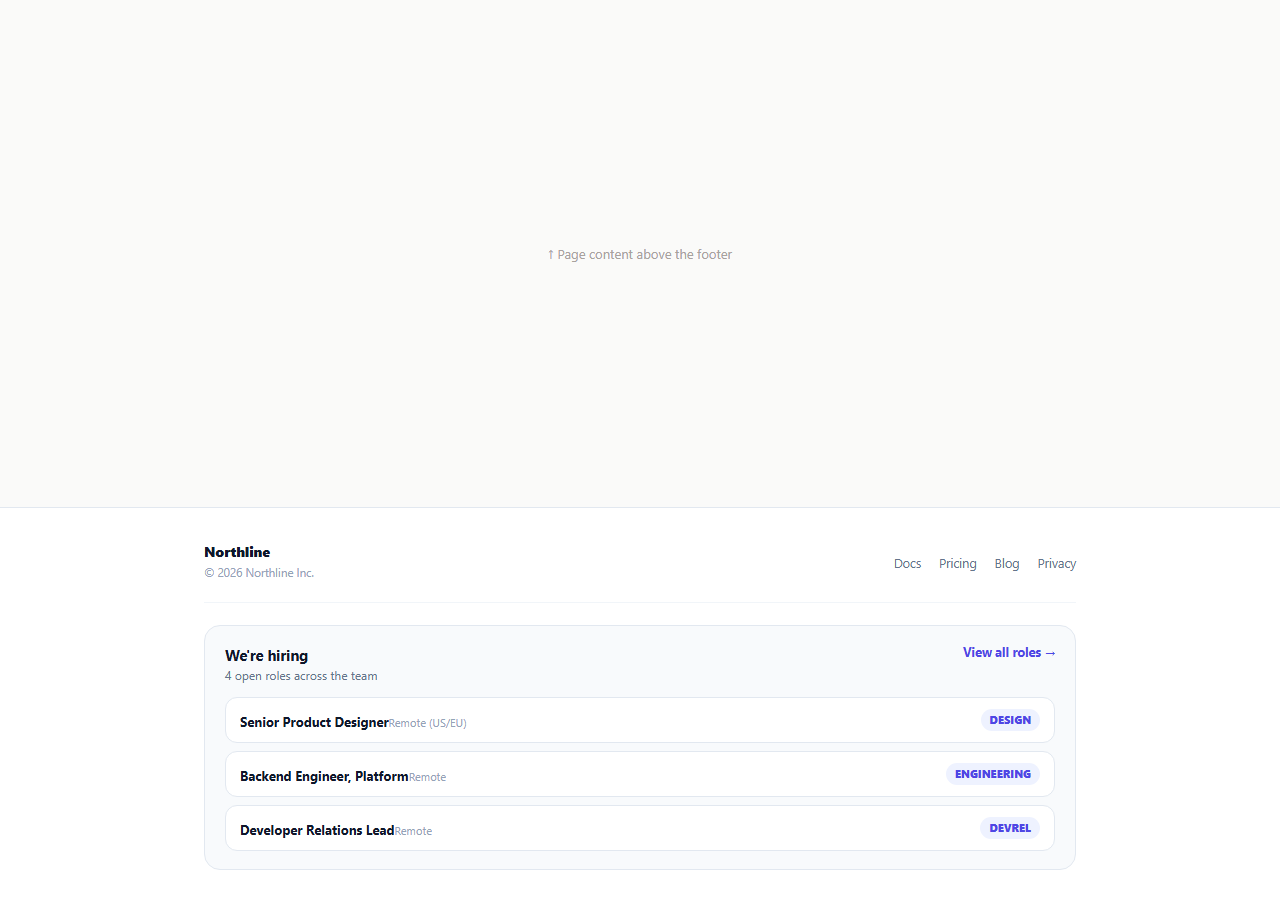
A "We're hiring" link with no context is easy to skip; a footer that shows the actual open roles, their departments, and locations gives a visitor an immediate reason to click through. This snippet renders a compact careers card at the bottom of the page, pulling its content from a single openRoles array so the count and the role list can never drift out of sync with each other.
One array, two derived outputs
openRoles holds { title, dept, location } objects. renderRoles() derives both the summary line ("4 open roles across the team") and the visible role cards from the same array's .length and .slice(0, maxShown) — there is no separate hardcoded count to keep in sync manually. Add or remove a role from the array and both the count and the list update together automatically.
Showing a few, linking to the rest
Rather than dumping every open role into the footer, maxShown caps the visible list (three by default) and a "View all roles →" link sits in the card header for the full board. This mirrors how most real careers pages structure a homepage or footer teaser — enough to prove there are real live openings worth the click, without turning the footer into a full job board.
Department tags as a scan aid
Each role card ends with a small colored .fct-role-dept pill (Design, Engineering, DevRel, Support). A visitor scanning quickly can filter mentally by department without reading every title — someone looking for an engineering role can skip past a Support listing at a glance rather than reading its full title first.
An honest empty state
If openRoles is an empty array, renderRoles() swaps the whole card to a "No open roles right now" message instead of rendering a broken or blank list. This matters because a careers teaser that silently shows nothing when there happen to be zero current openings reads as broken, not simply quiet — an explicit empty state avoids that impression.
Simulated load delay
The role list starts blank and calls renderRoles() after a setTimeout, standing in for an async fetch() to a real applicant-tracking-system (ATS) API such as Greenhouse, Lever, or Ashby, most of which expose a public JSON job-board endpoint.
Wiring it to a real ATS
Replace the static openRoles array with a fetch() call to your ATS's public job-board API on page load, mapping each returned job into the same { title, dept, location } shape renderRoles() already expects — the render, count, and empty-state logic need no changes once real data is flowing in.
Build with AI
Build, Understand, Optimize, and Extend It With AI
Rather than tracing the derived-count logic by hand, paste this snippet's HTML, CSS, and JS into an AI coding assistant like Claude and ask it to explain exactly how renderRoles() keeps the summary count and the rendered role cards consistent by deriving both from the same openRoles array. The same assistant can help you optimize it, for instance asking whether the role list should be cached with a short revalidation window if pulled from a live ATS API on every page load. It is also useful for extending the footer: ask it to wire in a real fetch() call to your Greenhouse, Lever, or Ashby job-board endpoint, add a department filter dropdown above the role list, or animate newly added roles with a subtle highlight for a set period after they are posted. Treat the code less like a finished artifact and more like a starting point for a conversation.
Prompt to recreate it
Copy this into your AI assistant of choice to build the effect from scratch, or as a jumping-off point for your own variant:
Build a footer "we're hiring" careers teaser widget in plain HTML, CSS, and JavaScript, no library.

Requirements:
- A card within the footer showing a "We're hiring" heading, a summary line stating how many roles are currently open, a "View all roles" link, and a short list of individual role cards (title, location, and a department tag) below it.
- All of it — the open-role count and the rendered role cards — must be derived from one single JavaScript array of role objects (title, department, location), not hardcoded separately, so adding or removing a role from the array automatically updates both the count and the visible list together.
- Only show a capped number of roles (configurable via a constant) even if the array has more, since the full list lives on a separate "view all" page.
- If the array is empty, the card must show an explicit "no open roles right now" message instead of rendering a blank or broken-looking list.
- The role list must start empty and populate after a short simulated delay via setTimeout, standing in for a real API fetch to an applicant-tracking-system job board.
Want to tighten it up first? Run this prompt through the AI Prompt Studio to score it across 8 quality dimensions, catch anti-patterns, and tune the wording for Claude, ChatGPT, or Gemini before you paste it in.
Step by step
How to Use
- 1Paste HTML, CSS, and JSThe footer shows a loading label, then populates the open-role count and cards after a short simulated delay.
- 2Check the role count lineIt is derived directly from the length of the openRoles array, never hand-typed separately.
- 3Add a new rolePush a new { title, dept, location } object into the openRoles array in the JS panel.
- 4Change how many roles showUpdate the maxShown constant to show more or fewer role cards before "View all roles".
- 5Test the empty stateSet openRoles to an empty array and reload to see the "No open roles right now" message.
- 6Wire it to a real ATSReplace the static array with a fetch() call to your Greenhouse, Lever, or Ashby public job-board API.
Real-world uses
Common Use Cases
Got questions?
Frequently Asked Questions
The openRoles array in the JS panel, a list of { title, dept, location } objects. Both the summary count line and the rendered role cards are derived from this one array's length and contents, so they always stay consistent with each other.
Change the maxShown constant near the top of the JS panel to any number. renderRoles() uses openRoles.slice(0, maxShown) to decide how many cards to render.
renderRoles() checks openRoles.length === 0 and swaps the entire card to an explicit "No open roles right now" message instead of silently rendering nothing, so the footer never looks broken when hiring is temporarily paused.
Replace the static openRoles array with a fetch() call to your applicant-tracking system's public API (Greenhouse, Lever, and Ashby all expose one) on page load, mapping each returned job into the same { title, dept, location } shape before calling renderRoles().
Yes — add a department filter UI that sets a filtered array (e.g. openRoles.filter(r => r.dept === selected)) and pass that into renderRoles() instead of the full array.
Yes. Keep openRoles as state or fetched data, derive the count from openRoles.length in a computed value, and map the sliced array to role card components the same way renderRoles() builds its HTML string.