Faceted Filter Sidebar — HTML CSS JS Snippet

Faceted Filter Sidebar · Forms · Plain HTML, CSS & JS · Live preview

Share & Support

What's included

Features

Single-state render model
One state object holds every selection; a single render function rebuilds chips, the clear-all button, and the result count — unidirectional flow in vanilla JS.
Collapsible facet groups
toggleFacet toggles an .open class; CSS animates max-height to 0 and rotates the caret, so unknown-height panels still transition smoothly.
Dual-handle price range
Two stacked range inputs with pointer-events only on the thumbs; onPrice enforces a minimum gap and paints the selected band via left/right percentages.
Custom-property colour swatches
Each swatch reads its fill from a --c variable, so a single CSS rule styles every colour and the active ring uses a layered box-shadow.
Pure-CSS partial star rating
.stars::before clips a linear-gradient to text at --n × 20% — fractional star fills with no SVG or image assets.
Removable active-filter chips
render rebuilds the chip row from state; each chip's × calls removeChip(key, value) to clear exactly one selection and re-sync its input.
Conditional clear-all
The Clear-all control fades in via a .show class only when one or more filters are active, then resets the entire state and all inputs.
Live result count
The count decays per active facet so filtering feels instant; swap the formula for your filtered array length or a server count in production.

About this UI Snippet

Faceted Filter Sidebar — Collapsible Facets, Dual Range Slider, Colour Swatches & Active-Filter Chips
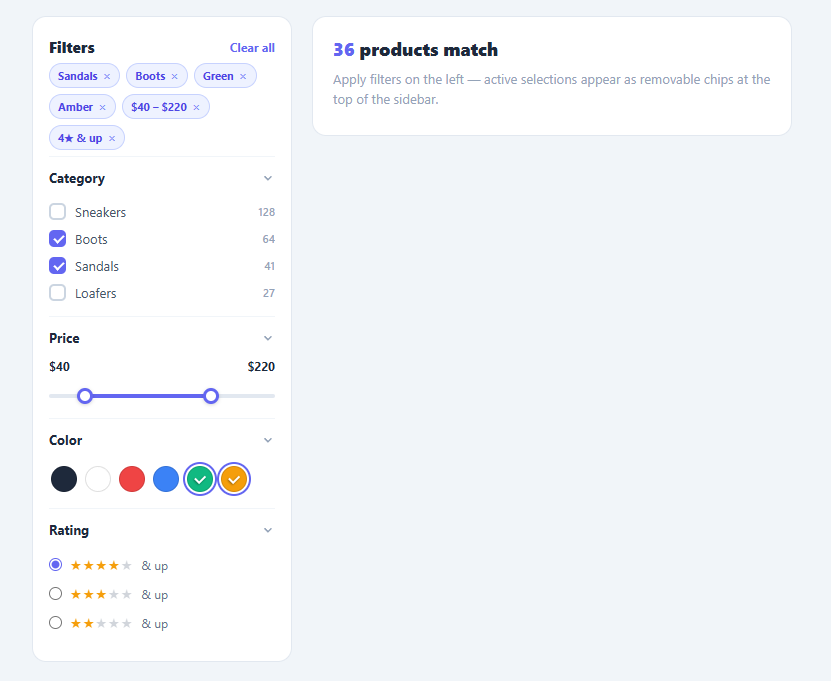
Screenshot of the Faceted Filter Sidebar snippet rendered live

Faceted search is the backbone of every catalogue, marketplace, and product listing page. When a shop has thousands of items, users do not scroll — they filter. A faceted filter sidebar lets shoppers narrow results by combining independent dimensions (category, price, colour, rating) and instantly see how many products match. This snippet implements the complete pattern in plain HTML, CSS, and vanilla JavaScript: collapsible facet groups, a dual-handle price range, clickable colour swatches, a star-rating filter, removable active-filter chips, and a clear-all action.

The single most important UX principle in faceted filtering is feedback: every selection must immediately update both the visible "active filters" summary and the result count. This snippet keeps a single state object as the source of truth and re-derives the whole UI from it in one render function — the same unidirectional-data-flow idea React popularised, written in vanilla JS.

Collapsible facet groups

Each facet is a .facet block with an .open class. The toggleFacet function toggles that class on click; the CSS animates max-height from its open value to 0 and rotates the caret svg 90 degrees. Using max-height (rather than height) lets the panel collapse with a transition even though its natural height is unknown. Long facet lists stay scannable because users can fold the groups they are not using.

Dual-handle price range

The price filter stacks two <input type="range"> elements on the same track. Both have pointer-events: none so the track shows through, and only the thumbs re-enable pointer events via ::-webkit-slider-thumb. The onPrice function reads both values, enforces a minimum gap so the handles cannot cross (min > max - 10), and sets the .range-fill element's left and right as percentages to paint the selected band. This is the standard two-thumb slider technique that avoids any library.

Colour swatches and star rating

Swatches are buttons whose colour comes from a --c CSS custom property, so one rule styles every chip. Clicking toggles an .active ring and adds or removes the colour from state.Color. The rating facet uses radio inputs and a pure-CSS star bar: .stars::before renders five glyphs and a linear-gradient clipped to text fills them to --n × 20%, giving partial-star precision without images.

Active-filter chips and clear-all

After every change, render rebuilds the chip row from state. Each chip carries a removeChip(key, value) handler that clears just that selection — unchecking the matching input or resetting the price — then re-renders. The Clear-all button only appears (.show) when at least one filter is active. The mock result count decays with each active facet so the count feels responsive; in production you would swap that for the length of your filtered dataset or an API response.

Pair this sidebar with a product card grid, a chip filter bar for quick toggles, or a pagination table to page through matches.

Step by step

How to Use

  1. 1
    Paste HTML, CSS, and JSA sidebar appears with four facet groups — Category, Price, Colour, Rating — beside a results panel showing "260 products match".
  2. 2
    Collapse a facetClick any group heading — the panel folds with a smooth max-height transition and the caret rotates. Click again to expand it.
  3. 3
    Tick category boxesCheck Sneakers and Boots — each adds a removable chip at the top of the sidebar and the result count drops.
  4. 4
    Drag the price handlesMove the two range thumbs — the purple fill band tracks between them and the dollar labels update. The handles cannot cross.
  5. 5
    Pick colours and a ratingClick colour swatches to ring them, then choose "4★ & up" — both appear as chips and the count recalculates.
  6. 6
    Remove or clear filtersClick the × on any chip to drop that filter, or hit "Clear all" (it only shows when filters are active) to reset everything.

Real-world uses

Common Use Cases

E-commerce category pages
The primary use case — narrow a shoe, apparel, or electronics catalogue by category, price, colour, and rating. Drop it beside a product card grid.
Marketplace and listing search
Property, car, and job marketplaces use faceted sidebars to combine many filter dimensions. Pair the sidebar with a data table of results.
Documentation and content libraries
Filter articles or components by tag, type, and difficulty. Combine with a search box for free-text plus facet filtering.
Admin dashboards and reports
Refine large record sets by status, owner, date, and rating before exporting. Works alongside a pagination table for paged results.
Travel and booking sites
Filter hotels or flights by price band, star rating, and amenity colour tags — the dual range slider maps directly to nightly-price filtering.
Mobile filter sheets
On narrow screens the sidebar stacks above results; move it into a bottom sheet triggered by a "Filters" button for mobile catalogues.

Got questions?

Frequently Asked Questions

In render, replace the mock count formula with a filter over your dataset: keep an array of products and run products.filter(p => state.Category.length === 0 || state.Category.includes(p.category)) and similar checks for colour, price band, and rating. Render the matching items into the results panel and set the count to the filtered length.

On each render, serialise state into query params with URLSearchParams and call history.replaceState. On load, read the params back and pre-check the matching inputs before the first render. This makes filtered views shareable and bookmarkable — essential for SEO and paid traffic landing pages.

For facets with many options (brands, sizes), add an <input type="text"> above the list and filter the visible .check rows on oninput by matching the label text. Hide non-matching rows with display:none so users can type to find an option instead of scrolling.

Add aria-label="Minimum price" and aria-label="Maximum price" to the two range inputs and aria-valuetext updated in onPrice so screen readers announce dollar amounts. Range inputs are keyboard-operable by default (arrow keys), and the minimum-gap guard prevents an invalid inverted range.

Yes. In React, move state into useState and render chips and counts from it directly — no manual render call needed. In Vue, make state reactive with ref/reactive and bind inputs with v-model. In Angular, hold state on the component and use (change)/(input) bindings. The dual-range CSS and star-bar trick port unchanged.

Faceted Filter Sidebar — Export as HTML, React, Vue, Angular & Tailwind

HTML
<!DOCTYPE html>
<html lang="en">
<head>
  <meta charset="UTF-8" />
  <meta name="viewport" content="width=device-width, initial-scale=1.0" />
  <title>Faceted Filter Sidebar</title>
  <style>
    *{box-sizing:border-box;margin:0;padding:0}
    body{font-family:system-ui,-apple-system,sans-serif;background:#f1f5f9;padding:24px 16px;color:#1e293b}
    .catalog{max-width:760px;margin:0 auto;display:grid;grid-template-columns:260px 1fr;gap:20px;align-items:start}
    
    .filters{background:#fff;border:1px solid #e2e8f0;border-radius:14px;padding:6px 16px 14px}
    .filters-head{display:flex;align-items:center;justify-content:space-between;padding:14px 0 6px}
    .filters-title{font-size:15px;font-weight:800}
    .clear-all{background:none;border:none;color:#6366f1;font-size:12px;font-weight:700;cursor:pointer;font-family:inherit;opacity:0;pointer-events:none;transition:opacity .15s}
    .clear-all.show{opacity:1;pointer-events:auto}
    
    .chips{display:flex;flex-wrap:wrap;gap:6px;margin-bottom:6px}
    .chips:empty{margin:0}
    .chip{display:inline-flex;align-items:center;gap:5px;background:#eef2ff;color:#4f46e5;border:1px solid #c7d2fe;border-radius:999px;font-size:11px;font-weight:700;padding:4px 8px;animation:pop .18s ease}
    .chip button{background:none;border:none;color:#818cf8;cursor:pointer;font-size:13px;line-height:1;padding:0;font-family:inherit}
    .chip button:hover{color:#4f46e5}
    @keyframes pop{from{transform:scale(.8);opacity:0}to{transform:scale(1);opacity:1}}
    
    .facet{border-top:1px solid #f1f5f9}
    .facet-head{width:100%;display:flex;align-items:center;justify-content:space-between;background:none;border:none;padding:12px 0;font-size:13px;font-weight:700;color:#1e293b;cursor:pointer;font-family:inherit}
    .caret{color:#94a3b8;transition:transform .2s}
    .facet:not(.open) .caret{transform:rotate(-90deg)}
    .facet-body{overflow:hidden;max-height:300px;transition:max-height .25s ease,opacity .2s;opacity:1;padding-bottom:10px}
    .facet:not(.open) .facet-body{max-height:0;opacity:0;padding-bottom:0}
    
    .check{display:flex;align-items:center;gap:9px;font-size:13px;color:#475569;padding:5px 0;cursor:pointer;user-select:none}
    .check input{position:absolute;opacity:0;width:0;height:0}
    .box{width:17px;height:17px;border:2px solid #cbd5e1;border-radius:5px;flex-shrink:0;transition:all .15s;position:relative}
    .check input:checked+.box{background:#6366f1;border-color:#6366f1}
    .check input:checked+.box::after{content:'';position:absolute;left:4.5px;top:1px;width:4px;height:8px;border:solid #fff;border-width:0 2px 2px 0;transform:rotate(45deg)}
    .check em{margin-left:auto;font-style:normal;font-size:11px;color:#94a3b8;font-weight:600}
    
    .price-vals{display:flex;justify-content:space-between;font-size:12px;font-weight:700;color:#1e293b;margin-bottom:10px}
    .range{position:relative;height:24px}
    .range-track{position:absolute;top:10px;left:0;right:0;height:4px;background:#e2e8f0;border-radius:4px}
    .range-fill{position:absolute;height:100%;background:#6366f1;border-radius:4px}
    .range input{position:absolute;top:0;left:0;width:100%;height:24px;margin:0;background:none;pointer-events:none;-webkit-appearance:none;appearance:none}
    .range input::-webkit-slider-thumb{-webkit-appearance:none;pointer-events:auto;width:16px;height:16px;border-radius:50%;background:#fff;border:3px solid #6366f1;cursor:pointer;box-shadow:0 1px 4px rgba(0,0,0,.2)}
    .range input::-moz-range-thumb{pointer-events:auto;width:16px;height:16px;border-radius:50%;background:#fff;border:3px solid #6366f1;cursor:pointer}
    
    .swatches{display:flex;flex-wrap:wrap;gap:8px;padding:6px 6px 6px 2px}
    .swatch{width:26px;height:26px;border-radius:50%;background:var(--c);border:1px solid rgba(0,0,0,.12);cursor:pointer;position:relative;transition:transform .12s}
    .swatch:hover{transform:scale(1.12)}
    .swatch.active{box-shadow:0 0 0 2px #fff,0 0 0 4px #6366f1}
    .swatch.active::after{content:'';position:absolute;left:51%;top:44%;width:4.5px;height:8px;border:solid #fff;border-width:0 2px 2px 0;transform:translate(-50%,-50%) rotate(45deg);filter:drop-shadow(0 1px 1px rgba(0,0,0,.45))}
    .swatch[data-color="White"].active::after{border-color:#1e293b;filter:none}
    
    .rate{display:flex;align-items:center;gap:8px;font-size:12px;color:#64748b;padding:5px 0;cursor:pointer}
    .rate input{accent-color:#6366f1}
    .stars{--n:0}
    .stars::before{content:'★★★★★';letter-spacing:1px;background:linear-gradient(90deg,#f59e0b calc(var(--n)*20%),#d1d5db calc(var(--n)*20%));-webkit-background-clip:text;background-clip:text;-webkit-text-fill-color:transparent;font-size:14px}
    
    .results{background:#fff;border:1px solid #e2e8f0;border-radius:14px;padding:20px;min-height:120px}
    .results-head{font-size:18px;font-weight:800}
    .results-head span{color:#6366f1}
    .results-note{font-size:13px;color:#94a3b8;margin-top:8px;line-height:1.5}
    
    @media(max-width:640px){.catalog{grid-template-columns:1fr}}
  </style>
</head>
<body>
  <div class="catalog">
    <aside class="filters" id="filters">
      <div class="filters-head">
        <span class="filters-title">Filters</span>
        <button class="clear-all" id="clearAll" onclick="clearAll()">Clear all</button>
      </div>
  
      <div class="chips" id="activeChips"></div>
  
      <div class="facet open">
        <button class="facet-head" onclick="toggleFacet(this)">
          <span>Category</span>
          <svg class="caret" width="14" height="14" viewBox="0 0 24 24" fill="none" stroke="currentColor" stroke-width="2.5"><path d="m6 9 6 6 6-6"/></svg>
        </button>
        <div class="facet-body">
          <label class="check"><input type="checkbox" value="Sneakers" onchange="onFacet(this,'Category')"><span class="box"></span>Sneakers<em>128</em></label>
          <label class="check"><input type="checkbox" value="Boots" onchange="onFacet(this,'Category')"><span class="box"></span>Boots<em>64</em></label>
          <label class="check"><input type="checkbox" value="Sandals" onchange="onFacet(this,'Category')"><span class="box"></span>Sandals<em>41</em></label>
          <label class="check"><input type="checkbox" value="Loafers" onchange="onFacet(this,'Category')"><span class="box"></span>Loafers<em>27</em></label>
        </div>
      </div>
  
      <div class="facet open">
        <button class="facet-head" onclick="toggleFacet(this)">
          <span>Price</span>
          <svg class="caret" width="14" height="14" viewBox="0 0 24 24" fill="none" stroke="currentColor" stroke-width="2.5"><path d="m6 9 6 6 6-6"/></svg>
        </button>
        <div class="facet-body">
          <div class="price-vals"><span id="priceMinVal">$0</span><span id="priceMaxVal">$300</span></div>
          <div class="range">
            <div class="range-track"><div class="range-fill" id="rangeFill"></div></div>
            <input type="range" id="priceMin" min="0" max="300" value="0" step="10" oninput="onPrice()">
            <input type="range" id="priceMax" min="0" max="300" value="300" step="10" oninput="onPrice()">
          </div>
        </div>
      </div>
  
      <div class="facet open">
        <button class="facet-head" onclick="toggleFacet(this)">
          <span>Color</span>
          <svg class="caret" width="14" height="14" viewBox="0 0 24 24" fill="none" stroke="currentColor" stroke-width="2.5"><path d="m6 9 6 6 6-6"/></svg>
        </button>
        <div class="facet-body">
          <div class="swatches">
            <button class="swatch" style="--c:#1e293b" data-color="Black" onclick="onSwatch(this)" title="Black"></button>
            <button class="swatch" style="--c:#ffffff" data-color="White" onclick="onSwatch(this)" title="White"></button>
            <button class="swatch" style="--c:#ef4444" data-color="Red" onclick="onSwatch(this)" title="Red"></button>
            <button class="swatch" style="--c:#3b82f6" data-color="Blue" onclick="onSwatch(this)" title="Blue"></button>
            <button class="swatch" style="--c:#10b981" data-color="Green" onclick="onSwatch(this)" title="Green"></button>
            <button class="swatch" style="--c:#f59e0b" data-color="Amber" onclick="onSwatch(this)" title="Amber"></button>
          </div>
        </div>
      </div>
  
      <div class="facet open">
        <button class="facet-head" onclick="toggleFacet(this)">
          <span>Rating</span>
          <svg class="caret" width="14" height="14" viewBox="0 0 24 24" fill="none" stroke="currentColor" stroke-width="2.5"><path d="m6 9 6 6 6-6"/></svg>
        </button>
        <div class="facet-body">
          <label class="rate"><input type="radio" name="rating" value="4" onchange="onRating(this)"><span class="stars" data-n="4"></span>& up</label>
          <label class="rate"><input type="radio" name="rating" value="3" onchange="onRating(this)"><span class="stars" data-n="3"></span>& up</label>
          <label class="rate"><input type="radio" name="rating" value="2" onchange="onRating(this)"><span class="stars" data-n="2"></span>& up</label>
        </div>
      </div>
    </aside>
  
    <div class="results">
      <div class="results-head"><span id="resultCount">260</span> products match</div>
      <div class="results-note">Apply filters on the left — active selections appear as removable chips at the top of the sidebar.</div>
    </div>
  </div>
  <script>
    var TOTAL = 260;
    var state = { Category: [], Color: [], rating: null, price: [0, 300] };
    
    function toggleFacet(btn) {
      btn.parentElement.classList.toggle('open');
    }
    
    function onFacet(input, group) {
      var arr = state[group];
      if (input.checked) arr.push(input.value);
      else state[group] = arr.filter(function (v) { return v !== input.value; });
      render();
    }
    
    function onSwatch(btn) {
      var c = btn.dataset.color;
      btn.classList.toggle('active');
      if (state.Color.indexOf(c) === -1) state.Color.push(c);
      else state.Color = state.Color.filter(function (v) { return v !== c; });
      render();
    }
    
    function onRating(input) {
      state.rating = input.value;
      render();
    }
    
    function onPrice() {
      var lo = document.getElementById('priceMin');
      var hi = document.getElementById('priceMax');
      var min = +lo.value, max = +hi.value;
      if (min > max - 10) { if (this === lo) min = max - 10; else max = min + 10; lo.value = min; hi.value = max; }
      state.price = [min, max];
      document.getElementById('priceMinVal').textContent = '$' + min;
      document.getElementById('priceMaxVal').textContent = '$' + max;
      var fill = document.getElementById('rangeFill');
      fill.style.left = (min / 300 * 100) + '%';
      fill.style.right = (100 - max / 300 * 100) + '%';
      render();
    }
    
    function removeChip(key, value) {
      if (key === 'rating') {
        state.rating = null;
        document.querySelectorAll('input[name="rating"]').forEach(function (r) { r.checked = false; });
      } else if (key === 'price') {
        state.price = [0, 300];
        document.getElementById('priceMin').value = 0;
        document.getElementById('priceMax').value = 300;
        onPrice();
        return;
      } else {
        state[key] = state[key].filter(function (v) { return v !== value; });
        document.querySelectorAll('.check input, .swatch').forEach(function (el) {
          var val = el.value || el.dataset.color;
          if (val === value) { el.checked = false; el.classList && el.classList.remove('active'); }
        });
      }
      render();
    }
    
    function clearAll() {
      state = { Category: [], Color: [], rating: null, price: [0, 300] };
      document.querySelectorAll('.check input, input[name="rating"]').forEach(function (i) { i.checked = false; });
      document.querySelectorAll('.swatch').forEach(function (s) { s.classList.remove('active'); });
      document.getElementById('priceMin').value = 0;
      document.getElementById('priceMax').value = 300;
      onPrice();
    }
    
    function render() {
      var chips = [];
      state.Category.forEach(function (v) { chips.push(['Category', v, v]); });
      state.Color.forEach(function (v) { chips.push(['Color', v, v]); });
      if (state.price[0] > 0 || state.price[1] < 300) chips.push(['price', null, '$' + state.price[0] + ' – $' + state.price[1]]);
      if (state.rating) chips.push(['rating', null, state.rating + '★ & up']);
    
      var box = document.getElementById('activeChips');
      box.innerHTML = chips.map(function (c) {
        return '<span class="chip">' + c[2] + '<button onclick="removeChip(\'' + c[0] + '\',\'' + (c[1] || '') + '\')" aria-label="Remove">×</button></span>';
      }).join('');
    
      document.getElementById('clearAll').classList.toggle('show', chips.length > 0);
    
      var active = state.Category.length + state.Color.length + (state.rating ? 1 : 0) + ((state.price[0] > 0 || state.price[1] < 300) ? 1 : 0);
      var remaining = Math.max(8, Math.round(TOTAL * Math.pow(0.72, active)));
      document.getElementById('resultCount').textContent = active ? remaining : TOTAL;
    }
    
    document.querySelectorAll('.stars').forEach(function (s) { s.style.setProperty('--n', s.dataset.n); });
    onPrice();
  </script>
</body>
</html>
Tailwind
<!DOCTYPE html>
<html lang="en">
<head>
  <meta charset="UTF-8" />
  <meta name="viewport" content="width=device-width, initial-scale=1.0" />
  <title>Faceted Filter Sidebar</title>
  <!-- Tailwind CSS v3+ — arbitrary value classes (e.g. bg-[#0f172a]) are valid -->
  <script src="https://cdn.tailwindcss.com"></script>
  <style>
    @keyframes pop{from{transform:scale(.8);opacity:0}to{transform:scale(1);opacity:1}}

    * {
      box-sizing:border-box;margin:0;padding:0
    }

    body {
      font-family:system-ui,-apple-system,sans-serif;background:#f1f5f9;padding:24px 16px;color:#1e293b
    }

    .clear-all.show {
      opacity:1;pointer-events:auto
    }

    .chips:empty {
      margin:0
    }

    .chip {
      display:inline-flex;align-items:center;gap:5px;background:#eef2ff;color:#4f46e5;border:1px solid #c7d2fe;border-radius:999px;font-size:11px;font-weight:700;padding:4px 8px;animation:pop .18s ease
    }

    .chip button {
      background:none;border:none;color:#818cf8;cursor:pointer;font-size:13px;line-height:1;padding:0;font-family:inherit
    }

    .chip button:hover {
      color:#4f46e5
    }

    .facet:not(.open) .caret {
      transform:rotate(-90deg)
    }

    .facet:not(.open) .facet-body {
      max-height:0;opacity:0;padding-bottom:0
    }

    .check input {
      position:absolute;opacity:0;width:0;height:0
    }

    .check input:checked+.box {
      background:#6366f1;border-color:#6366f1
    }

    .check input:checked+.box::after {
      content:'';position:absolute;left:4.5px;top:1px;width:4px;height:8px;border:solid #fff;border-width:0 2px 2px 0;transform:rotate(45deg)
    }

    .check em {
      margin-left:auto;font-style:normal;font-size:11px;color:#94a3b8;font-weight:600
    }

    .range input {
      position:absolute;top:0;left:0;width:100%;height:24px;margin:0;background:none;pointer-events:none;-webkit-appearance:none;appearance:none
    }

    .range input::-webkit-slider-thumb {
      -webkit-appearance:none;pointer-events:auto;width:16px;height:16px;border-radius:50%;background:#fff;border:3px solid #6366f1;cursor:pointer;box-shadow:0 1px 4px rgba(0,0,0,.2)
    }

    .range input::-moz-range-thumb {
      pointer-events:auto;width:16px;height:16px;border-radius:50%;background:#fff;border:3px solid #6366f1;cursor:pointer
    }

    .swatch.active {
      box-shadow:0 0 0 2px #fff,0 0 0 4px #6366f1
    }

    .swatch.active::after {
      content:'';position:absolute;left:51%;top:44%;width:4.5px;height:8px;border:solid #fff;border-width:0 2px 2px 0;transform:translate(-50%,-50%) rotate(45deg);filter:drop-shadow(0 1px 1px rgba(0,0,0,.45))
    }

    .swatch[data-color="White"].active::after {
      border-color:#1e293b;filter:none
    }

    .rate input {
      accent-color:#6366f1
    }

    .stars::before {
      content:'★★★★★';letter-spacing:1px;background:linear-gradient(90deg,#f59e0b calc(var(--n)*20%),#d1d5db calc(var(--n)*20%));-webkit-background-clip:text;background-clip:text;-webkit-text-fill-color:transparent;font-size:14px
    }

    .results-head span {
      color:#6366f1
    }
  </style>
</head>
<body>
  <div class="max-w-[760px] my-0 mx-auto grid grid-cols-1 gap-5 items-start max-[640px]:grid-cols-1">
    <aside class="bg-[#fff] border border-[#e2e8f0] rounded-[14px] pt-1.5 px-4 pb-3.5" id="filters">
      <div class="flex items-center justify-between pt-3.5 px-0 pb-1.5">
        <span class="text-[15px] font-extrabold">Filters</span>
        <button class="clear-all bg-transparent border-0 text-[#6366f1] text-xs font-bold cursor-pointer font-[inherit] opacity-0 pointer-events-none [transition:opacity_.15s]" id="clearAll" onclick="clearAll()">Clear all</button>
      </div>
  
      <div class="chips flex flex-wrap gap-1.5 mb-1.5" id="activeChips"></div>
  
      <div class="facet border-t border-t-[#f1f5f9] open">
        <button class="w-full flex items-center justify-between bg-transparent border-0 py-3 px-0 text-[13px] font-bold text-[#1e293b] cursor-pointer font-[inherit]" onclick="toggleFacet(this)">
          <span>Category</span>
          <svg class="caret text-[#94a3b8] [transition:transform_.2s]" width="14" height="14" viewBox="0 0 24 24" fill="none" stroke="currentColor" stroke-width="2.5"><path d="m6 9 6 6 6-6"/></svg>
        </button>
        <div class="facet-body overflow-hidden max-h-[300px] [transition:max-height_.25s_ease,opacity_.2s] opacity-100 pb-2.5">
          <label class="check flex items-center gap-[9px] text-[13px] text-[#475569] py-[5px] px-0 cursor-pointer select-none"><input type="checkbox" value="Sneakers" onchange="onFacet(this,'Category')"><span class="box w-[17px] h-[17px] border-2 border-[#cbd5e1] rounded-[5px] shrink-0 [transition:all_.15s] relative"></span>Sneakers<em>128</em></label>
          <label class="check flex items-center gap-[9px] text-[13px] text-[#475569] py-[5px] px-0 cursor-pointer select-none"><input type="checkbox" value="Boots" onchange="onFacet(this,'Category')"><span class="box w-[17px] h-[17px] border-2 border-[#cbd5e1] rounded-[5px] shrink-0 [transition:all_.15s] relative"></span>Boots<em>64</em></label>
          <label class="check flex items-center gap-[9px] text-[13px] text-[#475569] py-[5px] px-0 cursor-pointer select-none"><input type="checkbox" value="Sandals" onchange="onFacet(this,'Category')"><span class="box w-[17px] h-[17px] border-2 border-[#cbd5e1] rounded-[5px] shrink-0 [transition:all_.15s] relative"></span>Sandals<em>41</em></label>
          <label class="check flex items-center gap-[9px] text-[13px] text-[#475569] py-[5px] px-0 cursor-pointer select-none"><input type="checkbox" value="Loafers" onchange="onFacet(this,'Category')"><span class="box w-[17px] h-[17px] border-2 border-[#cbd5e1] rounded-[5px] shrink-0 [transition:all_.15s] relative"></span>Loafers<em>27</em></label>
        </div>
      </div>
  
      <div class="facet border-t border-t-[#f1f5f9] open">
        <button class="w-full flex items-center justify-between bg-transparent border-0 py-3 px-0 text-[13px] font-bold text-[#1e293b] cursor-pointer font-[inherit]" onclick="toggleFacet(this)">
          <span>Price</span>
          <svg class="caret text-[#94a3b8] [transition:transform_.2s]" width="14" height="14" viewBox="0 0 24 24" fill="none" stroke="currentColor" stroke-width="2.5"><path d="m6 9 6 6 6-6"/></svg>
        </button>
        <div class="facet-body overflow-hidden max-h-[300px] [transition:max-height_.25s_ease,opacity_.2s] opacity-100 pb-2.5">
          <div class="flex justify-between text-xs font-bold text-[#1e293b] mb-2.5"><span id="priceMinVal">$0</span><span id="priceMaxVal">$300</span></div>
          <div class="range relative h-6">
            <div class="absolute top-2.5 left-0 right-0 h-1 bg-[#e2e8f0] rounded"><div class="absolute h-full bg-[#6366f1] rounded" id="rangeFill"></div></div>
            <input type="range" id="priceMin" min="0" max="300" value="0" step="10" oninput="onPrice()">
            <input type="range" id="priceMax" min="0" max="300" value="300" step="10" oninput="onPrice()">
          </div>
        </div>
      </div>
  
      <div class="facet border-t border-t-[#f1f5f9] open">
        <button class="w-full flex items-center justify-between bg-transparent border-0 py-3 px-0 text-[13px] font-bold text-[#1e293b] cursor-pointer font-[inherit]" onclick="toggleFacet(this)">
          <span>Color</span>
          <svg class="caret text-[#94a3b8] [transition:transform_.2s]" width="14" height="14" viewBox="0 0 24 24" fill="none" stroke="currentColor" stroke-width="2.5"><path d="m6 9 6 6 6-6"/></svg>
        </button>
        <div class="facet-body overflow-hidden max-h-[300px] [transition:max-height_.25s_ease,opacity_.2s] opacity-100 pb-2.5">
          <div class="flex flex-wrap gap-2 pt-1.5 pr-1.5 pb-1.5 pl-0.5">
            <button class="swatch w-[26px] h-[26px] rounded-full [background:var(--c)] border border-[rgba(0,0,0,.12)] cursor-pointer relative [transition:transform_.12s] hover:[transform:scale(1.12)]" style="--c:#1e293b" data-color="Black" onclick="onSwatch(this)" title="Black"></button>
            <button class="swatch w-[26px] h-[26px] rounded-full [background:var(--c)] border border-[rgba(0,0,0,.12)] cursor-pointer relative [transition:transform_.12s] hover:[transform:scale(1.12)]" style="--c:#ffffff" data-color="White" onclick="onSwatch(this)" title="White"></button>
            <button class="swatch w-[26px] h-[26px] rounded-full [background:var(--c)] border border-[rgba(0,0,0,.12)] cursor-pointer relative [transition:transform_.12s] hover:[transform:scale(1.12)]" style="--c:#ef4444" data-color="Red" onclick="onSwatch(this)" title="Red"></button>
            <button class="swatch w-[26px] h-[26px] rounded-full [background:var(--c)] border border-[rgba(0,0,0,.12)] cursor-pointer relative [transition:transform_.12s] hover:[transform:scale(1.12)]" style="--c:#3b82f6" data-color="Blue" onclick="onSwatch(this)" title="Blue"></button>
            <button class="swatch w-[26px] h-[26px] rounded-full [background:var(--c)] border border-[rgba(0,0,0,.12)] cursor-pointer relative [transition:transform_.12s] hover:[transform:scale(1.12)]" style="--c:#10b981" data-color="Green" onclick="onSwatch(this)" title="Green"></button>
            <button class="swatch w-[26px] h-[26px] rounded-full [background:var(--c)] border border-[rgba(0,0,0,.12)] cursor-pointer relative [transition:transform_.12s] hover:[transform:scale(1.12)]" style="--c:#f59e0b" data-color="Amber" onclick="onSwatch(this)" title="Amber"></button>
          </div>
        </div>
      </div>
  
      <div class="facet border-t border-t-[#f1f5f9] open">
        <button class="w-full flex items-center justify-between bg-transparent border-0 py-3 px-0 text-[13px] font-bold text-[#1e293b] cursor-pointer font-[inherit]" onclick="toggleFacet(this)">
          <span>Rating</span>
          <svg class="caret text-[#94a3b8] [transition:transform_.2s]" width="14" height="14" viewBox="0 0 24 24" fill="none" stroke="currentColor" stroke-width="2.5"><path d="m6 9 6 6 6-6"/></svg>
        </button>
        <div class="facet-body overflow-hidden max-h-[300px] [transition:max-height_.25s_ease,opacity_.2s] opacity-100 pb-2.5">
          <label class="rate flex items-center gap-2 text-xs text-[#64748b] py-[5px] px-0 cursor-pointer"><input type="radio" name="rating" value="4" onchange="onRating(this)"><span class="stars [--n:0]" data-n="4"></span>& up</label>
          <label class="rate flex items-center gap-2 text-xs text-[#64748b] py-[5px] px-0 cursor-pointer"><input type="radio" name="rating" value="3" onchange="onRating(this)"><span class="stars [--n:0]" data-n="3"></span>& up</label>
          <label class="rate flex items-center gap-2 text-xs text-[#64748b] py-[5px] px-0 cursor-pointer"><input type="radio" name="rating" value="2" onchange="onRating(this)"><span class="stars [--n:0]" data-n="2"></span>& up</label>
        </div>
      </div>
    </aside>
  
    <div class="bg-[#fff] border border-[#e2e8f0] rounded-[14px] p-5 min-h-[120px]">
      <div class="results-head text-lg font-extrabold"><span id="resultCount">260</span> products match</div>
      <div class="text-[13px] text-[#94a3b8] mt-2 leading-normal">Apply filters on the left — active selections appear as removable chips at the top of the sidebar.</div>
    </div>
  </div>
  <script>
    var TOTAL = 260;
    var state = { Category: [], Color: [], rating: null, price: [0, 300] };
    
    function toggleFacet(btn) {
      btn.parentElement.classList.toggle('open');
    }
    
    function onFacet(input, group) {
      var arr = state[group];
      if (input.checked) arr.push(input.value);
      else state[group] = arr.filter(function (v) { return v !== input.value; });
      render();
    }
    
    function onSwatch(btn) {
      var c = btn.dataset.color;
      btn.classList.toggle('active');
      if (state.Color.indexOf(c) === -1) state.Color.push(c);
      else state.Color = state.Color.filter(function (v) { return v !== c; });
      render();
    }
    
    function onRating(input) {
      state.rating = input.value;
      render();
    }
    
    function onPrice() {
      var lo = document.getElementById('priceMin');
      var hi = document.getElementById('priceMax');
      var min = +lo.value, max = +hi.value;
      if (min > max - 10) { if (this === lo) min = max - 10; else max = min + 10; lo.value = min; hi.value = max; }
      state.price = [min, max];
      document.getElementById('priceMinVal').textContent = '$' + min;
      document.getElementById('priceMaxVal').textContent = '$' + max;
      var fill = document.getElementById('rangeFill');
      fill.style.left = (min / 300 * 100) + '%';
      fill.style.right = (100 - max / 300 * 100) + '%';
      render();
    }
    
    function removeChip(key, value) {
      if (key === 'rating') {
        state.rating = null;
        document.querySelectorAll('input[name="rating"]').forEach(function (r) { r.checked = false; });
      } else if (key === 'price') {
        state.price = [0, 300];
        document.getElementById('priceMin').value = 0;
        document.getElementById('priceMax').value = 300;
        onPrice();
        return;
      } else {
        state[key] = state[key].filter(function (v) { return v !== value; });
        document.querySelectorAll('.check input, .swatch').forEach(function (el) {
          var val = el.value || el.dataset.color;
          if (val === value) { el.checked = false; el.classList && el.classList.remove('active'); }
        });
      }
      render();
    }
    
    function clearAll() {
      state = { Category: [], Color: [], rating: null, price: [0, 300] };
      document.querySelectorAll('.check input, input[name="rating"]').forEach(function (i) { i.checked = false; });
      document.querySelectorAll('.swatch').forEach(function (s) { s.classList.remove('active'); });
      document.getElementById('priceMin').value = 0;
      document.getElementById('priceMax').value = 300;
      onPrice();
    }
    
    function render() {
      var chips = [];
      state.Category.forEach(function (v) { chips.push(['Category', v, v]); });
      state.Color.forEach(function (v) { chips.push(['Color', v, v]); });
      if (state.price[0] > 0 || state.price[1] < 300) chips.push(['price', null, '$' + state.price[0] + ' – $' + state.price[1]]);
      if (state.rating) chips.push(['rating', null, state.rating + '★ & up']);
    
      var box = document.getElementById('activeChips');
      box.innerHTML = chips.map(function (c) {
        return '<span class="chip">' + c[2] + '<button onclick="removeChip(\'' + c[0] + '\',\'' + (c[1] || '') + '\')" aria-label="Remove">×</button></span>';
      }).join('');
    
      document.getElementById('clearAll').classList.toggle('show', chips.length > 0);
    
      var active = state.Category.length + state.Color.length + (state.rating ? 1 : 0) + ((state.price[0] > 0 || state.price[1] < 300) ? 1 : 0);
      var remaining = Math.max(8, Math.round(TOTAL * Math.pow(0.72, active)));
      document.getElementById('resultCount').textContent = active ? remaining : TOTAL;
    }
    
    document.querySelectorAll('.stars').forEach(function (s) { s.style.setProperty('--n', s.dataset.n); });
    onPrice();
  </script>
</body>
</html>
React
import React, { useEffect } from 'react';

// CSS — optionally move to FacetedFilterSidebar.module.css
const css = `
*{box-sizing:border-box;margin:0;padding:0}
body{font-family:system-ui,-apple-system,sans-serif;background:#f1f5f9;padding:24px 16px;color:#1e293b}
.catalog{max-width:760px;margin:0 auto;display:grid;grid-template-columns:260px 1fr;gap:20px;align-items:start}

.filters{background:#fff;border:1px solid #e2e8f0;border-radius:14px;padding:6px 16px 14px}
.filters-head{display:flex;align-items:center;justify-content:space-between;padding:14px 0 6px}
.filters-title{font-size:15px;font-weight:800}
.clear-all{background:none;border:none;color:#6366f1;font-size:12px;font-weight:700;cursor:pointer;font-family:inherit;opacity:0;pointer-events:none;transition:opacity .15s}
.clear-all.show{opacity:1;pointer-events:auto}

.chips{display:flex;flex-wrap:wrap;gap:6px;margin-bottom:6px}
.chips:empty{margin:0}
.chip{display:inline-flex;align-items:center;gap:5px;background:#eef2ff;color:#4f46e5;border:1px solid #c7d2fe;border-radius:999px;font-size:11px;font-weight:700;padding:4px 8px;animation:pop .18s ease}
.chip button{background:none;border:none;color:#818cf8;cursor:pointer;font-size:13px;line-height:1;padding:0;font-family:inherit}
.chip button:hover{color:#4f46e5}
@keyframes pop{from{transform:scale(.8);opacity:0}to{transform:scale(1);opacity:1}}

.facet{border-top:1px solid #f1f5f9}
.facet-head{width:100%;display:flex;align-items:center;justify-content:space-between;background:none;border:none;padding:12px 0;font-size:13px;font-weight:700;color:#1e293b;cursor:pointer;font-family:inherit}
.caret{color:#94a3b8;transition:transform .2s}
.facet:not(.open) .caret{transform:rotate(-90deg)}
.facet-body{overflow:hidden;max-height:300px;transition:max-height .25s ease,opacity .2s;opacity:1;padding-bottom:10px}
.facet:not(.open) .facet-body{max-height:0;opacity:0;padding-bottom:0}

.check{display:flex;align-items:center;gap:9px;font-size:13px;color:#475569;padding:5px 0;cursor:pointer;user-select:none}
.check input{position:absolute;opacity:0;width:0;height:0}
.box{width:17px;height:17px;border:2px solid #cbd5e1;border-radius:5px;flex-shrink:0;transition:all .15s;position:relative}
.check input:checked+.box{background:#6366f1;border-color:#6366f1}
.check input:checked+.box::after{content:'';position:absolute;left:4.5px;top:1px;width:4px;height:8px;border:solid #fff;border-width:0 2px 2px 0;transform:rotate(45deg)}
.check em{margin-left:auto;font-style:normal;font-size:11px;color:#94a3b8;font-weight:600}

.price-vals{display:flex;justify-content:space-between;font-size:12px;font-weight:700;color:#1e293b;margin-bottom:10px}
.range{position:relative;height:24px}
.range-track{position:absolute;top:10px;left:0;right:0;height:4px;background:#e2e8f0;border-radius:4px}
.range-fill{position:absolute;height:100%;background:#6366f1;border-radius:4px}
.range input{position:absolute;top:0;left:0;width:100%;height:24px;margin:0;background:none;pointer-events:none;-webkit-appearance:none;appearance:none}
.range input::-webkit-slider-thumb{-webkit-appearance:none;pointer-events:auto;width:16px;height:16px;border-radius:50%;background:#fff;border:3px solid #6366f1;cursor:pointer;box-shadow:0 1px 4px rgba(0,0,0,.2)}
.range input::-moz-range-thumb{pointer-events:auto;width:16px;height:16px;border-radius:50%;background:#fff;border:3px solid #6366f1;cursor:pointer}

.swatches{display:flex;flex-wrap:wrap;gap:8px;padding:6px 6px 6px 2px}
.swatch{width:26px;height:26px;border-radius:50%;background:var(--c);border:1px solid rgba(0,0,0,.12);cursor:pointer;position:relative;transition:transform .12s}
.swatch:hover{transform:scale(1.12)}
.swatch.active{box-shadow:0 0 0 2px #fff,0 0 0 4px #6366f1}
.swatch.active::after{content:'';position:absolute;left:51%;top:44%;width:4.5px;height:8px;border:solid #fff;border-width:0 2px 2px 0;transform:translate(-50%,-50%) rotate(45deg);filter:drop-shadow(0 1px 1px rgba(0,0,0,.45))}
.swatch[data-color="White"].active::after{border-color:#1e293b;filter:none}

.rate{display:flex;align-items:center;gap:8px;font-size:12px;color:#64748b;padding:5px 0;cursor:pointer}
.rate input{accent-color:#6366f1}
.stars{--n:0}
.stars::before{content:'★★★★★';letter-spacing:1px;background:linear-gradient(90deg,#f59e0b calc(var(--n)*20%),#d1d5db calc(var(--n)*20%));-webkit-background-clip:text;background-clip:text;-webkit-text-fill-color:transparent;font-size:14px}

.results{background:#fff;border:1px solid #e2e8f0;border-radius:14px;padding:20px;min-height:120px}
.results-head{font-size:18px;font-weight:800}
.results-head span{color:#6366f1}
.results-note{font-size:13px;color:#94a3b8;margin-top:8px;line-height:1.5}

@media(max-width:640px){.catalog{grid-template-columns:1fr}}
`;

export default function FacetedFilterSidebar() {
  // Auto-generated escape hatch: the original snippet's vanilla JS runs once
  // after mount and queries the rendered DOM. For idiomatic React, lift this
  // into state + handlers.
  useEffect(() => {
    const _listeners = [];
    const _originalAddEventListener = EventTarget.prototype.addEventListener;
    EventTarget.prototype.addEventListener = function(type, listener, options) {
      _listeners.push({ target: this, type, listener, options });
      return _originalAddEventListener.call(this, type, listener, options);
    };
    var TOTAL = 260;
    var state = { Category: [], Color: [], rating: null, price: [0, 300] };
    
    function toggleFacet(btn) {
      btn.parentElement.classList.toggle('open');
    }
    
    function onFacet(input, group) {
      var arr = state[group];
      if (input.checked) arr.push(input.value);
      else state[group] = arr.filter(function (v) { return v !== input.value; });
      render();
    }
    
    function onSwatch(btn) {
      var c = btn.dataset.color;
      btn.classList.toggle('active');
      if (state.Color.indexOf(c) === -1) state.Color.push(c);
      else state.Color = state.Color.filter(function (v) { return v !== c; });
      render();
    }
    
    function onRating(input) {
      state.rating = input.value;
      render();
    }
    
    function onPrice() {
      var lo = document.getElementById('priceMin');
      var hi = document.getElementById('priceMax');
      var min = +lo.value, max = +hi.value;
      if (min > max - 10) { if (this === lo) min = max - 10; else max = min + 10; lo.value = min; hi.value = max; }
      state.price = [min, max];
      document.getElementById('priceMinVal').textContent = '$' + min;
      document.getElementById('priceMaxVal').textContent = '$' + max;
      var fill = document.getElementById('rangeFill');
      fill.style.left = (min / 300 * 100) + '%';
      fill.style.right = (100 - max / 300 * 100) + '%';
      render();
    }
    
    function removeChip(key, value) {
      if (key === 'rating') {
        state.rating = null;
        document.querySelectorAll('input[name="rating"]').forEach(function (r) { r.checked = false; });
      } else if (key === 'price') {
        state.price = [0, 300];
        document.getElementById('priceMin').value = 0;
        document.getElementById('priceMax').value = 300;
        onPrice();
        return;
      } else {
        state[key] = state[key].filter(function (v) { return v !== value; });
        document.querySelectorAll('.check input, .swatch').forEach(function (el) {
          var val = el.value || el.dataset.color;
          if (val === value) { el.checked = false; el.classList && el.classList.remove('active'); }
        });
      }
      render();
    }
    
    function clearAll() {
      state = { Category: [], Color: [], rating: null, price: [0, 300] };
      document.querySelectorAll('.check input, input[name="rating"]').forEach(function (i) { i.checked = false; });
      document.querySelectorAll('.swatch').forEach(function (s) { s.classList.remove('active'); });
      document.getElementById('priceMin').value = 0;
      document.getElementById('priceMax').value = 300;
      onPrice();
    }
    
    function render() {
      var chips = [];
      state.Category.forEach(function (v) { chips.push(['Category', v, v]); });
      state.Color.forEach(function (v) { chips.push(['Color', v, v]); });
      if (state.price[0] > 0 || state.price[1] < 300) chips.push(['price', null, '$' + state.price[0] + ' – $' + state.price[1]]);
      if (state.rating) chips.push(['rating', null, state.rating + '★ & up']);
    
      var box = document.getElementById('activeChips');
      box.innerHTML = chips.map(function (c) {
        return '<span class="chip">' + c[2] + '<button onclick="removeChip(\'' + c[0] + '\',\'' + (c[1] || '') + '\')" aria-label="Remove">×</button></span>';
      }).join('');
    
      document.getElementById('clearAll').classList.toggle('show', chips.length > 0);
    
      var active = state.Category.length + state.Color.length + (state.rating ? 1 : 0) + ((state.price[0] > 0 || state.price[1] < 300) ? 1 : 0);
      var remaining = Math.max(8, Math.round(TOTAL * Math.pow(0.72, active)));
      document.getElementById('resultCount').textContent = active ? remaining : TOTAL;
    }
    
    document.querySelectorAll('.stars').forEach(function (s) { s.style.setProperty('--n', s.dataset.n); });
    onPrice();
    // Cleanup: restore addEventListener and remove all listeners
    return () => {
      EventTarget.prototype.addEventListener = _originalAddEventListener;
      for (const { target, type, listener, options } of _listeners) {
        target.removeEventListener(type, listener, options);
      }
    };

    // Expose handlers used by inline JSX events to the global scope
    if (typeof clearAll === 'function') window.clearAll = clearAll;
    if (typeof toggleFacet === 'function') window.toggleFacet = toggleFacet;
    if (typeof onFacet === 'function') window.onFacet = onFacet;
    if (typeof onPrice === 'function') window.onPrice = onPrice;
    if (typeof onSwatch === 'function') window.onSwatch = onSwatch;
    if (typeof onRating === 'function') window.onRating = onRating;
    if (typeof removeChip === 'function') window.removeChip = removeChip;
  }, []);

  return (
    <>
      <style>{css}</style>
      <div className="catalog">
        <aside className="filters" id="filters">
          <div className="filters-head">
            <span className="filters-title">Filters</span>
            <button className="clear-all" id="clearAll" onClick={(event) => { clearAll() }}>Clear all</button>
          </div>
      
          <div className="chips" id="activeChips"></div>
      
          <div className="facet open">
            <button className="facet-head" onClick={(event) => { toggleFacet(event.currentTarget) }}>
              <span>Category</span>
              <svg className="caret" width="14" height="14" viewBox="0 0 24 24" fill="none" stroke="currentColor" strokeWidth="2.5"><path d="m6 9 6 6 6-6"/></svg>
            </button>
            <div className="facet-body">
              <label className="check"><input type="checkbox" value="Sneakers" onChange={(event) => { onFacet(event.currentTarget,'Category') }} /><span className="box"></span>Sneakers<em>128</em></label>
              <label className="check"><input type="checkbox" value="Boots" onChange={(event) => { onFacet(event.currentTarget,'Category') }} /><span className="box"></span>Boots<em>64</em></label>
              <label className="check"><input type="checkbox" value="Sandals" onChange={(event) => { onFacet(event.currentTarget,'Category') }} /><span className="box"></span>Sandals<em>41</em></label>
              <label className="check"><input type="checkbox" value="Loafers" onChange={(event) => { onFacet(event.currentTarget,'Category') }} /><span className="box"></span>Loafers<em>27</em></label>
            </div>
          </div>
      
          <div className="facet open">
            <button className="facet-head" onClick={(event) => { toggleFacet(event.currentTarget) }}>
              <span>Price</span>
              <svg className="caret" width="14" height="14" viewBox="0 0 24 24" fill="none" stroke="currentColor" strokeWidth="2.5"><path d="m6 9 6 6 6-6"/></svg>
            </button>
            <div className="facet-body">
              <div className="price-vals"><span id="priceMinVal">$0</span><span id="priceMaxVal">$300</span></div>
              <div className="range">
                <div className="range-track"><div className="range-fill" id="rangeFill"></div></div>
                <input type="range" id="priceMin" min="0" max="300" value="0" step="10" onInput={(event) => { onPrice() }} />
                <input type="range" id="priceMax" min="0" max="300" value="300" step="10" onInput={(event) => { onPrice() }} />
              </div>
            </div>
          </div>
      
          <div className="facet open">
            <button className="facet-head" onClick={(event) => { toggleFacet(event.currentTarget) }}>
              <span>Color</span>
              <svg className="caret" width="14" height="14" viewBox="0 0 24 24" fill="none" stroke="currentColor" strokeWidth="2.5"><path d="m6 9 6 6 6-6"/></svg>
            </button>
            <div className="facet-body">
              <div className="swatches">
                <button className="swatch" style={{ '--c': '#1e293b' }} data-color="Black" onClick={(event) => { onSwatch(event.currentTarget) }} title="Black"></button>
                <button className="swatch" style={{ '--c': '#ffffff' }} data-color="White" onClick={(event) => { onSwatch(event.currentTarget) }} title="White"></button>
                <button className="swatch" style={{ '--c': '#ef4444' }} data-color="Red" onClick={(event) => { onSwatch(event.currentTarget) }} title="Red"></button>
                <button className="swatch" style={{ '--c': '#3b82f6' }} data-color="Blue" onClick={(event) => { onSwatch(event.currentTarget) }} title="Blue"></button>
                <button className="swatch" style={{ '--c': '#10b981' }} data-color="Green" onClick={(event) => { onSwatch(event.currentTarget) }} title="Green"></button>
                <button className="swatch" style={{ '--c': '#f59e0b' }} data-color="Amber" onClick={(event) => { onSwatch(event.currentTarget) }} title="Amber"></button>
              </div>
            </div>
          </div>
      
          <div className="facet open">
            <button className="facet-head" onClick={(event) => { toggleFacet(event.currentTarget) }}>
              <span>Rating</span>
              <svg className="caret" width="14" height="14" viewBox="0 0 24 24" fill="none" stroke="currentColor" strokeWidth="2.5"><path d="m6 9 6 6 6-6"/></svg>
            </button>
            <div className="facet-body">
              <label className="rate"><input type="radio" name="rating" value="4" onChange={(event) => { onRating(event.currentTarget) }} /><span className="stars" data-n="4"></span>& up</label>
              <label className="rate"><input type="radio" name="rating" value="3" onChange={(event) => { onRating(event.currentTarget) }} /><span className="stars" data-n="3"></span>& up</label>
              <label className="rate"><input type="radio" name="rating" value="2" onChange={(event) => { onRating(event.currentTarget) }} /><span className="stars" data-n="2"></span>& up</label>
            </div>
          </div>
        </aside>
      
        <div className="results">
          <div className="results-head"><span id="resultCount">260</span> products match</div>
          <div className="results-note">Apply filters on the left — active selections appear as removable chips at the top of the sidebar.</div>
        </div>
      </div>
    </>
  );
}
React + Tailwind
import React, { useEffect } from 'react';
// Requires Tailwind CSS v3+ — https://tailwindcss.com/docs/installation
// Arbitrary value classes (e.g. bg-[#0f172a]) are valid Tailwind v3+

export default function FacetedFilterSidebar() {
  // Auto-generated escape hatch: the original snippet's vanilla JS runs once
  // after mount and queries the rendered DOM. For idiomatic React, lift this
  // into state + handlers.
  useEffect(() => {
    const _listeners = [];
    const _originalAddEventListener = EventTarget.prototype.addEventListener;
    EventTarget.prototype.addEventListener = function(type, listener, options) {
      _listeners.push({ target: this, type, listener, options });
      return _originalAddEventListener.call(this, type, listener, options);
    };
    var TOTAL = 260;
    var state = { Category: [], Color: [], rating: null, price: [0, 300] };
    
    function toggleFacet(btn) {
      btn.parentElement.classList.toggle('open');
    }
    
    function onFacet(input, group) {
      var arr = state[group];
      if (input.checked) arr.push(input.value);
      else state[group] = arr.filter(function (v) { return v !== input.value; });
      render();
    }
    
    function onSwatch(btn) {
      var c = btn.dataset.color;
      btn.classList.toggle('active');
      if (state.Color.indexOf(c) === -1) state.Color.push(c);
      else state.Color = state.Color.filter(function (v) { return v !== c; });
      render();
    }
    
    function onRating(input) {
      state.rating = input.value;
      render();
    }
    
    function onPrice() {
      var lo = document.getElementById('priceMin');
      var hi = document.getElementById('priceMax');
      var min = +lo.value, max = +hi.value;
      if (min > max - 10) { if (this === lo) min = max - 10; else max = min + 10; lo.value = min; hi.value = max; }
      state.price = [min, max];
      document.getElementById('priceMinVal').textContent = '$' + min;
      document.getElementById('priceMaxVal').textContent = '$' + max;
      var fill = document.getElementById('rangeFill');
      fill.style.left = (min / 300 * 100) + '%';
      fill.style.right = (100 - max / 300 * 100) + '%';
      render();
    }
    
    function removeChip(key, value) {
      if (key === 'rating') {
        state.rating = null;
        document.querySelectorAll('input[name="rating"]').forEach(function (r) { r.checked = false; });
      } else if (key === 'price') {
        state.price = [0, 300];
        document.getElementById('priceMin').value = 0;
        document.getElementById('priceMax').value = 300;
        onPrice();
        return;
      } else {
        state[key] = state[key].filter(function (v) { return v !== value; });
        document.querySelectorAll('.check input, .swatch').forEach(function (el) {
          var val = el.value || el.dataset.color;
          if (val === value) { el.checked = false; el.classList && el.classList.remove('active'); }
        });
      }
      render();
    }
    
    function clearAll() {
      state = { Category: [], Color: [], rating: null, price: [0, 300] };
      document.querySelectorAll('.check input, input[name="rating"]').forEach(function (i) { i.checked = false; });
      document.querySelectorAll('.swatch').forEach(function (s) { s.classList.remove('active'); });
      document.getElementById('priceMin').value = 0;
      document.getElementById('priceMax').value = 300;
      onPrice();
    }
    
    function render() {
      var chips = [];
      state.Category.forEach(function (v) { chips.push(['Category', v, v]); });
      state.Color.forEach(function (v) { chips.push(['Color', v, v]); });
      if (state.price[0] > 0 || state.price[1] < 300) chips.push(['price', null, '$' + state.price[0] + ' – $' + state.price[1]]);
      if (state.rating) chips.push(['rating', null, state.rating + '★ & up']);
    
      var box = document.getElementById('activeChips');
      box.innerHTML = chips.map(function (c) {
        return '<span class="chip">' + c[2] + '<button onclick="removeChip(\'' + c[0] + '\',\'' + (c[1] || '') + '\')" aria-label="Remove">×</button></span>';
      }).join('');
    
      document.getElementById('clearAll').classList.toggle('show', chips.length > 0);
    
      var active = state.Category.length + state.Color.length + (state.rating ? 1 : 0) + ((state.price[0] > 0 || state.price[1] < 300) ? 1 : 0);
      var remaining = Math.max(8, Math.round(TOTAL * Math.pow(0.72, active)));
      document.getElementById('resultCount').textContent = active ? remaining : TOTAL;
    }
    
    document.querySelectorAll('.stars').forEach(function (s) { s.style.setProperty('--n', s.dataset.n); });
    onPrice();
    // Cleanup: restore addEventListener and remove all listeners
    return () => {
      EventTarget.prototype.addEventListener = _originalAddEventListener;
      for (const { target, type, listener, options } of _listeners) {
        target.removeEventListener(type, listener, options);
      }
    };

    // Expose handlers used by inline JSX events to the global scope
    if (typeof clearAll === 'function') window.clearAll = clearAll;
    if (typeof toggleFacet === 'function') window.toggleFacet = toggleFacet;
    if (typeof onFacet === 'function') window.onFacet = onFacet;
    if (typeof onPrice === 'function') window.onPrice = onPrice;
    if (typeof onSwatch === 'function') window.onSwatch = onSwatch;
    if (typeof onRating === 'function') window.onRating = onRating;
    if (typeof removeChip === 'function') window.removeChip = removeChip;
  }, []);

  return (
    <>
      <style>{`
@keyframes pop{from{transform:scale(.8);opacity:0}to{transform:scale(1);opacity:1}}

* {
  box-sizing:border-box;margin:0;padding:0
}

body {
  font-family:system-ui,-apple-system,sans-serif;background:#f1f5f9;padding:24px 16px;color:#1e293b
}

.clear-all.show {
  opacity:1;pointer-events:auto
}

.chips:empty {
  margin:0
}

.chip {
  display:inline-flex;align-items:center;gap:5px;background:#eef2ff;color:#4f46e5;border:1px solid #c7d2fe;border-radius:999px;font-size:11px;font-weight:700;padding:4px 8px;animation:pop .18s ease
}

.chip button {
  background:none;border:none;color:#818cf8;cursor:pointer;font-size:13px;line-height:1;padding:0;font-family:inherit
}

.chip button:hover {
  color:#4f46e5
}

.facet:not(.open) .caret {
  transform:rotate(-90deg)
}

.facet:not(.open) .facet-body {
  max-height:0;opacity:0;padding-bottom:0
}

.check input {
  position:absolute;opacity:0;width:0;height:0
}

.check input:checked+.box {
  background:#6366f1;border-color:#6366f1
}

.check input:checked+.box::after {
  content:'';position:absolute;left:4.5px;top:1px;width:4px;height:8px;border:solid #fff;border-width:0 2px 2px 0;transform:rotate(45deg)
}

.check em {
  margin-left:auto;font-style:normal;font-size:11px;color:#94a3b8;font-weight:600
}

.range input {
  position:absolute;top:0;left:0;width:100%;height:24px;margin:0;background:none;pointer-events:none;-webkit-appearance:none;appearance:none
}

.range input::-webkit-slider-thumb {
  -webkit-appearance:none;pointer-events:auto;width:16px;height:16px;border-radius:50%;background:#fff;border:3px solid #6366f1;cursor:pointer;box-shadow:0 1px 4px rgba(0,0,0,.2)
}

.range input::-moz-range-thumb {
  pointer-events:auto;width:16px;height:16px;border-radius:50%;background:#fff;border:3px solid #6366f1;cursor:pointer
}

.swatch.active {
  box-shadow:0 0 0 2px #fff,0 0 0 4px #6366f1
}

.swatch.active::after {
  content:'';position:absolute;left:51%;top:44%;width:4.5px;height:8px;border:solid #fff;border-width:0 2px 2px 0;transform:translate(-50%,-50%) rotate(45deg);filter:drop-shadow(0 1px 1px rgba(0,0,0,.45))
}

.swatch[data-color="White"].active::after {
  border-color:#1e293b;filter:none
}

.rate input {
  accent-color:#6366f1
}

.stars::before {
  content:'★★★★★';letter-spacing:1px;background:linear-gradient(90deg,#f59e0b calc(var(--n)*20%),#d1d5db calc(var(--n)*20%));-webkit-background-clip:text;background-clip:text;-webkit-text-fill-color:transparent;font-size:14px
}

.results-head span {
  color:#6366f1
}
      `}</style>
      <div className="max-w-[760px] my-0 mx-auto grid grid-cols-1 gap-5 items-start max-[640px]:grid-cols-1">
        <aside className="bg-[#fff] border border-[#e2e8f0] rounded-[14px] pt-1.5 px-4 pb-3.5" id="filters">
          <div className="flex items-center justify-between pt-3.5 px-0 pb-1.5">
            <span className="text-[15px] font-extrabold">Filters</span>
            <button className="clear-all bg-transparent border-0 text-[#6366f1] text-xs font-bold cursor-pointer font-[inherit] opacity-0 pointer-events-none [transition:opacity_.15s]" id="clearAll" onClick={(event) => { clearAll() }}>Clear all</button>
          </div>
      
          <div className="chips flex flex-wrap gap-1.5 mb-1.5" id="activeChips"></div>
      
          <div className="facet border-t border-t-[#f1f5f9] open">
            <button className="w-full flex items-center justify-between bg-transparent border-0 py-3 px-0 text-[13px] font-bold text-[#1e293b] cursor-pointer font-[inherit]" onClick={(event) => { toggleFacet(event.currentTarget) }}>
              <span>Category</span>
              <svg className="caret text-[#94a3b8] [transition:transform_.2s]" width="14" height="14" viewBox="0 0 24 24" fill="none" stroke="currentColor" strokeWidth="2.5"><path d="m6 9 6 6 6-6"/></svg>
            </button>
            <div className="facet-body overflow-hidden max-h-[300px] [transition:max-height_.25s_ease,opacity_.2s] opacity-100 pb-2.5">
              <label className="check flex items-center gap-[9px] text-[13px] text-[#475569] py-[5px] px-0 cursor-pointer select-none"><input type="checkbox" value="Sneakers" onChange={(event) => { onFacet(event.currentTarget,'Category') }} /><span className="box w-[17px] h-[17px] border-2 border-[#cbd5e1] rounded-[5px] shrink-0 [transition:all_.15s] relative"></span>Sneakers<em>128</em></label>
              <label className="check flex items-center gap-[9px] text-[13px] text-[#475569] py-[5px] px-0 cursor-pointer select-none"><input type="checkbox" value="Boots" onChange={(event) => { onFacet(event.currentTarget,'Category') }} /><span className="box w-[17px] h-[17px] border-2 border-[#cbd5e1] rounded-[5px] shrink-0 [transition:all_.15s] relative"></span>Boots<em>64</em></label>
              <label className="check flex items-center gap-[9px] text-[13px] text-[#475569] py-[5px] px-0 cursor-pointer select-none"><input type="checkbox" value="Sandals" onChange={(event) => { onFacet(event.currentTarget,'Category') }} /><span className="box w-[17px] h-[17px] border-2 border-[#cbd5e1] rounded-[5px] shrink-0 [transition:all_.15s] relative"></span>Sandals<em>41</em></label>
              <label className="check flex items-center gap-[9px] text-[13px] text-[#475569] py-[5px] px-0 cursor-pointer select-none"><input type="checkbox" value="Loafers" onChange={(event) => { onFacet(event.currentTarget,'Category') }} /><span className="box w-[17px] h-[17px] border-2 border-[#cbd5e1] rounded-[5px] shrink-0 [transition:all_.15s] relative"></span>Loafers<em>27</em></label>
            </div>
          </div>
      
          <div className="facet border-t border-t-[#f1f5f9] open">
            <button className="w-full flex items-center justify-between bg-transparent border-0 py-3 px-0 text-[13px] font-bold text-[#1e293b] cursor-pointer font-[inherit]" onClick={(event) => { toggleFacet(event.currentTarget) }}>
              <span>Price</span>
              <svg className="caret text-[#94a3b8] [transition:transform_.2s]" width="14" height="14" viewBox="0 0 24 24" fill="none" stroke="currentColor" strokeWidth="2.5"><path d="m6 9 6 6 6-6"/></svg>
            </button>
            <div className="facet-body overflow-hidden max-h-[300px] [transition:max-height_.25s_ease,opacity_.2s] opacity-100 pb-2.5">
              <div className="flex justify-between text-xs font-bold text-[#1e293b] mb-2.5"><span id="priceMinVal">$0</span><span id="priceMaxVal">$300</span></div>
              <div className="range relative h-6">
                <div className="absolute top-2.5 left-0 right-0 h-1 bg-[#e2e8f0] rounded"><div className="absolute h-full bg-[#6366f1] rounded" id="rangeFill"></div></div>
                <input type="range" id="priceMin" min="0" max="300" value="0" step="10" onInput={(event) => { onPrice() }} />
                <input type="range" id="priceMax" min="0" max="300" value="300" step="10" onInput={(event) => { onPrice() }} />
              </div>
            </div>
          </div>
      
          <div className="facet border-t border-t-[#f1f5f9] open">
            <button className="w-full flex items-center justify-between bg-transparent border-0 py-3 px-0 text-[13px] font-bold text-[#1e293b] cursor-pointer font-[inherit]" onClick={(event) => { toggleFacet(event.currentTarget) }}>
              <span>Color</span>
              <svg className="caret text-[#94a3b8] [transition:transform_.2s]" width="14" height="14" viewBox="0 0 24 24" fill="none" stroke="currentColor" strokeWidth="2.5"><path d="m6 9 6 6 6-6"/></svg>
            </button>
            <div className="facet-body overflow-hidden max-h-[300px] [transition:max-height_.25s_ease,opacity_.2s] opacity-100 pb-2.5">
              <div className="flex flex-wrap gap-2 pt-1.5 pr-1.5 pb-1.5 pl-0.5">
                <button className="swatch w-[26px] h-[26px] rounded-full [background:var(--c)] border border-[rgba(0,0,0,.12)] cursor-pointer relative [transition:transform_.12s] hover:[transform:scale(1.12)]" style={{ '--c': '#1e293b' }} data-color="Black" onClick={(event) => { onSwatch(event.currentTarget) }} title="Black"></button>
                <button className="swatch w-[26px] h-[26px] rounded-full [background:var(--c)] border border-[rgba(0,0,0,.12)] cursor-pointer relative [transition:transform_.12s] hover:[transform:scale(1.12)]" style={{ '--c': '#ffffff' }} data-color="White" onClick={(event) => { onSwatch(event.currentTarget) }} title="White"></button>
                <button className="swatch w-[26px] h-[26px] rounded-full [background:var(--c)] border border-[rgba(0,0,0,.12)] cursor-pointer relative [transition:transform_.12s] hover:[transform:scale(1.12)]" style={{ '--c': '#ef4444' }} data-color="Red" onClick={(event) => { onSwatch(event.currentTarget) }} title="Red"></button>
                <button className="swatch w-[26px] h-[26px] rounded-full [background:var(--c)] border border-[rgba(0,0,0,.12)] cursor-pointer relative [transition:transform_.12s] hover:[transform:scale(1.12)]" style={{ '--c': '#3b82f6' }} data-color="Blue" onClick={(event) => { onSwatch(event.currentTarget) }} title="Blue"></button>
                <button className="swatch w-[26px] h-[26px] rounded-full [background:var(--c)] border border-[rgba(0,0,0,.12)] cursor-pointer relative [transition:transform_.12s] hover:[transform:scale(1.12)]" style={{ '--c': '#10b981' }} data-color="Green" onClick={(event) => { onSwatch(event.currentTarget) }} title="Green"></button>
                <button className="swatch w-[26px] h-[26px] rounded-full [background:var(--c)] border border-[rgba(0,0,0,.12)] cursor-pointer relative [transition:transform_.12s] hover:[transform:scale(1.12)]" style={{ '--c': '#f59e0b' }} data-color="Amber" onClick={(event) => { onSwatch(event.currentTarget) }} title="Amber"></button>
              </div>
            </div>
          </div>
      
          <div className="facet border-t border-t-[#f1f5f9] open">
            <button className="w-full flex items-center justify-between bg-transparent border-0 py-3 px-0 text-[13px] font-bold text-[#1e293b] cursor-pointer font-[inherit]" onClick={(event) => { toggleFacet(event.currentTarget) }}>
              <span>Rating</span>
              <svg className="caret text-[#94a3b8] [transition:transform_.2s]" width="14" height="14" viewBox="0 0 24 24" fill="none" stroke="currentColor" strokeWidth="2.5"><path d="m6 9 6 6 6-6"/></svg>
            </button>
            <div className="facet-body overflow-hidden max-h-[300px] [transition:max-height_.25s_ease,opacity_.2s] opacity-100 pb-2.5">
              <label className="rate flex items-center gap-2 text-xs text-[#64748b] py-[5px] px-0 cursor-pointer"><input type="radio" name="rating" value="4" onChange={(event) => { onRating(event.currentTarget) }} /><span className="stars [--n:0]" data-n="4"></span>& up</label>
              <label className="rate flex items-center gap-2 text-xs text-[#64748b] py-[5px] px-0 cursor-pointer"><input type="radio" name="rating" value="3" onChange={(event) => { onRating(event.currentTarget) }} /><span className="stars [--n:0]" data-n="3"></span>& up</label>
              <label className="rate flex items-center gap-2 text-xs text-[#64748b] py-[5px] px-0 cursor-pointer"><input type="radio" name="rating" value="2" onChange={(event) => { onRating(event.currentTarget) }} /><span className="stars [--n:0]" data-n="2"></span>& up</label>
            </div>
          </div>
        </aside>
      
        <div className="bg-[#fff] border border-[#e2e8f0] rounded-[14px] p-5 min-h-[120px]">
          <div className="results-head text-lg font-extrabold"><span id="resultCount">260</span> products match</div>
          <div className="text-[13px] text-[#94a3b8] mt-2 leading-normal">Apply filters on the left — active selections appear as removable chips at the top of the sidebar.</div>
        </div>
      </div>
    </>
  );
}
Vue
<template>
  <div class="catalog">
    <aside class="filters" id="filters">
      <div class="filters-head">
        <span class="filters-title">Filters</span>
        <button class="clear-all" id="clearAll" @click="clearAll()">Clear all</button>
      </div>
  
      <div class="chips" id="activeChips"></div>
  
      <div class="facet open">
        <button class="facet-head" @click="toggleFacet($event.currentTarget)">
          <span>Category</span>
          <svg class="caret" width="14" height="14" viewBox="0 0 24 24" fill="none" stroke="currentColor" stroke-width="2.5"><path d="m6 9 6 6 6-6"/></svg>
        </button>
        <div class="facet-body">
          <label class="check"><input type="checkbox" value="Sneakers" @change="onFacet($event.currentTarget,'Category')"><span class="box"></span>Sneakers<em>128</em></label>
          <label class="check"><input type="checkbox" value="Boots" @change="onFacet($event.currentTarget,'Category')"><span class="box"></span>Boots<em>64</em></label>
          <label class="check"><input type="checkbox" value="Sandals" @change="onFacet($event.currentTarget,'Category')"><span class="box"></span>Sandals<em>41</em></label>
          <label class="check"><input type="checkbox" value="Loafers" @change="onFacet($event.currentTarget,'Category')"><span class="box"></span>Loafers<em>27</em></label>
        </div>
      </div>
  
      <div class="facet open">
        <button class="facet-head" @click="toggleFacet($event.currentTarget)">
          <span>Price</span>
          <svg class="caret" width="14" height="14" viewBox="0 0 24 24" fill="none" stroke="currentColor" stroke-width="2.5"><path d="m6 9 6 6 6-6"/></svg>
        </button>
        <div class="facet-body">
          <div class="price-vals"><span id="priceMinVal">$0</span><span id="priceMaxVal">$300</span></div>
          <div class="range">
            <div class="range-track"><div class="range-fill" id="rangeFill"></div></div>
            <input type="range" id="priceMin" min="0" max="300" value="0" step="10" @input="onPrice()">
            <input type="range" id="priceMax" min="0" max="300" value="300" step="10" @input="onPrice()">
          </div>
        </div>
      </div>
  
      <div class="facet open">
        <button class="facet-head" @click="toggleFacet($event.currentTarget)">
          <span>Color</span>
          <svg class="caret" width="14" height="14" viewBox="0 0 24 24" fill="none" stroke="currentColor" stroke-width="2.5"><path d="m6 9 6 6 6-6"/></svg>
        </button>
        <div class="facet-body">
          <div class="swatches">
            <button class="swatch" style="--c:#1e293b" data-color="Black" @click="onSwatch($event.currentTarget)" title="Black"></button>
            <button class="swatch" style="--c:#ffffff" data-color="White" @click="onSwatch($event.currentTarget)" title="White"></button>
            <button class="swatch" style="--c:#ef4444" data-color="Red" @click="onSwatch($event.currentTarget)" title="Red"></button>
            <button class="swatch" style="--c:#3b82f6" data-color="Blue" @click="onSwatch($event.currentTarget)" title="Blue"></button>
            <button class="swatch" style="--c:#10b981" data-color="Green" @click="onSwatch($event.currentTarget)" title="Green"></button>
            <button class="swatch" style="--c:#f59e0b" data-color="Amber" @click="onSwatch($event.currentTarget)" title="Amber"></button>
          </div>
        </div>
      </div>
  
      <div class="facet open">
        <button class="facet-head" @click="toggleFacet($event.currentTarget)">
          <span>Rating</span>
          <svg class="caret" width="14" height="14" viewBox="0 0 24 24" fill="none" stroke="currentColor" stroke-width="2.5"><path d="m6 9 6 6 6-6"/></svg>
        </button>
        <div class="facet-body">
          <label class="rate"><input type="radio" name="rating" value="4" @change="onRating($event.currentTarget)"><span class="stars" data-n="4"></span>& up</label>
          <label class="rate"><input type="radio" name="rating" value="3" @change="onRating($event.currentTarget)"><span class="stars" data-n="3"></span>& up</label>
          <label class="rate"><input type="radio" name="rating" value="2" @change="onRating($event.currentTarget)"><span class="stars" data-n="2"></span>& up</label>
        </div>
      </div>
    </aside>
  
    <div class="results">
      <div class="results-head"><span id="resultCount">260</span> products match</div>
      <div class="results-note">Apply filters on the left — active selections appear as removable chips at the top of the sidebar.</div>
    </div>
  </div>
</template>

<script setup>
import { onMounted } from 'vue';

var TOTAL = 260;
var state = { Category: [], Color: [], rating: null, price: [0, 300] };
function toggleFacet(btn) {
  btn.parentElement.classList.toggle('open');
}
function onFacet(input, group) {
  var arr = state[group];
  if (input.checked) arr.push(input.value);
  else state[group] = arr.filter(function (v) { return v !== input.value; });
  render();
}
function onSwatch(btn) {
  var c = btn.dataset.color;
  btn.classList.toggle('active');
  if (state.Color.indexOf(c) === -1) state.Color.push(c);
  else state.Color = state.Color.filter(function (v) { return v !== c; });
  render();
}
function onRating(input) {
  state.rating = input.value;
  render();
}
function onPrice() {
  var lo = document.getElementById('priceMin');
  var hi = document.getElementById('priceMax');
  var min = +lo.value, max = +hi.value;
  if (min > max - 10) { if (this === lo) min = max - 10; else max = min + 10; lo.value = min; hi.value = max; }
  state.price = [min, max];
  document.getElementById('priceMinVal').textContent = '$' + min;
  document.getElementById('priceMaxVal').textContent = '$' + max;
  var fill = document.getElementById('rangeFill');
  fill.style.left = (min / 300 * 100) + '%';
  fill.style.right = (100 - max / 300 * 100) + '%';
  render();
}
function removeChip(key, value) {
  if (key === 'rating') {
    state.rating = null;
    document.querySelectorAll('input[name="rating"]').forEach(function (r) { r.checked = false; });
  } else if (key === 'price') {
    state.price = [0, 300];
    document.getElementById('priceMin').value = 0;
    document.getElementById('priceMax').value = 300;
    onPrice();
    return;
  } else {
    state[key] = state[key].filter(function (v) { return v !== value; });
    document.querySelectorAll('.check input, .swatch').forEach(function (el) {
      var val = el.value || el.dataset.color;
      if (val === value) { el.checked = false; el.classList && el.classList.remove('active'); }
    });
  }
  render();
}
function clearAll() {
  state = { Category: [], Color: [], rating: null, price: [0, 300] };
  document.querySelectorAll('.check input, input[name="rating"]').forEach(function (i) { i.checked = false; });
  document.querySelectorAll('.swatch').forEach(function (s) { s.classList.remove('active'); });
  document.getElementById('priceMin').value = 0;
  document.getElementById('priceMax').value = 300;
  onPrice();
}
function render() {
  var chips = [];
  state.Category.forEach(function (v) { chips.push(['Category', v, v]); });
  state.Color.forEach(function (v) { chips.push(['Color', v, v]); });
  if (state.price[0] > 0 || state.price[1] < 300) chips.push(['price', null, '$' + state.price[0] + ' – $' + state.price[1]]);
  if (state.rating) chips.push(['rating', null, state.rating + '★ & up']);

  var box = document.getElementById('activeChips');
  box.innerHTML = chips.map(function (c) {
    return '<span class="chip">' + c[2] + '<button onclick="removeChip(\'' + c[0] + '\',\'' + (c[1] || '') + '\')" aria-label="Remove">×</button></span>';
  }).join('');

  document.getElementById('clearAll').classList.toggle('show', chips.length > 0);

  var active = state.Category.length + state.Color.length + (state.rating ? 1 : 0) + ((state.price[0] > 0 || state.price[1] < 300) ? 1 : 0);
  var remaining = Math.max(8, Math.round(TOTAL * Math.pow(0.72, active)));
  document.getElementById('resultCount').textContent = active ? remaining : TOTAL;
}

onMounted(() => {
  if (typeof removeChip === 'function') window.removeChip = removeChip;
  document.querySelectorAll('.stars').forEach(function (s) { s.style.setProperty('--n', s.dataset.n); });
  onPrice();
});
</script>

<style scoped>
*{box-sizing:border-box;margin:0;padding:0}
body{font-family:system-ui,-apple-system,sans-serif;background:#f1f5f9;padding:24px 16px;color:#1e293b}
.catalog{max-width:760px;margin:0 auto;display:grid;grid-template-columns:260px 1fr;gap:20px;align-items:start}

.filters{background:#fff;border:1px solid #e2e8f0;border-radius:14px;padding:6px 16px 14px}
.filters-head{display:flex;align-items:center;justify-content:space-between;padding:14px 0 6px}
.filters-title{font-size:15px;font-weight:800}
.clear-all{background:none;border:none;color:#6366f1;font-size:12px;font-weight:700;cursor:pointer;font-family:inherit;opacity:0;pointer-events:none;transition:opacity .15s}
.clear-all.show{opacity:1;pointer-events:auto}

.chips{display:flex;flex-wrap:wrap;gap:6px;margin-bottom:6px}
.chips:empty{margin:0}
.chip{display:inline-flex;align-items:center;gap:5px;background:#eef2ff;color:#4f46e5;border:1px solid #c7d2fe;border-radius:999px;font-size:11px;font-weight:700;padding:4px 8px;animation:pop .18s ease}
.chip button{background:none;border:none;color:#818cf8;cursor:pointer;font-size:13px;line-height:1;padding:0;font-family:inherit}
.chip button:hover{color:#4f46e5}
@keyframes pop{from{transform:scale(.8);opacity:0}to{transform:scale(1);opacity:1}}

.facet{border-top:1px solid #f1f5f9}
.facet-head{width:100%;display:flex;align-items:center;justify-content:space-between;background:none;border:none;padding:12px 0;font-size:13px;font-weight:700;color:#1e293b;cursor:pointer;font-family:inherit}
.caret{color:#94a3b8;transition:transform .2s}
.facet:not(.open) .caret{transform:rotate(-90deg)}
.facet-body{overflow:hidden;max-height:300px;transition:max-height .25s ease,opacity .2s;opacity:1;padding-bottom:10px}
.facet:not(.open) .facet-body{max-height:0;opacity:0;padding-bottom:0}

.check{display:flex;align-items:center;gap:9px;font-size:13px;color:#475569;padding:5px 0;cursor:pointer;user-select:none}
.check input{position:absolute;opacity:0;width:0;height:0}
.box{width:17px;height:17px;border:2px solid #cbd5e1;border-radius:5px;flex-shrink:0;transition:all .15s;position:relative}
.check input:checked+.box{background:#6366f1;border-color:#6366f1}
.check input:checked+.box::after{content:'';position:absolute;left:4.5px;top:1px;width:4px;height:8px;border:solid #fff;border-width:0 2px 2px 0;transform:rotate(45deg)}
.check em{margin-left:auto;font-style:normal;font-size:11px;color:#94a3b8;font-weight:600}

.price-vals{display:flex;justify-content:space-between;font-size:12px;font-weight:700;color:#1e293b;margin-bottom:10px}
.range{position:relative;height:24px}
.range-track{position:absolute;top:10px;left:0;right:0;height:4px;background:#e2e8f0;border-radius:4px}
.range-fill{position:absolute;height:100%;background:#6366f1;border-radius:4px}
.range input{position:absolute;top:0;left:0;width:100%;height:24px;margin:0;background:none;pointer-events:none;-webkit-appearance:none;appearance:none}
.range input::-webkit-slider-thumb{-webkit-appearance:none;pointer-events:auto;width:16px;height:16px;border-radius:50%;background:#fff;border:3px solid #6366f1;cursor:pointer;box-shadow:0 1px 4px rgba(0,0,0,.2)}
.range input::-moz-range-thumb{pointer-events:auto;width:16px;height:16px;border-radius:50%;background:#fff;border:3px solid #6366f1;cursor:pointer}

.swatches{display:flex;flex-wrap:wrap;gap:8px;padding:6px 6px 6px 2px}
.swatch{width:26px;height:26px;border-radius:50%;background:var(--c);border:1px solid rgba(0,0,0,.12);cursor:pointer;position:relative;transition:transform .12s}
.swatch:hover{transform:scale(1.12)}
.swatch.active{box-shadow:0 0 0 2px #fff,0 0 0 4px #6366f1}
.swatch.active::after{content:'';position:absolute;left:51%;top:44%;width:4.5px;height:8px;border:solid #fff;border-width:0 2px 2px 0;transform:translate(-50%,-50%) rotate(45deg);filter:drop-shadow(0 1px 1px rgba(0,0,0,.45))}
.swatch[data-color="White"].active::after{border-color:#1e293b;filter:none}

.rate{display:flex;align-items:center;gap:8px;font-size:12px;color:#64748b;padding:5px 0;cursor:pointer}
.rate input{accent-color:#6366f1}
.stars{--n:0}
.stars::before{content:'★★★★★';letter-spacing:1px;background:linear-gradient(90deg,#f59e0b calc(var(--n)*20%),#d1d5db calc(var(--n)*20%));-webkit-background-clip:text;background-clip:text;-webkit-text-fill-color:transparent;font-size:14px}

.results{background:#fff;border:1px solid #e2e8f0;border-radius:14px;padding:20px;min-height:120px}
.results-head{font-size:18px;font-weight:800}
.results-head span{color:#6366f1}
.results-note{font-size:13px;color:#94a3b8;margin-top:8px;line-height:1.5}

@media(max-width:640px){.catalog{grid-template-columns:1fr}}
</style>
Angular
// @ts-nocheck
// Note: vanilla JS DOM manipulation is preserved as-is inside ngAfterViewInit().
// For idiomatic Angular, replace document.getElementById() with @ViewChild() refs
// and move state into component properties with two-way binding.
import { Component, AfterViewInit, ViewEncapsulation } from '@angular/core';
import { CommonModule } from '@angular/common';

@Component({
  selector: 'app-faceted-filter-sidebar',
  standalone: true,
  imports: [CommonModule],
  encapsulation: ViewEncapsulation.None,
  template: `
    <div class="catalog">
      <aside class="filters" id="filters">
        <div class="filters-head">
          <span class="filters-title">Filters</span>
          <button class="clear-all" id="clearAll" (click)="clearAll()">Clear all</button>
        </div>
    
        <div class="chips" id="activeChips"></div>
    
        <div class="facet open">
          <button class="facet-head" (click)="toggleFacet($event.currentTarget)">
            <span>Category</span>
            <svg class="caret" width="14" height="14" viewBox="0 0 24 24" fill="none" stroke="currentColor" stroke-width="2.5"><path d="m6 9 6 6 6-6"/></svg>
          </button>
          <div class="facet-body">
            <label class="check"><input type="checkbox" value="Sneakers" (change)="onFacet($event.currentTarget,'Category')"><span class="box"></span>Sneakers<em>128</em></label>
            <label class="check"><input type="checkbox" value="Boots" (change)="onFacet($event.currentTarget,'Category')"><span class="box"></span>Boots<em>64</em></label>
            <label class="check"><input type="checkbox" value="Sandals" (change)="onFacet($event.currentTarget,'Category')"><span class="box"></span>Sandals<em>41</em></label>
            <label class="check"><input type="checkbox" value="Loafers" (change)="onFacet($event.currentTarget,'Category')"><span class="box"></span>Loafers<em>27</em></label>
          </div>
        </div>
    
        <div class="facet open">
          <button class="facet-head" (click)="toggleFacet($event.currentTarget)">
            <span>Price</span>
            <svg class="caret" width="14" height="14" viewBox="0 0 24 24" fill="none" stroke="currentColor" stroke-width="2.5"><path d="m6 9 6 6 6-6"/></svg>
          </button>
          <div class="facet-body">
            <div class="price-vals"><span id="priceMinVal">$0</span><span id="priceMaxVal">$300</span></div>
            <div class="range">
              <div class="range-track"><div class="range-fill" id="rangeFill"></div></div>
              <input type="range" id="priceMin" min="0" max="300" value="0" step="10" (input)="onPrice()">
              <input type="range" id="priceMax" min="0" max="300" value="300" step="10" (input)="onPrice()">
            </div>
          </div>
        </div>
    
        <div class="facet open">
          <button class="facet-head" (click)="toggleFacet($event.currentTarget)">
            <span>Color</span>
            <svg class="caret" width="14" height="14" viewBox="0 0 24 24" fill="none" stroke="currentColor" stroke-width="2.5"><path d="m6 9 6 6 6-6"/></svg>
          </button>
          <div class="facet-body">
            <div class="swatches">
              <button class="swatch" style="--c:#1e293b" data-color="Black" (click)="onSwatch($event.currentTarget)" title="Black"></button>
              <button class="swatch" style="--c:#ffffff" data-color="White" (click)="onSwatch($event.currentTarget)" title="White"></button>
              <button class="swatch" style="--c:#ef4444" data-color="Red" (click)="onSwatch($event.currentTarget)" title="Red"></button>
              <button class="swatch" style="--c:#3b82f6" data-color="Blue" (click)="onSwatch($event.currentTarget)" title="Blue"></button>
              <button class="swatch" style="--c:#10b981" data-color="Green" (click)="onSwatch($event.currentTarget)" title="Green"></button>
              <button class="swatch" style="--c:#f59e0b" data-color="Amber" (click)="onSwatch($event.currentTarget)" title="Amber"></button>
            </div>
          </div>
        </div>
    
        <div class="facet open">
          <button class="facet-head" (click)="toggleFacet($event.currentTarget)">
            <span>Rating</span>
            <svg class="caret" width="14" height="14" viewBox="0 0 24 24" fill="none" stroke="currentColor" stroke-width="2.5"><path d="m6 9 6 6 6-6"/></svg>
          </button>
          <div class="facet-body">
            <label class="rate"><input type="radio" name="rating" value="4" (change)="onRating($event.currentTarget)"><span class="stars" data-n="4"></span>& up</label>
            <label class="rate"><input type="radio" name="rating" value="3" (change)="onRating($event.currentTarget)"><span class="stars" data-n="3"></span>& up</label>
            <label class="rate"><input type="radio" name="rating" value="2" (change)="onRating($event.currentTarget)"><span class="stars" data-n="2"></span>& up</label>
          </div>
        </div>
      </aside>
    
      <div class="results">
        <div class="results-head"><span id="resultCount">260</span> products match</div>
        <div class="results-note">Apply filters on the left — active selections appear as removable chips at the top of the sidebar.</div>
      </div>
    </div>
  `,
  styles: [`
    *{box-sizing:border-box;margin:0;padding:0}
    body{font-family:system-ui,-apple-system,sans-serif;background:#f1f5f9;padding:24px 16px;color:#1e293b}
    .catalog{max-width:760px;margin:0 auto;display:grid;grid-template-columns:260px 1fr;gap:20px;align-items:start}
    
    .filters{background:#fff;border:1px solid #e2e8f0;border-radius:14px;padding:6px 16px 14px}
    .filters-head{display:flex;align-items:center;justify-content:space-between;padding:14px 0 6px}
    .filters-title{font-size:15px;font-weight:800}
    .clear-all{background:none;border:none;color:#6366f1;font-size:12px;font-weight:700;cursor:pointer;font-family:inherit;opacity:0;pointer-events:none;transition:opacity .15s}
    .clear-all.show{opacity:1;pointer-events:auto}
    
    .chips{display:flex;flex-wrap:wrap;gap:6px;margin-bottom:6px}
    .chips:empty{margin:0}
    .chip{display:inline-flex;align-items:center;gap:5px;background:#eef2ff;color:#4f46e5;border:1px solid #c7d2fe;border-radius:999px;font-size:11px;font-weight:700;padding:4px 8px;animation:pop .18s ease}
    .chip button{background:none;border:none;color:#818cf8;cursor:pointer;font-size:13px;line-height:1;padding:0;font-family:inherit}
    .chip button:hover{color:#4f46e5}
    @keyframes pop{from{transform:scale(.8);opacity:0}to{transform:scale(1);opacity:1}}
    
    .facet{border-top:1px solid #f1f5f9}
    .facet-head{width:100%;display:flex;align-items:center;justify-content:space-between;background:none;border:none;padding:12px 0;font-size:13px;font-weight:700;color:#1e293b;cursor:pointer;font-family:inherit}
    .caret{color:#94a3b8;transition:transform .2s}
    .facet:not(.open) .caret{transform:rotate(-90deg)}
    .facet-body{overflow:hidden;max-height:300px;transition:max-height .25s ease,opacity .2s;opacity:1;padding-bottom:10px}
    .facet:not(.open) .facet-body{max-height:0;opacity:0;padding-bottom:0}
    
    .check{display:flex;align-items:center;gap:9px;font-size:13px;color:#475569;padding:5px 0;cursor:pointer;user-select:none}
    .check input{position:absolute;opacity:0;width:0;height:0}
    .box{width:17px;height:17px;border:2px solid #cbd5e1;border-radius:5px;flex-shrink:0;transition:all .15s;position:relative}
    .check input:checked+.box{background:#6366f1;border-color:#6366f1}
    .check input:checked+.box::after{content:'';position:absolute;left:4.5px;top:1px;width:4px;height:8px;border:solid #fff;border-width:0 2px 2px 0;transform:rotate(45deg)}
    .check em{margin-left:auto;font-style:normal;font-size:11px;color:#94a3b8;font-weight:600}
    
    .price-vals{display:flex;justify-content:space-between;font-size:12px;font-weight:700;color:#1e293b;margin-bottom:10px}
    .range{position:relative;height:24px}
    .range-track{position:absolute;top:10px;left:0;right:0;height:4px;background:#e2e8f0;border-radius:4px}
    .range-fill{position:absolute;height:100%;background:#6366f1;border-radius:4px}
    .range input{position:absolute;top:0;left:0;width:100%;height:24px;margin:0;background:none;pointer-events:none;-webkit-appearance:none;appearance:none}
    .range input::-webkit-slider-thumb{-webkit-appearance:none;pointer-events:auto;width:16px;height:16px;border-radius:50%;background:#fff;border:3px solid #6366f1;cursor:pointer;box-shadow:0 1px 4px rgba(0,0,0,.2)}
    .range input::-moz-range-thumb{pointer-events:auto;width:16px;height:16px;border-radius:50%;background:#fff;border:3px solid #6366f1;cursor:pointer}
    
    .swatches{display:flex;flex-wrap:wrap;gap:8px;padding:6px 6px 6px 2px}
    .swatch{width:26px;height:26px;border-radius:50%;background:var(--c);border:1px solid rgba(0,0,0,.12);cursor:pointer;position:relative;transition:transform .12s}
    .swatch:hover{transform:scale(1.12)}
    .swatch.active{box-shadow:0 0 0 2px #fff,0 0 0 4px #6366f1}
    .swatch.active::after{content:'';position:absolute;left:51%;top:44%;width:4.5px;height:8px;border:solid #fff;border-width:0 2px 2px 0;transform:translate(-50%,-50%) rotate(45deg);filter:drop-shadow(0 1px 1px rgba(0,0,0,.45))}
    .swatch[data-color="White"].active::after{border-color:#1e293b;filter:none}
    
    .rate{display:flex;align-items:center;gap:8px;font-size:12px;color:#64748b;padding:5px 0;cursor:pointer}
    .rate input{accent-color:#6366f1}
    .stars{--n:0}
    .stars::before{content:'★★★★★';letter-spacing:1px;background:linear-gradient(90deg,#f59e0b calc(var(--n)*20%),#d1d5db calc(var(--n)*20%));-webkit-background-clip:text;background-clip:text;-webkit-text-fill-color:transparent;font-size:14px}
    
    .results{background:#fff;border:1px solid #e2e8f0;border-radius:14px;padding:20px;min-height:120px}
    .results-head{font-size:18px;font-weight:800}
    .results-head span{color:#6366f1}
    .results-note{font-size:13px;color:#94a3b8;margin-top:8px;line-height:1.5}
    
    @media(max-width:640px){.catalog{grid-template-columns:1fr}}
  `]
})
export class FacetedFilterSidebarComponent implements AfterViewInit {
  ngAfterViewInit(): void {
    var TOTAL = 260;
    var state = { Category: [], Color: [], rating: null, price: [0, 300] };
    
    function toggleFacet(btn) {
      btn.parentElement.classList.toggle('open');
    }
    
    function onFacet(input, group) {
      var arr = state[group];
      if (input.checked) arr.push(input.value);
      else state[group] = arr.filter(function (v) { return v !== input.value; });
      render();
    }
    
    function onSwatch(btn) {
      var c = btn.dataset.color;
      btn.classList.toggle('active');
      if (state.Color.indexOf(c) === -1) state.Color.push(c);
      else state.Color = state.Color.filter(function (v) { return v !== c; });
      render();
    }
    
    function onRating(input) {
      state.rating = input.value;
      render();
    }
    
    function onPrice() {
      var lo = document.getElementById('priceMin');
      var hi = document.getElementById('priceMax');
      var min = +lo.value, max = +hi.value;
      if (min > max - 10) { if (this === lo) min = max - 10; else max = min + 10; lo.value = min; hi.value = max; }
      state.price = [min, max];
      document.getElementById('priceMinVal').textContent = '$' + min;
      document.getElementById('priceMaxVal').textContent = '$' + max;
      var fill = document.getElementById('rangeFill');
      fill.style.left = (min / 300 * 100) + '%';
      fill.style.right = (100 - max / 300 * 100) + '%';
      render();
    }
    
    function removeChip(key, value) {
      if (key === 'rating') {
        state.rating = null;
        document.querySelectorAll('input[name="rating"]').forEach(function (r) { r.checked = false; });
      } else if (key === 'price') {
        state.price = [0, 300];
        document.getElementById('priceMin').value = 0;
        document.getElementById('priceMax').value = 300;
        onPrice();
        return;
      } else {
        state[key] = state[key].filter(function (v) { return v !== value; });
        document.querySelectorAll('.check input, .swatch').forEach(function (el) {
          var val = el.value || el.dataset.color;
          if (val === value) { el.checked = false; el.classList && el.classList.remove('active'); }
        });
      }
      render();
    }
    
    function clearAll() {
      state = { Category: [], Color: [], rating: null, price: [0, 300] };
      document.querySelectorAll('.check input, input[name="rating"]').forEach(function (i) { i.checked = false; });
      document.querySelectorAll('.swatch').forEach(function (s) { s.classList.remove('active'); });
      document.getElementById('priceMin').value = 0;
      document.getElementById('priceMax').value = 300;
      onPrice();
    }
    
    function render() {
      var chips = [];
      state.Category.forEach(function (v) { chips.push(['Category', v, v]); });
      state.Color.forEach(function (v) { chips.push(['Color', v, v]); });
      if (state.price[0] > 0 || state.price[1] < 300) chips.push(['price', null, '$' + state.price[0] + ' – $' + state.price[1]]);
      if (state.rating) chips.push(['rating', null, state.rating + '★ & up']);
    
      var box = document.getElementById('activeChips');
      box.innerHTML = chips.map(function (c) {
        return '<span class="chip">' + c[2] + '<button onclick="removeChip(\'' + c[0] + '\',\'' + (c[1] || '') + '\')" aria-label="Remove">×</button></span>';
      }).join('');
    
      document.getElementById('clearAll').classList.toggle('show', chips.length > 0);
    
      var active = state.Category.length + state.Color.length + (state.rating ? 1 : 0) + ((state.price[0] > 0 || state.price[1] < 300) ? 1 : 0);
      var remaining = Math.max(8, Math.round(TOTAL * Math.pow(0.72, active)));
      document.getElementById('resultCount').textContent = active ? remaining : TOTAL;
    }
    
    document.querySelectorAll('.stars').forEach(function (s) { s.style.setProperty('--n', s.dataset.n); });
    onPrice();

    // Bind inline-handler functions to the component so the template can call them
    Object.assign(this, { toggleFacet, onFacet, onSwatch, onRating, onPrice, removeChip, clearAll, render });

    // Expose handlers used by runtime-injected inline markup to window
    if (typeof removeChip === 'function') window.removeChip = removeChip;
  }
}